

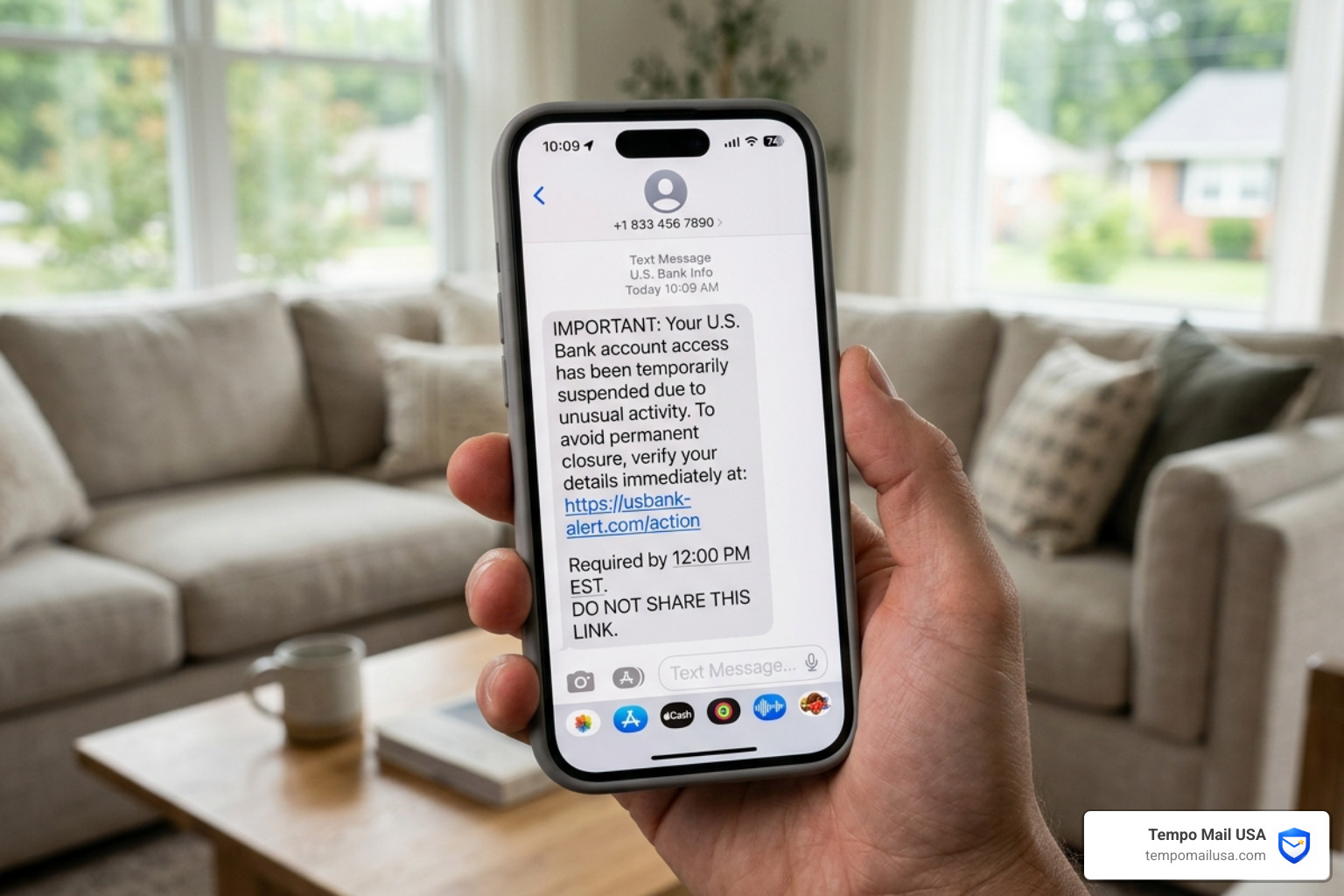

Scam Texts Are Targeting iPhone Users — Here's What You Need to Know Right Now
iPhone scam text messages how to identify phishing sms and protect your data with best security tools is one of the most searched mobile security topics in 2026 — and for good reason.
Quick Answer: How to Identify and Handle iPhone Phishing Texts
- Look for urgent language — threats like "Your Apple ID will be locked in 24 hours" are classic pressure tactics
- Check the sender — Apple never sends unsolicited texts asking for passwords, security codes, or payment info
- Inspect any links — fake domains like
apple-idverify.comorapple-support-alert.netmimic real Apple URLs - Never reply — even replying "STOP" confirms your number is active and invites more scams
- Don't call numbers in the text — the phone number in a scam message is often the real weapon
- Forward to 7726 — this reports the message to your carrier (works on AT&T, Verizon, and T-Mobile)
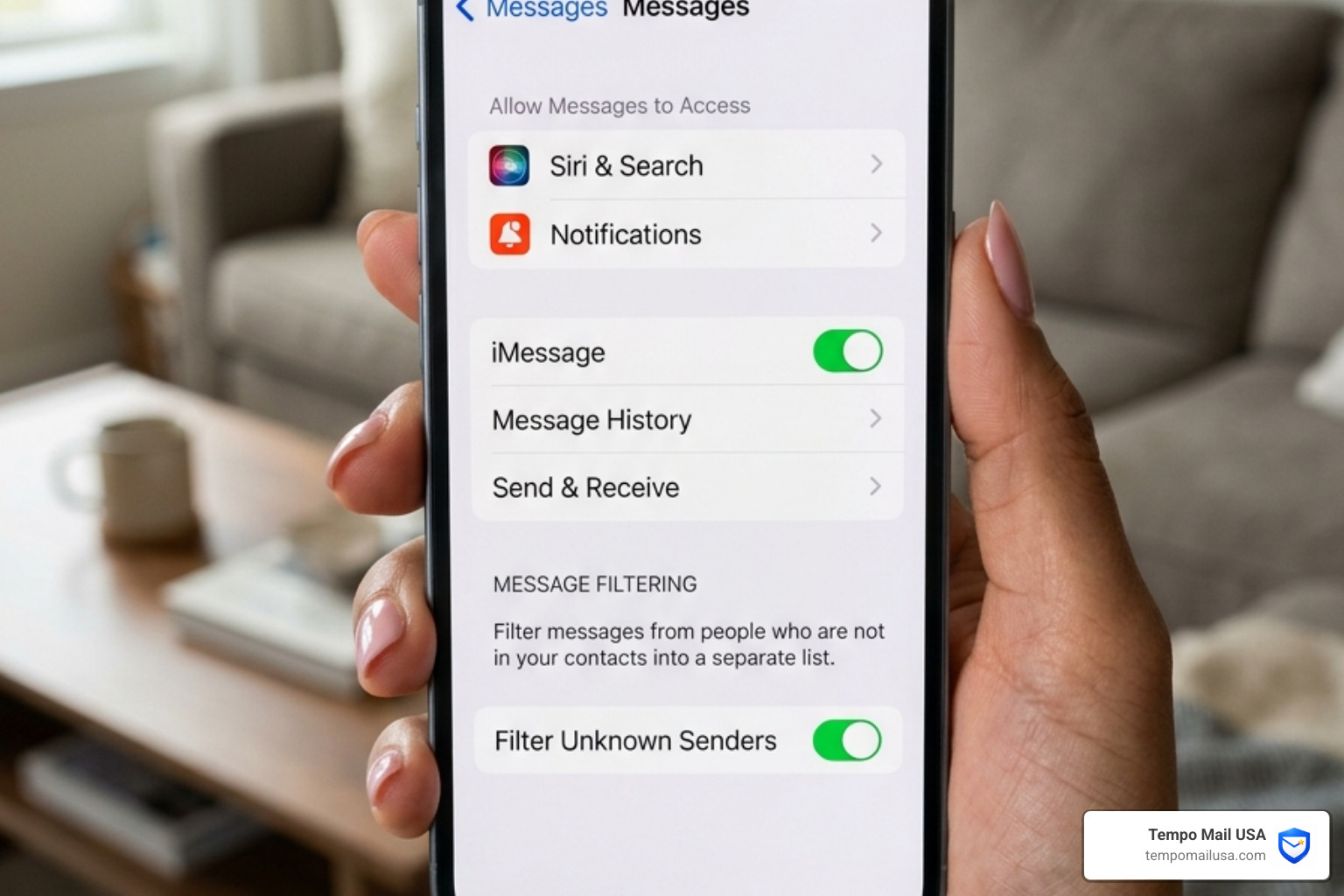
- Enable Filter Unknown Senders — go to Settings > Messages and turn it on to separate unknown contacts
- Use a privacy email — tools like Tempo Mail USA act as a PII firewall so your real address never ends up in scammer databases. Using a dedicated PII firewall is the most effective way to protect your data with best security tools and stop scams at the source.
Here's how bad it's gotten: 61% of U.S. adults now receive at least one scam text per week. One in five gets hit every single day. And in 2022 alone, Americans lost $9 billion to scammers — a number that has only climbed since.
iPhone users are a prime target. Scammers impersonate Apple support, the IRS, USPS, and banks — crafting messages that look eerily legitimate. The goal is always the same: panic you into clicking a link, calling a fake number, or handing over credentials before your brain catches up with your thumb.
What makes this worse? Some of the best defenses built into your iPhone — like message filtering for unknown senders — are turned off by default. Most people don't know they exist until after something goes wrong.
And the threat is getting smarter. In 2026, AI-generated phishing texts are increasingly difficult to distinguish from real communications. Gone are the obvious typos and clunky grammar. Today's scam texts can be polished, personalized, and timed to land when you're distracted.
This guide walks you through everything: how to spot these scams on sight, what to do if you've already clicked something, the best tools to lock down your iPhone, and — critically — how to stop putting your personal information in front of scammers in the first place.
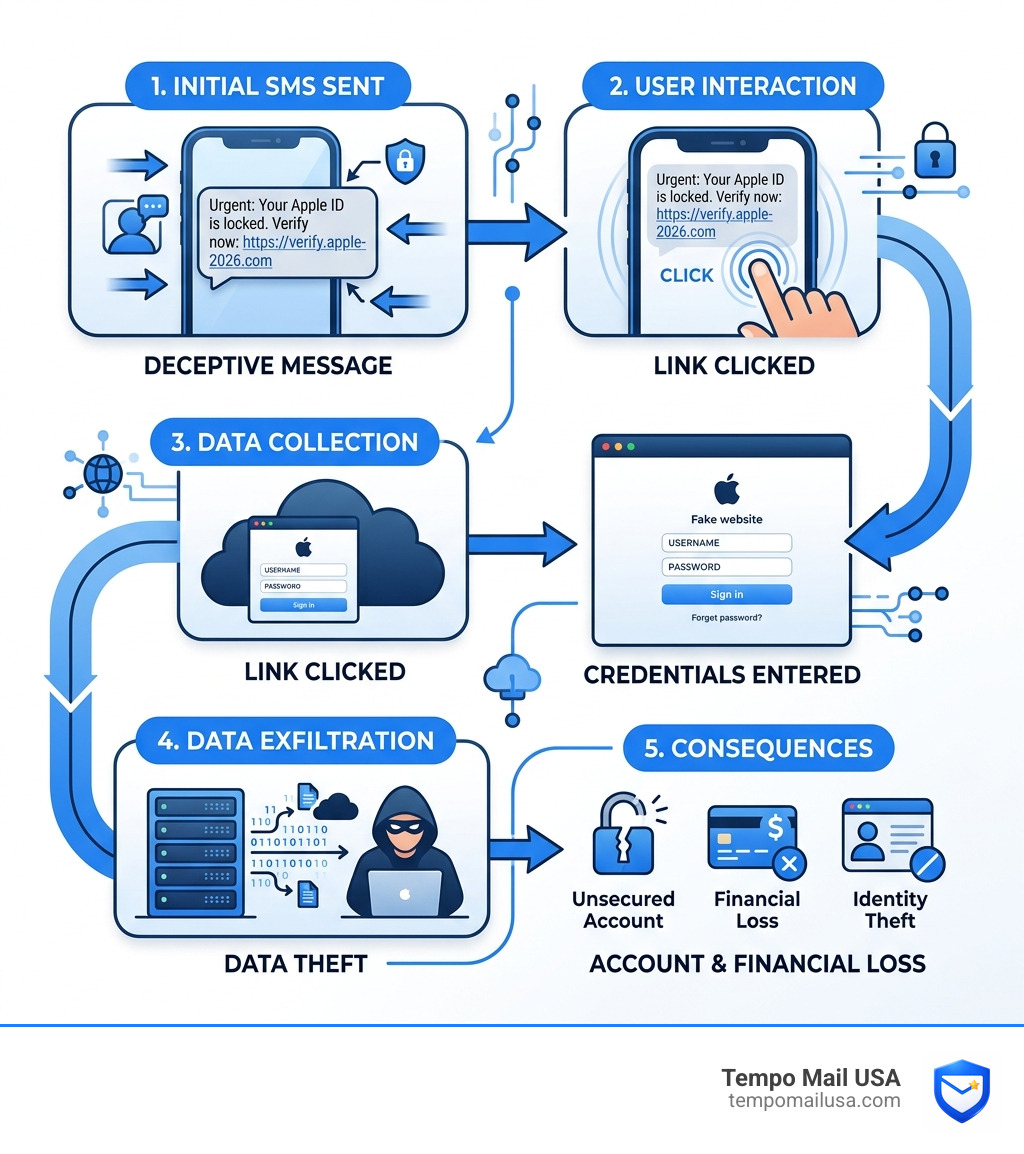
Understanding the Surge in iPhone Scam Text Messages
The explosion of "smishing" (SMS phishing) isn't accidental. Cybercriminal gangs, some of which have generated over $1 billion in illicit revenue, have turned text-based fraud into a high-precision industry. Unlike email, which has robust "junk" folders, text messages land directly in your pocket with a notification chime that demands attention.
As we move through 2026, the volume of these attacks has reached record highs. Statistics show that nearly 26% of adults aged 18-29 have already lost money to an online scam. Why? Because scammers are moving faster than our default settings. While Scam Texts Are On The Rise - Here's How iOS 26 Keeps You Safe highlights new AI-driven filtering, many users still have their primary defenses disabled.
If you've noticed a sudden uptick in pings, you aren't alone. You can Discover Why Am I Getting So Many Spam Calls Recently, as the same data breaches that leak your phone number to telemarketers also sell your contact info to smishing syndicates.
The "Reply Y" Trick and Link Reactivation
One of the most devious tactics emerging in 2026 involves exploiting Apple’s own security features. By default, iMessage often disables clickable links from unknown senders to protect you. However, scammers have found a workaround: they send a message that looks like a delivery failure and instruct you to "Reply Y" to see the details.
According to research on How to spot and block scam texts on your iPhone, replying "Y" (or any character) does two dangerous things:
- It tells the iPhone the sender is "trusted," which reactivates the malicious link.
- It confirms to the scammer that your number is active and monitored by a real person.
Once you reply, you become an "active target," and the floodgates for future scams swing wide open.
Common Smishing Lures in 2026
Scammers love to use "authority" lures that require immediate action. In 2026, we see a massive wave of:
- Failed Deliveries: Posing as USPS, FedEx, or DHL claiming a package is held due to a "missing house number."
- Unpaid Tolls: Messages claiming you have an outstanding balance on an "E-ZPass" or "Express Toll" account.
- Fake Tickets: The Traffic Citation Text Scam Fake Ticket Messages are particularly effective because they threaten legal action.
- Government Threats: Scams like the Mva Scam Text Maryland Pay Today Or Be Arrested use extreme fear to bypass your critical thinking.
iPhone Scam Text Messages: How to Identify Phishing SMS and Protect Your Data with Best Security Tools
Identifying a scam requires looking past the "Apple" logo or the professional-looking header. Scammers are experts at social engineering—the art of manipulating human emotions like fear, curiosity, or greed.
Apple's official stance is clear: they will never send you an unsolicited text message asking for your Apple Account password, verification codes, or payment details. You should Recognize and avoid social engineering schemes including phishing messages, phony support calls, and other scams - Apple Support to understand that any message demanding this info is a guaranteed fake.
If the pings are becoming unbearable, learning How To Stop Spam Calls On Iphone is a great first step, as many of the same blocking techniques apply to both calls and texts.
Step-by-Step: iPhone Scam Text Messages How to Identify Phishing SMS and Protect Your Data with Best Security Tools
When a suspicious text arrives, run it through this mental checklist:
- Generic Greetings: Does it say "Dear Customer" or "Valued User" instead of your name?
- Suspicious Domains: Hover over or long-press the link (don't click!). Does it go to
apple.comor something likeapple-support-security-check.com? - Urgency & Threats: Does it claim your account will be deleted or you will be arrested if you don't act now?
- Mismatched Info: Check the "From" field. Is it a random Gmail address or a 10-digit number pretending to be a multi-billion dollar corporation?
A deep dive into Apple Security Alert Scam Texts EXPOSED - Full Investigation reveals that scammers often use specific amounts (like $143.95) to make a "fraudulent charge" alert feel more real. If you see an email version of this, knowing How To Report Bogus Emails Safely can help protect your inbox alongside your phone.
Comparison: Best Security Tools for iPhone Scam Protection
While iOS has built-in features, third-party apps provide a "PII firewall" for your messages by cross-referencing senders against massive databases of known scammers. If you want to Block Scam Likely Calls and Stop Spam Fast, these tools are essential.
| App Name | Primary Feature | Best For | Estimated Cost (2026) |
|---|---|---|---|
| RoboKiller | Predictive blocking | Wasting scammer time | ~$4.99/mo |
| TextKiller | AI-powered filtering | Automated SMS protection | ~$5.99/mo |
| SpamHound | Manual rules | Custom whitelisting | Free / Premium |
| SMS Spam Stopper | Signature matching | High-volume spam | One-time purchase |
The Anatomy of an Apple Support Text Scam
The "Apple Support" scam is the "Final Boss" of iPhone smishing. It usually starts with a text claiming "Suspicious activity detected on your Apple ID" or "Your iCloud storage payment failed."
These messages often include a specific "case number" or a "trigger amount" like $143.95 to create believability. As noted in the Apple Support Text Message Scam: Complete Protection Guide, the goal is credential harvesting. Once you click the link, you are taken to a pixel-perfect replica of the Apple login page. When you enter your email and password, the scammer now has the keys to your digital life.
Why Scammers Target Your Apple ID
Your Apple ID is a goldmine. It contains:
- iCloud Data: Your private photos, messages, and backups.
- Apple Pay: Access to your linked credit cards.
- Device Control: The ability to "Lock" your phone via Find My and demand a ransom.
To protect yourself, we recommend using a hardened security layer like NordVPN to encrypt your traffic and prevent man-in-the-middle attacks. Furthermore, you should learn How To Hide Email From Spam 5 Proven Methods to ensure your primary Apple ID email isn't floating around on the dark web.
Reporting and Blocking Tactics
Don't just delete the message; report it.
- Forward to 7726: This spells "SPAM" on your keypad. It sends the message to a carrier-joint task force that blocks these numbers at the network level.
- Report to Apple: Take a screenshot and email it to
reportphishing@apple.com. - Use Carrier Tools: Apps like Verizon Call Filter, T-Mobile Scam Shield, and AT&T ActiveArmor are often free and provide backend filtering.
Understanding What Potential Spam Call Means can help you realize that if your phone is already flagging a contact, you should never engage with the text version of that sender.
Immediate Recovery Steps if You Are Scammed
If you clicked the link and entered your info, don't panic—but act fast.
- Change Your Apple ID Password: Go to Settings > [Your Name] > Sign-In & Security. Use a strong, unique password.
- Enable 2FA: If you haven't already, turn on Two-Factor Authentication.
- Check for Malicious Profiles: Go to Settings > General > VPN & Device Management. If you see a profile you didn't install, delete it immediately.
- Notify Banks: If you provided payment info, call your bank to freeze your cards. Scams like Vinclarity often start with a small $1 charge before hitting you for hundreds.
- Report to IdentityTheft.gov: This is the official FTC site for recovery plans.
Frequently Asked Questions about iPhone Scam Text Messages
Should I reply "STOP" to a scam text message?
No. Never reply to a suspicious text. Replying "STOP" or "NO" confirms to the scammer that your phone number is active and that a human is reading the messages. This will lead to an increase in the number of scam texts you receive. Instead, block the number and report it to 7726.
How do I enable the built-in spam filter on iOS 26?
Go to Settings > Messages > Filter Unknown Senders. Toggle this switch to 'On'. This automatically creates a separate tab in your messages for people not in your contacts, effectively silencing notifications from potential scammers.
Can my iPhone get a virus from clicking a link in a text?
Rarely, but your personal data is at high risk. While iOS sandboxing prevents most traditional viruses, these links are designed for "Social Engineering" to trick you into installing a malicious configuration profile or giving away your Apple ID credentials.
Conclusion
The most effective way to protect your data in 2026 is to stop giving it out. Scammers can't text a number they don't have, and they can't hack an email they can't see. This is where a "PII Firewall" becomes your best friend.
At Tempo Mail USA, we provide secure, temporary email aliases that act as a buffer between you and the internet. By using an alias for sign-ups, newsletters, and rewards programs, you ensure that if a service is breached, your real identity remains shielded. We believe that privacy isn't just a feature—it's a necessity.
Protect your inbox and your iPhone by visiting Temporary Email USA Stop Spam Protect Your Inbox today. Stay vigilant, keep your iOS updated, and never let a sense of urgency override your common sense.