


Why You Need to Hide Email From Spam Before It's Too Late
The fastest way to hide email from spam is to never expose your real address in the first place. Here are the most effective methods:
- Use a temporary or disposable email for sign-ups and one-time registrations
- Use an email alias (like Gmail's + trick or Apple's Hide My Email) to mask your real address
- Obfuscate your email on websites using JavaScript, HTML entities, or Cloudflare's built-in tool
- Replace your public email with a contact form so your address is never visible
- Use a dedicated masking service like Firefox Relay or SimpleLogin for ongoing forwarding
Think about how often you type your email into a website. A newsletter sign-up here. A discount code there. A free trial somewhere else.
Every time you do, you're taking a risk.
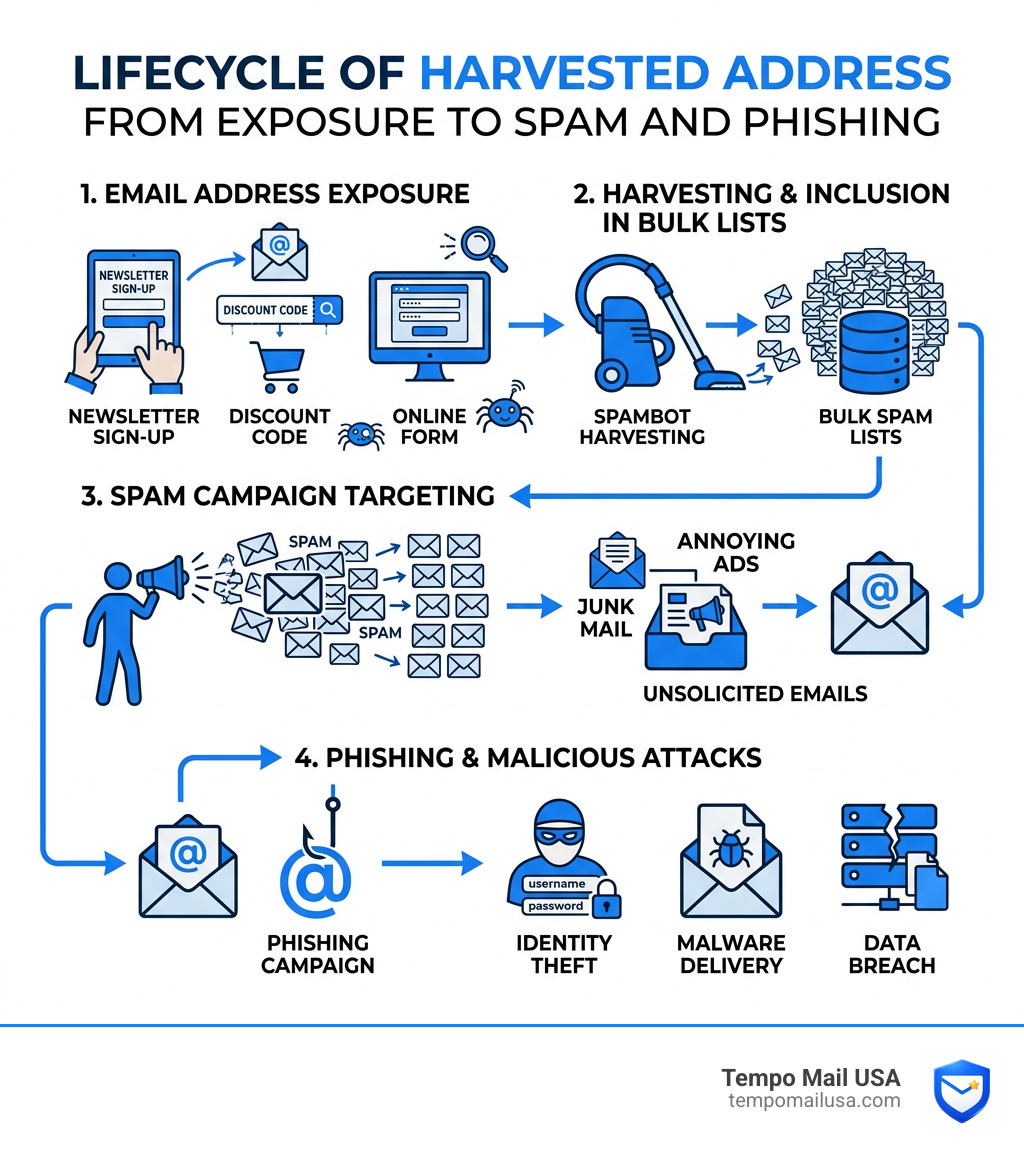
Spambots constantly crawl websites, scanning source code for the @ symbol. Once they find your address, it gets added to bulk spam lists, sold to data brokers, and targeted by phishing campaigns. According to Statista, nearly 46% of all emails sent globally are spam — and your exposed address is part of why that number stays so high.
It doesn't stop at annoying junk mail either. Exposed email addresses are a front door for identity theft, phishing attacks, and data breaches. Your email is personally identifiable information (PII) — and once it's out there, you can't take it back.
The good news? You have real options to protect yourself. Whether you own a website, run a business, or just want to stop your inbox from filling up with garbage, this guide covers every practical method to keep your real address private.
Effective Strategies to Hide Email From Spam on Websites
If you run a website or a blog, you probably want people to be able to contact you. However, posting your address in plain text is like leaving your front door wide open for every digital burglar on the internet. Spambots are automated programs that "troll" or crawl web pages specifically looking for the @ character. Once they find a string that looks like an email, they harvest it into a database.
The scale of the problem is massive. Research shows that nearly 46 percent of all emails sent globally are spam. If you aren't careful, your professional inbox will quickly become a graveyard of "urgent" inheritance offers and dubious pharmaceutical ads. Beyond the annoyance, there are The Hidden Dangers of Sharing Your Email Online, including the risk of targeted phishing where scammers use your name and public info to trick you.
To combat this, we use various "obfuscation" techniques. Here is a comparison of how they stack up:
| Method | Effectiveness | User Experience | Accessibility |
|---|---|---|---|
| Plain Text | None | Excellent | Excellent |
| Text Replacement | Low | Poor | Good |
| HTML Entities | Medium | Excellent | Excellent |
| JavaScript | High | Excellent | Moderate |
| Images | High | Poor | Very Poor |

How to Hide Email From Spam Using JavaScript
JavaScript is widely considered one of the best ways to hide email from spam while keeping the experience seamless for your human visitors. Most basic spambots are "dumb"—they read the raw HTML of a page but don't actually execute the JavaScript code.
By using JavaScript, you can break your email into pieces and have the browser reassemble it only when the page loads or when a user clicks a link. For example, instead of writing contact@example.com, you might write a script that joins "contact", "@", and "example.com" dynamically. This creates a functional mailto: link that works for humans but looks like gibberish to a bot.
While more advanced bots are starting to execute JavaScript, this method still filters out the vast majority of automated harvesters. It’s a classic case of making the "lock" just hard enough that the thief moves on to an easier target.
Using HTML Entities and Text Munging
If you aren't a coder, you can use "munging" or HTML entities. Munging is the practice of replacing symbols with words, such as name [at] domain [dot] com. It’s simple, but it forces your users to manually copy, paste, and edit the text, which is a bit of a chore.
A more elegant version of this is using ASCII codes (HTML entities). In HTML, every character has a numeric code. For example, the @ symbol is @. When you use these codes in your website's code, the browser still displays a perfectly normal email address to the user, but a bot looking for the literal @ symbol might fly right past it.
Combining these methods is a great way to Stop Spam in Its Tracks: Combat Email Spam Effectively. It provides a layered defense that protects your PII without making your website look like a puzzle.
Email Obfuscation: How It Works and Why It Matters
At its core, email obfuscation is about pattern disruption. Bots are programmed to recognize the "user@domain.tld" pattern. By hiding that pattern in the source code, you effectively become invisible to the harvester's "eyes."
Why does this matter so much? Because the stakes have moved beyond just junk mail. Modern cybercrime is sophisticated. Statistics show that 73% of organisations still face business email compromise attacks. These attacks often start with a simple scraped email address. Once a bad actor has your address, they can attempt to brute-force your password or send highly convincing "spear-phishing" emails to your colleagues. Maintaining Email Privacy & Cybersecurity starts with controlling who has your address in the first place.
Automated Protection and Server-Side Obfuscation
For those using modern web services like Cloudflare, protection can be almost entirely automatic. Cloudflare’s Email Address Obfuscation works by scanning your traffic and replacing email addresses with a special script. To a bot, the address looks like a long string of random hexadecimals. To a human, it’s a clickable link.
However, sometimes you want an email to be visible (like in a JSON file for an app). In those cases, you can use specific HTML comments like <!--email_off--> to tell the server to leave that specific address alone. Managing these settings correctly ensures that your legitimate AJAX requests or JSON data stay functional while your public "Contact Us" page remains protected.
Using Email Aliases and Masking for Personal Privacy
While obfuscation protects your website, what protects you when you're the one signing up for things? This is where email aliases and masking come into play.
We often talk about the "PII Firewall." At Tempo Mail USA, we believe your real email should be a closely guarded secret, shared only with people you trust. For everything else—shopping discounts, forum sign-ups, or "free" eBooks—you should use an alias.
There are two main ways to do this:
- The Plus Trick (+): In Gmail and many other services, you can add a plus sign and any word after your username (e.g.,
janedoe+newsletters@gmail.com). This is great for filtering, but it doesn't actually hide your real address. A savvy spammer can just strip the+newsletterspart and they have your real ID. - True Email Aliases: Services like Tempo Mail USA provide a completely different address that forwards to your real one. This is a much stronger shield because there is no mathematical way for a spammer to "guess" your real address from the alias.
Using these tools is a primary reason Why Use Temporary Email: Protect Yourself from Spam. It puts you in control. If an alias starts getting too much junk, you simply delete the alias. Your real inbox stays pristine.
Why You Should Hide Email From Spam During Sign-ups
Every time you sign up for a new service, you're trusting that company's security. If they have a data breach, your email is leaked. If they sell their marketing list to "partners," your email is gone.
By using disposable addresses or aliases, you create a "proxy identity." If a site you used three years ago gets hacked, the only thing the hackers get is a masked email that you can deactivate with one click. It’s the ultimate way to stay anonymous and track exactly who is selling your data. If you get spam at myname+shadywebsite@gmail.com, you know exactly who leaked your info!
Protecting Business Communications Without Sacrificing UX
For businesses, the challenge is balancing security with the "User Experience" (UX). You don't want to make it so hard to contact you that you lose customers.
The gold standard for business is the Contact Form. Instead of listing an email, provide a form. This keeps your address entirely on the server side, never exposing it to the browser. To keep the form itself from being spammed, you can use tools like CAPTCHA or "honeypot" fields (hidden fields that only bots fill out).
Business Email Best Practices:
- Use Contact Forms: Avoid
mailto:links on high-traffic pages. - Monitor Domain Reputation: Use deliverability tools to ensure your legitimate emails aren't being marked as spam.
- Layer Your Security: Use a combination of server-side filters and front-end obfuscation.
- Accessibility Matters: Ensure that whatever method you use (like JS) still allows screen readers for visually impaired users to find your contact info.
Frequently Asked Questions about Email Protection
Is email obfuscation still effective against modern bots?
Yes, but it's not a silver bullet. Modern, high-end crawlers can execute JavaScript and solve simple puzzles. However, most "bulk" spammers use cheaper, faster bots that don't bother with these extra steps. Obfuscation is about reducing the volume of spam by making your address an "expensive" target to harvest.
What is the difference between an alias and a disposable email?
An alias is usually a permanent or semi-permanent address that forwards to your main inbox. You might use one alias for all your shopping and another for all your social media. A disposable email (or temp mail) is typically short-lived. You use it to grab a verification code or a download link, and then the address expires or is deleted shortly after. Both are excellent tools for masking your identity.
Can I hide my email on social media profiles?
Most social platforms have privacy settings that allow you to hide your email from everyone except "Friends" or to hide it entirely. We highly recommend keeping this set to "Private." Scrapers love LinkedIn and Facebook because they can associate an email address with a real name, job title, and location—the perfect ingredients for a phishing attack.
Conclusion
Your email address is the "key" to your digital life. It’s connected to your bank, your social accounts, and your personal memories. Protecting it isn't just about avoiding annoying ads; it's about securing your PII and preventing identity theft.
By using a combination of website obfuscation, contact forms, and masking services, you can significantly reduce your digital footprint. Whether you are a developer looking to protect a site or a casual user trying to clean up your inbox, the tools are available. We encourage you to Protect Your Privacy with Free Private Email Services and take the first step toward a spam-free life.
Ready to build your PII firewall? Visit us at tempomailusa.com to see how easy it is to keep your real identity under wraps. Stay safe out there!