

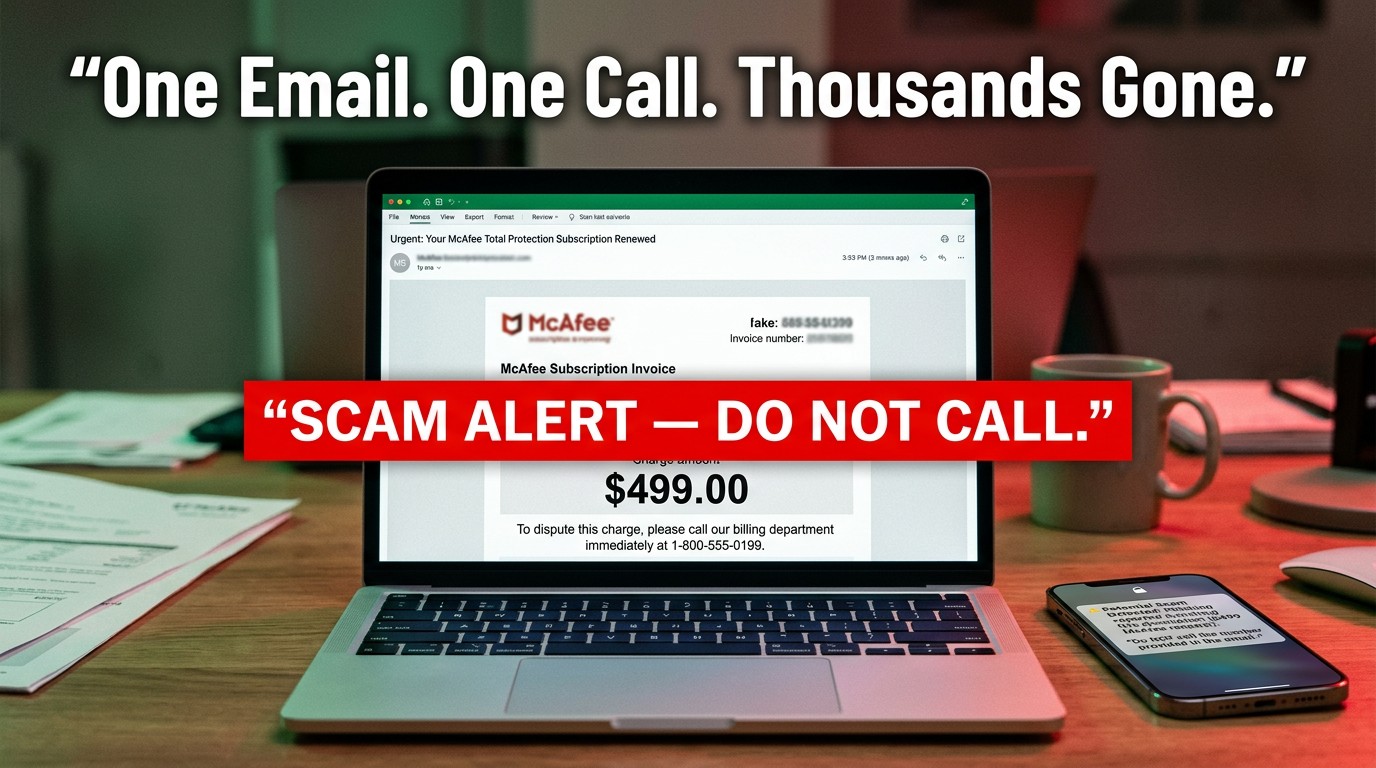

The McAfee Scam Is Costing People Thousands — Here's What You Need to Know
A mcafee scam is a fraudulent scheme where criminals impersonate the well-known antivirus brand to steal money or personal information from victims. These scams arrive as fake emails, browser popups, or phone calls — and they're alarmingly convincing.
Quick answer: How to spot a McAfee scam
- The email comes from a Gmail or non-McAfee address (e.g.,
vyankumetkar6@gmail.com) - It claims you owe money for a subscription you don't remember signing up for
- It includes an urgent phone number to call
- It threatens legal action or service cancellation
- It asks for personal information, gift cards, or remote access to your device
Real McAfee will never cold-call you, threaten you, or ask for gift card payments.
The scale of the problem is staggering. In 2023 alone, Americans reported losing $10 billion to scams — a record high, according to the FTC. Tech support fraud like the McAfee scam accounted for $56 million in losses in 2020, with the average victim losing around $1,200. Some individuals lose far more: one victim received a fake McAfee invoice for $715.15 and ended up losing nearly $11,000 after calling the number listed in the email.
These scams target everyone, but privacy-conscious people are often hit hardest — because their real email address, once exposed in a data breach or sold on the dark web, becomes a direct line for scammers to exploit.
This guide covers everything you need to identify, avoid, and respond to McAfee scams — so you can protect your money, your data, and your devices.
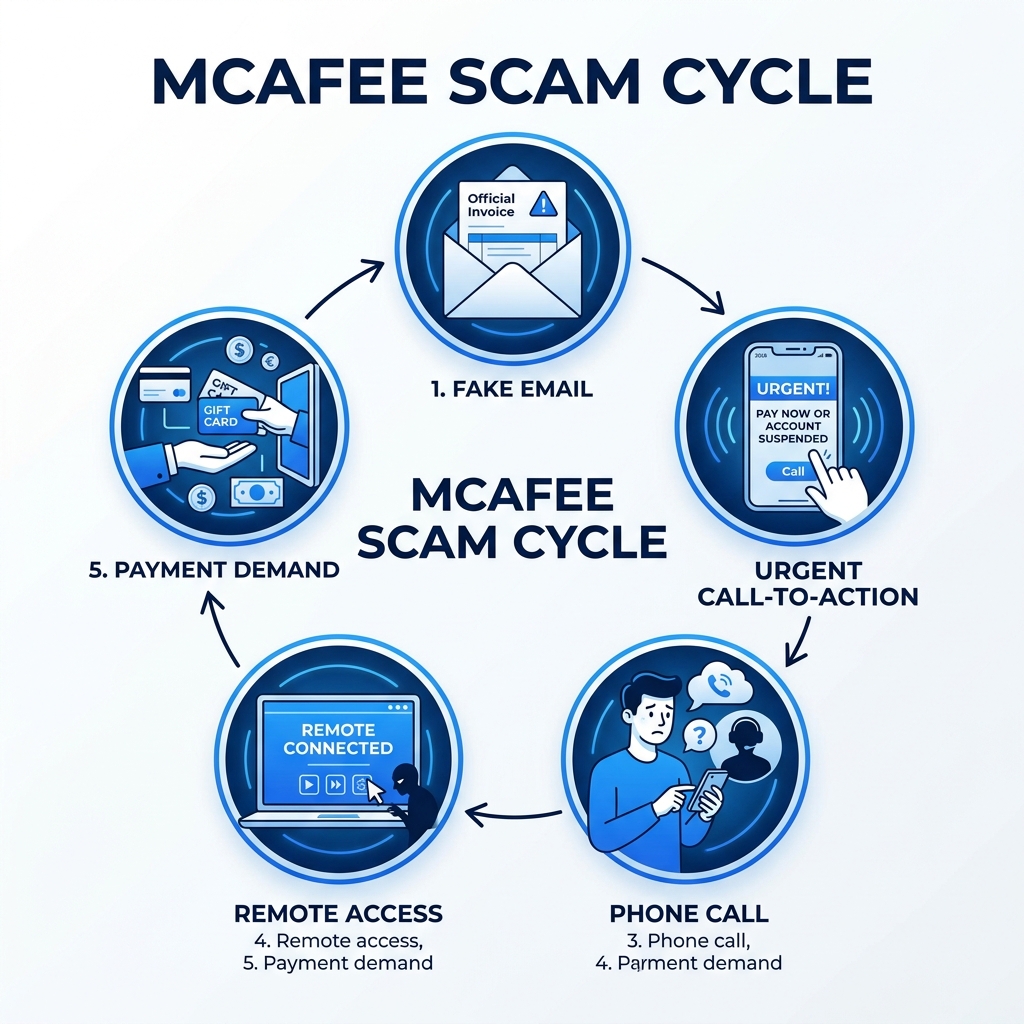
Anatomy of a McAfee Scam: How It Works
To the untrained eye, a mcafee scam looks like a standard administrative alert. However, beneath the professional-looking logos and "Official Invoice" headers lies a sophisticated psychological trap designed to bypass your logical defenses.
The scam almost always begins with social engineering. This is the art of manipulating people into performing actions or divulging confidential information. Scammers don't "hack" your computer in the traditional sense; they hack you. They use fear (your account was charged $499), urgency (you have 24 hours to cancel), and authority (impersonating a multi-billion dollar security firm) to make you act before you think.
Typically, the cycle follows a predictable path:
- The Hook: You receive an email or see a popup claiming a massive charge for a "McAfee Total Protection" subscription.
- The Bait: The message provides a "Help Desk" or "Billing Support" phone number to call if you want to dispute the charge.
- The Trap: When you call, a professional-sounding agent (often in an overseas boiler-room call center) offers to help you get a refund.
- The Payload: To "process the refund," they convince you to install remote access software or provide your banking details.
This lifecycle is incredibly effective. With reported losses to the FTC hitting $10 billion in 2023, it’s clear that these criminals are getting better at their "jobs" every year. You can see more about how the brand fights back on McAfee on YouTube.
Why Scams Appear on Reputable Websites
One of the most confusing aspects of the mcafee scam is that it often appears on legitimate, high-traffic websites like local newspapers or reputable blogs. You might be reading the morning news when suddenly a flashing red banner tells you your "McAfee subscription has expired" and your "system is infected with 13 viruses."
This happens because most websites don't sell their own ads. Instead, they use third-party ad networks. Cybercriminals "malvertise" by buying ad space through these networks. If the network’s vetting process is weak, the scam ad slips through.
These ads often use fullscreen intimidation. They trigger a browser script that forces your window into fullscreen mode (hiding your browser's address bar and exit buttons) to make it look like a system-level warning. It’s a cheap trick, but it works on thousands of people every day.
The Goal of Tech Support Fraud
What are they actually after? It’s usually one of three things: your money, your data, or your computer's resources.
In the most common scenario, the "agent" asks you to download a "secure connection tool" like AnyDesk or TeamViewer. Once you give them the code, they have full remote access to your machine. They might:
- Open a fake "security scan" that shows terrifying (but fake) red text.
- Go into your browser settings to steal saved passwords and credit card numbers.
- Blackmail you by locking your files.
- Direct you to a Bitcoin ATM to "protect your funds" by transferring them to a "secure government vault" (which is actually the scammer's wallet).
With $56 million lost to tech support fraud in a single year, these criminals are highly motivated to keep the charade going.
Red Flags: Identifying Fake Communications
Detecting a mcafee scam is much easier when you know what the "tells" are. Scammers are often lazy or rely on templates that contain consistent errors.

The biggest red flag is urgent language. If an email says you must act "within 12 hours" or "immediately" to avoid a charge, it is almost certainly a scam. Legitimate companies give you plenty of notice for renewals.
Another sign is generic greetings. Real McAfee communications will usually address you by the name on your account. If you see "Dear Valued Customer" or "Dear your email address," be on high alert. Finally, check for poor grammar. While some scams are getting more polished, many still contain odd phrasing, missing spaces, or strange capitalization.
Legitimate vs. Fraudulent Email Characteristics
| Feature | Legitimate McAfee Email | McAfee Scam Email |
|---|---|---|
| Sender Address | Ends in @mcafee.com or @protect.mcafee.com | Ends in @gmail.com, @outlook.com, or random strings |
| Greeting | Your actual name | "Dear Customer" or "User" |
| Urgency | Standard renewal notice (30 days) | "Urgent," "Immediate," or "Final Notice" |
| Payment | Handled through official website portal | Requests Gift Cards, Wire Transfers, or Bitcoin |
| Phone Number | Directs you to official support site | Provides a "Direct Line" in the email body |
Common Signs of a McAfee Scam Email
The most frequent variant is the fake billing notice. You’ll get a PDF or an email body claiming a renewal for a specific, high amount. Common "scam prices" include:
- $460.11 for a 3-year subscription.
- $499.99 for "McAfee AntiVirus Platinum."
- $715.15 for a 5-year protection plan.
These numbers are chosen because they are high enough to cause panic but low enough to be a "believable" multi-year corporate expense. If you see these specific amounts, it’s a textbook mcafee scam. For more visual examples, check the official guide on How to Recognize McAfee Scam Emails & Fake Popups.
Legitimate McAfee Communication Methods
McAfee is a massive company, and they do send a lot of emails. To help you sort the wheat from the chaff, here is a list of legitimate McAfee email domains:
info@protect.mcafee.comdonotreply@mcafee.comconsumersupport@mcafee.comno-reply@mcafeemobilesecurity.commcafee@m.e.mcafee.com
If an email claims to be from McAfee but the "From" field shows something like billing-support-332@gmail.com, it is a fake. When in doubt, never click a link in an email. Instead, manually type mcafee.com into your browser, log in to your My Account page, and check your subscription status there.
Immediate Action Plan: What to Do If You Encounter a Scam
If you're staring at a screen that’s screaming at you about viruses, or you just opened an email that says you’re out $500, take a deep breath. The scammer's greatest weapon is your adrenaline.
How to Handle a Fake McAfee Scam Popup
If a browser popup appears and won't let you close the tab:
- Don't click anything: Even the "X" on the popup might be a fake button that triggers a download.
- Exit Fullscreen: If your browser has taken over the whole screen, press F11 (Windows) or Cmd+Ctrl+F (Mac) to exit fullscreen mode.
- Use Task Manager: Press Ctrl + Shift + Esc (Windows) or Command + Option + Esc (Mac). Find your browser in the list (Chrome, Edge, Safari) and select "End Task" or "Force Quit."
- Clear Cookies: Once you restart your browser, go into settings and clear your cookies and cache. This prevents the "sticky" popup from reappearing.
- Seek Official Help: If you are genuinely worried about your subscription, contact the real Customer Support directly.
Steps to Take if You’ve Already Interacted
If you’ve already called the number, clicked a link, or—worst-case scenario—given someone remote access, you need to move fast to minimize the damage.
- Disconnect: If someone is currently on your computer, pull the plug on your internet router or turn off Wi-Fi immediately.
- Freeze Accounts: Call your bank and credit card companies. Tell them you’ve been a victim of a tech support scam and need to freeze your accounts and issue new cards.
- Reset Passwords: From a different device (like your phone), change the passwords for your email, banking, and social media accounts. Enable Two-Factor Authentication (2FA) on everything.
- Factory Reset: If a scammer had remote access, they likely installed "persistence" malware or keyloggers. The only way to be 100% sure your device is clean is to perform a factory reset (after backing up your essential photos and documents).
- Police Report: File a report with your local police and the FBI's IC3. This is essential for insurance claims and for helping authorities track these overseas groups.
Remember the $11,000 loss example from our intro? That victim didn't lose the money because of a virus; they lost it because they followed the scammer's instructions to "move money to a safe spot." Never move money to "protect" it.
If you suspect you've been targeted, Report the scam email to the FTC to help them shut down these operations.
Long-Term Protection Against the McAfee Scam
Prevention is always cheaper and less stressful than recovery. Protecting yourself from the mcafee scam requires a mix of technical tools and "inbox hygiene."
First, Two-Factor Authentication (2FA) is non-negotiable. Even if a scammer steals your password via a fake login page, they can't get into your account without that secondary code from your phone.
Second, use unique passwords. If you use the same password for McAfee as you do for your bank, a single phishing win for the scammer becomes a total financial catastrophe for you. Use a password manager to keep track of complex, unique strings for every site.
Third, the root of the problem is often that your real email address is "out there." When you sign up for a "free trial" or a "newsletter" on a random site, your email often ends up on a list sold to scammers. This is where Tempo Mail USA becomes your best friend. By using temporary email aliases, you create a "firewall" for your identity. If a scammer gets a hold of your temporary alias, they can't find your real account, and you can simply delete the alias to stop the spam. You can find More info about privacy trials to see how this works in practice.
Reporting and Official Help
McAfee takes these scams seriously because they damage the brand's reputation. If you receive a suspicious email, don't just delete it—forward it to scam@mcafee.com. This helps their security teams track new domains and tactics.
For broader protection, ensure your computer's operating system and browser are always updated. Modern browsers have built-in "Safe Browsing" features that block known scam sites before you even see them. You can check how different security products stack up in the AV-Comparatives Performance Test.
Frequently Asked Questions about the McAfee Scam
How can I tell if a McAfee email is real?
Check the sender's email address. A real McAfee email will always come from a domain ending in @mcafee.com or @protect.mcafee.com. Also, look for your actual name in the greeting. If the email asks for payment via gift cards or wire transfers, it is 100% a scam.
Why am I seeing these popups on reputable news sites?
Reputable sites use automated ad networks to fill their banner spaces. Scammers "inject" malicious ads into these networks. These ads use scripts to force your browser into fullscreen mode to scare you. They are not a sign that the news site itself is "hacked," just that their ad provider let a bad ad through.
What should I do if I already called the scammer's number?
Hang up immediately. If you gave them remote access, disconnect your internet. Run a deep virus scan using a different security tool, change all your major passwords, and notify your bank if you shared any financial details. Monitoring your credit report for the next few months is also a wise move.
Conclusion
The mcafee scam is a reminder that in the digital age, our biggest vulnerability isn't a software bug—it's our own trust. These criminals spend all day perfecting their scripts to make you feel panicked and rushed. By staying calm and verifying every "urgent" notice through official channels, you take away their power.
At Tempo Mail USA, we believe privacy is your best defense. Scammers can't target what they can't find. By using our temporary email aliases, you keep your primary inbox clean and your real identity hidden from the data brokers and "lead lists" that scammers use to find their next victim. Our secure proxying acts as a firewall, protecting your real personal information from the services you use.
Stay safe, stay skeptical, and remember: if an email about your antivirus sounds like a threat, it’s probably the very thing it claims to protect you from.
Protect your privacy today at Tempo Mail USA.