


The Scam Likely Epidemic: Why Your Phone Won't Stop Ringing
Learning how to block scam likely calls is one of the most important things you can do to protect your privacy right now. Here's a quick overview of the five methods that work:
- Use carrier tools - Enable free network-level blocking from T-Mobile, Verizon, or AT&T
- Register with the Do Not Call Registry - Visit donotcall.gov to reduce legitimate telemarketing
- Install a third-party call-blocking app - Apps like Nomorobo or Truecaller use crowd-sourced scam databases
- Use built-in phone features - Enable "Silence Unknown Callers" (iPhone) or "Caller ID & Spam" (Android)
- Secure your landline or VoIP phone - Use call-blocking devices or anonymous call rejection
If you have a phone, scammers probably already have your number. The FTC received 1.2 million complaints in 2023 from people on the Do Not Call List alone — and that's just the people who bothered to report it.
The hard truth? Scammers don't care about the Do Not Call Registry. They ignore it completely. That "Scam Likely" label on your screen means your carrier flagged the call before it reached you — but plenty more slip through every day.
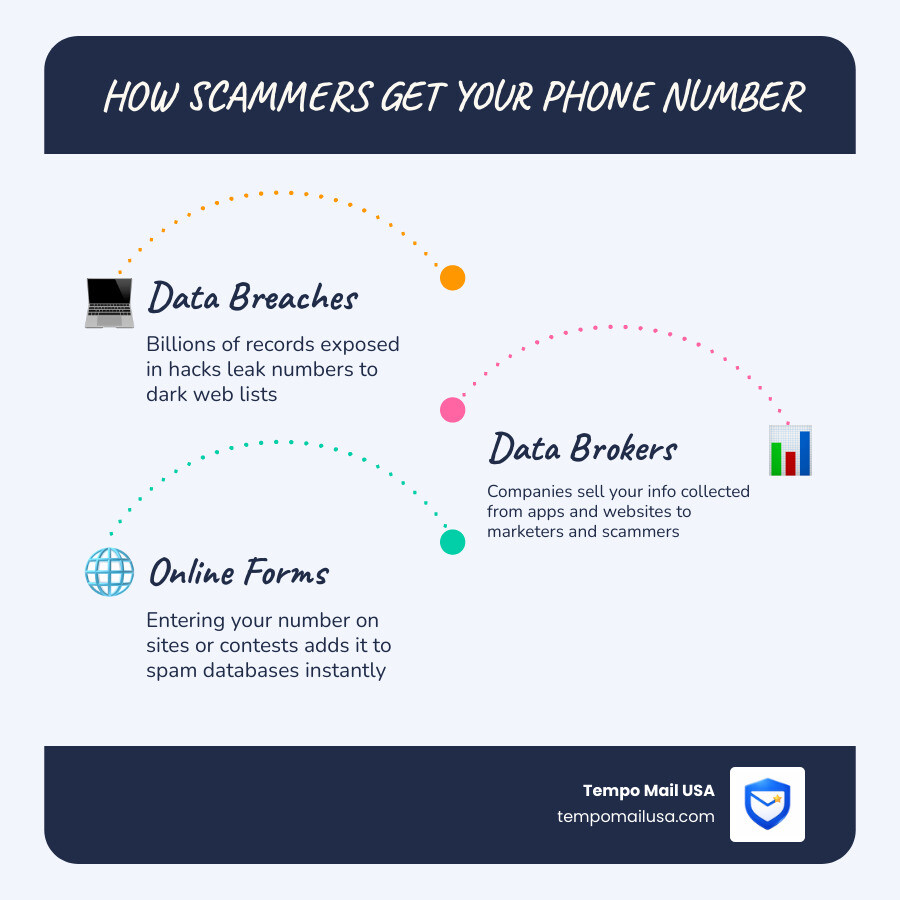
Your number likely ended up on scam lists through data breaches, data brokers, or simply by being entered into an online form. Billions of records have been exposed in breaches worldwide, and your phone number travels fast once it's out there.
The good news is that the right combination of tools can dramatically cut down the noise — and protect your personal information in the process.
Understanding "Scam Likely" and Why You Get These Calls
When your phone vibrates and displays "Scam Likely," "Spam Risk," or "Potential Fraud," you are seeing the result of complex carrier algorithms working in real-time. But how exactly do they know?
Carrier Identification and the STIR/SHAKEN Protocol
Major carriers use massive databases and behavioral analytics to identify suspicious patterns. If a single number makes 5,000 calls in ten minutes, it's flagged. Furthermore, the industry has implemented the STIR/SHAKEN protocol. This mouthful of an acronym refers to a framework of interconnected standards that allow carriers to "authenticate" that a call is actually coming from the number displayed on your caller ID. Think of it as a digital birth certificate for every phone call.
The Art of the Spoof: Neighbor and Caller ID Spoofing
Despite these protocols, scammers are clever. They frequently use caller ID spoofing to manipulate the name or number you see. A common tactic is neighbor spoofing, where the scammer mimics the first six digits of your own phone number. They know you are statistically more likely to answer a call that looks like it’s coming from a local neighbor or a nearby business.
Why the Sudden Surge in Calls?
You might be wondering, Why Am I Getting So Many Spam Calls All of a Sudden? The answer usually lies in data hygiene. Your number may have been part of a massive Data Breach Alert: 50M Accounts Exposed News event, or perhaps you entered it into a "free giveaway" that was actually a front for a data broker. Once your number is marked as "active" (which happens the moment you answer a scam call), it is sold and resold on the dark web.
Common Impersonation Tactics
Scammers aren't just selling car warranties anymore. They use high-pressure Phone Scams to impersonate:
- Government Agencies: Scammers pretend to be from the SSA, IRS, or even the FTC to threaten you with arrest.
- Tech Support: Claiming your computer has a virus to gain remote access.
- Family Members: The "Grandparent Scam," where they claim a loved one is in jail and needs bail money immediately.
How to Block Scam Likely Calls on iPhone and Android
Before we dive into advanced methods, let's look at the powerful tools already sitting in your pocket. Both Apple and Google have integrated sophisticated software to help you figure out how to block scam likely calls.
Blocking on iPhone
Apple offers a "scorched earth" policy for unknown callers.
- Silence Unknown Callers: Go to Settings > Phone > Silence Unknown Callers. When enabled, calls from numbers not in your contacts, outgoing calls, or Siri Suggestions will be silenced and sent straight to voicemail.
- Manual Blocking: If a specific number keeps pestering you, go to your Recents list, tap the "i" icon next to the number, and select Block this Caller.
- Check Your Junk: Just like email, your iPhone manages filtered content. If you're wondering Where is the Junk: Locating Your Spam Folder on iPhone, silenced calls appear in your Recents list with a specific icon, and filtered texts go to a "Known" or "Unknown" sender tab in Messages.

Blocking on Android
Android devices, especially those using the Google Phone app, have excellent built-in protection.
- Caller ID & Spam: Open the Phone app, tap the three dots (More options), go to Settings > Caller ID & spam. Toggle on "See caller and spam ID" and "Filter spam calls."
- Call Screening: If you have a Pixel phone, you can use "Call Screen," where Google Assistant answers the call for you and asks the caller why they are calling. You see a live transcript and can decide whether to pick up.
Reporting via 7726
Regardless of your device, you can help the entire ecosystem by reporting spam. If you receive a scam text, forward it to 7726 (which spells "SPAM"). This alerts carriers to the malicious source so they can block it at the network level. For more detailed steps, see the official guide on How To Block Unwanted Calls.
5 Guaranteed Methods to Stop the Ringing
Method 1: Use Carrier Tools to Block Scam Likely Calls
Your wireless provider is your first line of defense. They have "network-level" visibility that apps simply don't have.
- T-Mobile Scam Shield: This is built into the network. You can dial #662# to turn on Scam Block, which stops "Scam Likely" calls before they even reach your phone. Their defenses update every 6 minutes.
- AT&T ActiveArmor: This app offers auto-fraud blocking and nuisance call alerts.
- Verizon Call Filter: This service identifies and filters out robocalls. If you ever feel your security is compromised on this network, you can Contact Verizon's Fraud Department Email for assistance.
One of the biggest benefits of carrier tools is Callback Protection. This warns you if you try to call back a number that has been flagged as a high-risk scam. This is particularly useful for avoiding United Client Solutions Spam Calls and other debt-collection-themed frauds.
Method 2: Register for the National Do Not Call Registry
The National Do Not Call Registry is managed by the FTC. While it won't stop a criminal in a basement in another country, it will stop legitimate companies from calling you for sales purposes.
- Why it Matters: Once you are on the list, any telemarketing call you receive is almost certainly a scam. This makes it much easier to decide which calls to ignore.
- How to Register: Go to donotcall.gov and enter your number. It takes about 31 days for the registry to take full effect.
- Reporting: If you are on the list and still get sales calls, you should Report Identity Theft to the FTC or file a complaint at Unwanted Calls | Consumer Advice.
Method 3: Install Third-Party Call-Blocking Apps
If carrier tools and built-in features aren't enough, third-party apps provide an extra layer of "crowd-sourced" protection.
- Nomorobo: Winner of the FTC Robocall Challenge, it’s excellent for VoIP and mobile.
- Truecaller: Uses a massive community-based database to identify callers even if they aren't in your contacts.
- Robokiller: Uses "Answer Bots" to waste the scammer's time, which is both effective and hilarious.
Pro Tip: Always review the privacy policy of these apps. Since they need access to your call logs to work, you want to ensure they aren't selling your data to the very brokers who caused the problem! Learn more about How to Identify Spam Calls & Stop Scams.
Method 4: Use Built-in OS Features
We touched on this earlier, but maximizing these settings is crucial for how to block scam likely calls.
| Feature | iOS (iPhone) | Android |
|---|---|---|
| Unknown Callers | Silence Unknown Callers (Sends to VM) | Block Unknown (Prevents ring) |
| Spam Labeling | Carrier-dependent | Google Spam Database |
| Manual Block | "Block this Caller" in Recents | "Block/Report Spam" in History |
| Whitelisting | "Emergency Bypass" or Contacts only | "Starred Contacts" in DND |
Using Do Not Disturb (DND) mode is another secret weapon. You can set your phone to DND but allow calls only from your "Favorites" list. This ensures that your grandma can always reach you, but "Scam Likely" never makes a sound.
Method 5: Secure Your Landline and VoIP Phones
Don't forget the home phone! Landlines are often the primary targets for scammers because they are frequently used by older adults.
- Physical Blocking Devices: You can buy small boxes (like CPR Call Blocker) that plug into your phone jack. They come pre-loaded with thousands of known scam numbers and have a big red "Block Now" button.
- VoIP Services: If you use internet-based phone service (VoIP), check your provider's dashboard. Most offer "Anonymous Call Rejection," which forces callers with hidden IDs to unmask themselves before the call goes through.
- Official Guidance: The FTC provides a specific resource on How to Stop Calls From Fake Numbers that is tailored for landline users.
Frequently Asked Questions about Scam Calls
Why do I still get calls if I'm on the Do Not Call list?
The Do Not Call Registry is a law, and scammers, by definition, do not follow the law. The registry is designed to stop legitimate telemarketers. If you are on the list and still get a robocall, it is a massive red flag that the person on the other end is a criminal.
Can I block "Scam Likely" calls permanently?
Technically, no. Scammers generate new numbers every second. However, by using carrier-level "Scam Block" (like T-Mobile's #662#), you can prevent the vast majority from ever reaching your device. It's a game of cat and mouse, but the tools are getting better every day.
What should I do if I answer a scam call by mistake?
Hang up immediately. Do not speak, do not press "1" to be removed from the list (this just confirms your number is active), and certainly do not provide personal information. If you accidentally gave out info, you'll need to take immediate steps like Combatting PayPal Phishing Attacks Effectively or learning How to Report Phishing Emails to protect your other accounts.
Conclusion: Protecting Your Identity in a Digital World
Blocking scam calls is only half the battle. The reason these scammers have your number in the first place is often due to poor "data hygiene." Every time you give your real phone number or email to a retail website, a loyalty program, or a "free" app, you are increasing your footprint.
We believe that the best way to stop a scam is to never let the scammer find you. This is where Tempo Mail USA comes in. By using temporary email aliases, you create a "PII Firewall" (Personally Identifiable Information) between you and the world.
Think about it: if a website requires an email to give you a discount code, don't give them your primary address that is linked to your phone number and bank account. Get a One-Time Email Address and Ghost the Spammers instead. This prevents your data from being harvested and eventually sold to the very people calling you at 3:00 PM on a Tuesday.
Be mindful of The Hidden Dangers of Sharing Your Email Online. Your email and phone number are the keys to your digital life. Keep them locked away, use the blocking methods we've discussed, and Protect your identity at TempoMailUSA.com. Stay safe, stay silent, and let those "Scam Likely" calls go straight to the void where they belong.