



Your Personal Data Is Under Attack Right Now
How to protect your identity online starts with a few high-impact habits most people skip.
Here's a quick answer:
- Use strong, unique passwords with a password manager (15+ characters)
- Enable two-factor authentication (2FA) on every account, especially email and banking
- Freeze your credit at all three bureaus (Experian, TransUnion, Equifax) — it's free
- Use a VPN on public Wi-Fi networks
- Limit what you share on social media — thieves mine it for security question answers
- Use disposable email addresses when signing up for websites and apps
- Watch for phishing — over 90% of successful cyberattacks start with a phishing email
- Monitor your credit reports at least once a year at AnnualCreditReport.com
- Keep software updated to close security vulnerabilities
- Report theft immediately at IdentityTheft.gov
Think your data is safe because you're "not that interesting"? That's exactly what identity thieves count on.
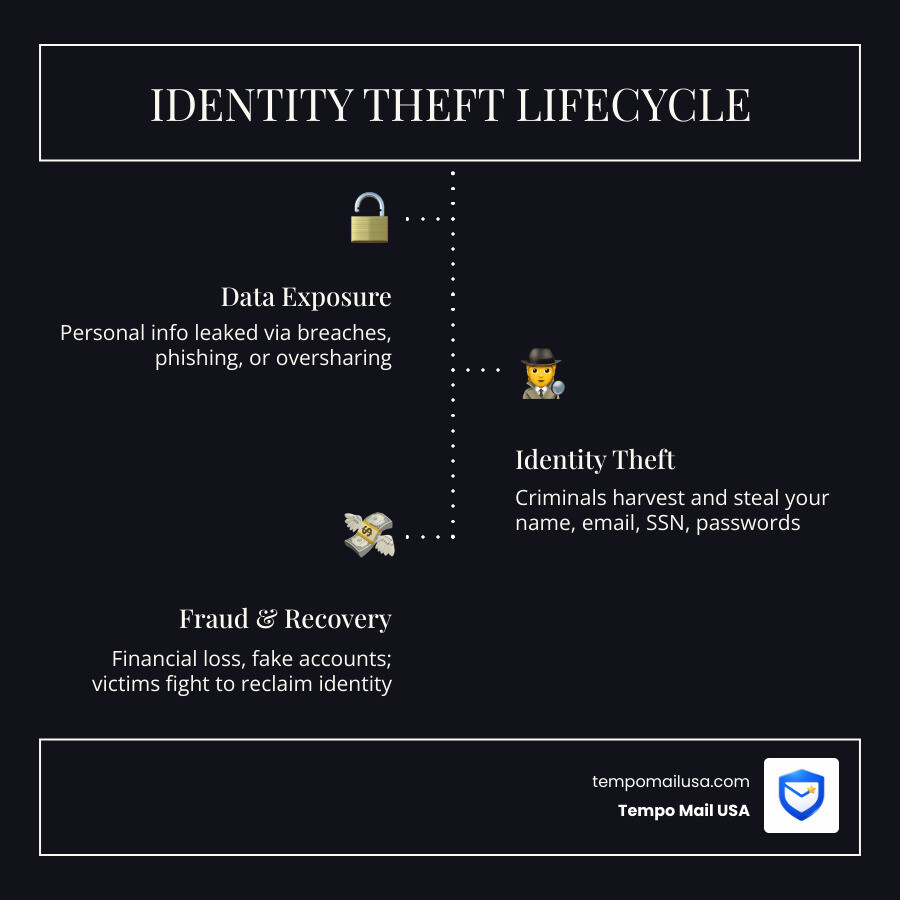
Identity theft jumped 13% in 2023, and more than a million people filed reports with the FTC in just one year. The average person leaves dozens of data trails every single day — through sign-up forms, social media posts, public Wi-Fi, and email.
Your data isn't being targeted by a lone hacker in a hoodie. It's being harvested at scale, automatically, from the sites and services you use every day. One breach at a company you signed up with three years ago can expose your name, email, password, and sometimes your Social Security number — all at once.
The good news? Most identity theft is preventable. You don't need to be a cybersecurity expert. You just need to stop treating your personal data like a free buffet that anyone can help themselves to.
This guide walks you through every layer of protection — from passwords and 2FA to credit freezes and disposable emails — in plain language, without the paranoia or the jargon.
Understanding Identity Theft and Your Threat Model
At its core, identity theft occurs when someone gains access to your personal or financial information without your permission. This isn't just about someone buying a flat-screen TV on your credit card. It can involve criminals opening entirely new lines of credit, stealing your tax refund, or even obtaining medical care under your name.
According to the Federal Trade Commission – Identity Theft Overview, identity theft is one of the fastest-growing crimes in the digital age. But to fight it effectively, we need to understand our "threat model."
A threat model is just a fancy way of asking: "Who is trying to steal my stuff, and how much effort are they willing to put in?" For the average user, the threat is usually automated "bots" and mass phishing campaigns. For high-risk individuals—like journalists or executives—the threat might be more targeted. Regardless of who you are, the goal is the same: reduce your "attack surface" so you aren't an easy target.
Defining the Digital Threat Landscape
The digital landscape is littered with traps. Criminals don't just wait for you to make a mistake; they actively hunt for vulnerabilities. Common methods include:
- Phishing: Fake emails or texts that look like they're from your bank or a government agency.
- Malware: Malicious software that sneaks onto your device via a "free" download or a suspicious pop-up.
- Data Breaches: When a company you trust loses your data to hackers. For instance, the Data Breach Alert: 50M Accounts Exposed News highlights how quickly massive amounts of PII (Personally Identifiable Information) can hit the dark web.
Assessing Your Personal Risk Level
To stay safe, we recommend a strategy called compartmentalization. This means keeping different parts of your digital life separate. If you use the same email and password for your bank as you do for a random cat-meme forum, a breach at the forum gives the hacker the keys to your life savings.
By practicing good digital hygiene and learning how to Protect Personal Information Online, you can move from being a "high-risk" target to a "hardened" one. This involves minimizing the amount of real data you leave behind on the internet.
How to Protect Identity Online with Robust Account Security
The single most common way identities are stolen is through compromised accounts. If a hacker gets into your primary email, they can reset the passwords for almost every other service you use.
Implementing Multi-Factor Authentication (2FA)
If you take only one thing away from this guide, let it be this: Turn on Multi-Factor Authentication (2FA) everywhere.
2FA requires two pieces of evidence to prove you are who you say you are. Usually, this is something you know (your password) and something you have (a code on your phone). While SMS-based codes are better than nothing, they are vulnerable to "SIM swapping" attacks.
For better security, use:
- Authenticator Apps: Like Microsoft Authenticator or Google Authenticator.
- Hardware Tokens: Physical USB keys like Yubico.
- Biometrics: Fingerprint or facial recognition.
The CISA Cybersecurity Tips emphasize that over 90% of cyberattacks start with phishing, and 2FA is the most effective shield against those attacks.
Advanced Password Management Strategies
Stop trying to remember passwords. Humans are terrible at it, which is why we end up using "Password123" or our dog's name. Instead, use a password manager like Bitwarden.
A good manager will:
- Generate random, 15+ character strings.
- Store them using AES-256 encryption.
- Auto-fill them so you don't have to type (preventing keyloggers).
You should also treat your security questions like secondary passwords. If a site asks for your mother's maiden name, don't give the real one—thieves can find that on public records. Give a random string of text and save it in your password manager. Check the Google Dark Web Report: Essential Findings You Must Know to see if your current passwords have already been leaked. For more tips, see our guide on Email Hacking Prevention: Safeguard Valuable Asset.
Hardening Your Digital Footprint and Network
Your home network is the gateway to all your devices. If your router is "soft," every phone, laptop, and smart fridge in your house is at risk.
Securing Home Wi-Fi and Mobile Devices
To lock down your home network:
- Update your router's firmware: Manufacturers release patches for security holes.
- Use WPA3 encryption: If your router supports it; otherwise, use WPA2-AES.
- Change the default SSID and password: Don't let neighbors know which router model you have.
- Enable AP Isolation: This prevents devices on your Wi-Fi from "talking" to each other, which stops malware from spreading from a compromised laptop to your phone.
On your mobile devices, always keep your OS updated and audit your app permissions. Does that flashlight app really need access to your contacts and location? Probably not.
Managing Social Media and Privacy Settings
Social media is a goldmine for identity thieves. They look for "About Me" sections to find your birthday, high school mascot, or pet's name—all common answers to security questions.
We recommend "metadata stripping" before posting photos. Photos often contain EXIF data, which includes the exact GPS coordinates of where the photo was taken (like your front porch). You can also learn How to Remove Personal Info from the Internet to clean up your existing footprint. For more comprehensive advice, check out these Steps to manage personal information.
Proactive Defense: Credit Freezes and Data Minimization
If a thief steals your Social Security number, their first move is usually to open a credit card or a loan in your name. You can stop them dead in their tracks with a credit freeze.
| Feature | Credit Freeze | Fraud Alert |
|---|---|---|
| What it does | Seals your credit report; no one can open new accounts. | Requires lenders to verify your identity before opening accounts. |
| Cost | Free (by law) | Free |
| Duration | Until you lift it | 1 year (renewable) |
| Best for | Maximum protection for everyone. | Those who suspect they've been targeted. |
The Power of Credit Freezes and Fraud Alerts
You must contact each of the three major bureaus individually: Experian, TransUnion, and Equifax. It only takes a few minutes online, and it provides the strongest possible protection against financial identity theft. This is especially important for children under 16, whose credit is rarely checked and makes them prime targets for long-term fraud. You can find more details on the Best Identity Theft Protection Services in the USA.
Minimizing Data Exposure with Aliases
Why give a website your real email address if you don't have to? Every time you share your primary email, you're giving away a piece of your identity that can be used for tracking or targeted in a breach.
At Tempo Mail USA, we believe in the "PII Firewall." By using temporary email aliases, you can:
- Proxy your identity: The service sees the alias, not you.
- Stop tracking: Marketers can't link your activity across different sites.
- Prevent "Data Poisoning": If a site is breached, the hackers get a useless alias instead of your real contact info.
This is a key part of staying safe and using Top Email Spam Filter Services for Your Ultimate Privacy.
Detection and Recovery: What to Do if Your Identity is Stolen
Even with the best defenses, breaches happen. The key is catching it early.
Recognizing the Warning Signs of Theft
You might be a victim of identity theft if:
- You stop receiving expected bills (a thief may have changed your address).
- You see unrecognized charges on your bank or credit card statement.
- You receive calls from debt collectors for accounts you didn't open.
- Your tax return is rejected because one has already been filed in your name.
Regularly checking your credit report is vital. You are entitled to one free report per year from each bureau at AnnualCreditReport.com. You should also learn How to Check if Your Data Was Breached using online scanners.
Immediate Steps for Identity Recovery
If the worst happens, don't panic. Follow these IdentityTheft.gov Recovery Steps:
- Report it to the FTC: Go to IdentityTheft.gov to get a personalized recovery plan and an official "Identity Theft Report."
- Contact the Credit Bureaus: Place a fraud alert and get your free credit reports.
- Contact the affected companies: Close or freeze any accounts that were tampered with.
- File a police report: This is often required to prove to creditors that fraud occurred.
For more detailed recovery advice, read our guide on What to Do After Email Hack: Recovery Steps.
Frequently Asked Questions about Online Privacy
How to protect identity online on social media?
The best way is to treat everything you post as public. Use strict privacy settings to limit posts to "Friends Only," but remember that your friends can still be hacked. Never post photos of your ID, boarding passes, or anything showing your home address. Avoid those "fun" quizzes that ask for your first pet's name or the street you grew up on—those are just social engineering traps.
Does incognito mode help how to protect identity online?
Not as much as you think. Incognito (or private) mode only prevents your local computer from saving your history and cookies. Your Internet Service Provider (ISP), your employer, and the websites you visit can still see exactly who you are and what you're doing. To truly hide your identity, you need a VPN or the Tor Browser.
What are the best tools for how to protect identity online?
We recommend a "security stack" consisting of:
- A password manager (Bitwarden).
- An authenticator app (Microsoft Authenticator).
- A reputable VPN.
- Tempo Mail USA for disposable email aliases.
- FOSS (Free and Open Source Software) apps that don't track your data.
Conclusion
Learning how to protect your identity online doesn't have to be a full-time job. It’s about building a "PII Firewall" around your life. By using password managers, enabling 2FA, freezing your credit, and using disposable emails, you take the power back from hackers and data brokers.
At Tempo Mail USA, we're dedicated to helping you stay anonymous. Our secure aliases act as a shield, ensuring your real personal information never reaches the "buffet" of the open web.
Ready to take the first step toward a more private digital life? Check out The Ultimate Guide to Private Disposable Email or visit us at https://tempomailusa.com to start protecting your data today. Your identity is your most valuable asset—don't wait until it's stolen to start protecting it.