


Your Personal Data May Already Be Exposed — Here's What to Do
Knowing how to check if data was breached is one of the most important things you can do for your online security right now.
Here's the quick answer:
- Go to Have I Been Pwned — enter your email address and hit search
- Review your results — see which breaches included your data and what was exposed
- Check for paste records — see if your email appeared in public data dumps
- Set up breach alerts — get notified if your email shows up in future breaches
- Change compromised passwords immediately — especially if you reuse them across sites
In 2023 alone, over 353 million Americans had their personal information exposed in data breaches. That's not a small number — it's roughly the entire U.S. population.
And here's the unsettling part: you might already be one of them and not know it.
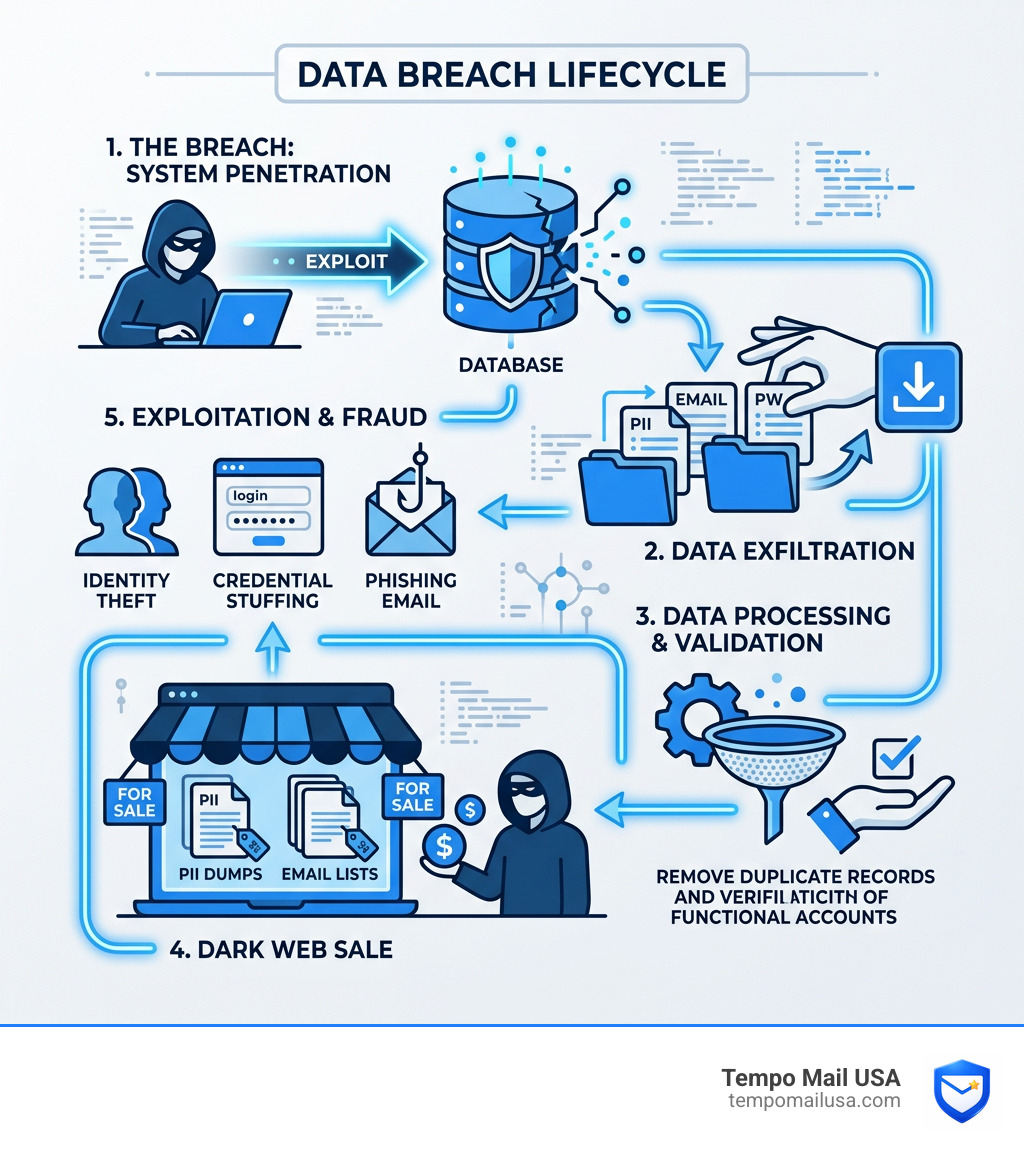
Data breaches happen when hackers, insiders, or system failures expose private information — things like your email address, password, phone number, or even your Social Security number. That data often ends up for sale on the dark web before anyone tells you it was taken.
The problem is that companies don't always notify you quickly. Sometimes notifications are delayed by weeks or months. Sometimes they never come at all.
That's why checking yourself — proactively — matters.
How to Check if Data Was Breached and Your Identity is at Risk
If you’ve ever felt that nagging suspicion that your digital life isn’t as private as you’d like, you aren't alone. We live in an era where data is the new gold, and unfortunately, there are plenty of "digital prospectors" looking to steal it. To truly understand how to check if data was breached, we need to look at the scale of the problem. Currently, there are over 17.5 billion pwned accounts across nearly 1,000 compromised websites.
The first step in taking control is using a centralized database to see where your email address has appeared. One of the most reputable resources is Have I Been Pwned, a tool that aggregates data from thousands of breaches. By simply entering your email, you can see a timeline of every incident where your information was leaked.
If you are specifically worried about your primary communication channel, you should Is My Email on the Dark Web? Check for Free to see if your credentials are being traded by cybercriminals.

Using Free Tools to Check if Data Was Breached
You don't need to be a cybersecurity expert or hire a private investigator to find out if you've been compromised. There are several high-quality, free tools available to the public.
- Email and Phone Search: Most tools allow you to search by email address, but some now include phone number lookups. Since many breaches (like the Facebook 2019 leak) exposed phone numbers, this is a critical check.
- Paste Records: Sometimes data isn't part of a formal "breach" but is instead dumped onto "paste" sites like Pastebin. Hackers use these to share lists of stolen emails and passwords. Tools like Have I Been Pwned also scan these records.
- Specific Breach Checks: Certain massive leaks require specialized tools. For instance, if you're worried about the National Public Data leak, you can use the NPD Breach Check to see if sensitive info like your Social Security number was involved.
- Browser-Based Reports: If you use Google services, you can access the Google Dark Web Report: Essential Findings You Must Know. This tool monitors the dark web for your Gmail address and provides a summary of findings.
Signs Your Accounts or Identity Have Been Affected
Sometimes the "check" isn't a tool, but your own observation of weird behavior. Even if a database hasn't updated yet, your accounts might show symptoms of a breach. Keep a sharp eye out for:
- Unrecognized Charges: Even a "test" charge of $1.00 on your credit card statement can be a sign that your financial data was part of a merchant breach.
- Password Reset Emails: If you receive an email saying "Click here to reset your password" for a service you weren't currently using, someone else is likely trying to get in.
- Unknown Logins: Many services (Netflix, Google, Facebook) allow you to see "Logged in devices." If you see a login from a city you’ve never visited on a device you don't own, you've been breached.
- Verification Codes: Receiving unexpected SMS 2FA codes means someone has your password and is currently hitting the security wall.
To stay ahead of these tactics, we recommend you learn how to Recognize and Report Phishing, as many breaches are actually "credential stuffing" attacks born from phishing.
Immediate Steps to Take After a Data Compromise
Finding out you’ve been "pwned" can feel like a punch to the gut. We’ve all been there—that moment of panic where you wonder if your bank account is about to be emptied. But don't freeze up! Taking immediate action can stop a minor leak from becoming a total identity takeover.
First, identify what was stolen. Was it just an email address? Or was it a password and a Social Security number? The severity of your response should match the sensitivity of the data. For a comprehensive guide on the road to recovery, check out our breakdown of What to Do After Email Hack: Recovery Steps.
Securing Your Passwords and Enabling Two-Factor Authentication
If your password was part of a breach, it is now "plaintext" to hackers. Even if it was encrypted, weak passwords can be cracked in seconds. Strong, complex passwords might take years to decrypt, but if you’ve reused that password elsewhere, the hackers don't need to decrypt it—they’ll just try it on every other site you use.
- Change It Now: Update the password for the breached account immediately.
- The Domino Effect: If you used that same password for your bank, your Amazon account, or your primary email, change those too.
- Use a Manager: We strongly suggest you Try 1Password or a similar password manager. These tools generate unique, "un-guessable" strings for every site, so a breach at one store doesn't compromise your entire life.
- Turn on 2FA: Two-factor authentication is the single best way to How to Bulletproof Your Email Account from Hackers. Even if a hacker has your password, they can't get in without that second physical token or code.
Utilizing Credit Freezes and Fraud Alerts
When sensitive PII (Personally Identifiable Information) like your Social Security number is leaked—as happened in the infamous Equifax breach—changing a password isn't enough. You need to lock down your financial identity.
- Credit Freeze: This is the "nuclear option," and it's free. It prevents anyone (including you) from opening new credit accounts in your name. You can Place a Credit Freeze by contacting Equifax, Experian, and TransUnion individually.
- Fraud Alerts: A step below a freeze, a fraud alert tells creditors to take extra steps to verify your identity before issuing credit. If you place an alert with one bureau, they are required to notify the other two.
- Recovery Plans: If you suspect your identity is already being misused, visit Identity Theft Recovery Plan to create a government-backed recovery strategy.
Notable Past Breaches and Their Long-Term Impact
To understand why we emphasize how to check if data was breached, look at the history of digital disasters. These aren't just statistics; they represent billions of real people whose lives were disrupted.
| Company | Date of Breach | Accounts Affected | Data Exposed |
|---|---|---|---|
| Yahoo | August 2013 | 3 Billion | Names, emails, birthdays, hashed passwords. |
| June 2021 | 700 Million | Emails, phone numbers, geolocation, social handles. | |
| April 2019 | 533 Million | Phone numbers, Facebook IDs, full names, locations. | |
| Equifax | Sept 2017 | 147 Million | SSNs, birthdays, addresses, driver’s license numbers. |
| Target | Nov 2013 | 41 Million | Credit card numbers, encrypted PINs, names. |
The Equifax Settlement Info is a prime example of how long these things last. Years after the 2017 breach, people are still dealing with the fallout of their Social Security numbers being available on the dark web. This is why we advocate for a "security first" mindset.
How to Prevent Future Data Breaches from Affecting You
We like to think of cybersecurity not as a one-time fix, but as "digital hygiene." You wouldn't go a year without brushing your teeth; you shouldn't go a year without checking your data exposure.
The best way to prevent a breach from hurting you is to ensure there is nothing valuable to steal in the first place. This is called Data Minimization. If a website doesn't have your real email or your real name, they can't lose it in a breach.
Using a "PII Firewall" is the most effective proactive strategy. By using temporary email aliases, you proxy your identity. If that service is breached, the hackers only get a "temp" address that isn't connected to your bank or your personal life. For more on how these corporate leaks happen, read our Conduent Data Breach 101 guide.
Proactive Strategies to Check if Data Was Breached in the Future
Don't wait for the news to tell you there was a problem. You can automate your vigilance:
- Sign up for Alerts: Most breach-check sites have a "Notify Me" feature. Use it.
- Check State Resources: Some states are very proactive. For example, the California Breach List maintained by the Attorney General lists every breach affecting more than 500 residents.
- Review Login Histories: Once a month, check the "Security" or "Activity" tab on your major accounts.
- Use Checklists: Follow a structured approach like our Ultimate Checklist for Conduent Data Breach to ensure no stone is left unturned.
Frequently Asked Questions about Data Breaches
What is the most common source of data breaches?
While we often imagine "hoodied" hackers in dark basements, the reality is often more mundane. The most common sources are malicious hacking (exploiting software vulnerabilities), weak or stolen passwords, and phishing attacks. Human error—like an employee accidentally leaving a database "open" to the public internet—is also a massive contributor.
Should I change all my passwords after one breach?
You don't necessarily need to change every password on the internet, but you must change any password that was reused. Hackers use a technique called credential stuffing, where they take the email/password combo from a small breach (like a niche hobby forum) and automatically try it on high-value sites like PayPal or Gmail. If you use unique passwords for every site, you only need to change the one that was breached.
Who do I notify if my business experiences a breach?
If you are on the other side of the fence and your business is breached, the clock is ticking. You must notify law enforcement (like the FBI's IC3), affected individuals, and potentially state regulators. If you handle health data, you must comply with the HIPAA Breach Notification Rule, which requires notifying the Department of Health and Human Services (HHS).
Conclusion
At the end of the day, the internet is a bit like the Wild West. There are incredible opportunities, but there are also outlaws around every corner. Learning how to check if data was breached is your way of putting up a fence around your digital homestead.
At Tempo Mail USA, we believe the best way to win the game is to stop playing by the hackers' rules. By using our temporary email aliases, you create a PII firewall. You can sign up for newsletters, test new apps, and shop online without ever handing over your real, permanent email address. If those companies get breached, your primary identity remains safe and sound.
Stay proactive, keep your passwords unique, and Protect your data with our Data Retention Policy to ensure your information stays where it belongs—with you.