



Your Personal Information Is Already Online — Here's How to Remove It
How to remove personal info from internet sources starts with these core steps:
- Google yourself — search your name, phone, and email to see what's exposed
- Request removal from Google Search — use the "Results about you" tool at myactivity.google.com
- Delete or lock down social media accounts — Facebook, Instagram, X, TikTok
- Opt out of data brokers — sites like Whitepages, Spokeo, and BeenVerified
- Submit a Google content removal form for addresses, IDs, or other sensitive info
- Use a disposable or alias email for any future signups to stop new data from spreading
- Monitor for reappearance — removed data often comes back within weeks
Go ahead and Google yourself right now. What you find might surprise you.
Your home address, phone number, relatives' names, and even your daily habits are likely sitting on dozens of websites — most of which you never signed up for. Data brokers, people-search sites, social media platforms, and public records all feed a sprawling ecosystem that profits from your personal information.
The scary part? Even "anonymized" data isn't as safe as it sounds. A 2019 study published in Nature found that just 15 demographic attributes are enough to correctly re-identify 99.98% of Americans in any dataset.
And completely erasing yourself? That's not fully possible. Public records, cached pages, the Wayback Machine, and offshore data brokers mean some information will always linger. But you can dramatically reduce your exposure — and that matters a lot for protecting yourself from identity theft, spam, doxxing, and targeted scams.
This guide walks you through every practical step, from free DIY methods to paid services, so you can take back as much control as possible.
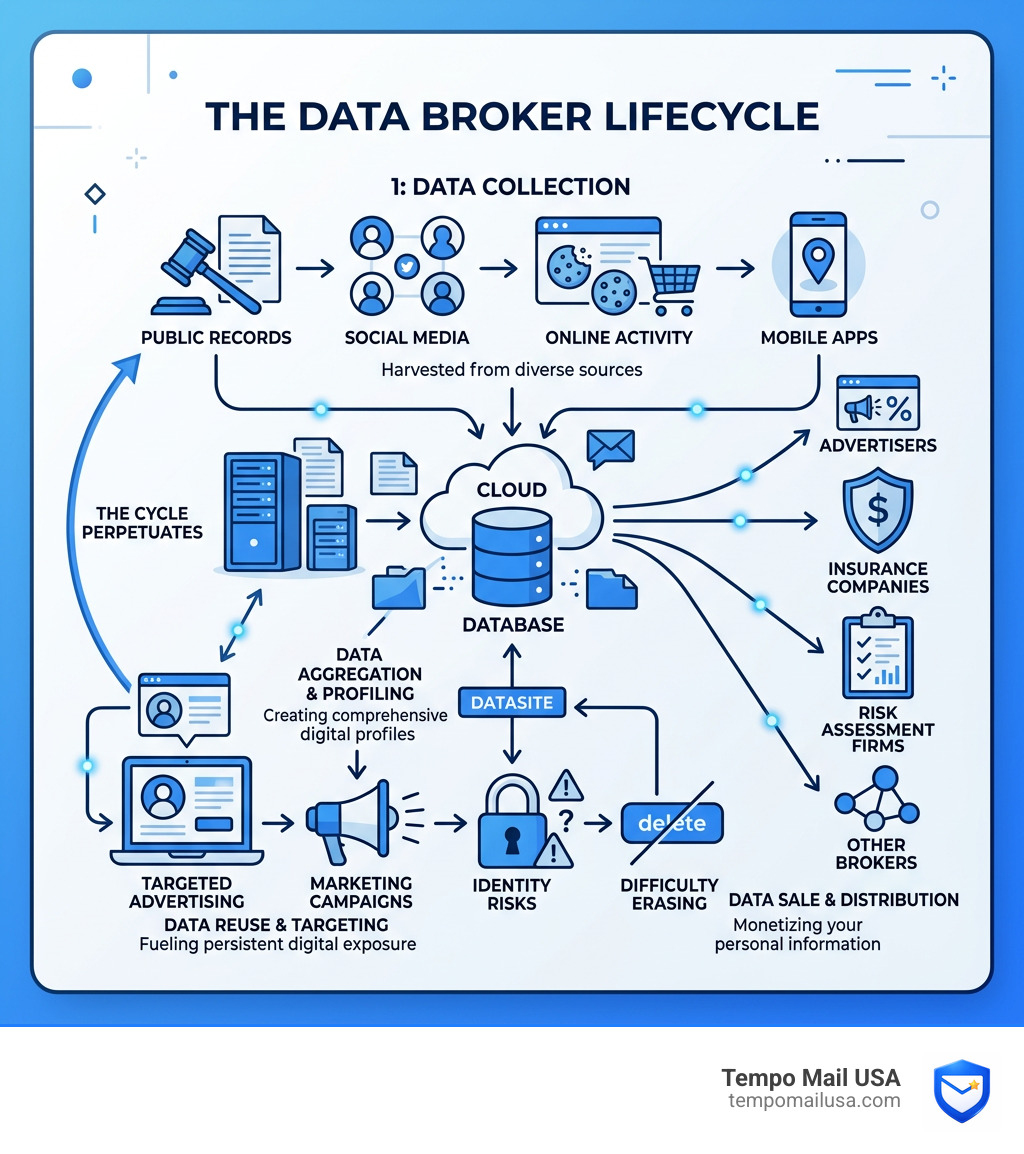
Why You Should Remove Personal Info From Internet Sources
We often treat our digital lives like a series of harmless interactions. We sign up for a coupon, post a vacation photo, or register for a local 5K run. But behind the scenes, these tiny crumbs of data are vacuumed up by an industry that is larger than most people realize.
The global data broker market is an absolute behemoth, expected to reach more than $600 billion by 2030. These companies aren't just selling your name; they are selling a "digital version" of you to advertisers, insurance companies, and even risk assessment firms. When this much money is involved, your privacy isn't the priority — profit is.

Beyond the creepy factor of being watched, there are very real dangers to leaving your PII (Personally Identifiable Information) floating around:
- Identity Theft: Criminals don't need your physical wallet to ruin your credit. They just need enough data points — like your birthdate, address, and mother’s maiden name — to piece together a profile.
- Doxxing and Harassment: If you end up in a heated online debate or become a target for whatever reason, having your home address and phone number easily searchable is a recipe for disaster.
- The Re-identification Risk: As we mentioned earlier, the 99.98% re-identification risk means that even if a company "strips" your name from a dataset, a clever algorithm can easily figure out who you are by cross-referencing other public data.
- Targeted Scams: Have you ever received a phishing text that knew your name or a recent purchase? That’s not a coincidence. Scammers use data broker info to make their lies more believable.
Learning how to protect your personal information online isn't just about hiding; it's about reducing the "surface area" that hackers and marketers can attack.
How to Remove Personal Info From Internet Search Results
When people want to find out about you, they go to Google or Bing. While these search engines don't usually create the content, they act as the front door to it. If you can close that door, you’ve won half the battle.
The Google "Results About You" Tool
Google has made significant strides in helping users manage their presence. Their Results about you tool is a game-changer. It allows you to search for your own contact information and request its removal directly from the search interface.
If you find a result that exposes your phone number, home address, or email, you can click the three dots next to the result and select "Remove result." Google will then review the request based on their policies.
Formal Removal Requests
For more sensitive information, you may need to use the official Google removal form. Google typically approves requests for:
- Non-consensual explicit imagery (revenge porn).
- Bank account or credit card numbers.
- Handwritten signatures or ID images.
- "Doxxing" content (info shared with malicious intent).
Google has historically received roughly 1.88 million delisting requests, and they have delisted over three million URLs to date. However, they do weigh requests against "public interest." If the information is part of a news story or a public record (like a political contribution), they might deny the request.
Don't Forget Bing
While Google is the giant, Bing still holds a significant share of the market. You should also utilize the Bing privacy tool to request removals under similar criteria.
Pro Tip: When submitting these requests, always take screenshots of the offending page. Google and Bing often require visual proof to locate the specific PII you're talking about. Just be sure to edit the screenshots to only show the relevant info — don't accidentally send them more of your data than necessary!
Scrubbing Your Social Media and Old Accounts
Your social media profiles are essentially a diary of your life that you've handed over to advertisers. Even if your profile is "private," the platforms themselves are still collecting and selling your habits. To truly reclaim your identity, you need to conduct a deep audit of your digital hygiene.
Deactivation vs. Deletion: What's the Difference?
| Feature | Deactivation | Deletion |
|---|---|---|
| Visibility | Profile is hidden but exists | Profile and data are removed |
| Recovery | Can be reactivated anytime | Usually a 30-day grace period, then gone |
| Data Retention | Platform keeps all your data | Platform deletes data (mostly) |
| Best For | Taking a temporary break | Permanently removing your footprint |
Before you hit the nuclear button, we recommend using Google Takeout to download an archive of your data. You’d be surprised how many old photos and memories you might want to keep before they vanish.
After backing up, visit your Google Account page and run a Security checkup. This will show you every third-party app that has access to your account. We’ve all signed up for a random quiz or game years ago that still has "read" access to our emails. Revoke those permissions immediately.
For a comprehensive list of how to delete almost any account, use the JustDeleteMe directory. It ranks sites by how difficult they make the deletion process.
How to remove personal info from internet social profiles
- Facebook: Go to Settings & Privacy > Settings > Your Facebook Information. You can choose Facebook deactivation or permanent deletion. Facebook may take up to 90 days to fully delete your data from its backup systems.
- X (Twitter): Navigate to Your Account and select "Deactivate your account." If you don't log in for 30 days, it becomes permanent.
- Instagram: Instagram makes it tricky. You usually have to visit the specific Instagram deletion page while logged in to start the process.
- TikTok: Access your TikTok settings to deactivate or delete. Like others, they offer a 30-day window before the data is purged.
- Snapchat: Use the Snapchat accounts portal to request deletion.
Opting Out of Data Brokers and Public Records
This is the "heavy lifting" part of the process. Data brokers like Whitepages, Spokeo, and Intelius are professional aggregators. They don't care about your privacy; they care about the data broker market's $450 billion projected value.
The Legal Framework: GDPR and CCPA
If you live in the European Union, you have the Right to be forgotten under GDPR. This allows you to demand that organizations delete your data if it's no longer necessary. In the U.S., there is no federal "right to be forgotten," but the California Attorney General enforces the CCPA (California Consumer Privacy Act), which gives California residents similar rights to see and delete their data.
Manual Opt-Outs
For most of us, we have to go site-by-site.
- Search for your name on a site like Whitepages.
- Scroll to the bottom of the page (the footer).
- Look for a link that says "Do Not Sell My Personal Information" or "Opt-Out."
- Follow the instructions. Ironically, they will often ask for your email to "verify" the removal. This is exactly why you should use an alias email from Tempo Mail USA. Don't give them your real email just to tell them to stop selling your data!
The "Un-removable" Data
Some things are public record by law. This includes:
- Property deeds and tax assessments.
- Voter registration (in many states).
- Marriage licenses and court filings.
While you can't always delete these, you can sometimes request "redaction" from your local county clerk if you are a victim of stalking or work in a high-risk profession (like law enforcement). You can also use an ICANN lookup to find out who owns a specific website that might be hosting your info and contact their webmaster directly.
Preventing Future Data Collection and Exposure
Removing your old data is like mopping a floor while the faucet is still running. If you don't change your habits, your information will be back on those data broker sites within months. You need a "PII Firewall."
Secure Your Browsing
Stop the tracking before it starts. We recommend using the Brave browser or DuckDuckGo as your primary search engine. These tools block the trackers and "pixels" that follow you from site to site.
Additionally, always use a VPN to mask your IP address. This prevents websites from pinpointing your physical location based on your internet connection. We also suggest checking Have I Been Pwned regularly to see if your email has been part of a recent breach. If it has, change your passwords immediately.
Proactive steps: how to remove personal info from internet permanently
The single most effective way to keep your data off the internet is to stop giving it away.
When a website asks for your email to "get 10% off," they aren't being generous. They are buying your identity for the price of a discount. This is where email privacy & cybersecurity becomes your best friend.
- Use Alias Emails: Instead of your primary Gmail or Outlook, use a temporary email alias. At Tempo Mail USA, we provide secure aliases that act as a buffer. If that service gets breached or starts selling your info, your real identity remains hidden.
- Guest Checkout: Never "Create an Account" if you don't have to. Use guest checkout and a temporary email.
- The "Burner" Strategy: Understand how temporary emails protect you from data breaches. If the alias is compromised, you simply delete it. No harm, no foul.
Sharing your real email is one of the hidden dangers of online life. It is the "primary key" that data brokers use to link your social media, your shopping habits, and your public records together. If you break that link with an alias, you become a ghost to their algorithms.
Frequently Asked Questions about Online Privacy
Why is it impossible to completely remove all personal data?
The internet is "legion." Once information is posted, it is often archived by the Wayback Machine or cached by search engines. Furthermore, many data brokers operate in jurisdictions with zero privacy laws, making them immune to removal requests. Finally, information stored on a blockchain is, by definition, immutable and cannot be deleted.
How long does the removal process take?
It varies wildly. A Google search removal might take a few days, while a social media deactivation usually has a 30-day "cooldown" period. Data brokers can take anywhere from 24 hours to 45 days to process an opt-out. The biggest frustration is that data often reappears because brokers constantly scrape new sources. This is why digital hygiene is a lifelong practice, not a one-time chore.
What public records cannot be removed?
Generally, anything that is a matter of government record is difficult to hide. This includes property ownership, marriage licenses, and court records. However, some states allow you to use a P.O. Box or an LLC to hold property, which adds a layer of anonymity to your physical home address.
Conclusion
Reclaiming your identity in the digital age is an ongoing battle, but it is one worth fighting. By scrubbing your search results, deleting old accounts, and opting out of data brokers, you are significantly lowering your risk of identity theft and harassment.
But remember: the best defense is a good offense. Don't let the "faucet" keep running. Use a PII firewall. By protecting your privacy with free private email services, you ensure that your real information stays where it belongs — with you.
At Tempo Mail USA, we believe privacy shouldn't be a luxury. Start using aliases today, and stop giving the internet a map to your front door. Stay safe, stay anonymous, and take back your data.