


The Evite Scam Is More Convincing Than Ever — Here's What You Need to Know
Evite scam emails are phishing attacks disguised as digital party invitations. They trick you into clicking a malicious link — often appearing to come from someone you actually know.
Quick answer — what is an Evite scam and what should you do?
- What it is: A fake digital invitation email mimicking Evite (or similar services) designed to steal your login credentials or install malware.
- How to spot it: Check the sender's email domain, hover over links before clicking, and watch for misspelled URLs like "envtte" instead of evite.com.
- What to do if you clicked: Disconnect from the internet, change your passwords from a separate device, log out all active sessions, and alert your contacts immediately.
- How to prevent it: Use strong antivirus software, never reuse passwords, and consider a disposable email address for online signups to protect your real inbox.
These scams have quietly evolved into some of the most convincing phishing attacks in circulation. Unlike the obvious "Nigerian prince" emails of the past, modern invitation phishing is polished, personal, and psychologically sharp.
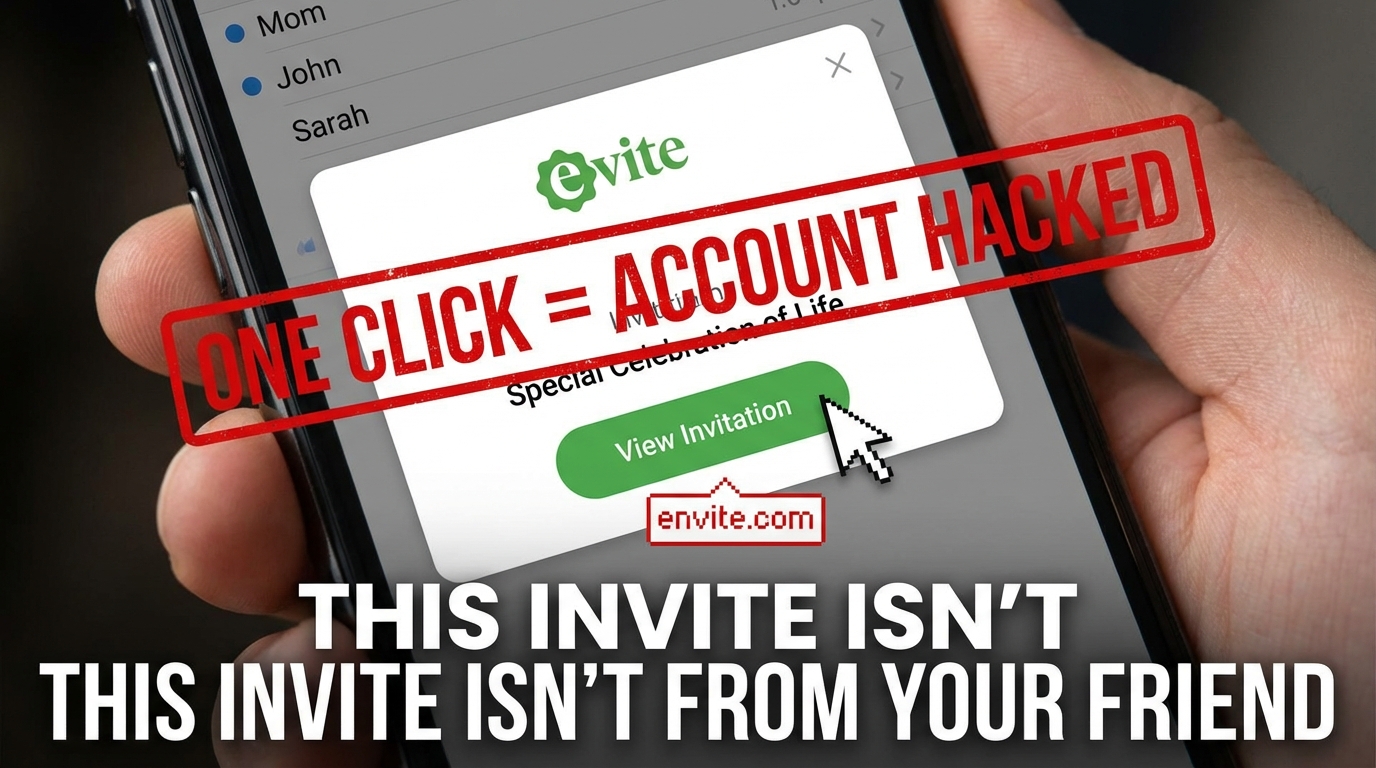
Consider this real example reported by a cybersecurity expert: an email arrived with the subject line "Special Celebration of Life" — appearing to come from a friend. It looked identical to a genuine Evite. Only when the recipient hovered over the "View Invitation" button did anything seem off: the link pointed to a misspelled domain, envtte, not evite.com. An antivirus tool caught it just in time.
Most people aren't that lucky.
What makes these scams especially dangerous is the social trust they exploit. The invitation appears to come from your neighbor, your coworker, or your aunt. Your guard drops. You click. And that one click can hand scammers your email credentials, your contact list, and potentially access to your financial accounts.
The threat is real, it's growing, and it's targeting everyday people — not just the tech-unsavvy.
Anatomy of a Modern Evite Scam
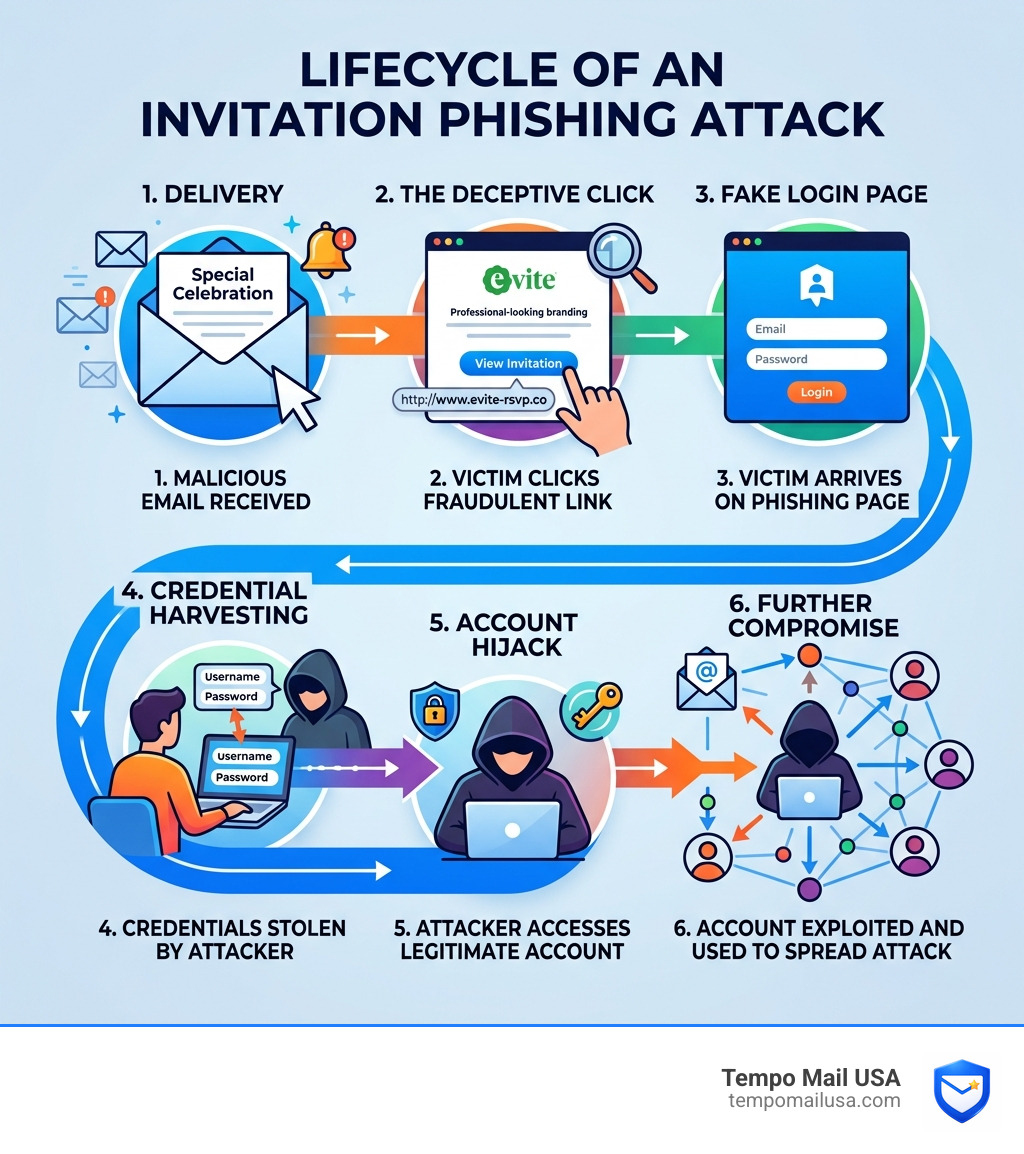
To protect ourselves, we first need to understand the mechanics of the trap. A modern evite scam isn't just a random piece of spam; it is a carefully choreographed social engineering attack. Scammers leverage the professional branding of platforms like Evite and Paperless Post to create a sense of legitimacy that bypasses our natural skepticism.
Emotional Triggers and Themed Lures
Scammers are increasingly using emotionally charged subjects to bait the hook. As noted in recent Scamicide alerts from late 2025, themes like "Celebration of Life" or "Memorial Service" are particularly effective. Why? Because these subjects demand an immediate, respectful response. Most of us wouldn't dream of ignoring a funeral or memorial invite, and the emotional weight of the event often causes us to click "View Invitation" before we think to check the sender's address.
Holiday party themes are another favorite. During the peak of the 2025 holiday season, thousands of users received fake invitations for "Christmas Cocktails" or "New Year’s Eve Bash." These scams thrive on the high volume of legitimate social invitations we receive during these periods, making the fake ones blend in perfectly with the real ones.
Credential Harvesting and Account Hijacking
The goal of the evite scam is rarely just to get you to visit a website. It is usually about "credential harvesting." When you click that "View Invitation" button, you are often redirected to a page that looks exactly like a login screen for Gmail, Outlook, or Evite itself.
If you enter your username and password, you aren't logging in to see the party details; you are handing your keys directly to a criminal. Once they have your credentials, they hijack your account to:
- Scrape your contact list: They want to know who you know.
- Spread the infection: They send the same scam to everyone in your address book, appearing to come from you.
- Monitor your activity: They may set up "mail rules" to forward your incoming bank statements or password reset emails to their own accounts.
How the Evite Scam Hijacks Social Trust
The most sinister element of this attack is how it weaponizes our friendships. When you receive an invitation from party-planner-123@random-scam-site.com, you probably delete it. But what if the "From" field says "Sarah Miller," your actual best friend?
Spoofed Names and Familiar Contacts
Scammers use "display name spoofing" to make the email appear as if it’s from a trusted contact. In many cases, the account has already been compromised. This means the email is actually coming from Sarah’s real email address because she fell for the same evite scam twenty minutes earlier. This creates a chain reaction of trust that can sweep through an entire social circle or workplace in hours.
According to research from McAfee on new phishing traps, this psychological bypass is what makes invitation phishing so much more effective than traditional "fear-based" phishing (like fake IRS threats). It starts with curiosity and social obligation, which are much harder for our brains to flag as dangerous.
Red Flags: Identifying a Fake Invitation
While these scams are sophisticated, they aren't perfect. If we slow down and look closely, the red flags are almost always there.
The Power of the "Hover"
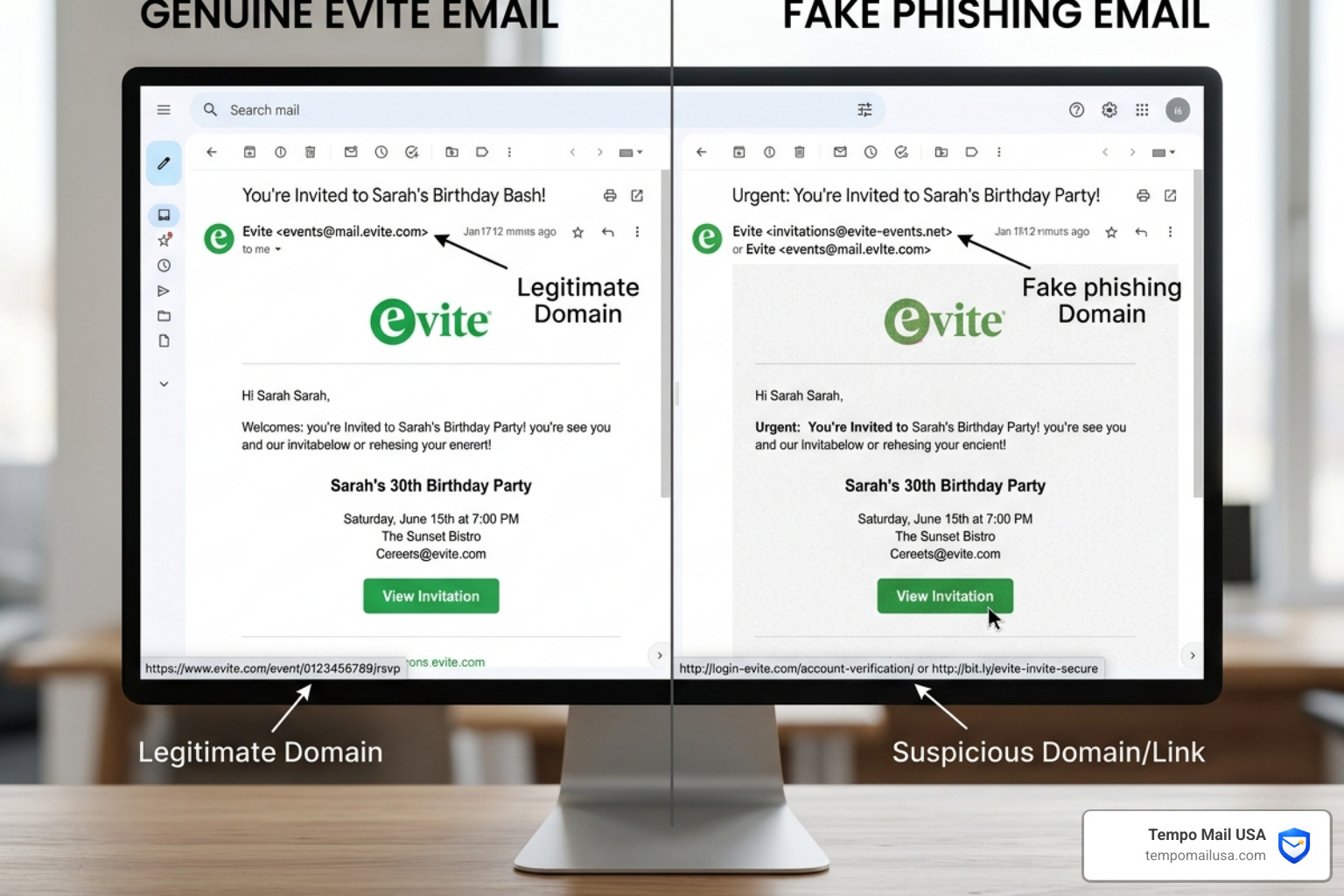
Before you click any button in an invitation, hover your mouse cursor over it (or long-press on a mobile device). A small box will appear showing the actual destination URL.
- Misspelled Domains: Look for "envtte.com," "evite-login.net," or "e-vite.com." These are known as homoglyph attacks or typosquatting.
- Generic Greetings: Legitimate Evites usually address you by name if you are on the guest list. Scams often use "Dear User" or "Hello Friend."
- Unexpected Login Prompts: If you click a link and are immediately asked to "log in to your email to view the invite," stop. Legitimate services do not require you to provide your email password to see a party's location.
Technical Warning Signs
As highlighted by IT Support 101 alerts, be extremely wary of any invitation that includes an attachment.
- File Types: Real Evites are web-based. They do not come as .PDF or .EXE files. If you see an attachment, it is almost certainly malware designed to infect your computer.
Verifying Official Domains and Senders
To stay safe, you should know what the "real" versions look like.
- Evite: Official emails typically come from
info@mail.evite.comordev@evite.com. - Paperless Post: Legitimate invites come from
paperlesspost@paperlesspost.comorpaperlesspost@accounts.paperlesspost.com. - Verification: Some email providers now show a "blue checkmark" or a verified sender icon for major brands like Paperless Post. If that’s missing on an email that claims to be official, proceed with extreme caution.
Pro Tip: If you're unsure, don't click. Text or call the person who supposedly sent the invite. A quick "Hey, did you just send me an Evite for a memorial service?" can save you weeks of identity theft headaches.
The Hidden Dangers of Clicking Malicious Links
What actually happens if you click? It’s often more than just a stolen password.
Malware and Remote Access
Some evite scam links lead to "drive-by downloads." This means simply visiting the page starts a silent installation of malware in the background. One specific threat identified in 2026 is the use of Screenconnect.exe or similar remote access tools. These allow scammers to literally see your screen, move your mouse, and access your files as if they were sitting at your desk.
The 2019 Data Breach Legacy
We also have to contend with the "ghosts" of the past. The 2019 Evite data breach exposed the names, emails, and passwords of millions of users. Scammers still use this old data today to make their phishing emails more convincing, often including personal details that make you believe the email must be legitimate.
This type of compromised data often ends up in the hands of "phantom" collectors who use it for further extortion. If you've been targeted by these, you might want to read our guide on the Phantom Debt Collection Scam to see how these threats are connected.
Step-by-Step Recovery: What to Do if You’ve Been Compromised
If you realized too late that you clicked a fake link or entered your credentials, don't panic. Speed is your best friend.
Immediate Actions vs. Long-Term Recovery
| Action Level | Steps to Take Immediately |
|---|---|
| Immediate | Disconnect: Turn off Wi-Fi and unplug ethernet to stop malware from communicating. |
| Immediate | Password Reset: Use a different, clean device to change your email password. |
| Critical | Session Logout: In your email settings, select "Log out of all other sessions" to kick the hacker out. |
| Recovery | Notify Contacts: Tell your friends you were hacked so they don't click the links sent from your account. |
| Security | Check Rules: Look for unauthorized "Forwarding Rules" in your email settings that might be sending your mail to the scammer. |
If you need a more detailed walkthrough, see our full guide on what to do after an email hack.
Reporting the Incident
Once you've secured your account, help others by reporting the scam. You can report phishing emails to the FTC and FBI to help authorities track down the infrastructure behind these attacks. For broader financial fraud concerns, follow the official steps on how to report fraud to the FTC.
Advanced Protection: Building a PII Firewall
In 2026, standard "common sense" isn't always enough to stop a professional evite scam. We need a layered defense strategy—what we call a PII (Personally Identifiable Information) Firewall.
1. Advanced Malware Protection
Invest in high-quality antivirus software that features "Real-time Web Protection." These tools can often identify a malicious domain like "envtte" before the page even loads.
2. Enterprise-Grade Encryption
Using a VPN like NordVPN adds a layer of security by encrypting your traffic and often blocking known malicious sites at the DNS level. This is especially important if you are checking your invites on public Wi-Fi.
3. Personal Data Removal Services
Scammers find you because your data is available on "people search" sites. Using a service to scrub your name, address, and email from these databases makes it much harder for scammers to target you with personalized lures. You can learn more about this in our guide on how to protect your personal information online.
Preventing the Evite Scam with Proactive Security
The best way to win is to not play the game with your real identity. At Tempo Mail USA, we advocate for Identity Proxying.
The Power of Email Aliasing
When you sign up for social platforms or RSVP to events, you shouldn't have to give away your primary, "permanent" email address. This is the address linked to your bank, your healthcare, and your recovery accounts.
By using a temporary email alias from Tempo Mail USA, you create a "firewall" between the service and your real inbox. If that service is ever breached—or if a scammer tries to target that alias—you can simply delete the alias. Your real inbox remains untouched, and the evite scam never reaches your "inner circle."
This practice of "inbox hygiene" is the single most effective way to reduce your digital footprint and stop the spread of phishing.
Frequently Asked Questions about Evite Scams
Why did I receive a fake Evite from someone I actually know?
This usually happens because your friend's account was compromised. Once a scammer gains access to an account via an evite scam, they use automated scripts to send the same phishing link to every person in that user's contact list. Because it comes from a "trusted" source, it is much more likely to be clicked.
Can antivirus software stop an Evite phishing link?
Yes, but with caveats. Most modern antivirus programs use "heuristic analysis" to spot suspicious website behavior. However, "zero-day" scams (brand new ones) might briefly bypass these filters. That is why manual verification—like hovering over links—remains a critical skill.
What is the most common subject line for an Evite scam?
Currently, "Special Celebration of Life" and "Urgent: Updated Event Details" are the most common. Scammers use these because they trigger an emotional response or a sense of urgency, making you more likely to click without thinking.
Conclusion
The evite scam is a reminder that in the digital age, our social connections are being weaponized against us. By staying vigilant, checking our links, and using privacy-first tools like Tempo Mail USA, we can enjoy our social lives without handing over the keys to our digital kingdom.
Stay safe, stay private, and always hover before you click. For more ways to secure your digital life, secure your primary inbox today with Tempo Mail USA.