


Spot a Geek Squad Scam Email Before You Respond
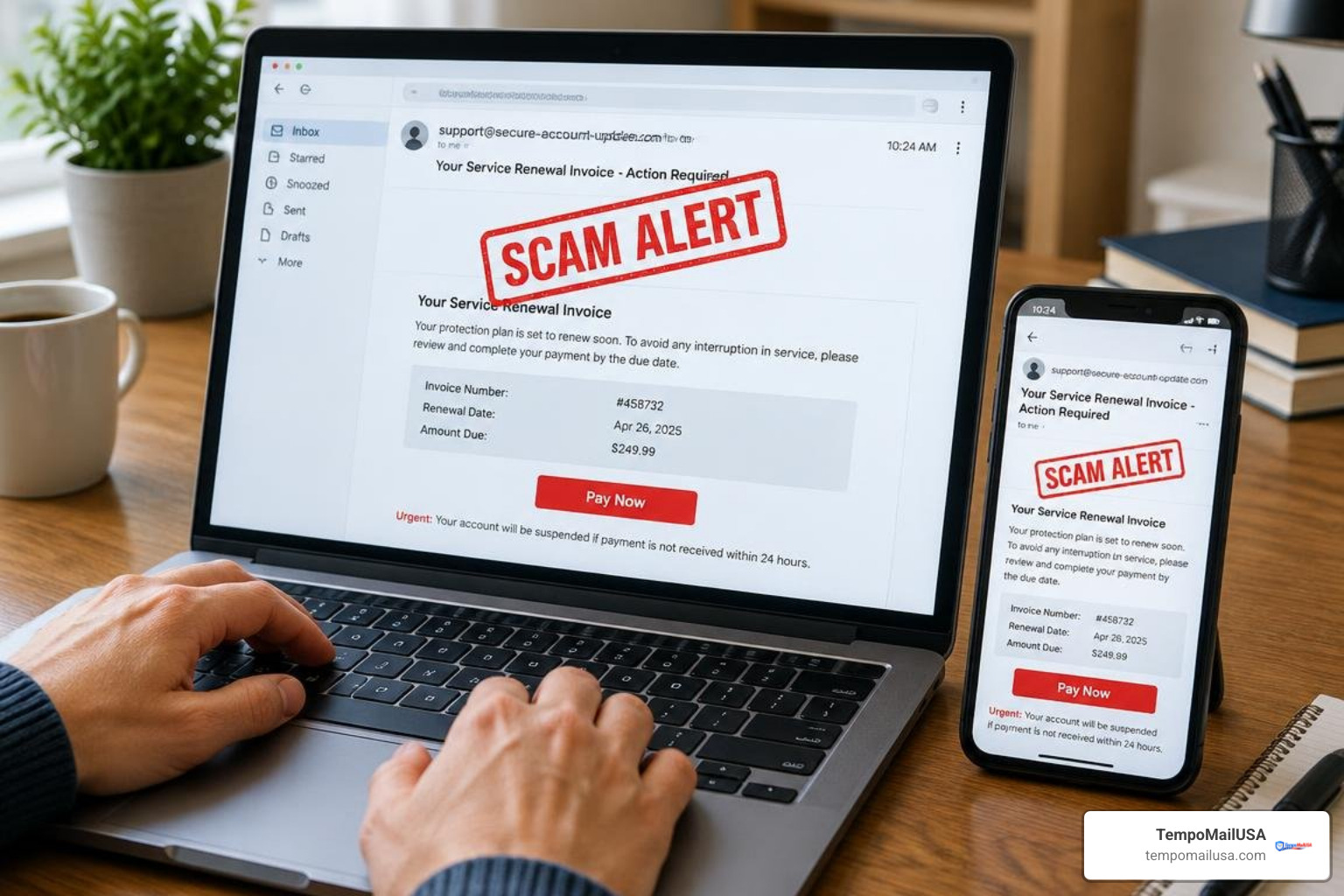
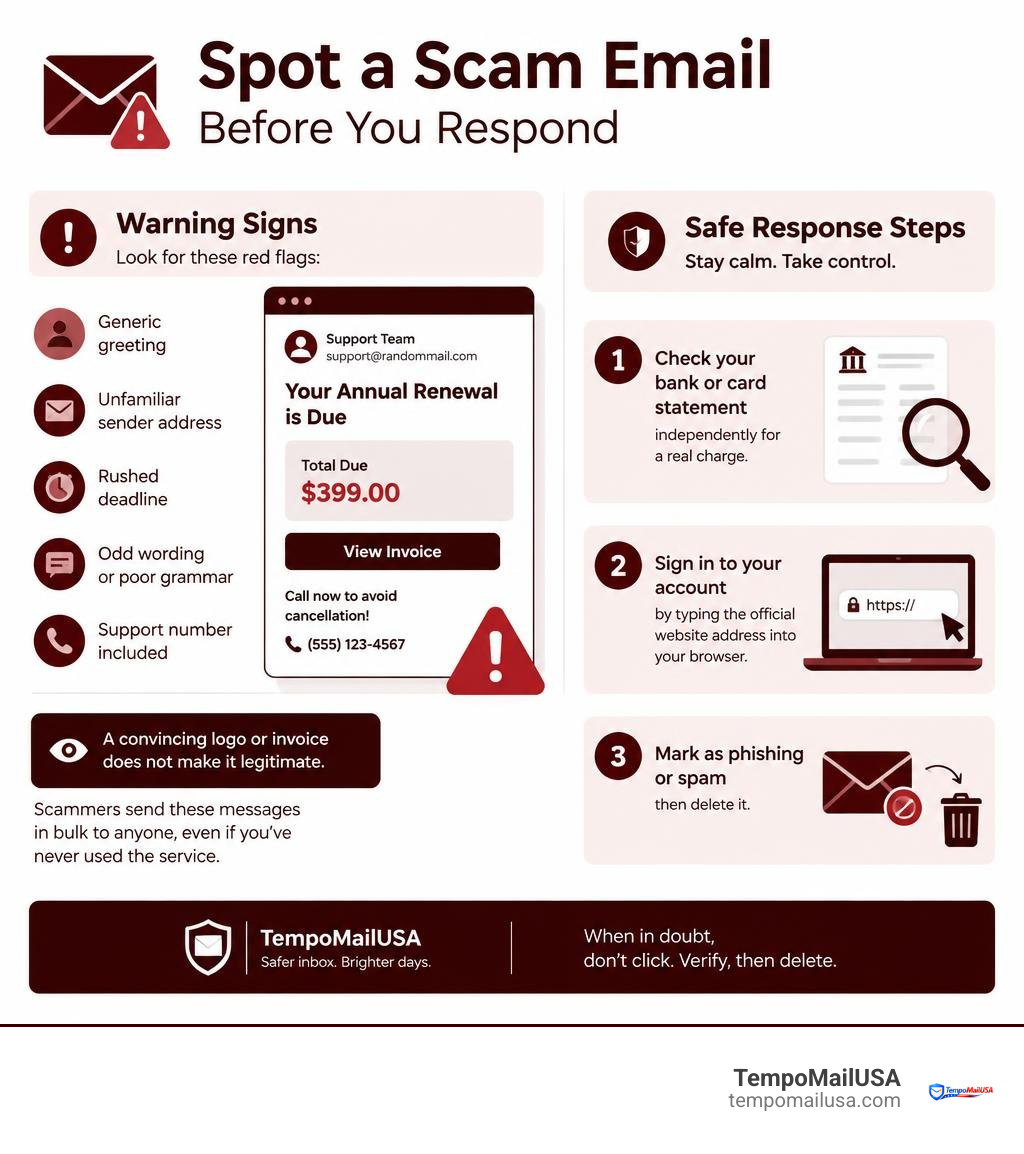
A Geek Squad scam email is usually a fake renewal notice or invoice designed to make you panic and contact a scammer. Do not click its links, open attachments, reply, or call the phone number in the message.
Instead:
- Check your bank or card statement independently for a real charge.
- Sign in to your Best Buy account by typing the official website address into your browser.
- Mark the email as phishing or spam, then delete it.
These messages often claim you owe hundreds of dollars for an automatic Geek Squad renewal. The real goal is commonly to get you on the phone, where a scammer may ask for payment details or persuade you to install remote-access software.
Look for a generic greeting, an unfamiliar sender address, a rushed deadline, odd wording, and a support number included in the email. A convincing logo or invoice does not make it legitimate. Scammers send these messages in bulk to harvested email lists, including people who have never used Geek Squad.
How a Geek Squad Scam Email Works and Why It Spreads
The modern threat landscape relies heavily on psychological pressure rather than complex technical exploits. Scammers deliberately trigger your panic reflex by sending fabricated renewal receipts with painful price tags, typically ranging from $299 to $599. They capitalize on subscription fatigue—the reality that most people subscribe to so many software tools, streaming platforms, and technical services that an unexpected annual charge feels plausible at first glance.
These operations run like organized, illicit call centers. Rather than embedding automated malware directly into the body text, cybercriminals employ social engineering to force you into initiating contact. They establish artificial 24-hour to 48-hour cancellation windows, warning that failure to call their customer support line immediately will result in an irreversible, automatic bank deduction.
When an unsuspecting victim dials the number, the call is routed directly to a boiler-room fraud ring. The criminal agents are trained in aggressive de-escalation, high-pressure persuasion, and technical deception. They blast these messages across millions of inboxes simultaneously using automated mailing scripts fueled by data breaches, knowing that even a 0.1% response rate generates massive revenue.
The Phone-First Refund Trap and Remote Access Script
Understanding the Geek Squad subscription renewal scam — how the fake invoice email works requires examining the deceptive telephone script known as the "refund trap." When you call the toll-free number printed on the fake invoice, the representative claims they are ready to help you cancel the unauthorized charge and process a full refund.
To process this bogus refund, the operator insists they must connect to your machine to establish a secure session or fill out an electronic cancellation form. They guide you to install legitimate remote desktop applications such as AnyDesk, TeamViewer, or UltraViewer. Once granted access, the scammer executes a multi-step fraud sequence:
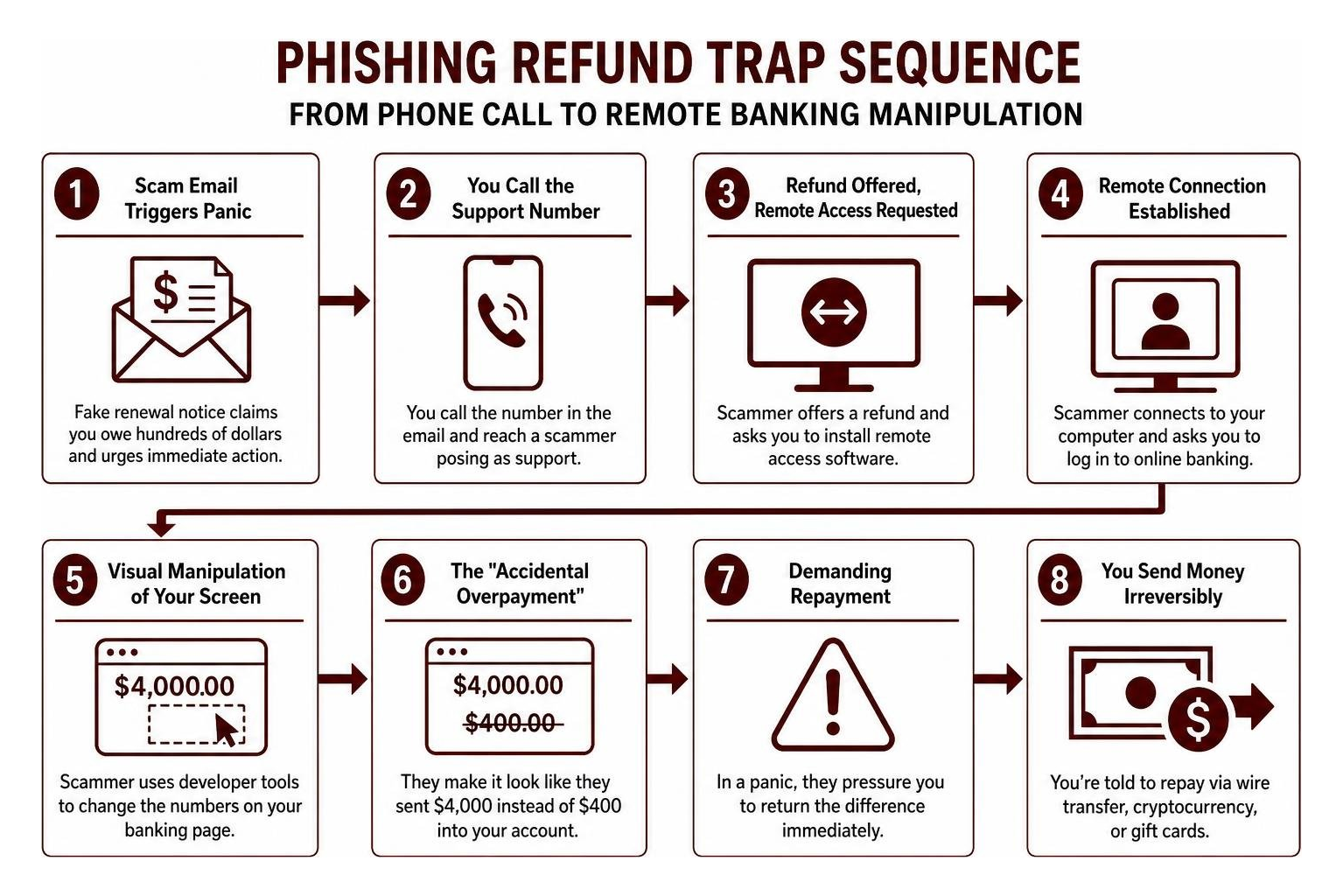
- Remote Connection: The scammer gains control of your desktop and asks you to log into your online banking portal to verify the refund.
- Visual Manipulation: While you are logged in, the scammer blanks your screen or directs your attention away while using your browser's "Inspect Element" developer tool to alter the displayed HTML numbers on your online banking page.
- The "Accidental Overpayment": They make it look like they accidentally transferred $4,000 instead of $400 into your account, pretending their job is on the line.
- Demanding Repayment: In a manufactured panic, they plead with you to return the difference immediately via irreversible payment methods, including wire transfers, cryptocurrency, or retail gift cards.
How Scammers Bypass Spam Filters via Payment Gateways
Traditional spam filters look for malicious attachments, suspicious links, and unauthenticated sender servers. To evade these defenses, cybercriminals exploit legitimate corporate infrastructure. As highlighted in reporting on how a fake Geek Squad billing scam email circumvents standard filters, attackers abuse merchant accounts on genuine payment platforms like Razorpay, PayPal, or QuickBooks.
By registering test-mode merchant accounts or abusing genuine invoicing features on these platforms, scammers generate automated billing notices directly through trusted corporate relays. Because the outbound emails originate from verified IP addresses with valid SPF, DKIM, and DMARC authentication records (such as system notifications delivered directly from official payment processor domains), security gateways deliver them cleanly into your primary inbox. The body of these platform-generated receipts contains custom invoice text embedded with fraudulent support numbers, allowing the scammers to bypass standard email security filters effortlessly.
Major Red Flags to Spot Phishing Invoices Immediately
Catching a fake invoice before picking up the phone requires looking past the brand logos. Legitimate communications from Best Buy and Geek Squad adhere to strict corporate formatting, use authenticated domains, and never force you to cancel digital services exclusively over a voice call.
| Feature / Indicator | Legitimate Geek Squad Receipt | Fake Geek Squad Phishing Invoice |
|---|---|---|
| Sender Email Domain | @bestbuy.com or @geeksquad.com | Public domains (e.g., @gmail.com) or lookalike domains |
| Greeting Style | Personalized with your full name and account details | Generic ("Dear Customer", "Valued Client", or blank) |
| Payment Method | Shows last 4 digits of your saved payment card | Threatens automated charges without listing a card profile |
| Cancellation Method | Online account dashboard under "Services & Subscriptions" | Mandatory telephone number with urgent 24-hour deadline |
| Attachment Format | Clean HTML summary or signed digital receipt | Unsolicited PDF attachments or links to external downloaders |
| Language & Syntax | Professional, standard corporate formatting | Inconsistent fonts, foreign language artifacts, awkward spacing |
Anatomy of a Fake Geek Squad Scam Email Invoice
Every fake invoice contains subtle structural errors that betray its illicit origins. Scrutinizing the specific layout elements explained in guides on the Geek Squad scam email invoice reveals clear warning signs:
- Generic Greetings: Scammers send bulk messages without access to your full name, greeting you with impersonal salutations like "Dear User" or omitting a name entirely.
- Inflated, Arbitrary Totals: The invoice uses amounts like $389.88, $449.99, or $580.57—sums calibrated to be high enough to alarm you, yet standard enough to resemble an annual multi-device support package.
- Randomized Subject Strings: Subject lines often include gibberish or serial numbers (such as
Invoice #GS-891485-Renew) designed to bypass spam content deduplication engines. - Conflicting Corporate Identifiers: Recycled scam templates frequently mix multiple brand names in one message, such as claiming a Geek Squad purchase managed through unrelated third-party billing names.
- Foreign Language Artifacts: Templates copied from international campaigns may include foreign terms like Rechnung (German for invoice) or awkward character spacing where automated scripts inserted dynamic text.
Common Variations of the Geek Squad Scam Email
Attackers regularly adjust their lures to catch different demographics off guard. Beyond traditional renewal invoices, you should be vigilant against several related phishing themes:
- Security Software & Antivirus Renewals: The email claims your computer's firewall, network protection, or antivirus license has automatically renewed, warning that cancellation requires immediate technical intervention. We frequently see this overlap when identifying impersonation scams that blend brands like McAfee or Norton with Geek Squad support branding.
- Suspicious Account Activity Alerts: These messages warn that your Best Buy account was accessed from an unrecognized location, instructing you to call a hotline or click a credential-harvesting link to secure your profile.
- Hardware Order Confirmations: You receive a fabricated receipt for a high-end laptop, television, or smartphone with an expedited delivery address, prompting you to call fraud prevention if you did not authorize the purchase.
- Password Reset Traps: Fake security notifications prompt you to reset your password via spoofed landing pages designed to harvest your login credentials and two-factor authentication tokens.
What to Do If You Receive or Respond to a Phishing Attempt
If a suspicious invoice appears in your inbox, following a strict containment protocol eliminates personal risk. The most effective rule in cybersecurity is the zero-interaction policy: never reply, never dial the embedded telephone number, never click embedded hyperlinks, and never download attached PDF files.

Immediate Actions: Verifying Accounts Safely
When an email claims you have been charged hundreds of dollars, it is natural to want immediate confirmation. Take these steps to verify your account without engaging with the email:
- Check Your Banking Records: Open your banking application or visit your credit card provider's website directly by typing their official URL. If no pending or completed charge appears on your statement, no money has left your account.
- Access Your Official Best Buy Profile: Open a new browser tab, navigate directly to
bestbuy.com, and sign in to your personal dashboard. Check your Memberships & Subscriptions tab. If there is no active Geek Squad plan listed, the invoice is entirely fabricated. - Verify Billing Alerts Independently: Treat unsolicited payment warnings with the same skepticism you would apply when recognizing fraudulent billing notices from unauthorized third parties.
- Purge the Message: Flag the email as phishing within your email client so your provider's global spam filters learn from the pattern, then delete it from your trash folder.
Damage Control If You Called or Granted Remote Access
If you already dialed the number or allowed a scammer to access your computer, you must take immediate remediation steps to protect your identity and financial assets:
- Sever Network Connections: Immediately unplug your Ethernet cable or disconnect your computer from Wi-Fi. This cuts off any active remote desktop sessions the scammer established.
- Uninstall Remote Access Software: Open your computer's control panel or application settings and remove AnyDesk, TeamViewer, LogMeIn, UltraViewer, or any recently installed software packages.
- Run a Deep Security Scan: Use a reputable, updated antivirus and anti-malware suite to scan your hard drive for remote access trojans (RATs), keyloggers, or background spyware.
- Alert Your Financial Institutions: Call the fraud departments of your banks and credit card issuers using the telephone numbers printed on the back of your physical cards. Inform them that you were targeted by a tech support scam, request replacement cards, and place temporary security freezes on your accounts.
- Reset All Critical Passwords: From an uncompromised secondary device (such as your smartphone), update passwords for your email accounts, banking profiles, password managers, and primary retail accounts. Ensure robust, multi-factor authentication (MFA) using an authenticator app rather than SMS verification.
- Block Inbound Harassment: If scammers flood your phone with follow-up calls after you hang up, adopt steps for mitigating persistent scam communications to filter out automated robocalls.
How to Report Phishing Scams and Protect Your Inbox
Reporting malicious emails helps law enforcement map criminal networks and enables security filters to block similar campaigns before they reach other users.
Official Channels to Report Tech Support Fraud
Take a few minutes to submit details of the fraudulent communication to official monitoring bodies:
- Best Buy Abuse Desk: Forward the raw phishing email, including full email headers when possible, directly to
phishing@bestbuy.comorabuse@bestbuy.com. - Federal Trade Commission (FTC): File a formal fraud report at ReportFraud.ftc.gov, providing the telephone number and financial demands listed in the message.
- FBI Internet Crime Complaint Center (IC3): Submit cyber fraud complaints involving wire fraud, remote access extortion, or monetary theft at IC3.gov.
- Email Client Phishing Desks: Use our comprehensive walkthrough on safely reporting malicious messages within platforms like Gmail, Outlook, and Apple Mail to alert email providers.
Preventing Inbox Exposure and Scraping
You might wonder why these fraudulent messages reach your private inbox in the first place. Cybercriminal syndicates utilize automated web scrapers to harvest email addresses exposed on public message boards, social media profiles, domain registries, and corporate directories. Additionally, billions of credentials leaked in commercial data breaches are sold in bulk on underground dark-web forums. Once your address lands on an active spam list, automated distribution scripts target it endlessly.
To maintain long-term digital privacy, you must minimize the exposure of your primary email address. Whenever you register for free trials, online marketplaces, public forums, or one-off verification portals, use a disposable address. Relying on blocking phishing threats with disposable email prevents your permanent inbox from appearing on harvested marketing lists. By reducing exposure to unsolicited spam, you shield your identity from automated phishing rings and stop scam invoices before they start.
Frequently Asked Questions About Fake Geek Squad Invoices
How can I verify a Geek Squad email without clicking any links?
To safely verify any communication claiming to be from Geek Squad, open a browser window and navigate directly to bestbuy.com. Log into your account dashboard and review the Order History and Memberships & Subscriptions sections. If you need customer assistance, use the official corporate support number (1-800-433-5778 / 1-800-GEEK-SQUAD) found on Best Buy’s legitimate contact page, rather than any contact details provided in an email.
Why am I receiving renewal invoices for a service I never bought?
Phishing campaigns do not target existing customers exclusively. Scammers obtain mass mailing lists harvested from historic corporate data breaches, public directory scraping, and automated email generation tools. They send identical fake renewal notices to millions of addresses simultaneously, anticipating that a percentage of recipients will panic over the unexpected financial charge and call the fraud line.
Can scammers steal my money simply from opening the email?
No. Simply opening and viewing a plain email in a standard email client will not grant scammers access to your computer or empty your bank accounts. Financial theft occurs only when you interact further—such as calling the fraudulent phone number, disclosing credit card numbers, authorizing banking transactions, downloading malicious attachments, or granting remote access permissions to your desktop.
Conclusion
The persistence of tech support and invoice fraud highlights the importance of maintaining proactive digital privacy hygiene. Scammers continue to refine their social engineering tactics, leveraging payment gateway abuse, brand impersonation, and psychological urgency to manipulate consumers.
By practicing zero interaction, verifying financial records through official channels, and shielding your primary inbox with privacy tools like TempoMailUSA, you eliminate the vectors cybercriminals rely on. When registering across the web, use disposable, temporary email addresses to protect your permanent accounts from data breaches and spam scrapers. For advanced email filtering tips and inbox management strategies, read our full guide to mastering email spam defenses to keep your inbox secure.