

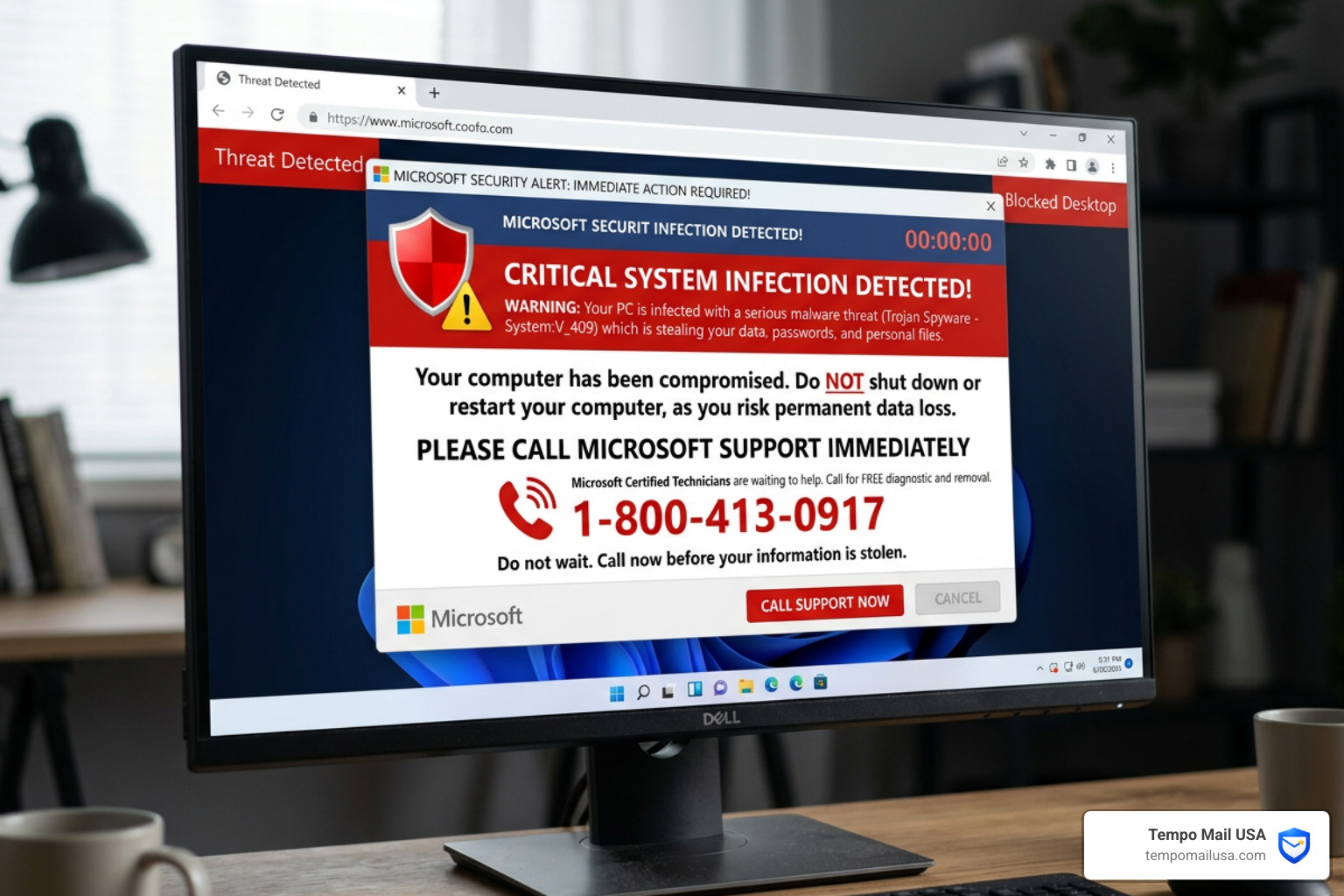

Is That Microsoft Security Alert Real — or a Scam?
A Microsoft Security Alert Scam is a fake warning — delivered by pop-up, email, or phone call — designed to trick you into thinking your computer or account is compromised. The goal is to get you to call a fake support number, hand over your credentials, or pay for help you don't need.
Quick answer: How to tell if a Microsoft security alert is a scam
- Pop-up includes a phone number? It's a scam. Microsoft never puts phone numbers in alerts.
- Email asks for your password or payment? It's a scam. Microsoft never requests this by email.
- Unsolicited phone call from "Microsoft"? It's a scam. Microsoft does not make cold calls.
- Urgent threat with countdown or loud audio? Almost certainly a scam.
- Sender is not from
@accountprotection.microsoft.comor@microsoft.com? Treat it as a scam.
If you received a real-looking Microsoft security alert and aren't sure, do not click any links. Go directly to account.microsoft.com in a new browser window to check your account status.
These scams are everywhere. Millions of people encounter fake Microsoft security alerts every year — and they're getting harder to spot. Scammers now copy Microsoft's branding almost perfectly, use urgent language to trigger panic, and sometimes even send messages through real Microsoft services like Power BI or Azure Monitor to bypass spam filters.
One real-world example from the research: a user's mother received a pop-up with a looping voice message saying "Your window is blocked because it is infected with trojan viruses" — complete with a fake toll-free support number. The screen appeared frozen. It felt completely real. It wasn't.
The scam works because fear short-circuits rational thinking. When something looks official and threatens immediate harm, most people react before they reflect.
This guide breaks down exactly how these scams work, how to recognize them, and what to do if you've already been targeted.
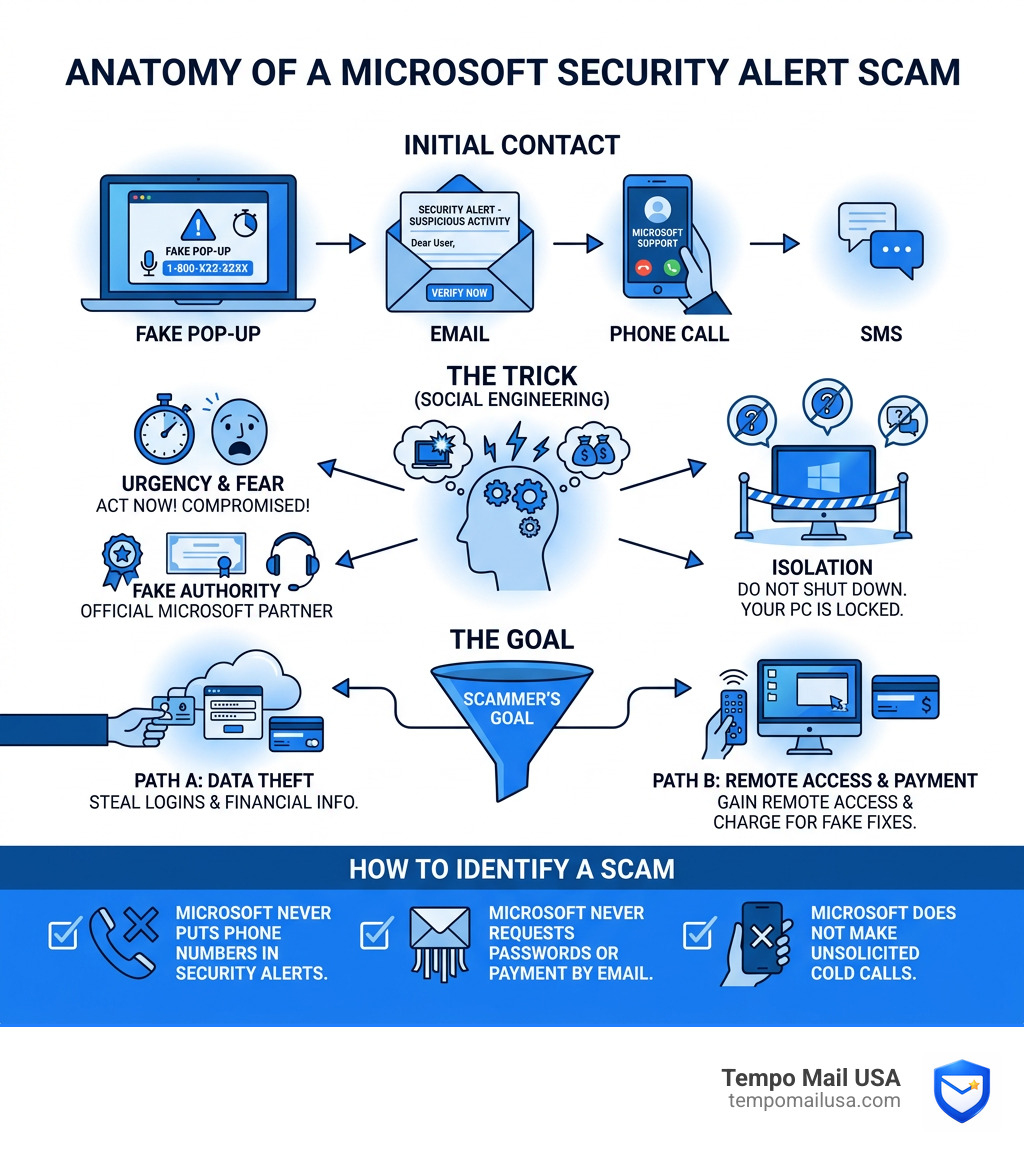
Anatomy of a Microsoft Security Alert Scam
To protect ourselves, we first need to understand the mechanics of the Microsoft Security Alert Scam. It isn't just one type of trick; it is a multi-channel operation involving phishing, social engineering, and technical manipulation.
Scammers cast a wide net because the target audience is massive. According to Statista, Outlook's 4% market share makes it a massive target for attackers, representing millions of potential victims. When you add in the hundreds of millions of Windows users, it's clear why cybercriminals focus so heavily on impersonating this specific brand.
These scams typically arrive in three flavors:
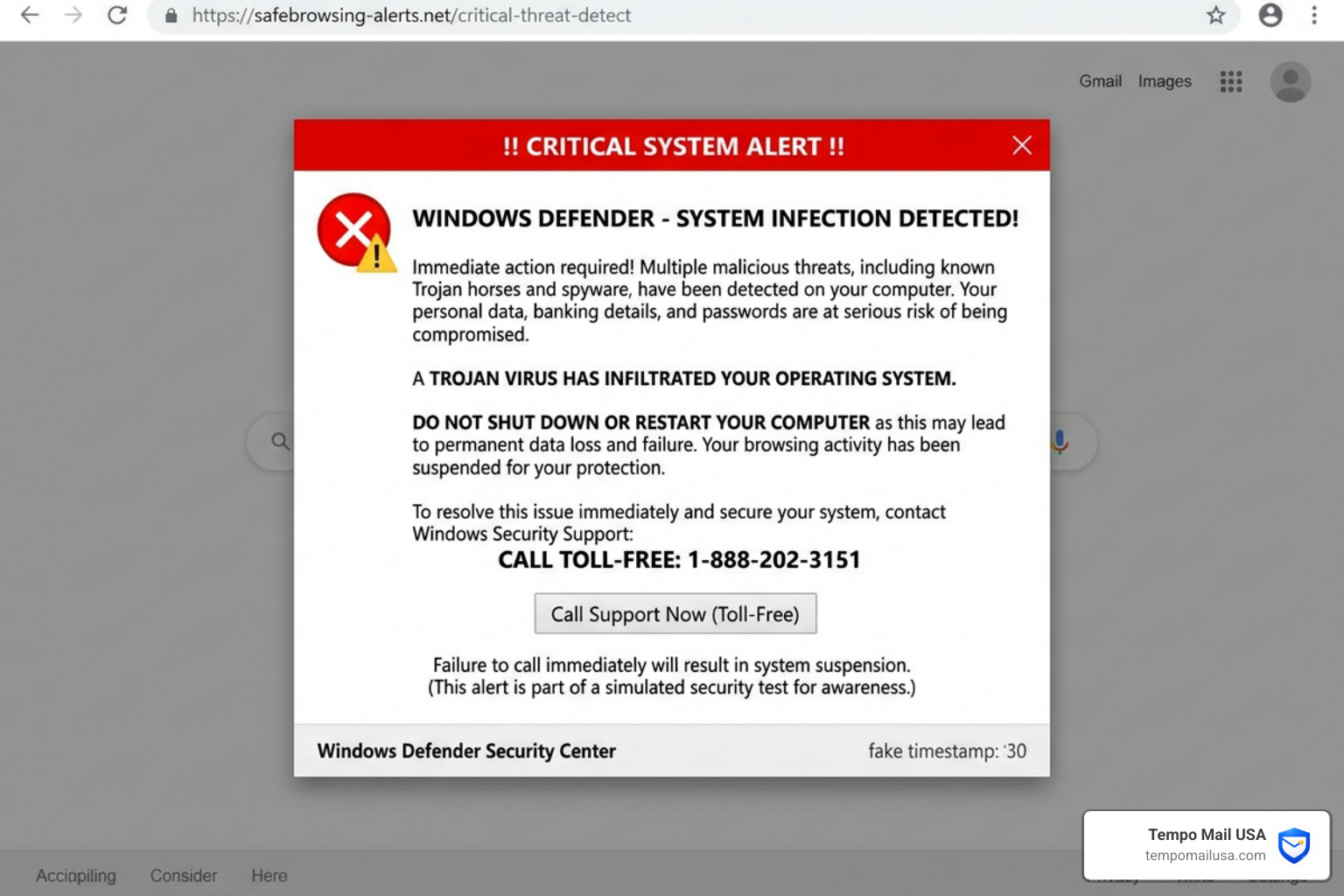
- Malicious Pop-ups: While you are browsing the web—often on less-than-reputable sites like illegal streaming or torrent platforms—a window suddenly takes over your screen. It might look like a "Blue Screen of Death" or a Windows Defender notification. These often use JavaScript to "lock" your browser, making it difficult to close the tab, which heightens the sense of panic.
- Phishing Emails: You receive an "Important Mail" or "Security Alert" claiming there was an unauthorized sign-in from a foreign country. These emails are designed to look identical to official Microsoft communications, often using the same fonts, logos, and footer information. More info about phishing scams can help you understand the broader context of these digital traps.
- Cold Calls: A person calls you claiming to be from "Microsoft Tech Support." They might say they've detected "malicious signals" coming from your IP address or that your Windows license has expired. They use public directories to find your name and phone number to build a false sense of trust.
How Scammers Exploit Legitimate Services
One of the most alarming trends we've observed is how scammers have moved beyond fake domains. They are now weaponizing legitimate Microsoft infrastructure to send their poison.
By using services like Power BI, Azure Monitor, or SharePoint, scammers can send emails that originate from actual Microsoft servers (such as no-reply-powerbi@microsoft.com). Because these emails are technically "real" Microsoft messages, they pass all standard authentication checks like SPF, DKIM, and DMARC.
In an Azure Monitor scam, for example, a criminal might set up a legitimate Azure account, create a fake "alert" with a description that includes a fraudulent support phone number, and trigger it to be sent to your email. When you see a message from a legitimate Microsoft domain, your guard naturally drops. This is why Microsoft's breakdown of sophisticated tech support scams emphasizes that the platform itself is being used as a Trojan horse.
Common Tactics in a Microsoft Security Alert Scam
The "secret sauce" of a Microsoft Security Alert Scam is psychological manipulation. Scammers don't want you to think; they want you to feel.
- Extreme Urgency: "Your account will be terminated in 24 hours" or "Your data is being deleted right now."
- Fear-Based Messaging: Using scary technical terms like "Trojan.Spyware.MAPS" or "Error Code: #0x80070422" to confuse non-technical users.
- Sensory Overload: Some pop-ups play a looping audio file of a robotic voice warning you of a security breach, or they make your computer emit a loud, continuous beeping sound.
- Technical Mimicry: Scammers use remote access software like AnyDesk or TeamViewer. Once they are "helping" you, they might open the Command Prompt and type random gibberish to "prove" your computer is infected.
Interestingly, this isn't unique to Windows users. We see very similar patterns in the Apple security alert scam comparison, proving that cybercriminals use the same playbook regardless of the operating system.
Spotting the Red Flags: Real vs. Fake Alerts
Distinguishing a genuine warning from a Microsoft Security Alert Scam is the most important skill you can develop for your digital safety. Legitimate alerts are designed to inform you; scams are designed to frighten you.
| Feature | Legitimate Microsoft Alert | Microsoft Security Alert Scam |
|---|---|---|
| Sender Address | @accountprotection.microsoft.com | Generic (AOL, Gmail) or slightly misspelled |
| Phone Numbers | Never included in pop-ups or error codes | Prominently displayed "Support Hotline" |
| Tone | Professional, calm, and instructional | Urgent, threatening, or panicked |
| Personalization | Often uses your actual name | "Dear User" or "Valued Customer" |
| Action Required | Check activity on official portal | Call a number or download software |
| Payment | Never requested via alert | Demands for gift cards or crypto |
A legitimate security alert comes from an official domain, and it will never pressure you into a financial transaction on the spot. If you are ever in doubt, knowing how to report phishing emails is a great way to help the community while protecting yourself.
Verifying a Microsoft Security Alert Scam Email
If an email lands in your inbox claiming your account is at risk, take a deep breath and perform these three checks:
- Check the "From" Address: Hover your mouse over the sender's name. If the display name says "Microsoft Security," but the actual email is
security-check-492@aol.com, it’s a scam. Genuine security notifications come fromaccount-security-noreply@accountprotection.microsoft.com. - Hover Before You Click: Hover your mouse over any button or link in the email. Look at the bottom corner of your browser or email client. If the link points to a strange URL like
bit.ly/secure-login-392or a SharePoint site you don't recognize, do not click it. - Look for Generic Language: Scammers often use impersonal greetings. While Microsoft might use your name, scammers stick to "Dear Account Holder."
According to official Microsoft guidance on tech support scams, the company will never send unsolicited emails or make unsolicited phone calls to request personal or financial information.
Why These Scams Are Highly Effective
We often wonder why people fall for these. It’s not about lack of intelligence; it’s about "Brand Trust." We trust Microsoft to keep our computers running. When that brand tells us something is wrong, our instinct is to fix it.
Scammers combine this trust with "Technical Mimicry." They use official logos, high-quality graphics, and even spoofed caller IDs that make your phone display "Microsoft Corporation" when they call. By the time you realize something is wrong, they may already have remote access to your device.
Immediate Steps if You’ve Been Targeted
If a Microsoft Security Alert Scam pop-up has appeared on your screen and your browser seems "locked," don't panic. The "lock" is usually just a bit of clever code that prevents you from clicking away.
1. Force Quit the Browser: Do not click "OK" or "Cancel" on the pop-up. Instead, use the Windows Task Manager.
- Press
Ctrl + Shift + Esc. - Find your browser (Chrome, Edge, Firefox) in the list.
- Right-click it and select "End Task."
2. Disconnect from the Internet: If you’ve clicked a link or feel like something is "happening" on your screen, turn off your Wi-Fi or unplug your Ethernet cable. This cuts the connection between your computer and the scammer's server.
3. Run a Malware Scan: Use a reputable tool like Microsoft Defender or Malwarebytes to run a full system scan. This will help identify if any malicious software was downloaded during the encounter. It's always a good idea to learn how to stop spam before it starts to prevent these malicious sites from reaching you in the first place.
Recovery and Reporting
If you provided any information or feel your account was compromised, you must act quickly:
- Reset Your Password: Change your Microsoft account password immediately. Make sure it is unique and not used on any other site.
- Enable Multi-Factor Authentication (MFA): This is your best line of defense. Even if a scammer has your password, they can't get in without the code from your phone.
- Report the Incident: You should report the scam to the FTC at
reportfraud.ftc.govand the FBI's Internet Crime Complaint Center (IC3) atic3.gov.
For those using Gmail, understanding your Gmail spam folder deep dive can help you see how these messages are often caught before they reach you.
What to Do if You Granted Remote Access
This is the most dangerous scenario. If you allowed a "technician" to connect to your computer using AnyDesk, LogMeIn, or TeamViewer:
- Uninstall the Software: Go to your "Apps & Features" settings and remove any remote access tools you didn't install yourself.
- Contact Your Bank: If you provided credit card info or logged into your bank while they were watching, call your financial institutions immediately to freeze your accounts and request new cards.
- Identity Theft Protection: Consider placing a fraud alert on your credit report.
- Credential Rotation: Assume every password you typed while they were connected is compromised. Change them all from a different, clean device.
Proactive Defense Strategies for Individuals and Businesses
We believe that the best way to handle a Microsoft Security Alert Scam is to never see it in the first place. A proactive defense saves you from the stress of a potential breach.
For businesses, this means adopting a Zero Trust architecture. Never assume a message is safe just because it looks official. For individuals, it means using tools that shield your real identity. Why use temporary email for privacy is a key question every modern internet user should ask. By using an alias, you keep your primary "vault" (your main email) hidden from the databases scammers use to find targets.
Best Practices for Account Security
- Use a PII Firewall: Services like Tempo Mail USA provide email aliases that act as a shield. If an alias starts receiving scam alerts, you can simply delete it without losing access to your main account.
- Regular Activity Audits: Once a month, log into
account.microsoft.comand click on "Security," then "Sign-in activity." If you see successful logins from countries you’ve never visited, you know it’s time to change your credentials. - Official Portal Verification: Make it a rule—never click a security link in an email. If an email says there is a problem, manually type the website address into your browser to check.
Frequently Asked Questions about Microsoft Security Alert Scam
Does Microsoft ever ask for payment in an alert?
No. Microsoft will never demand payment to "fix" your computer via a security alert. Legitimate services are billed through your Microsoft account dashboard. If anyone asks for payment via gift cards, cryptocurrency, or wire transfers, it is 100% a scam. These methods are used because they are nearly impossible to reverse once the money is sent.
What should I do if my screen is locked by a pop-up?
Do not call the number! Use the Task Manager (Ctrl + Shift + Esc) to kill the browser process. If that doesn't work, perform a force restart by holding down the physical power button on your computer until it shuts off. When you restart your browser, it might ask if you want to "Restore Pages." Select No or Close, otherwise, the scam pop-up will reappear. Finally, clear your browser cache to remove any lingering scripts.
How can I check my real account activity?
Navigate directly to account.microsoft.com. Log in and look for the Security tab. Under Sign-in activity, you can see every time and place your account was accessed. If a real alert was triggered, it will be listed there in your official notifications. This is the only source of truth for your account status.
Conclusion
The Microsoft Security Alert Scam continues to evolve, but its core remains the same: exploiting your trust and your fear. Whether it's a screaming pop-up or a sophisticated email sent through Power BI, the goal is to bypass your rational mind and get to your wallet.
At Tempo Mail USA, we provide the ultimate "PII firewall." By using our temporary email aliases, you can shield your personal information and proxy your identity. When you use an alias to sign up for services, your real email address remains private, making it significantly harder for scammers to target you with personalized phishing attacks.
Stay vigilant, use MFA, and remember: Microsoft will never call you out of the blue or put a phone number in an error message. If you do encounter a scam, be sure to report phishing to the authorities to help keep the internet safer for everyone. Protect your inbox, protect your identity, and don't let the scammers win.