

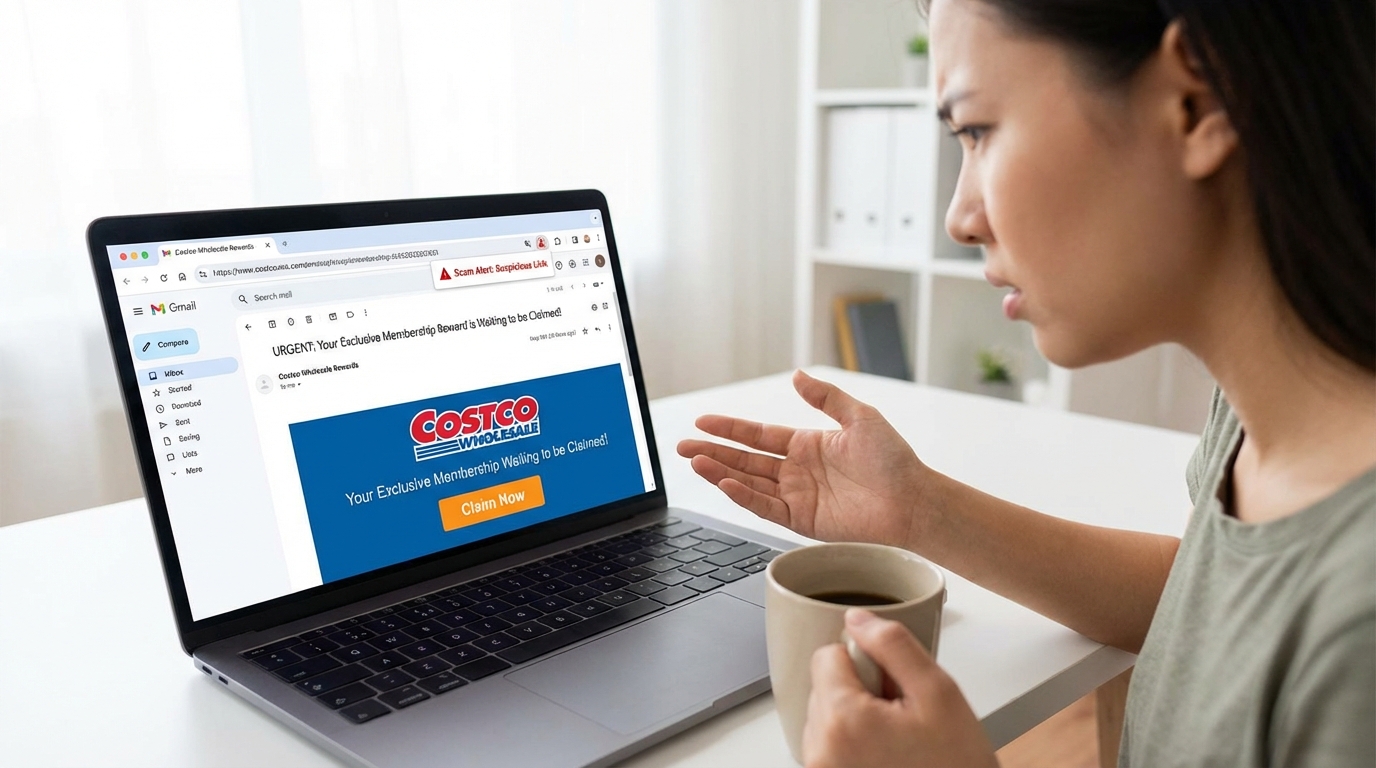

Costco Scam Emails Are Targeting Millions of Shoppers Right Now
Costco scam emails are fake messages designed to steal your personal information, payment details, or login credentials by pretending to be from Costco.
Here's a quick breakdown of what you need to know:
- What they are: Phishing emails impersonating Costco to trick you into clicking fake links or entering sensitive data
- Most common types: Fake membership expiration notices, free gift offers, survey rewards, and fake order confirmations
- Key red flags: Sender address not ending in
@costco.com, generic greetings like "Dear Customer," urgent deadlines, and suspicious links - What to do: Do not click any links — go directly to Costco.com to check your account
- If you already clicked: Change your passwords, enable multi-factor authentication, and monitor your bank statements for unexpected charges
Every day, scammers send roughly 3.4 billion phishing emails worldwide. Costco is one of their favorite targets — and it's easy to see why.
With around 130 million paying members globally, Costco's name carries enormous trust. Shoppers are already used to getting real emails from Costco about memberships, rewards, and orders. Scammers exploit that familiarity.
One real-world example: a viewer contacted a local news station after receiving an email claiming her Costco membership had expired — even though it was still active. The email came from a gibberish sender address with no connection to Costco and addressed her as "Dear Customer." She spotted it. Many people don't.
After falling for one of these scams, victims often start seeing mysterious monthly charges of $10–$40 from companies they've never heard of — buried in the fine print of a fake survey they completed to "claim their prize."
This guide gives you a complete checklist to recognize, avoid, and respond to Costco phishing scams before they cost you.
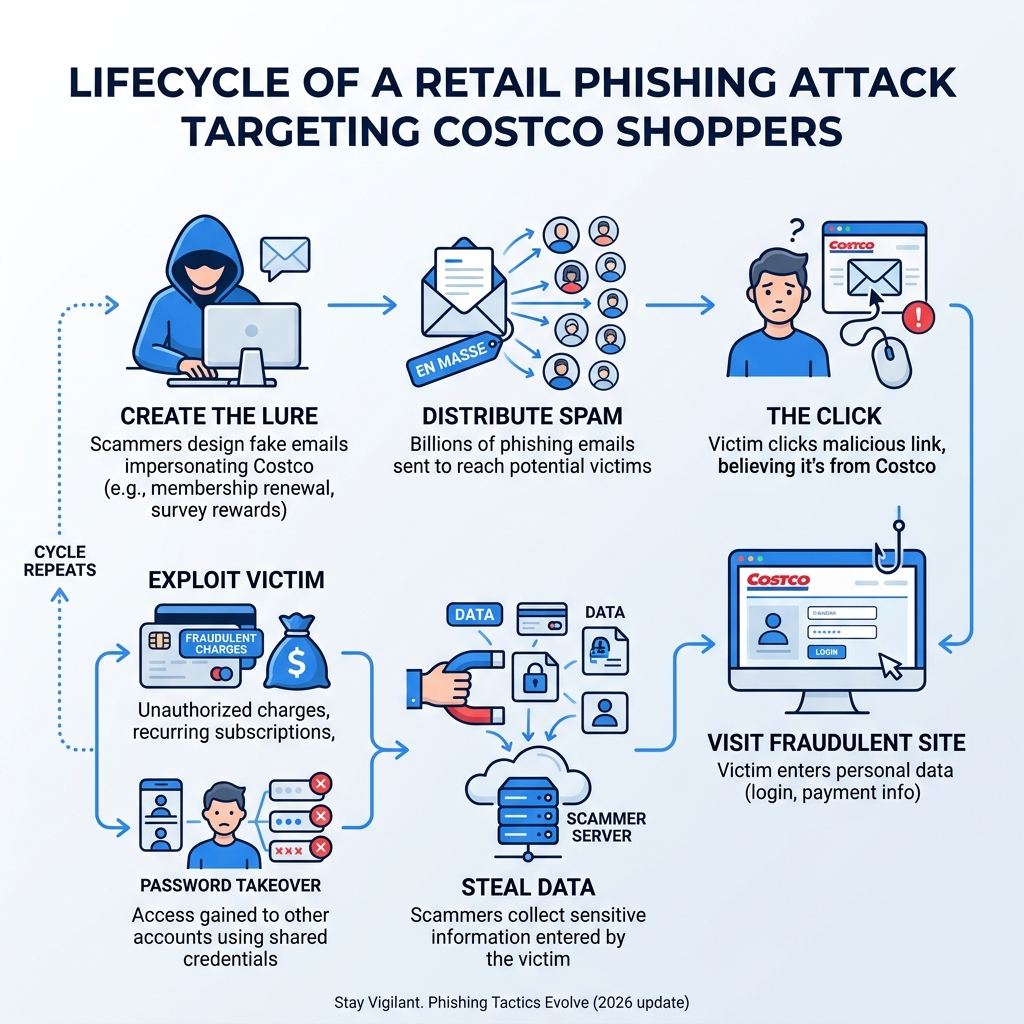
Common Types of Costco Scam Emails to Watch For
Scammers are creative, but they generally stick to a few "greatest hits" when it comes to costco scam emails. Their goal is almost always the same: to create an emotional reaction—like excitement or fear—that makes you click before you think.
1. The Membership Expiration Trap
This is perhaps the most common variant. You receive an email with a subject line like "Action Required: Your Membership Has Expired." Since many of us rely on our Costco cards for weekly groceries, the thought of being locked out of the warehouse is stressful. The email provides a convenient "Renew Now" button. However, clicking that button doesn't take you to Costco; it takes you to a lookalike site designed to harvest your credit card number. You can learn more about how these Fake Email for Costco Membership Trial offers work to stay one step ahead.
2. The "Free Gift" or Ninja CREAMi Scam
Who doesn't love free stuff? Scammers frequently use high-demand items as bait. Recently, a major scam promised a free Ninja CREAMi ice cream maker to members who completed a short survey. As reported by NBC Bay Area, these emails often come from domains like "@handtoneed.net" rather than an official Costco address. They ask for a small "shipping fee," which is really just a way to steal your financial data.
3. Survey Rewards and "Loyalty" Bonuses
"Congratulations! You've been chosen to receive a $100 gift card!" These emails claim you’ve won a prize for being a loyal shopper. To "claim" the reward, you’re asked to fill out a survey. Hidden in the fine print of these survey sites are authorizations for recurring monthly subscriptions. Victims often find themselves signed up for "wellness clubs" or "tech support" services charging $10 to $40 every month.
4. Recruitment and Job Fraud
We've seen sophisticated costco scam emails targeting job seekers. These messages offer high-paying, remote positions—sometimes claiming you can earn $250 to $500 per day for just 60 minutes of work. They might ask for an "application fee" or your Social Security number for a "background check." Remember: Costco never extends job offers via unsolicited emails or asks for payment to process an application.
5. Fake Invoices and Delivery Alerts
Scammers also send fake order confirmations or "failed delivery" notices. These often include a PDF attachment or a link to "track your package." Opening the attachment can install malware on your device. This is a common tactic in the broader world of retail fraud, similar to how Fake Invoice Email Scams can cause massive losses for both individuals and businesses.
Red Flags: How to Spot Costco Scam Emails
Recognizing a scam is easier when you know exactly what the "tell" is. Use this checklist the next time an email from "Costco" hits your inbox.
The "Hover Over" Technique
Before clicking any button or link, hover your mouse cursor over it (on a mobile device, long-press the link without releasing). A small box will appear showing the actual web address. If the email says it's from Costco but the link points to "big-savings-today.xyz" or "thegolfdealer.com," it is 100% a scam.
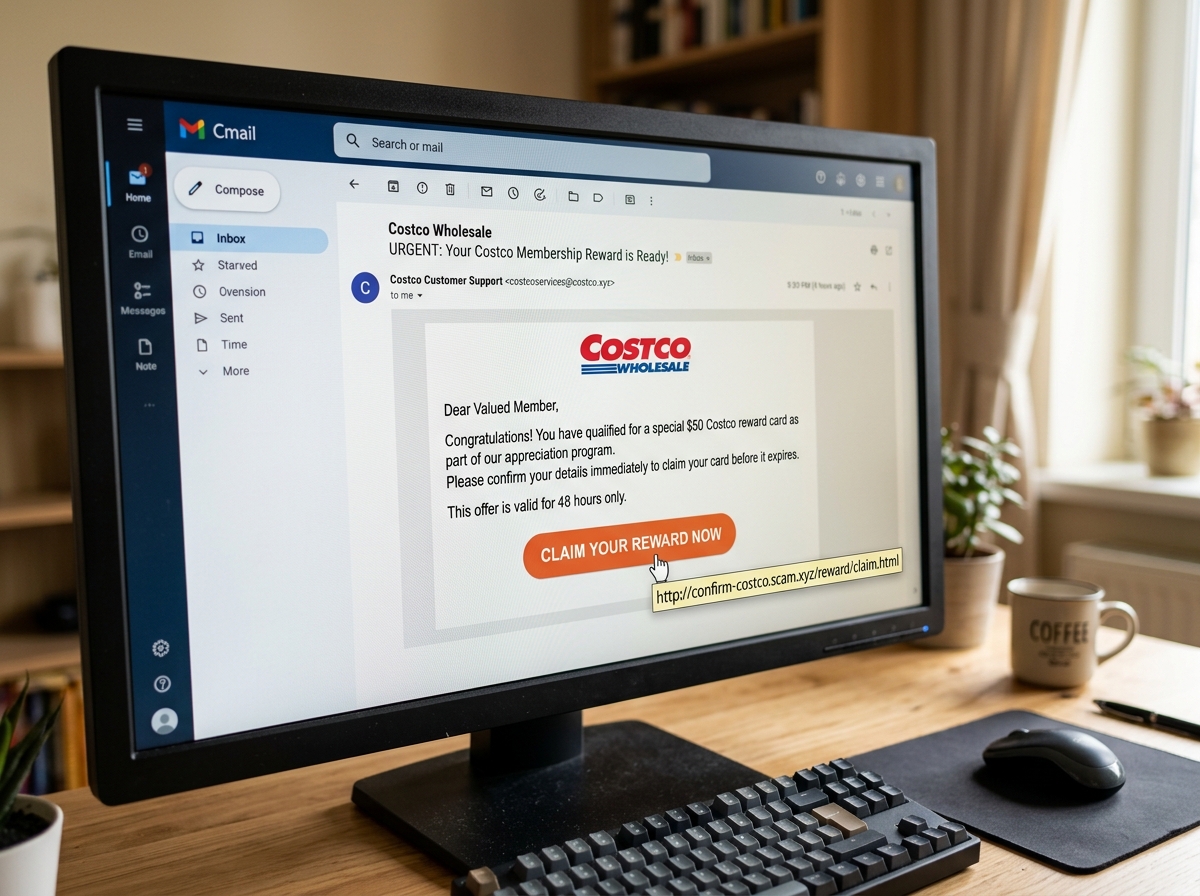
Check the Sender's Domain
Official communications from Costco will almost always come from an address ending in @costco.com. Scammers use "display names" to hide their true identity, so you must click on the sender's name to see the actual email address behind it.
| Official Costco Domains | Common Scammer Domains |
|---|---|
| @costco.com | @handtoneed.net |
| @online.costco.com | @costco-members.xyz |
| costco@digitalshopcard.costco.com | @bigbucksavers.com |
| @costcotravel.com | @survey-reward.store |
Generic Greetings and Poor Grammar
Costco knows who you are. If an email starts with "Dear Customer," "Dear Member," or "Valued Shopper," be suspicious. Furthermore, keep an eye out for sloppy graphics, typos, or odd phrasing. Professional retailers like Costco have entire teams dedicated to ensuring their emails look perfect. If the logo looks blurry or there are spelling mistakes, it's a fake.
Artificial Urgency and Unusual Payments
Scammers want you to panic. They use words like "Immediate," "Urgent," or "Final Notice" to rush your decision-making. Additionally, be wary of any request for payment via PayPal, Venmo, or cryptocurrency. Costco does not accept PayPal in its warehouses or on its main e-commerce site. For more tips on identifying these tactics, read our guide on how to Protect Yourself and Avoid Phishing.
You can also consult Costco’s official list of currently known scams to see if the message you received matches a known pattern.
Immediate Response: What to Do if You Receive a Suspicious Message
If you’ve spotted a costco scam email, your next steps are crucial to keeping your data safe.
- Do Not Click: This is the golden rule. Don't click links, don't open attachments, and certainly don't "unsubscribe," as that often just confirms to the scammer that your email address is active.
- Verify the Source Directly: If you're worried your membership actually is expired, don't use the link in the email. Instead, open a new browser tab and type in
www.costco.commanually. Log in to your account dashboard to check your status. - Mark as Spam: Use your email provider's "Report Phishing" or "Report Spam" button. This helps train the system's filters to block similar messages for you and others in the future. Check out these Expert Tips on How to Manage Unwanted Emails for more workflow ideas.
- Delete and Ignore: Once you've reported it, delete the email. Do not engage with the sender. Replying to a scammer—even to tell them off—only puts you on a "hot list" for future attacks.
If you are ever unsure, you can cross-reference the sender with Costco's list of official email addresses.
Damage Control: If You Clicked a Link in Costco Scam Emails
Mistakes happen. Scammers are professionals who spend all day trying to trick people. If you’ve clicked a link or entered information, follow this damage control checklist immediately.
1. Update Your Credentials
If you entered your Costco password, change it immediately. If you use that same password for other accounts (like your email or bank), change those too. We always recommend using a password manager to ensure every account has a unique, complex password.
2. Enable Multi-Factor Authentication (MFA)
MFA adds a second layer of security. Even if a scammer has your password, they won't be able to access your account without the code sent to your phone or generated by an app. This is one of the single most effective ways to stop an account takeover.
3. Scan for Malware
If you downloaded an attachment or visited a suspicious site, run a full system scan using reputable antivirus software. Scammers often use these sites to drop "Trojans" or "Keyloggers" that record everything you type.
4. Monitor Your Finances
Check your bank and credit card statements daily for the next few weeks. Look for small, unfamiliar charges. If you see something suspicious, contact your bank immediately to dispute the charge and request a new card. You should also Report rip-offs and imposter scams to the FTC to help authorities track the criminals.
5. Check the Dark Web
If you're worried your data has been sold to other hackers, you can Check if your email is on the Dark Web for free. This will tell you if your PII (Personally Identifiable Information) is circulating in hacker forums.
Proactive Protection and Reporting Resources
The best way to deal with costco scam emails is to prevent them from reaching your primary inbox in the first place.
The Power of Identity Proxying
At Tempo Mail USA, we believe in a "firewall" approach to privacy. When you sign up for rewards programs, surveys, or even retail memberships, you don't have to use your real, permanent email address. By using a temporary email alias, you create a buffer. If that alias is ever leaked or targeted by scammers, you can simply delete it without your primary inbox ever being compromised. This is a Smart Way to Stay Secure while still enjoying the benefits of online shopping.
Reporting to the Authorities
Reporting doesn't just help you—it helps everyone.
- FBI IC3: If you have lost money to a scam, file a report with the Internet Crime Complaint Center.
- State Attorney General: You can also contact your State Attorney General to report fraudulent business practices in your region.
- FTC: Use the FTC's Identity Theft portal if you believe your Social Security number or financial identity has been stolen.
For more long-term strategies, we recommend exploring how to Protect Personal Information Online and using Advanced Spam Filters to bolster your digital defenses.
Frequently Asked Questions about Costco Scam Emails
How can I tell if a costco scam emails reward is real?
A real Costco reward will typically come from a @costco.com domain. If you receive a "Digital Shop Card," the official sender is costco@digitalshopcard.costco.com. Always hover over links to see if they lead to www.costco.com. If a reward seems "too good to be true"—like a $500 gift card for a 30-second survey—it's a scam. When in doubt, call your local warehouse or Verify through official Costco Customer Service.
Does Costco ever email about expired memberships?
Yes, Costco does send legitimate renewal reminders. However, they will never threaten you or ask you to provide your credit card details via an unverified third-party site. The safest way to handle renewals is to set up "Automatic Renewal" on the official Costco website. This ensures you never have to click a renewal link in an email. To keep your primary inbox clean, you might even Use Temporary Email for Safe Online Sign-ups when interacting with various retail promotions.
What should I do if I gave my credit card to a fake costco scam emails site?
Contact your bank's fraud department immediately. Ask them to cancel the card and issue a new one. Scammers often wait a few weeks before hitting your card with $10-$40 monthly "subscription" fees, hoping you won't notice. Review your statements meticulously. If your identity is at risk, follow the IdentityTheft.gov recovery steps to secure your credit file.
Conclusion
Protecting yourself from costco scam emails doesn't require a degree in cybersecurity—it just requires a bit of healthy skepticism. By keeping an eye out for red flags like "Dear Customer" greetings and mismatched sender domains, you can avoid the vast majority of phishing traps.
At Tempo Mail USA, we provide the tools you need to stay anonymous and secure. Our temporary email aliases act as a digital firewall, protecting your real identity from the data leaks and scammers that plague the modern internet. By practicing secure identity proxying, you can shop with confidence, knowing your personal "master" inbox is safe from harm.
Stay vigilant, don't take the bait, and always verify before you click. For more information on how to protect your digital life, visit us at https://tempomailusa.com.