

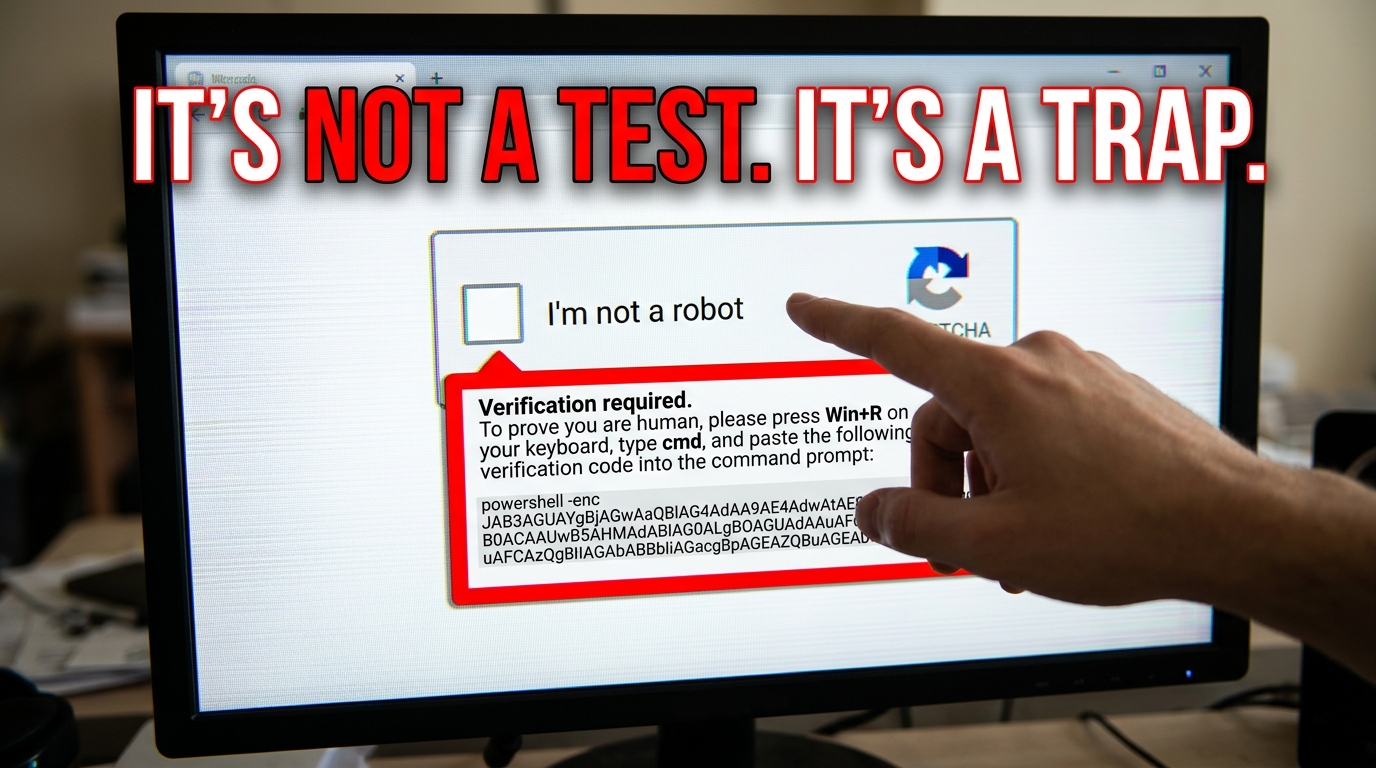

The "I'm Not a Robot" Trick That's Fooling Millions
A captcha scam is a cyberattack where criminals create a fake CAPTCHA verification page to trick you into running malware on your own device — without you even realizing it.
Quick answer: What is a CAPTCHA scam and what should you know?
- What it is: A fake "I'm not a robot" prompt designed to look like a real security check
- What it does: Tricks you into copying and pasting a malicious command, downloading malware, or handing over your login credentials
- Common malware delivered: Lumma Stealer, AMOS Stealer — targeting passwords, crypto wallets, and personal data
- Who is targeted: Anyone on Windows, Mac, or iPhone visiting a compromised or fake website
- Biggest red flag: Any CAPTCHA that asks you to open a terminal, press Win+R, or paste a command
You've clicked the "I'm not a robot" checkbox hundreds of times. It feels like a routine safety check — and that's exactly what makes it so dangerous.
Cybercriminals have figured out that people don't question CAPTCHAs. We're conditioned to trust them. So attackers copy the look of Google's reCAPTCHA — a tool used by more than 11 million websites — and add one small twist: hidden instructions that make your own computer install malware for them.
You do the work. They get your passwords.
Researchers tracked a dramatic rise in these attacks through Q3 2024, with over 2,800 hacked websites caught pushing fake CAPTCHAs to Mac users alone. This isn't a fringe threat. It's a fast-growing scam that targets everyday people — including privacy-conscious users who think they're being careful online.
This guide covers everything: how the scam works, what malware it delivers, how to spot it, and exactly what to do if you've already clicked.

What is a Fake CAPTCHA Scam?
At its core, a captcha scam is a form of social engineering. We usually think of CAPTCHAs (Completely Automated Public Turing test to tell Computers and Humans Apart) as a way for websites to block bots. When we see that familiar "I’m not a robot" box, our brain switches to "security mode." We think, "Oh, this site is making sure I'm real. That’s good."
Scammers exploit this built-in trust. In a captcha scam, the verification process is entirely fraudulent. Instead of using a legitimate service like Google’s reCAPTCHA to filter out automated traffic, the scammer uses a fake interface to trick you into performing actions that compromise your security.
According to Fake Captcha Scams: What is a Fake Captcha Scam?, these traps often instruct victims to press specific keys or run scripts rather than just selecting images of traffic lights or crosswalks. The goal isn't to see if you're a human; it's to get you to lower your guard so you'll execute code that grants them access to your system.
This tactic is frequently used in combination with other methods. For instance, you might receive a phishing email about a "missing package" or a "security alert" that leads you to a site where the captcha scam acts as the final gatekeeper. By the time you reach the CAPTCHA, you're already primed to follow instructions. This is just one of many How Scammers Steal Emails: 7 Common Methods used to harvest data and infect devices.
How the CAPTCHA Scam Works Step-by-Step
The brilliance (and cruelty) of the captcha scam is how it turns the victim into an unwitting accomplice. Here is the typical step-by-step breakdown of how these attacks unfold:
- The Hook: You land on a malicious or compromised website. This could happen through a phishing email, a deceptive social media ad, or even a hijacked "legitimate" site that has been injected with malicious code.
- The Fake Verification: A pop-up or a full-page overlay appears. It looks exactly like a standard CAPTCHA. It might say, "Please verify you are a human to continue."
- The Deceptive Instructions: Instead of asking you to click on pictures, the site claims there is an "error" or a "browser incompatibility." It provides a set of instructions to "fix" the verification.
- Clipboard Hijacking: The site asks you to click a button to "Copy Verification ID" or "Fix Verification." When you click this, a malicious PowerShell or Terminal command is copied to your computer's clipboard.
- User Execution: The instructions then tell you to press a keyboard shortcut (like Win + R on Windows) and paste (Ctrl + V) the command into the "Run" dialog box or a terminal window.
- Infection: Once you hit "Enter," the command executes. This script typically reaches out to a remote server, downloads a malware payload, and installs it in the background.

This method is incredibly effective because the malware never actually "downloads" in the traditional sense through your browser, which might trigger an alert. Instead, you are manually telling your operating system to run the code. Understanding these maneuvers is a key part of how to Stop Phishing: Effective Strategies to Prevent Attacks.
Common Malware Delivered via CAPTCHA Scam
What exactly are these scammers trying to put on your computer? In most cases, they are deploying "Information Stealers." These are specialized viruses designed to find and exfiltrate your most sensitive data as quickly as possible.
- Lumma Stealer: This is currently one of the most common payloads. It targets your browser data, looking for saved passwords, credit card numbers, and session cookies. By stealing session cookies, hackers can bypass your Two-Factor Authentication (2FA) and log into your accounts as if they were you.
- Amadey: This malware often acts as a "dropper," meaning once it's on your system, it can download even more dangerous viruses, like ransomware or banking trojans.
- Crypto Wallet Drainers: Many versions of the captcha scam specifically scan for browser extensions like MetaMask or Phantom to steal your recovery phrases and empty your digital wallets.
The scale of these data thefts is massive. We've seen reports where a single campaign can lead to a Data Breach Alert: 50M Accounts Exposed News, highlighting why these "small" clicks can have such huge consequences.
Platform Variations: Windows, Mac, and iPhone
Scammers have become platform-agnostic. They have tailored versions of the captcha scam for whatever device you happen to be using.
- Windows: This is the most common target. The scam usually involves the Win+R shortcut and a PowerShell command. PowerShell is a powerful administrative tool, and by tricking you into using it, the scammer gains deep access to your system.
- Mac (macOS): Mac users are often targeted with the AMOS Stealer (Atomic macOS Stealer). Instead of a "Run" box, the fake CAPTCHA might instruct the user to open the Terminal and paste a command. According to Fake CAPTCHA scams: how "I'm not a robot" installs malware, over 2,800 sites were recently found specifically targeting Mac users with this method.
- iPhone (iOS): On mobile, the scam often looks like a "Safari Update" or a "Security Certificate" error. Some variations even try to exploit WhatsApp, attempting to send malicious messages to your contacts or link your account to a hacker's device.
Why These Attacks Are So Dangerous and Effective
You might think, "I'd never paste a random command into my computer." But in the heat of the moment, when you're trying to access a file or read a news story, it’s easy to slip up.
The captcha scam is dangerous for several reasons:
- Routine Behavior: Clicking a CAPTCHA is a muscle-memory action. We do it without thinking.
- Lowered Guard: Because CAPTCHAs are associated with security, we don't expect them to be the source of a threat. It’s like a thief wearing a security guard uniform.
- Fileless Execution: By using built-in tools like PowerShell or Terminal, the malware can run "in-memory." This means there isn't always a malicious file saved to your hard drive for your antivirus to find immediately.
- Malware-as-a-Service (MaaS): Criminals can now buy "kits" that include the fake CAPTCHA pages and the malware payloads. This allows even low-skill hackers to launch sophisticated attacks.
The surge in these attacks in late 2024 shows that they are working. Hackers are moving away from simple "click this link" phishing and toward "interact with this page" social engineering. That's why follow a Quick Guide: How to Spot Phishing Emails to stay ahead of these evolving tactics.
How to Spot and Avoid a CAPTCHA Scam
The good news is that once you know what a captcha scam looks like, it becomes very easy to avoid. Legitimate CAPTCHAs follow a very strict set of rules. Here are the red flags to watch for:
- Keyboard Instructions: A real CAPTCHA will never ask you to press Win+R, Ctrl+V, or open your Terminal. If a verification test asks you to use your keyboard for anything other than typing letters or numbers into a box on the page, it is a scam.
- Copy-Paste Prompts: Legitimate services like Google reCAPTCHA or Cloudflare Turnstile do not ask you to copy "verification codes" to your clipboard.
- Suspicious URLs: Always look at the address bar. If you are on a site that looks like a major brand (like FedEx or Google) but the URL is a string of random characters or a misspelled name, get out of there.
- Terminal/Command Prompts: No website has a legitimate reason to ask you to run a command in your computer's administrative terminal to "prove you are human."
Being skeptical is your best defense. If a CAPTCHA feels "off," it probably is. For more tips on staying safe, check out our guide on What is a Phishing Scam? Protect Yourself.
Best Practices to Prevent a CAPTCHA Scam
Beyond just spotting the scam, we recommend a "defense-in-depth" approach to your digital life:
- Keep Software Updated: Operating system updates often include patches that make it harder for PowerShell or Terminal scripts to run unauthorized commands.
- Use a Password Manager: Password managers are great because they won't "autofill" your credentials on a fake site. If your manager doesn't recognize the URL, it’s a huge warning sign.
- Enable Multi-Factor Authentication (MFA): While some stealers can bypass session cookies, having MFA (especially via an app rather than SMS) adds an extra layer of protection.
- Install Script Blockers: Browser extensions like uBlock Origin can often block the malicious scripts that power these fake CAPTCHA overlays.
- Report It: If you find a scam site, report it to Google Safe Browsing or your IT department. You can learn How to Report Phishing Emails in 5 Easy Steps to help protect others.
Immediate Recovery Steps After Infection
If you realize you've fallen for a captcha scam and executed a command, you need to act fast. Every second counts before the malware finishes uploading your data.
- Disconnect from the Internet: Turn off your Wi-Fi or unplug your ethernet cable. This stops the malware from sending your stolen data back to the hacker.
- Run a Full Scan: Use a reputable antivirus tool. We recommend running a "Windows Defender Offline Scan" or using a tool like Malwarebytes to find and remove the infection.
- Change Your Passwords: Use a different, clean device (like your phone) to change the passwords for your most important accounts: email, banking, and social media.
- Log Out of All Sessions: Most major platforms (Google, Facebook, Microsoft) have an option to "Log out of all other sessions." This invalidates any stolen session cookies the hacker might have.
- Monitor Your Accounts: Keep a close eye on your bank statements and look for any "unauthorized login" emails.
- Factory Reset: If you suspect the infection is deep or your security software cannot fully clear the threat, perform a factory reset of your operating system to ensure all malicious scripts are removed.
Conclusion
The captcha scam is a sobering reminder that as our security tools get better, scammers simply get better at tricking us. By exploiting our habit of clicking "I'm not a robot," they turn our own computers against us.
At Tempo Mail USA, we believe that privacy is the first line of defense. Many of these scams start with a simple phishing email sent to your primary inbox. By using temporary email aliases, you can protect your real identity and keep your primary accounts out of the hands of scammers. Think of it as a firewall for your personal information.
Staying safe online doesn't require you to be a tech genius; it just requires a bit of healthy skepticism and the right tools. Don't let a fake checkbox compromise your digital life.
How can I distinguish a real CAPTCHA from a fake one?
A real CAPTCHA only requires you to interact with the webpage itself—clicking images, typing text, or simply checking a box. It will never ask you to open your computer's "Run" dialog, paste commands into a terminal, or download a "fix" to make the verification work. Always check the URL; if the CAPTCHA appears on a suspicious or misspelled domain, it's likely a scam.
Why are these scams becoming more common?
These scams are rising because they have a high success rate. Known as the "ClickFix" technique, they bypass traditional browser security by tricking the user into manually executing the malware. Since the user is the one "running" the code, many automated security filters are bypassed. Additionally, the availability of Malware-as-a-Service allows more criminals to launch these attacks easily.
What should I do if I ran a malicious command?
Immediately disconnect your device from the internet to stop data exfiltration. Run a comprehensive malware scan using a trusted tool like Malwarebytes or ESET. From a separate, uninfected device, change all your major passwords and enable 2FA. If you are on a work computer, notify your IT department immediately so they can isolate the threat from the rest of the network.