



Mastering Phishing Email Detection
Phishing is a type of cybercrime where attackers attempt to trick individuals into revealing sensitive information like passwords, credit card numbers, or other personal data. These deceptive emails, messages, or calls often impersonate trusted entities, leading to significant financial loss and identity theft. This guide provides practical advice to help you recognize, avoid, and report phishing scams, safeguarding your accounts and personal information.
Understanding Phishing: What It Is and How It Works
Phishing is a cybercrime where attackers pose as trusted organizations or people to steal sensitive information such as login credentials or credit card numbers. Scammers rely on psychological tricks that create urgency or a false sense of trust, prompting you to act quickly without thinking. Learning these tactics is crucial to spotting a fake message before it causes harm.
Common Types of Phishing Attacks
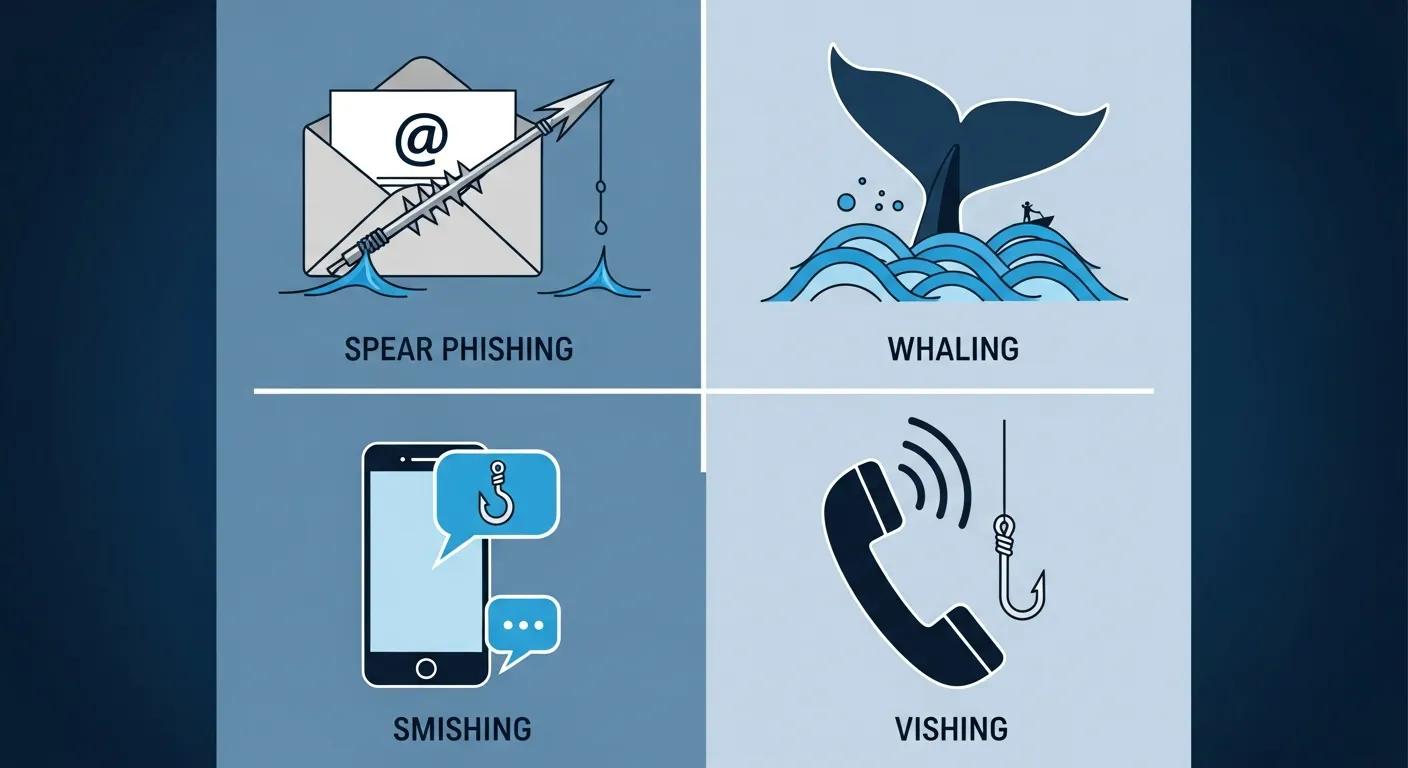
Phishing manifests in several forms, each with a distinct approach:
- Spear Phishing: A highly targeted message aimed at a specific person or group, often using personal details to appear legitimate.
- Whaling: A variant of spear phishing that targets senior executives or other high-value individuals to gain access to sensitive corporate data.
- Smishing: Phishing conducted via SMS (text messages), where attackers send texts that seem to be from banks, services, or contacts to trick you into clicking links or replying.
- Vishing: Voice-based phishing, where scammers call and attempt to extract credentials, verification codes, or other private information.
Recognizing the format and goal of each type helps you respond appropriately and stay alert.
How Social Engineering Fuels Phishing Attacks
Phishing heavily relies on social engineering—the manipulation of natural human reactions. Scammers exploit emotions and trust to make victims act without critical thought. Common approaches include:
- Manipulation Techniques: Messages designed to create panic or urgency, for example, claiming your account was breached and requires immediate action.
- Trust Exploitation: Impersonating familiar organizations (banks, delivery services, government agencies) to make the message appear official and trustworthy.
Recognizing these psychological hooks makes it easier to identify when someone is trying to manipulate you.
Security experts continuously refine methods to identify vulnerabilities and recommend practical mitigation steps against phishing.
Understanding Phishing Vulnerabilities and Mitigation
Effective phishing defense involves understanding common vulnerabilities and implementing a structured approach to mitigation. This includes assessing human and environmental risks to apply targeted defenses that significantly reduce successful phishing attempts.
How to Spot a Phishing Email: Key Warning Signs
Knowing the typical red flags allows you to quickly judge whether a message is suspicious. Look for a handful of consistent clues rather than relying on any single sign.
Identifying Suspicious Sender Information and Fake Email Addresses
Always start by checking who sent the message. Simple inspections often reveal fraud:
- Check Email Domain: Legitimate organizations typically use their official domain. Watch for tiny misspellings, extra words, or unusual domain endings.
- Look for Misspellings: Many phishing messages contain awkward wording or grammar mistakes—a quick hint that it wasn’t sent by a professional sender.
A careful glance at the sender details can help you catch many fakes before you interact with them.
The Dangers of Malicious Links and Attachments
Phishing often delivers harm through malicious links or files. Protect yourself with these habits:
- Hover Over Links: Before you click, hover your mouse over the link to reveal the actual URL. If it looks suspicious or doesn't match the expected destination, do not click.
- Recognize File Types: Be wary of unexpected attachments, especially executable files (.exe) or documents that ask you to enable macros.
Understanding these risks helps you avoid the most common infection and credential-theft methods.
Urgency, Grammar, and Personalization: Telltale Signs of Phishing
Certain stylistic choices in an email are strong indicators of phishing. Watch for pressure tactics and sloppy personalization.
Why Phishing Emails Use Urgent Language and Emotional Manipulation
Scammers use urgency to bypass your critical judgment. Common pressure lines include:
- "Immediate action required"
- "Your account will be suspended"
- "Verify your details now"
When an email pushes you to act immediately, pause and verify the request through an official channel (like calling the company directly) before responding.
Poor Grammar and Generic Greetings: Red Flags in Scam Emails
Many phishing messages are easy to spot if you look for careless language or vague salutations:
- Common Errors: Spelling mistakes, awkward phrasing, or an inconsistent writing tone often indicate the message is not legitimate.
- Generic Greetings: Phrases like "Dear Customer" or "Account Holder" instead of your actual name are common red flags.
These small details frequently reveal that the sender isn’t who they claim to be.
Preventing Phishing Scams: Disposable Emails and Best Practices

Stopping phishing begins with good habits. One effective tactic is using disposable email addresses for one-off sign-ups and less-trusted sites—this keeps your main inbox cleaner and reduces exposure to scams.
A layered approach—combining technical controls with regular user awareness—provides the best protection against evolving phishing tactics.
Multi-Layered Defense Against Phishing
The most effective defenses against phishing combine technical tools with ongoing user training. By understanding how social engineering and phishing tactics evolve, individuals and organizations can implement behavior-aware systems and continuous education to spot and stop attacks.
How Disposable Email Addresses Enhance Your Security
Disposable email services, such as TrashMail.in, offer temporary email addresses that can be used to protect your primary inbox. This strategy helps in two key ways:
- Protect Your Primary Email: By using a temporary address for sign-ups or services you don’t fully trust, you keep potential phishing attempts and unwanted communications away from your main email.
- Avoid Spam: Disposable addresses significantly reduce the amount of promotional mail and potentially risky links that reach your primary inbox, enhancing your overall privacy and security.
When used thoughtfully, disposable emails add a simple yet effective layer to your cybersecurity defenses.
Practical Uses for Temporary Email Addresses
Disposable emails are useful in many everyday situations, such as:
- Online Sign-Ups: When a site asks for an email but you don’t plan to use it long-term, provide a disposable address instead.
- Public Wi-Fi Usage: On shared or public networks, use temporary emails for account creation to limit exposure if the network is monitored.
These practical uses demonstrate how temporary addresses can reduce risk without disrupting your normal accounts.
What to Do If You Spot a Phishing Email
If you find a suspicious message, acting quickly and carefully limits damage and helps others avoid the same trap.
Why You Should Never Engage with Suspicious Emails
Interacting with phishing messages can have serious consequences, including:
- Potential Malware: Clicking links or opening attachments can install malicious software on your device.
- Data Theft: Replying or entering credentials can give attackers access to your accounts or personal information.
When in doubt, do not click—verify first through official channels.
How to Report Phishing Attempts
Reporting helps block scams and protects other users. Take these steps:
- Report to Authorities: Notify your local cybersecurity agency or law enforcement if the phishing attempt is severe or involves significant fraud.
- Inform Your Email Provider: Use your email service’s "report phishing" or "report spam" feature so the provider can block the sender and warn others.
Sharing phishing reports helps reduce repeat attacks and improves collective defenses.
Frequently Asked Questions
What to Do If You Click a Phishing Link
If you accidentally click a suspicious link, immediately disconnect from the internet if possible and run a full antivirus scan on your device. Change passwords for any accounts that might be affected, enable two-factor authentication where available, and closely monitor your financial statements for unusual charges. Report the incident to your email provider and consider contacting your local cybersecurity authority for additional guidance.
How Organizations Can Train Employees to Recognize Phishing
Organizations should implement regular, practical training that includes real-world examples, simulated phishing tests, and clear reporting procedures. Reinforce learning with short reminders and foster a culture where employees can report suspicious messages without fear. Combining training with technical protections (like email filters, MFA, and safe attachment policies) is most effective.
Tools and Software to Detect Phishing Emails
Yes, several tools can help. Email filters and security gateways scan incoming messages for known phishing patterns and malicious links. Many antivirus suites include phishing protection, and browser extensions can warn you about dangerous sites. While helpful, these tools work best when users remain cautious and verify suspicious messages.
Legal Consequences of Phishing
Phishing is a criminal act in many countries and can lead to significant fines or imprisonment for perpetrators. Laws and penalties vary by jurisdiction, but reporting phishing to law enforcement helps investigators track and prosecute offenders. Victims may pursue civil remedies, though recovering losses can be challenging.
Protecting Personal Information from Phishing
Always verify the sender before sharing sensitive data, use strong and unique passwords, and enable two-factor authentication on all important accounts. Keep software and devices updated, avoid clicking unknown links or opening unexpected attachments, and consider privacy tools like a VPN and disposable emails to limit your exposure.
The Role of Multi-Factor Authentication (MFA) in Phishing Prevention
Multi-factor authentication (MFA) adds an extra verification step beyond just a password, significantly reducing the chance attackers can access your accounts even if they obtain your credentials. Implement MFA wherever possible—it is one of the most effective defenses against account takeover.
Top 5 Signs of a Phishing Email
Watch for these five common indicators:
- Suspicious Sender Information: Unusual email addresses, small domain misspellings, or unexpected senders.
- Urgent Language: Messages that pressure you to act immediately or threaten account suspension.
- Poor Grammar: Spelling errors and awkward phrasing are common in scam messages.
- Generic Greetings: Vague salutations like "Dear Customer" instead of your name.
- Malicious Links or Attachments: Unexpected links or files that can carry malware or lead to credential theft.
How to Verify if an Email is Legitimate
Use these quick checks:
- Check the Sender's Email Address: Confirm the domain matches the official organization and looks correct.
- Look for Official Logos and Contact Information: Legitimate emails often include verifiable contact details and branding—but don’t rely on logos alone, as they can be easily copied.
When unsure, contact the organization directly using a phone number or website you know is real, not one provided in the suspicious email.
Conclusion
Protecting yourself from phishing requires vigilance and proactive measures. Always inspect sender details, be wary of urgent requests, and avoid clicking suspicious links or attachments. Enhance your security by using strong, unique passwords, enabling multi-factor authentication, and considering disposable email addresses for less trusted interactions. By adopting these best practices, you can significantly reduce your risk and keep your personal information safe from evolving cyber threats.