


Why Your Personal Information is Under Constant Attack
Personal information security is the practice of protecting your sensitive data—like your name, email, financial details, and online behavior—from unauthorized access, theft, and misuse. With cybercriminals constantly evolving their tactics, safeguarding this information is no longer optional.
Quick Protection Checklist:
- Use strong, unique passwords for every account (at least 15 characters)
- Enable two-factor authentication wherever available
- Keep software updated to patch security vulnerabilities
- Never click links in unexpected emails or texts
- Secure your home Wi-Fi with strong encryption
- Use temporary email services for untrustworthy websites
Your personal information is valuable—really valuable. That's why hackers and scammers spend so much effort trying to steal it. Every time you sign up for a service, make a purchase, or even browse the web, you're creating a digital footprint that bad actors want to exploit.
The numbers tell a sobering story. The Equifax breach in 2017 compromised the personal information of 147 million Americans. Yahoo's 2013-2014 breach affected all three billion accounts, making it the largest data breach in history. These aren't rare incidents—they're becoming the norm.
The consequences go beyond stolen credit card numbers. Identity theft can drain your bank account, wreck your credit score, and cause years of emotional distress. Under GDPR, companies face fines up to 20 million euros or 4% of global revenue for security failures. The stakes are high for everyone.
But here's the good news: you don't need to be a cybersecurity expert to protect yourself. Simple steps like using unique passwords, enabling two-factor authentication, and being cautious about phishing attempts can dramatically reduce your risk.
I'm Mohammad Waseem, and I've spent years building web platforms and experimenting with digital security tools, including temporary email services that help protect Personal information security. Through testing ad networks, analyzing user patterns, and optimizing online tools, I've learned what actually works to keep your data safe in the real world.
Defining Personal Information and the Importance of Protection
To truly master personal information security, we first need to understand what we are actually protecting. In the industry, we often call this PII, or Personally Identifiable Information. It isn't just your name and Social Security number; it is a sprawling web of data that defines your digital life.
- Sensitive Data: This includes government IDs, birth dates, and your physical address.
- Biometric Records: Your fingerprints and facial recognition data are unique and, unlike a password, cannot be changed if they are stolen.
- Financial Identifiers: Bank account numbers, credit card details, and even your tax records.
- Online Behavior: Your IP address, browsing history, and even the way you interact with apps.
Why does this matter so much? Because your data is the "new oil." Hackers use it for identity theft, while less-than-scrupulous companies use it to track you across the web. When your email is exposed, you become a target for endless spam and sophisticated scams. This is why Protect Yourself: Why Email Privacy Matters is a core tenet of modern safety.
According to the FTC, Protect Your Personal Information From Hackers and Scammers starts with recognizing that your data has a dollar value on the dark web. If a criminal can piece together enough of your PII, they can take out loans in your name or even claim your tax refund.
Common Threats and the Consequences of Exposure
The digital world is a bit like the Wild West—full of opportunity, but also crawling with outlaws. To keep our personal information security intact, we have to know who the "bad guys" are and how they operate.
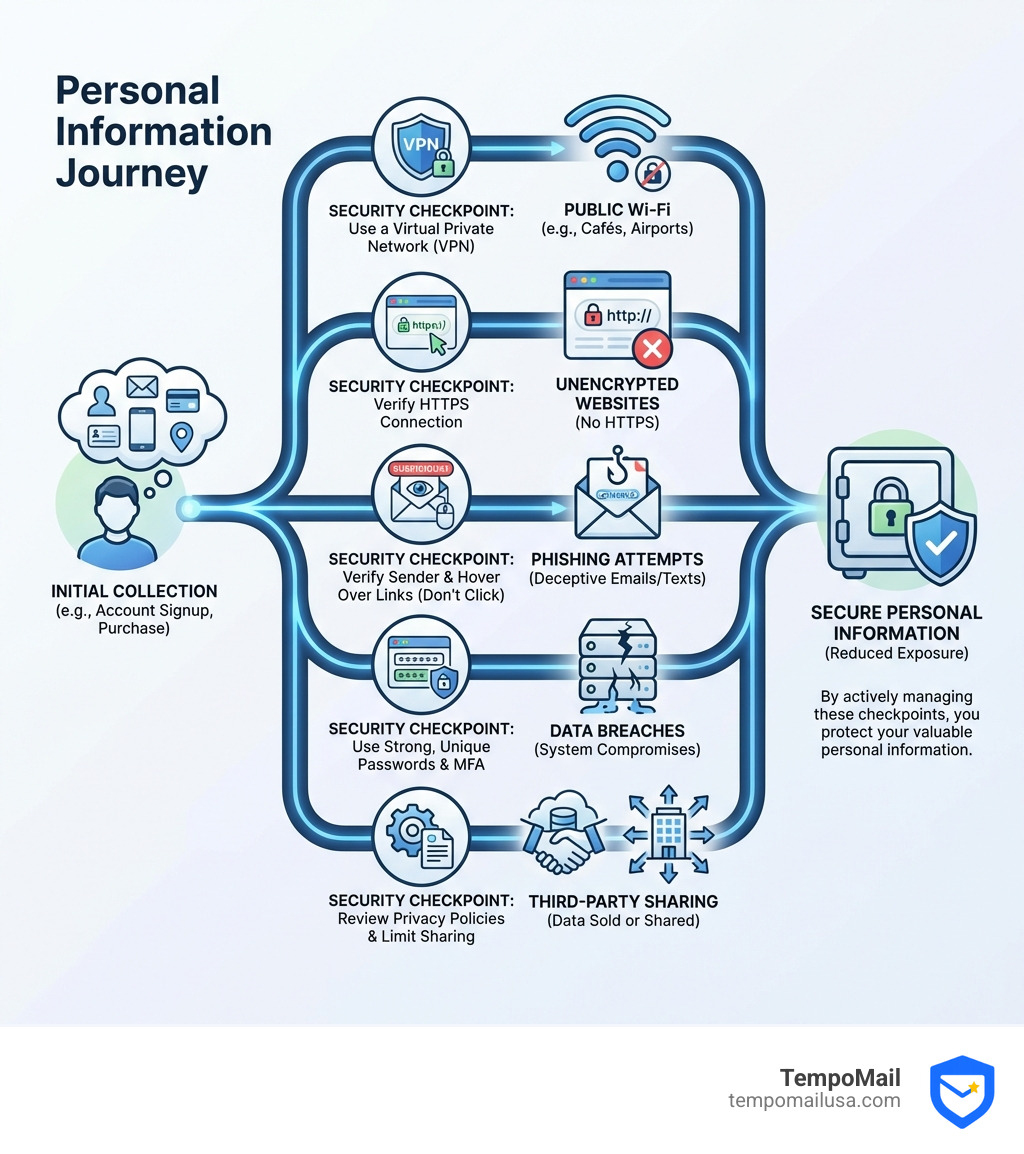
- Phishing: This is the most common threat. You receive an email that looks exactly like it’s from your bank or a delivery service. It asks you to "verify your account" by clicking a link. In reality, that link takes you to a fake site designed to steal your login credentials. You can learn more about this in our guide on What is a Phishing Scam? Protect Yourself.
- Malware: This includes viruses, ransomware, and spyware. Ransomware is particularly nasty—it encrypts your files and demands a payment to get them back. Spyware, on the other hand, sits quietly on your device, recording your keystrokes to steal passwords.
- Malicious Adware: Ever seen a "Your computer is infected!" pop-up? That’s often adware trying to trick you into downloading something dangerous. What Can Malicious Adware Do? Key Threats Explained breaks down how these annoying ads can turn into serious security breaches.
- Social Engineering: This is the "human hack." A scammer might call you pretending to be tech support, using psychological tricks to get you to reveal your password or grant them remote access to your computer.
- Insider Threats: Sometimes the threat comes from within an organization—a disgruntled employee or a negligent contractor who mishandles your data.
Real-World Consequences of Personal Information Security Breaches
When a breach happens, the fallout is rarely limited to one person. Large-scale data breaches have become a recurring nightmare for consumers.
- Equifax (2017): 147 million Social Security numbers and addresses were exposed. This forced millions of Americans to freeze their credit and monitor their identities for years.
- Yahoo (2013-2014): Every single account—3 billion in total—was affected. Stolen data included names, email addresses, and security questions.
- Target (2013): 40 million customers had their credit card info stolen during the holiday shopping season.
The consequences for individuals are devastating. Beyond the financial loss, there is the emotional distress of knowing a stranger has your private details. This is why many people are turning to "identity proxying." By using a buffer between yourself and the internet, you can limit your exposure. For instance, How Temporary Emails Protect You From Data Breaches explains how using a disposable address for a one-time signup ensures that if that site is ever hacked, your real primary email remains safe and sound.
Best Practices for Personal Information Security
Now that we've identified the risks, let's talk solutions. Protecting your personal information security doesn't require a degree in computer science; it just requires a few good habits.
One of the biggest battlegrounds is password management. Most people reuse the same simple password across ten different sites. If one site gets hacked, the hacker now has the key to all ten of your accounts.
| Feature | Manual Passwords | Password Managers |
|---|---|---|
| Complexity | Usually low (easy to remember) | Extremely high (random strings) |
| Uniqueness | Often reused across sites | Unique for every single account |
| Storage | Memory or sticky notes | Encrypted digital vault |
| Security | Vulnerable to guessing/leaks | Highly resistant to attacks |
To step up your game, we recommend using the built-in tools in your browser. For example, you can Learn more about secure passwords in Microsoft Edge to generate and store complex keys automatically.
The Golden Rules of Digital Safety:
- Enable Two-Factor Authentication (2FA): This is the single most effective thing you can do. Even if a hacker gets your password, they can't get in without that second code from your phone or an authenticator app.
- Update Your Software: Those annoying "Update Available" pop-ups are actually your best friend. They contain security patches that fix vulnerabilities hackers use to break in.
- Practice Safe Browsing: Check for the padlock icon in your browser and ensure the URL starts with
https://. Avoid using public Wi-Fi for banking or shopping unless you have a VPN. - Stay Informed: Cybersecurity changes fast. Following Data Privacy Week: Essential Tips for Staying Safe Online can help you stay ahead of the latest scams.
Advanced Tactics for Personal Information Security
If you want to go beyond the basics, consider these "pro" moves:
- VPN Tunnels: A Virtual Private Network (VPN) encrypts your entire internet connection. This is especially important for email privacy. You can Understand VPN Tunnels for Email Privacy to see how they hide your activity from ISPs and hackers on the same network.
- Device Hardening: This means disabling features you don't use, like Bluetooth or file sharing, which can be entry points for attackers.
- Encryption: Use full-disk encryption on your laptop (like BitLocker or FileVault) so that if your device is stolen, your data remains unreadable.
- Secure Wi-Fi: Change your router's default password and use WPA3 encryption if your hardware supports it.
Navigating Global Regulations and Compliance
We aren't alone in this fight. Governments around the world have passed strict laws to force companies to take our personal information security seriously.
- GDPR (General Data Protection Regulation): This EU law is the "gold standard." It gives users the right to know what data is being collected and the "right to be forgotten."
- CCPA (California Consumer Privacy Act): A similar law in the US that gives Californians more control over their personal information.
- PIPEDA (Personal Information Protection and Electronic Documents Act): Canada’s federal privacy law for the private sector, built on ten "Fair Information Principles" like accountability and consent.
Even tech giants are leaning into this. You can Learn more about AI safety and model development to see how companies are trying to build security into the very fabric of their artificial intelligence models.
Penalties and Compliance in Personal Information Security
For businesses, ignoring these laws is expensive. Under GDPR, fines can reach 20 million euros or 4% of a company's global annual revenue. In California, CCPA violations can cost up to $7,500 per intentional violation.
To stay compliant, organizations must maintain detailed audit logs and implement robust security measures. Safeguarding Data: Insider Threat Programs Explained Easy highlights how businesses protect themselves from internal risks while meeting these legal requirements. Compliance isn't just about avoiding fines; it's about building trust with customers.
The Future of Digital Privacy and Emerging Tech
The future of personal information security looks like something out of a sci-fi movie. As hackers get smarter, our defenses are becoming more high-tech.
- AI-Powered Security: Artificial intelligence is now being used to block nearly 10 million spam emails every minute in Gmail. AI can spot patterns in cyberattacks long before a human can.
- Blockchain: This technology isn't just for crypto. It offers a way to store data in a decentralized, tamper-proof ledger, making it much harder for a single breach to expose everything.
- Quantum Cryptography: As quantum computers threaten to break current encryption, scientists are developing "quantum-safe" encryption that uses the laws of physics to keep data secure.
- Zero Trust Architecture: This is a security model that operates on the principle of "never trust, always verify." No matter who you are or where you are connecting from, you must be authenticated every step of the way.
One of the most exciting trends is the move toward decentralized identity. Instead of giving your real email and name to every website, you use secure aliases. Our Anonymous Email Accounts: Your Guide shows how you can steer the web without leaving a trail of PII behind you.
Frequently Asked Questions about Digital Safety
How do I report a phishing email?
Reporting is crucial because it helps providers block the scammer for everyone else.
- Don't click anything.
- Use your email's "Report Phishing" button.
- Forward the email to the Anti-Phishing Working Group at
reportphishing@apwg.org. - Report it to the FTC at
ReportFraud.ftc.gov. - Check out How to Report Phishing Emails in 5 Easy Steps for a more detailed walkthrough.
What is the most secure way to store passwords?
The consensus among experts is to use a reputable password manager. These tools create long, random passwords for you and store them in an encrypted "vault" that you open with one master passphrase. For added security, you can How to generate secure passwords in Firefox or other major browsers to ensure you're never reusing a password again.
How can I check if my data was leaked?
If you suspect you've been part of a breach:
- Use a breach database like "Have I Been Pwned" to see if your email is in a known leak.
- Monitor your credit reports. You are entitled to a free report from the major bureaus once a year.
- Visit IdentityTheft.gov recovery plans if you find that your information is being used by someone else. They provide a step-by-step plan to help you recover.
Conclusion: Taking Control of Your Digital Footprint
At the end of the day, personal information security is about taking back control. We live in an age where our data is constantly being harvested, but we don't have to be passive victims. By practicing proactive defense—using strong passwords, enabling 2FA, and keeping our software updated—we can make ourselves very difficult targets.
At TempoMail, we believe the best way to protect your information is to not give it away in the first place. Our identity proxying services allow you to create secure aliases that act as a firewall. When a website asks for your email, you give them a temporary alias. The mail still gets to you, but the website never sees your real PII. If that website sells your data or gets hacked, you simply delete the alias and the threat vanishes.
You can Protect your online safety with anti-spam tracking today and start building a more secure digital future. Stay safe out there!