



The Microsoft Security Alert Scam Is Fooling Millions — Here's What You Need to Know
A microsoft security alert scam is a fake warning — delivered as a browser pop-up, email, or phone call — designed to trick you into thinking your computer or account is in danger.
Is that Microsoft security alert real or fake? Here's how to tell at a glance:
- Phone number in the alert? Fake. Microsoft never includes phone numbers in error messages.
- Urgent voice message looping on your screen? Fake. Microsoft does not do this.
- Unsolicited email or call from "Microsoft Support"? Fake. Microsoft does not make unsolicited contact.
- Asking for gift cards, crypto, or remote access? Fake. Always.
- Alert came from account-security-noreply@accountprotection.microsoft.com with no phone number? Likely real.
These scams are not new — but they are getting harder to spot. Scammers now use real Microsoft infrastructure, like Azure Monitor, to send emails that pass spam filters and look completely official.
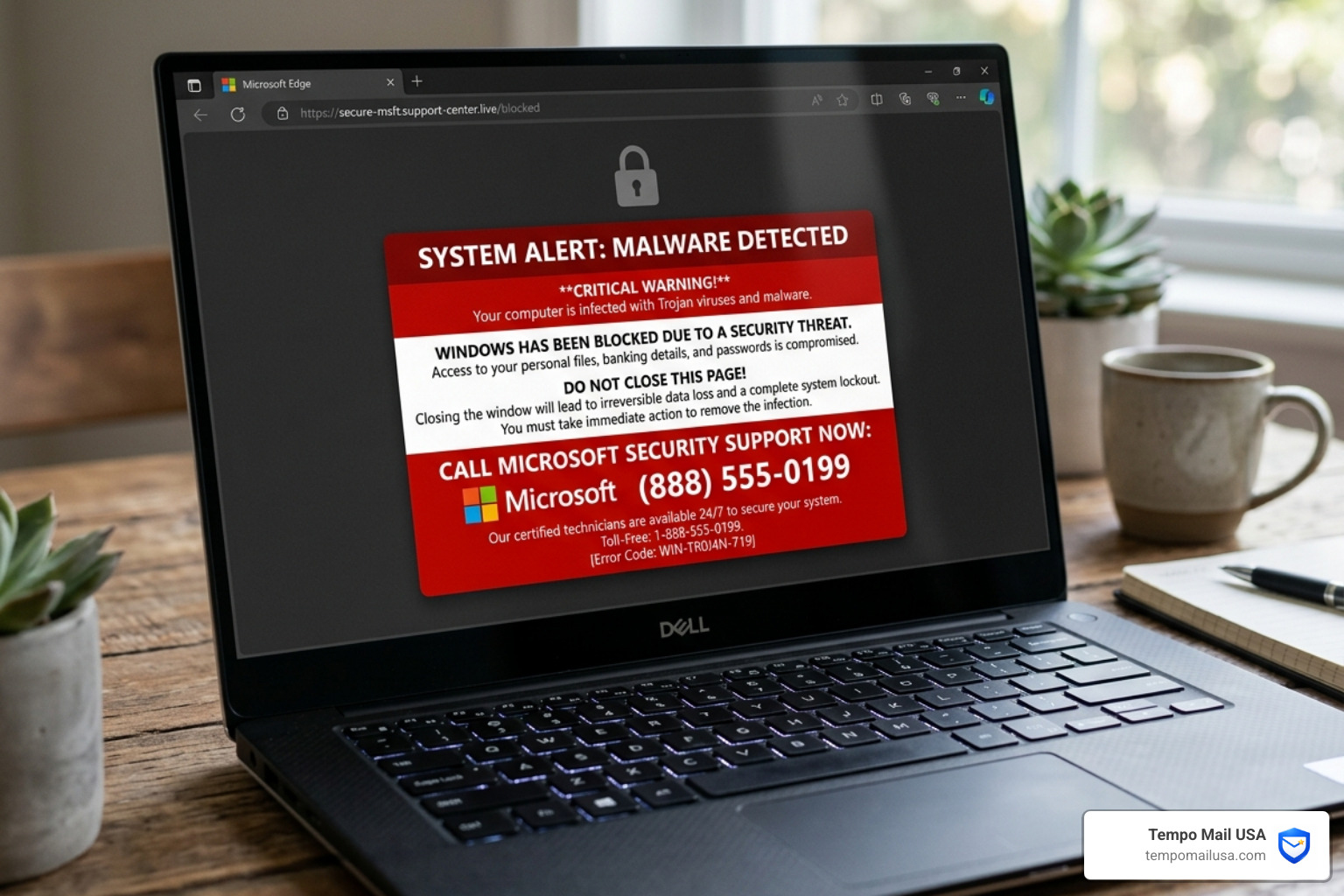
Consider this real example shared in a Microsoft community forum: a user's mother opened her laptop to find the screen locked, with a woman's voice repeating on a loop — "Your window is blocked because it is infected with trojan viruses and it is affecting Microsoft services" — alongside a phone number to call for help. That number connected directly to scammers.
This is a classic tech support scam. The goal is simple: scare you into calling, then manipulate you into handing over money or access to your device.
And it works. Because Microsoft is one of the most trusted brand names on the planet — and scammers know exactly how to exploit that trust.
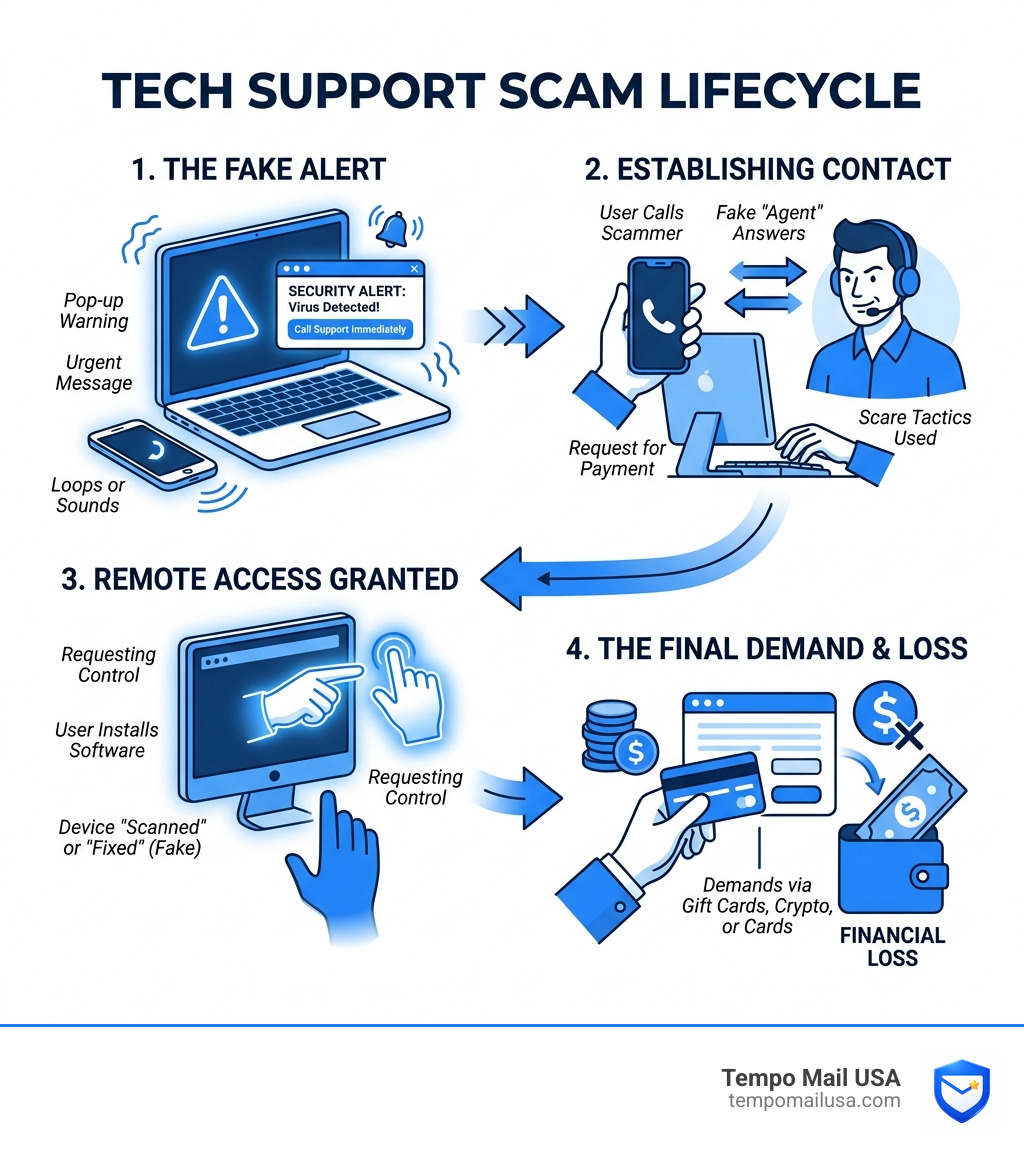
How the Microsoft Security Alert Scam Works
The mechanics of a microsoft security alert scam are designed to bypass your rational thinking and trigger an immediate, emotional response. These attacks generally begin with a "hook"—a sudden interruption to your digital life that demands your attention.
Browser Lockers and Looping Audio
One of the most common delivery methods is the "browser locker." This occurs when you visit a compromised website or click a malicious ad (malvertising). Suddenly, your browser goes into full-screen mode, and a window appears that looks exactly like a Windows system notification.
Scammers often use JavaScript tricks to disable your ability to close the tab or use the "X" button. To make things even more terrifying, they often include a looping audio message. As noted in Microsoft Q&A discussions, these voices often claim your computer is infected with "Trojan viruses" and that your "window is blocked."
Delivery Methods
While pop-ups are famous, they aren't the only way scammers reach you. We see three primary channels:
- Malicious Pop-ups: Triggered by third-party ad services on otherwise legitimate sites.
- Phishing Emails: These may claim there is "unusual sign-in activity" or a "billing error" on your account.
- Cold Calls: Scammers call you directly, claiming to be from "Microsoft Windows Support" and stating they have detected errors on your machine.
According to research on the Microsoft Security Alert Scam: Real Warning or Fake Trap, the common thread is technical mimicry. They use official logos, blue-screen backgrounds, and technical jargon like "Error Code: #0x80070422" to appear legitimate.
Psychological Triggers in Tech Support Scams
Why do smart people fall for these? It’s not about intelligence; it’s about psychology. Scammers use four main levers:
- Urgency: They tell you that if you don't act now, your data will be deleted.
- Authority: They hide behind the Microsoft brand, a name we’ve been taught to trust for decades.
- Fear: They claim your banking details or private photos are currently being stolen by hackers.
- Financial Loss: They might show a fake invoice for hundreds of dollars, making you desperate to "cancel" the charge.
The Role of Remote Access Software
The real danger begins if you call the number provided. The "agent" on the other end will ask you to download remote access software like AnyDesk, TeamViewer, or LogMeIn.
Once you grant them access, they have the keys to your kingdom. They can:
- Steal Credentials: Watch you log into your bank or email.
- Install Malware: Place "backdoors" on your computer so they can return later.
- Fabricate Evidence: They often open the "Event Viewer" (a normal Windows tool) and claim that standard system logs are "proof of hackers."
Learning how to Report Phishing Attack: Your Guide to Outsmarting these criminals is the first step in protecting your digital identity.
Identifying a Fake Microsoft Security Alert Scam
Distinguishing between a real system warning and a microsoft security alert scam is easier once you know what Microsoft never does.
| Feature | Genuine Microsoft Alert | Fraudulent Scam Pop-up |
|---|---|---|
| Phone Number | Never included | Always included (Toll-free) |
| Payment Method | Managed via official dashboard | Gift cards, Crypto, Wire transfer |
| Contact Method | Email from @accountprotection.microsoft.com | Unsolicited calls or browser pop-ups |
| Tone | Informational and calm | Urgent, threatening, or alarming |
| Remote Access | Only if YOU initiate the request | Demanded immediately to "fix" issues |
Common Red Flags of a Microsoft Security Alert Scam
If you see any of these signs, you are dealing with a scam:
- Demands for Gift Cards: No legitimate tech company will ever ask you to pay for support using Target, iTunes, or Google Play gift cards.
- Spelling and Grammar: Look for phrases like "Unsafety Detected" or "Your window is blocked." As highlighted in the Safety Services Pop-up Scam - FAKE Microsoft Alert EXPOSED, these errors are common in offshore scam centers.
- Generic Greetings: Real alerts usually address you by name or reference a specific account ID you recognize.
- Pressure Tactics: If the person on the phone gets angry or tells you that you will be arrested, hang up immediately.
Verifying Legitimate Microsoft Communications
Microsoft has clear policies for communication. According to official Microsoft Support, they do not send unsolicited emails or make unsolicited phone calls to request personal or financial information.
If you receive an email about an "unusual sign-in," check the sender. Legitimate emails come from account-security-noreply@accountprotection.microsoft.com. You can always verify your account status by navigating directly to account.microsoft.com and checking your recent activity page. Never click links in the email itself.
Advanced Phishing: Azure Monitor and Callback Attacks
As users become more tech-savvy, scammers are evolving. One of the most dangerous trends is the abuse of legitimate cloud infrastructure to send phishing emails.
How Scammers Exploit Trusted Platforms
Scammers have found ways to use Microsoft's own tools against us. For instance, they might use Google Docs or SharePoint to host a "security notice." Because the initial link comes from a trusted domain, your email filter might let it through. Once you click, you are redirected to a fake login page designed to steal your password. This is why understand how Docusign Email Scam Terms Demystified and similar tactics work across different platforms.
Infrastructure Abuse: The Azure Monitor Scam
Recent reports show that Microsoft Azure Monitor alerts are being abused. Scammers create a legitimate Azure account, set up a "Monitor Alert," and then customize the description to include a fraudulent "Fraud Hotline" number.
Because the email is sent by Microsoft's actual servers, it passes SPF, DKIM, and DMARC checks. It looks 100% official because, technically, the email is from Microsoft—but the content inside is a lie.
The Evolution of the Microsoft Security Alert Scam
We are seeing a shift toward "Callback Phishing." Instead of including a malicious link that might be blocked, the scammer includes a phone number. They might send a fake invoice for a "Windows Defender Subscription" for $499.99. When you call to "cancel" the charge, you are connected to a scammer who begins the remote access process.
This investigation into the Azure "Alert Was Triggered" scam reveals that scammers even use UTC timestamps and fake "Staff IDs" to make the call feel professional.
What to Do if You Encounter a Fake Security Alert
If a microsoft security alert scam pop-up appears on your screen, do not panic. The pop-up itself usually cannot harm your computer as long as you don't click anything or call the number.
Immediate Steps to Escape a Browser Locker
If your browser is "frozen" by a scam alert:
- Don't Call: Never dial the number on the screen.
- Force Quit: On Windows, press
Ctrl + Shift + Escto open the Task Manager. Find your browser (Chrome, Edge, etc.) and click "End Task." - Keyboard Shortcut: You can also try
Alt + F4to close the active window. - Clear Cache: Once you reopen your browser, do not restore the previous tabs. Go to your settings and clear your browsing history and cache to remove any lingering scripts.
Immediate Steps for Victims of Remote Access
If you already called the number and granted remote access, you need to move fast:
- Disconnect: Physically unplug your internet router or turn off Wi-Fi to stop the scammer's connection.
- Uninstall: Go to your Control Panel and uninstall any software they had you download (AnyDesk, TeamViewer, etc.).
- Scan: Run a full system scan using Microsoft Defender or a reputable anti-malware tool.
- Reset Passwords: From a different, clean device, change the passwords for your email, bank, and Microsoft account. Enable Multi-Factor Authentication (MFA) everywhere.
- Contact Your Bank: If you provided credit card info or bought gift cards, call your bank's fraud department immediately.
How to Report a Microsoft Security Alert Scam
Reporting helps authorities shut down these scam centers. You should:
- Report to the FTC at
reportfraud.ftc.gov. - File a report with the FBI IC3 at
ic3.gov. - Use the Microsoft Reporting Portal to let them know their brand is being impersonated.
For more tips on staying safe from various digital threats, check out our guide on how to Report Phishing Attack: Your Guide to Outsmarting.
Frequently Asked Questions about Microsoft Security Alert Scams
Does Microsoft ever include phone numbers in error messages?
No. This is the golden rule of Windows security. Official Microsoft error messages will provide an "Error Code" (like 0x800...) and perhaps a link to a help article, but they will never ask you to call a support number directly from a pop-up.
What happens if I call the number in a scam pop-up?
You will reach a call center, likely overseas, where "agents" are trained in social engineering. They will try to scare you into giving them remote access to your PC. Once inside, they will steal your personal data, install malware, and demand hundreds of dollars for "repairs" that you don't actually need.
Can a website really detect viruses on my computer?
No. Browsers operate in a "sandbox," meaning a website does not have the permission or the technical ability to scan your local hard drive for viruses. Any website claiming to have "detected 3 viruses" on your machine is lying. Only installed security software like Microsoft Defender can perform a real scan.
Conclusion
The microsoft security alert scam relies on one thing: your reaction. By staying calm and recognizing the red flags—like unsolicited phone numbers and demands for remote access—you take away the scammer's power.
At Tempo Mail USA, we believe the best defense is a proactive one. Many of these scams start because your real email address was leaked in a data breach or sold by a shady website, making you a target for phishing. Our service provides temporary email aliases that act as a "PII firewall," proxying your identity and keeping your real inbox clean and safe from scam targeting.
Protect your PII, use unique passwords, and always verify before you click. If you want to shield your primary email from the clutter and danger of the web, visit https://tempomailusa.com/ today to generate your secure identity proxy. Stay safe out there!