


Why the DocuSign Email Scam Catches So Many People Off Guard
A DocuSign email scam is a phishing attack where criminals impersonate DocuSign — one of the world's most trusted e-signature platforms — to trick you into clicking fake links, handing over login credentials, or downloading malware.
Quick answer: How to spot a DocuSign email scam
- The sender's email is not from
@docusign.comor@docusign.net - The greeting is generic, like "Dear Recipient" or "Dear DocuSign Customer"
- The email creates urgency — pressuring you to act fast
- Links point to domains that are not docusign.com or docusign.net
- The email contains attachments (real DocuSign emails don't include them)
- There are spelling mistakes, poor grammar, or inconsistent branding
DocuSign serves over one billion users worldwide, including 95% of Fortune 500 companies. That massive reach is exactly why scammers love impersonating it — almost anyone could plausibly receive a DocuSign notification.
The numbers tell a sobering story. Consumers lost nearly $12.5 billion to fraud in 2024, with DocuSign impersonation among the most common tactics. Phishing now accounts for the initial breach in 1 in 5 data breaches, and 60% of all breaches involve a human being making a mistake — like clicking a fake "Review Document" button.
The scariest part? Some of these scam emails are sent through DocuSign's own infrastructure, making them nearly impossible to distinguish from the real thing at first glance.
This guide breaks down exactly how these scams work, what to look for, and how to protect yourself — especially if you value keeping your personal email address private.
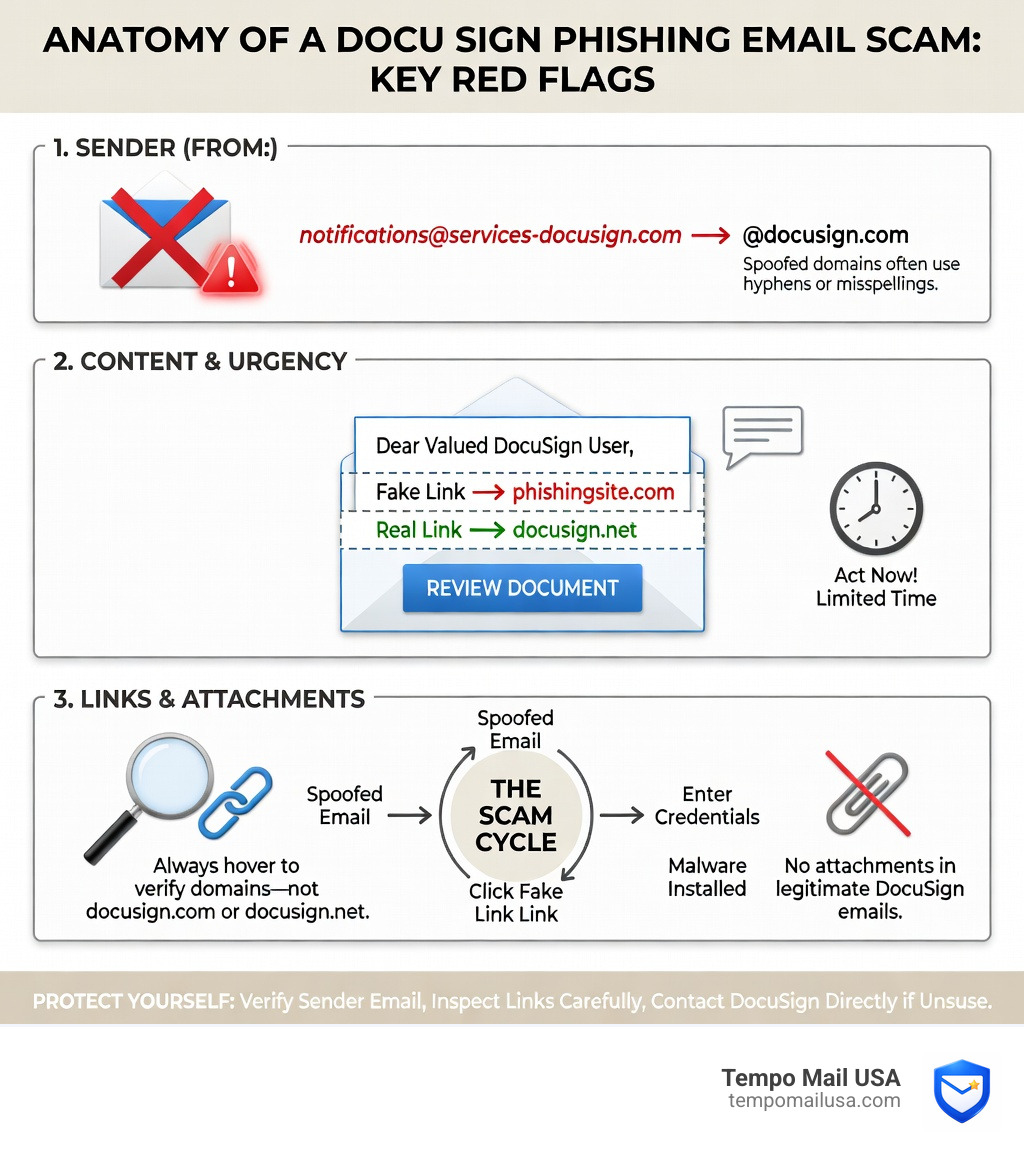
Anatomy of a DocuSign Email Scam
To understand a docusign email scam, we first have to look at why it works so well. These attacks aren't just technical glitches; they are masterpieces of social engineering. By using a brand we already trust to handle our most sensitive documents—mortgages, employment contracts, and legal NDAs—scammers bypass our natural defenses.
According to the Verizon Data Breach Investigations Report, the "human element" is a factor in a staggering 60% of all data breaches. Scammers know that if they create enough urgency—saying a "wire transfer is pending" or an "invoice is overdue"—our brains often switch from "critical thinking mode" to "panic mode." This is when we click the button without checking the sender.
The ultimate goal of these scams usually falls into two categories:
- Credential Theft: You are directed to a fake login page (often mimicking Microsoft 365 or Gmail) to "verify your identity" before viewing the document. Once you enter your password, the scammer has full access to your inbox.
- Malware Delivery: The email might contain a "secure" .zip file or a link to a document that, once opened, installs ransomware or spyware on your device.
How Phishing Campaigns Work
Most docusign email scam campaigns follow a predictable four-step path:
- The Hook: You receive an email with a subject line like "Action Required: Please DocuSign your Invoice." It features the familiar yellow "Review Document" button.
- The Redirect: Clicking that button doesn't take you to DocuSign. Instead, it sends you through a series of hidden redirects to a phishing site.
- The Harvest: The phishing site looks identical to a login portal. It asks for your email credentials.
- The Exploitation: Once they have your login, scammers can perform an "account takeover," using your real email to send more scams to your contacts or searching your "Sent" folder for banking details.
The Rise of API Abuse and Quishing
The game has changed recently. Sophisticated attackers are no longer just "spoofing" (faking) emails; they are using its APIs to send legitimate envelopes. By registering real DocuSign accounts, they can send authentic-looking invoices for brands like PayPal or Norton through DocuSign's actual servers. This allows the scam to bypass traditional spam filters because, technically, the email is coming from DocuSign.
We are also seeing a rise in "Quishing"—QR code phishing. Instead of a link, the scammer puts a QR code inside a Docusign “envelope”. They hope you’ll scan it with your phone, which often has fewer security protections than your laptop, leading you straight to a fake Microsoft login page. To learn more about how to shield yourself from these evolving tactics, check out our more info about secure email practices.
Red Flags: How to Spot a Fake Request
Identifying a docusign email scam requires a keen eye for detail. Scammers are good, but they often leave "digital crumbs" that give them away.
| Feature | Legitimate DocuSign Email | Scam DocuSign Email |
|---|---|---|
| Sender Address | Ends in @docusign.com or @docusign.net | Random domains or slight typos (e.g., @docusgn.com) |
| Greeting | Usually uses your full name | "Dear Customer," "Dear Recipient," or your email address |
| Attachments | No attachments (unless you've already signed) | Includes .zip, .html, or .exe files |
| Links | Always starts with https://docusign.net/ | Redirects to non-DocuSign domains |
| Tone | Professional and neutral | Urgent, threatening, or overly excited |
Identifying a docusign email scam Sender
The first thing we always check is the "From" field. However, don't just look at the name; look at the actual email address behind it. Official DocuSign notifications only come from two domains: @docusign.com and @docusign.net.
If the email comes from @cellucorc4lawsuit.com or a generic Gmail address, it is a scam. Even if the domain looks close, be wary. Federal Trade Commission data highlights that scammers are increasingly using brand impersonation because it bypasses our natural skepticism.
Mismatched Links and Malicious Attachments
Before you click any button in a DocuSign email, use the "hover technique." On a computer, hover your mouse over the "Review Document" button without clicking. A small box will appear showing the destination URL. If that URL doesn't contain docusign.net/, do not click it.
Another major red flag is the presence of attachments. Legitimate DocuSign requests do not include PDF or Word attachments for you to sign. They want you to sign on their secure platform. If you see a .zip file claiming to be your "Contract," it likely contains malware.
Real-World Examples of DocuSign Fraud
Scammers are creative, often tailoring their docusign email scam to match current events or popular services.
A common tactic involves envelopes that spoof invoices from big brands. You might get a "notification" from DocuSign regarding a $600 Norton Antivirus renewal or a PayPal payment you never authorized. These Fake invoice scams are designed to make you panic and click the "Cancel" or "Review" button.
We've also seen Refund scams where the email claims you are owed money, but you must "sign a release form" to claim it. This is a classic Reddit Example of a scam abusing people’s trust for data theft.
Government and Seasonal Phishing Themes
Scammers love a good theme. We've seen an increase in attackers posing as a government agency, such as the Department of Transportation (DOT) or the U.S. Department of Health and Human Services (HHS). These emails might claim you owe back taxes or need to sign a new "compliance document."
Seasonal themes are also popular:
- Tax Season: Fake W-2 forms or tax return signature requests.
- Open Enrollment: Human Resources (HR) impersonations regarding benefits.
- Holidays: Fake "wine delivery" gift notifications that require a signature.
Advanced Notification Exploitation
Some of the most dangerous scams use Fraud Alert: Advanced Phishing Scams Leveraging Notifications. Attackers have impersonated PayPal using DocuSign’s Maestro workflow tool. This makes the email look like a legitimate "Microsoft Purchase Confirmation." Because the notification comes from the real DocuSign system, it feels incredibly authentic, even though the content is a total fabrication meant to “cancel” an unauthorized transaction by stealing your data.
Immediate Actions: What to Do if You’ve Been Targeted
If you realize you've just interacted with a docusign email scam, don't panic. Speed is your friend here.
First, if you clicked a link but didn't enter any info, close the tab immediately and run a malware scan. If you did enter your password, you need to change your password immediately for your email account and any other service that uses that same password.
Reporting to Official Channels
Reporting these scams helps protect the whole community. There are several places we recommend sending the details:
- DocuSign Verification: Forward the suspicious email as an attachment to
verify@docusign.com. - On-Platform Reporting: If you are already inside the DocuSign interface, use the Report Abuse feature.
- The i-Sight Portal: For reporting fraud by a specific DocuSign customer, use the online portal i-Sight.
- Government Reporting: File a complaint with the Federal Trade Commission.
Recovery Steps for Compromised Accounts
If you suspect your account has been breached:
- Enable Multi-Factor Authentication (MFA): This is the single best way to stop a scammer from using your stolen password.
- Isolate the Device: If you downloaded an attachment, disconnect that computer from the Wi-Fi until it has been professionally cleaned.
- Monitor Your Accounts: Check your "Sent" folder for emails you didn't send and keep a close eye on your bank statements for the next few months.
- Submit a Privacy Request: If you are worried about your personal data being leaked, you can use the Privacy Request Portal.
Proactive Defense and Best Practices
We believe the best defense against a docusign email scam is a "zero-trust" mindset. Treat every unexpected signature request as a potential threat until proven otherwise.
One of the most effective ways to stay safe is to use a multi-layered security tool like ESET, which can detect malicious links before you even see them. Additionally, always keep your software patched; scammers often exploit old vulnerabilities in browsers to install malware.
Verifying Documents via Security Codes
Did you know you don't actually have to click the link in the email to sign a document? Every legitimate DocuSign email contains a unique Security Code at the bottom.
Instead of clicking the big yellow button, we recommend going directly to docusign.com, clicking on the Access Documents feature, and pasting that code. If the document is real, it will appear. If the code doesn't work, the email was a fake. This simple habit completely bypasses the risk of clicking a malicious link.
Preventing a docusign email scam with Advanced Tools
At Tempo Mail USA, we take a different approach to privacy. Most docusign email scam attacks succeed because the scammer already has your real email address. They find it in data breaches or buy it from marketing lists.
By using our email aliasing service, you can create a unique, "disposable" email address for every service you use. If you receive a "DocuSign" request on an email alias you only gave to a specific shopping site, you'll know immediately that it’s a scam. We act as a firewall, shielding your real identity and PII (Personally Identifiable Information) from the prying eyes of threat actors.
Frequently Asked Questions about DocuSign Scams
How can I tell if a DocuSign email is legitimate?
A legitimate email will always come from @docusign.com or @docusign.net. It will usually address you by your full name and will never contain an attachment like a .zip or .exe file. You can always verify the request by entering the security code directly on the official DocuSign website.
What should I do if I clicked a link in a suspicious email?
First, do not enter any information on the page that opens. Close your browser and run a full system scan with reputable antivirus software. If you entered a password, change it immediately and enable two-factor authentication (2FA) on that account.
Does DocuSign ever send attachments in a signature request?
No. For security reasons, DocuSign does not include attachments in the initial email requesting a signature. They want you to view the document on their secure platform. You will only receive a PDF attachment after all parties have signed the document as a "completed" copy.
Conclusion
The docusign email scam is a persistent threat because it exploits the tools we use for business every day. With nearly three million fraud claims reported last year, it is clear that cybercriminals aren't slowing down.
However, by practicing good digital hygiene—like hovering over links, using security codes, and reporting suspicious activity to DocuSign Support—you can stay one step ahead. The best way to stop a scammer is to deny them access to your real data in the first place.
Stay vigilant, trust your instincts, and protect your identity with Tempo Mail USA. By using email aliases, you can ensure that even if a scammer gets a hold of an address, your true personal identity remains safely behind our firewall.