



Why Spectrum Spam Calls Are a Growing Problem
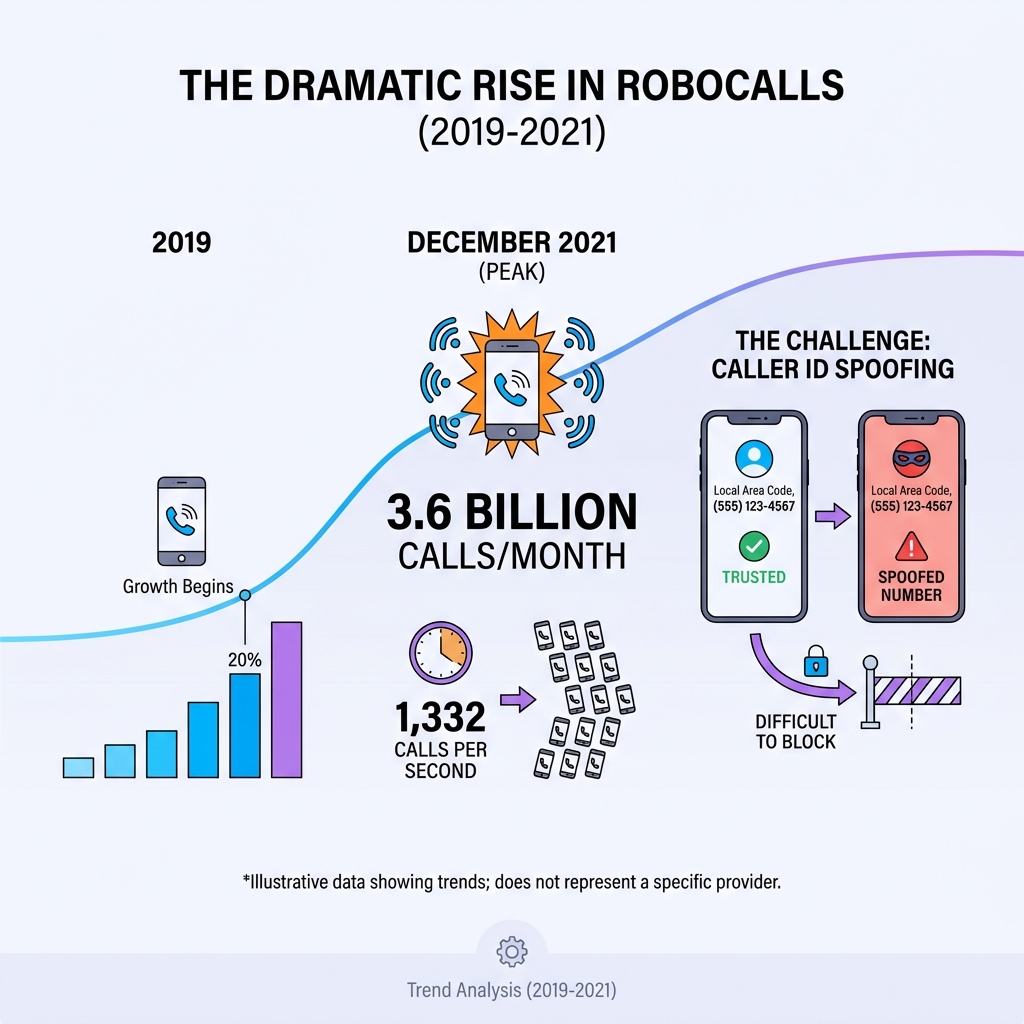
Spectrum spam calls are robocalls and scam attempts that target Spectrum phone customers, and they're exploding in volume. In December 2021 alone, Americans received just under 3.6 billion robocalls—nearly 1,332 every single second. If you're a Spectrum Voice or Spectrum Mobile customer, you're likely seeing more of these unwanted calls on your screen.
Quick Answer: How to Stop Spectrum Spam Calls
- Activate Spectrum Call Guard - Free automatic blocking and spam risk alerts
- Report spam numbers at reportspam.spectrum.com to improve filtering
- Use your phone's built-in blocking for iPhone or Android devices
- Register with the National Do Not Call Registry to reduce legitimate telemarketing
- Practice smart call handling - Don't answer unknown numbers or share personal info
These calls aren't just annoying—they're dangerous. Scammers use sophisticated techniques like caller ID spoofing to make their calls look legitimate, often mimicking local numbers or trusted organizations. They're after your personal information, your money, or recordings of your voice they can use for fraud.
The good news? Spectrum offers free tools to fight back, including Call Guard, which uses predictive analytics to automatically detect and block high-risk calls. The service applies "Spam Risk" labels to suspicious numbers while still letting important calls from schools or healthcare providers come through.
This guide shows you exactly how to use Spectrum's built-in protections plus four other proven methods to stop spam calls for good. You'll learn the difference between spammers and scammers, how to report problem numbers, and what steps to take right now to protect your phone line and your private information.
Understanding the Threat: Spammers, Scammers, and Spoofing
Before we dive into solutions, let's get to know our enemy. The world of unwanted calls is a tricky one, populated by various characters with different motives. Understanding these distinctions is the first step in building an effective defense against Spectrum spam calls.
Spammers vs. Scammers
While often used interchangeably, there's a key difference between spammers and scammers.
- Spammers are typically after your attention, trying to sell you something or get you to engage with a service you didn't ask for. Think telemarketers, even if they're unwelcome. Their calls can be annoying and disruptive, but usually aren't directly malicious.
- Scammers, on the other hand, are outright criminals. They're looking to defraud you, steal your personal information, or trick you into sending them money. Their tactics are often sophisticated and predatory.
Spectrum helps users identify these threats by providing tools and alerts, but knowing the signs yourself is crucial.
Phishing Scams
Phishing isn't just for emails anymore; it's rampant in phone calls too. These scams involve clever con artists who try to profit from topical subjects. They might call you pretending to be from a charity after a national tragedy, or even the IRS during tax season. Their goal is to get you to reveal personal information or send them money under false pretenses. A golden rule here: if a caller asks for any of your personal info, especially financial details, end the call immediately.
Caller ID Spoofing
This is one of the most frustrating aspects of unwanted calls. Caller ID spoofing occurs when a caller deliberately falsifies the information transmitted to your caller ID display to disguise their true identity. They make their call look like it's coming from a local number, a government agency, or even a friend. This makes it incredibly difficult for us to distinguish legitimate calls from malicious ones, as our trust in Caller ID is eroded.

A particularly sneaky form of this is Neighbor Spoofing, where you receive a call from a number that is very similar to your own or those in your immediate geographical area. This tactic banks on your likelihood to answer a familiar-looking number.
Vishing
Vishing is another fraudulent practice where scammers leave voicemail messages, claiming to be from reputable companies. They hope you'll call them back, thinking you're reaching a legitimate business, only to fall prey to their scams. Always be suspicious of unexpected voicemails asking you to call back a different number than the company's official contact.
"Can You Hear Me?" Scam
This seemingly innocuous question is a trap. If an unknown caller asks, "Can you hear me?" or "Do you pay most of the bills in your home?", they may be trying to record you saying "Yes." Scammers can then use this recording to authorize charges on a bill or a stolen credit card, making it sound like you consented. Our advice? Say nothing and hang up if you hear these suspicious questions.
Robocalls & Robotexts
These are the automated messages that plague our phones. Robocalls are automated telephone calls delivering a recorded message, while robotexts are unsolicited text messages. Both are sent using auto-dialers and often serve as the delivery mechanism for spammers and scammers alike. They're cheap to send in bulk, which is why we receive so many.
For a deeper dive into what that "potential spam" label on your phone actually means, check out our guide: What does potential spam call mean? Get the facts.
What is Spectrum Call Guard?
Spectrum Call Guard is a free, powerful first line of defense against Spectrum spam calls for both Spectrum Voice and Spectrum Mobile customers. It acts as a digital bouncer for your phone line.
How does it work? Using predictive analytics, Call Guard assesses incoming calls in real-time. Calls that are highly likely to be malicious are automatically blocked, so your phone never rings. For other suspicious calls, like telemarketing, it applies a "Spam Risk" alert to your Caller ID. This lets you see the warning and decide whether to answer. This balanced approach provides robust protection without blocking important calls from schools or healthcare providers. This comprehensive protection comes at no additional cost to eligible Spectrum customers.
How Spectrum Supports Anti-Robocall Regulations
We're not fighting this battle alone; Spectrum actively supports and implements governmental actions and regulations designed to combat robocalls. Our efforts are part of a broader industry-wide commitment to cleaning up our phone lines.
One of the most significant initiatives is the STIR/SHAKEN framework. This is a caller ID authentication technology that helps verify that the phone number appearing on your Caller ID is the actual number from which the call was placed. It makes it much harder for scammers to use caller ID spoofing effectively, ensuring that legitimate calls are properly identified and illegitimate ones are flagged.
Spectrum also works closely with FCC initiatives. Regulations like the TRACED Act and the Truth in Caller ID Act empower the FCC to pursue fraudulent robocallers and charge them with illegal spoofing. We apply new tools and techniques, including call analytics in conjunction with STIR/SHAKEN, to score and manage incoming traffic. This allows us to block numbers that should not originate calls and identify suspicious patterns.
Furthermore, Spectrum actively blocks numbers on the Industry Traceback Group's Do Not Originate list. These are numbers that should never be used to make outbound calls (e.g., numbers that are reserved for specific services or are known to be used by scammers). By blocking these at the network level, we prevent a significant volume of illegal calls from ever reaching our customers. These collaborative efforts with regulators and industry partners are essential in the ongoing fight against unwanted calls.
For more detailed information and advice on how the FCC is tackling robocalls, we encourage you to visit their site: More on FCC anti-robocall efforts.
5 Guaranteed Methods to Stop Spectrum Spam Calls
We've covered the threats, now let's talk solutions. Combating Spectrum spam calls requires a multi-layered approach. Here are five guaranteed methods, starting with Spectrum's built-in tools and moving to broader strategies you can implement right now, to give you back control of your phone.
Method 1: Activate Spectrum's Native Call Blocking Tools
Your Spectrum service comes equipped with powerful features specifically designed to filter out unwanted calls. Making sure these are activated and configured is your first and most effective step.
- Enable Call Guard: As we discussed, Call Guard is your automatic protector. For Spectrum Voice and Spectrum Mobile customers, this service automatically blocks highly malicious calls and flags suspicious ones with a "Spam Risk" alert. While it's often enabled by default, it's always a good idea to confirm its active status through your Spectrum account or by contacting customer support.
- Accept Select Calls Feature (Spectrum Voice): This is a fantastic tool for those who want tight control over who can reach them. You can configure your Spectrum Voice service to only accept calls from numbers on an approved list that you create. All other calls will be blocked or sent to voicemail, giving you peace of mind.
- Block Specific Unwanted Callers (Spectrum Voice): For those persistent callers that slip through the cracks, you can manually add their numbers to a block list. This ensures that once identified, they won't bother you again.
- Block Anonymous Calls (Spectrum Voice): Many spammers and telemarketers hide their numbers. Spectrum Voice allows you to block all calls where the caller ID is withheld or unavailable. This can significantly reduce the number of unwanted rings.
The specific tools and how to access them might vary slightly between Spectrum Voice (wireline) and Spectrum Mobile services. For our Spectrum Mobile customers, we have a dedicated resource to help you manage these unwanted calls: How to Avoid and Block Robocalls on Spectrum Mobile.
Method 2: Report Unwanted Spectrum Spam Calls
Think of reporting as your way to fight back and contribute to a cleaner phone network for everyone. Every report helps Spectrum's systems get smarter and more effective at catching unwanted calls.
- The Reporting Process: Spectrum provides a straightforward way for you to report unwanted calls, whether they're outright spam that wasn't blocked or even legitimate calls that were mistakenly identified as spam. This feedback is critical.
- Why Reporting Helps: Scammers and spammers are constantly evolving their methods, changing numbers and tactics to evade detection. When you report an unwanted number, you're providing Spectrum with fresh data. This data feeds into their predictive analytics and algorithms, helping them to identify new patterns and block future unwanted calls more efficiently. It's like teaching a very smart guard dog new tricks!
- Misidentified Spam Calls: If a legitimate call (perhaps from a doctor's office or a school) was incorrectly flagged as "Spam Risk" or blocked, reporting this helps Spectrum fine-tune their algorithm. It ensures that important communications aren't disrupted.
- Unblocked Spam Calls: Conversely, if a clear Spectrum spam call made it through without being blocked or flagged, reporting it gives Spectrum the information needed to add that number or pattern to their blacklist.
You can easily report specific unwanted phone numbers, or numbers that were misidentified, by visiting Spectrum's dedicated reporting portal: Report spam calls to Spectrum here. Your participation makes a real difference in the collective effort against robocalls.
Method 3: Use Your Smartphone's Built-in Features
Beyond your Spectrum service, your very own smartphone has excellent built-in capabilities to block unwanted calls. These are simple, effective tools that give you immediate control.
- Blocking Numbers on iPhone:
- Open the "Phone" app.
- Tap "Recents."
- Find the number you want to block and tap the blue "i" icon next to it.
- Scroll down and tap "Block this Caller."
- Blocking Numbers on Android:
- Open the "Phone" app.
- Tap "Recents" or "Call History."
- Tap on the number you want to block.
- Tap the three-dot menu (or similar icon) and select "Block/report spam" or "Block number."
- Silent Unknown Callers Feature (iPhone): For iPhone users, there's a handy feature under Settings > Phone > Silence Unknown Callers. When enabled, calls from numbers not in your contacts, recent outgoing calls, or Siri suggestions will be silenced and sent to voicemail. This is a great way to reduce interruptions from Spectrum spam calls without missing potentially important calls from people you know.
While these built-in features are powerful, for more advanced options and to explore third-party applications that can bolster your spam call defense, you might find our guide helpful: Block spam calls easily: Best free app for iPhone users.
Method 4: Register on the National Do Not Call Registry
The National Do Not Call Registry is a long-standing tool designed to curb unwanted telemarketing calls. It's a simple step you can take that, while not a silver bullet, can certainly help.
- Purpose of the Registry: The registry's primary purpose is to stop legitimate telemarketing companies from calling you. Once your number is on the list, telemarketers covered by the registry are legally prohibited from calling you.
- How to Register: You can register your phone number for free online at donotcall.gov or by calling 1-888-382-1222 (TTY: 1-866-290-4236) from the phone number you wish to register. Your registration never expires.
- Limitations for Illegal Calls: Here's the catch: the registry is generally effective against legitimate telemarketers. It won't stop calls from political organizations, charities, or companies with whom you have an existing business relationship. Crucially, it also won't stop illegal scammers or robocallers, as these criminals don't adhere to the law anyway. So, while it helps reduce some unwanted calls, it's just one piece of the puzzle in fighting Spectrum spam calls.
Method 5: Practice Smart Call Handling to Avoid Spectrum Spam Calls
Sometimes, the best defense is simply changing our habits. How we interact with incoming calls can significantly reduce our exposure to scams and unwanted solicitations.
- Don't Answer Unknown Numbers: We know, it's tempting. But if you don't recognize the number, let it go to voicemail. Legitimate callers will leave a message. Spammers and scammers rarely do, or they'll leave a generic, suspicious one. If it's truly important, they'll find another way to reach you.
- Never Give Personal Information: This is perhaps the most critical rule. No legitimate company or government agency will ever ask for sensitive personal information (like your Social Security number, bank account details, or credit card numbers) over an unsolicited phone call. If they ask, it's a scam. Hang up.
- Hang Up on Automated Messages: If you answer and hear a recorded message, especially one that asks you to press a number to speak to a representative or opt-out, just hang up. Interacting with these systems, even to opt-out, can signal to the spammers that your number is active, leading to more calls.
- Be Wary of Urgent Requests: Scammers often create a sense of urgency to pressure you into making rash decisions. Threats of arrest, immediate service disconnection, or "limited-time offers" are all red flags. Take a deep breath, hang up, and independently verify any claims using official contact information (not the number the caller provides).
By combining these smart habits with Spectrum's tools and other blocking methods, you'll create a formidable barrier against Spectrum spam calls.
Advanced Protection for Businesses: Call Guard for Enterprise
While residential customers face their share of Spectrum spam calls, businesses are often prime targets, facing disruptions and potential security risks from robocalls and fraudulent attempts. Spectrum offers robust, specialized protection for our business clients through Call Guard for Enterprise.
Call Guard for Enterprise is a complimentary feature specifically designed for our PRI/SIP trunking clients. It acts as a powerful shield, monitoring inbound calls for signs of scammers, telemarketers, or robocalls. Based on your organization's preferences, it will either automatically block these unwanted calls or send Caller ID alerts, similar to the residential version. If no warning signs are detected, calls proceed normally, ensuring your essential business communications aren't interrupted.
Call Guard for Enterprise identifies and categorizes blocked calls into three main types:
- Invalid Calls: These are numbers that are not part of the North American Numbering Plan Administrator (NANPA) but are formatted to look like they are. Think calls from numbers like "555-123-1212" (using an invalid area code) or "212-000-1212" (using an invalid exchange).
- Malformed Calls: These calls do not adhere to the E.164 international standard format for telephone numbers, which defines how numbers should be structured. This often indicates a technical anomaly or a deliberate attempt to obfuscate the origin.
- Scam/Robocalls: These are calls flagged or blocked due to known suspicious activity. Spectrum's predictive analytics identify these based on industry-leading data, even if they might appear safe at first glance.
For businesses, visibility is key. When call blocking is active, you'll have access to a report of any calls blocked across a selected timeframe, detailing the categories. This allows you to understand the types of threats your organization is facing.
Steps for Organizations to Protect Their Numbers from Being Blocked
It's a two-way street: while you want to block unwanted calls, you also need to ensure your legitimate business calls aren't mistakenly blocked by others. Here's how organizations can protect themselves:
- Educate Employees: Train your staff on the different types of robocalls and scams, and what to do if they receive a suspicious call. Knowledge is power!
- Use Caution with Personal Information Requests: Ensure employees understand never to provide sensitive company or customer information over an unsolicited call.
- Verify Callers: Encourage employees to verify the identity of unexpected callers, especially those asking for information or actions, by calling back using official numbers, not the one provided by the caller.
- Never Interact with Fraudulent Calls Beyond Hanging Up: Just like with residential calls, engaging with a known fraudulent robocall can flag your number as active, leading to more unwanted calls.
- Use Only Valid 10-Digit Numbers for Outbound Calls: When making legitimate business calls, always use valid 10-digit telephone numbers assigned by a service provider. Spammers often use invalid or non-numeric numbers, and service providers will tag and block these. Ensuring your outbound calls are properly formatted reduces the chance of them being mistakenly blocked as spam.
By implementing these best practices and leveraging tools like Call Guard for Enterprise, businesses can significantly reduce their exposure to robocall threats. For more details on Spectrum's business-specific robocall protections, visit: Robocall Protection for Spectrum Business.
Frequently Asked Questions about Spam Calls on Spectrum
We get it, Spectrum spam calls can be confusing. Here are some common questions we hear, and our clear answers to help you steer the landscape.
What's the difference between a blocked call and a "Spam Risk" alert?
This is an excellent question and highlights the nuance of Spectrum's protection.
- Blocked Calls: When a call is blocked by Spectrum Call Guard, it means the system has identified it as highly likely to be malicious. These calls are automatically stopped at the network level and will not ring your phone. You won't even know they tried to reach you, providing silent protection. For enterprise customers, these blocked calls can be reviewed in reports.
- "Spam Risk" Alerts: For calls that are suspicious but not definitively malicious (e.g., telemarketers, potential spam), Spectrum Call Guard applies a "Spam Risk" alert to the Caller ID. This means the call will still ring your phone, but you'll see a clear warning on your screen. This allows you to exercise your discretion. For example, a school or healthcare provider might occasionally be flagged as "Spam Risk" due to their call patterns, but you'd still want to answer those important calls. The alert empowers you to make an informed decision.
Can I see which numbers Spectrum has blocked?
For our Enterprise customers using Call Guard for Enterprise, yes, you absolutely can! When call blocking is active, you will have access to a report that details all calls blocked across a selected timeframe. These reports can show you the volume and types of calls that were prevented from reaching your organization. The blocked call categories include Invalid calls, Malformed calls, and Scam/robocalls, giving you insight into the threats you're facing. This reporting feature is invaluable for understanding your call traffic and the effectiveness of your protection.
For residential customers, while you won't typically get a detailed report of individual blocked calls, the benefit of Call Guard is that these highly malicious calls don't even reach your phone, providing a seamless, silent defense.
Why do I still get spam calls even with Call Guard?
Ah, the million-dollar question! It's frustrating when you have protections in place and still get hit, and we completely understand. Here’s why some Spectrum spam calls might still slip through:
- Evolving Tactics: Scammers and spammers are incredibly agile. They constantly change their phone numbers, use new spoofing techniques, and adapt their calling patterns to try and evade detection. It's an ongoing cat-and-mouse game. What was blocked yesterday might come from a new, as-yet-unidentified number today.
- New Numbers: There's a virtually endless supply of phone numbers. As soon as one is blacklisted, scammers can simply move on to another.
- Legitimate-Looking Calls: Sometimes, a call might originate from a legitimate number that has been compromised, or it might be a telemarketing call that falls into a gray area of "suspicious" rather than "malicious," leading to a "Spam Risk" alert instead of an outright block.
- The Power of Reporting: This is where you come in! Spectrum's systems learn and improve with every piece of data. If you receive a spam call that wasn't blocked or flagged, reporting that number to Spectrum (as outlined in Method 2) helps refine the algorithms. Your reports are crucial for teaching the system to identify and block these new or evolving threats more effectively.
So, while Call Guard is highly effective, it's not a 100% impenetrable shield due to the dynamic nature of spam. Consistent reporting and practicing smart call handling are vital complements to its automated protection.
Conclusion
The battle against Spectrum spam calls is an ongoing one, but with the right tools and strategies, you can reclaim your peace of mind and protect your valuable information. We've explored five guaranteed methods, from leveraging Spectrum's robust Call Guard service and reporting mechanisms to utilizing your smartphone's built-in features, registering with the National Do Not Call Registry, and adopting smart call handling habits.
The key takeaway is a layered defense. No single solution is a magic bullet, but by combining these methods, you create a formidable barrier against the relentless tide of unwanted calls. Each step you take, whether it's activating Call Guard or simply refusing to answer an unknown number, contributes to a safer and more private phone experience.
Protecting your Personally Identifiable Information (PII) is paramount in today's digital world. Data brokers constantly collect and sell our information, increasing our exposure to spammers and scammers. Just as you safeguard your phone line, consider how you protect your email. Here at Tempo Mail USA, we understand the importance of PII protection. That's why we provide identity proxying services, generating secure email aliases that act as a "firewall" for your email PII. By reducing your digital footprint and exposure, we help you stay one step ahead of those who wish to exploit your data.
Take control of your phone line today. Implement these strategies, stay vigilant, and empower yourself against unwanted interruptions.