


Your Inbox Is Being Used Against You: The Cloud Storage Email Scam Explained
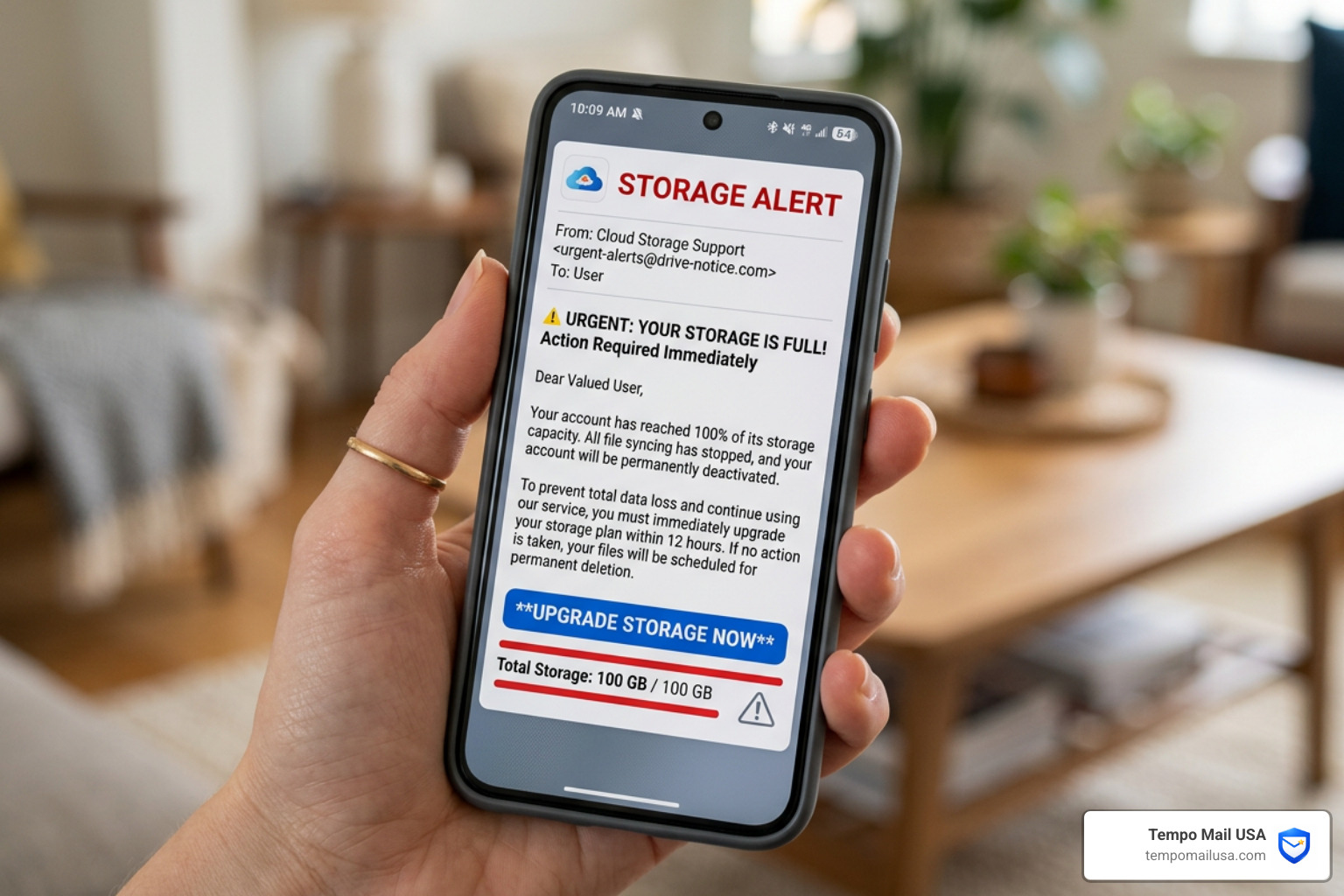
A cloud storage email scam is a phishing attack where criminals impersonate trusted services like Google Drive, iCloud, or OneDrive to trick you into handing over your login credentials or payment details — often by falsely claiming your storage is full or your files are about to be deleted.
Here's what you need to know right now:
- It's fake. Legitimate cloud providers do not send urgent emails threatening immediate file deletion.
- The threat is exaggerated. Google waits up to 2 years before deleting files. Microsoft freezes accounts for around 6 months — not overnight.
- The link is the trap. Clicking leads to a fake page designed to steal your card details or login info.
- You may not even use the service. Scammers send these emails in bulk, targeting anyone whose address was exposed in a data breach.
- The goal is money or data — sometimes both, through fake subscriptions, credential theft, or affiliate fraud.
Quick action if you received one:
- Do not click any links.
- Go directly to your provider's official app or website to check your actual storage.
- If you already clicked or paid, contact your bank immediately.
These scams are everywhere right now. Over the past few years, large-scale campaigns have been flooding inboxes worldwide — sometimes hitting the same person multiple times per day — with alarming messages like "Your photos and videos will be deleted unless you act immediately."
The reason they keep coming? They work. Cloud storage has become deeply personal. Photos, documents, contacts — losing that data feels genuinely scary. Scammers know this, and they exploit that fear on purpose.
By 2025, the world is expected to store more than 200 zettabytes of data in the cloud. That concentration of sensitive personal and financial information makes cloud accounts one of the most valuable targets for cybercriminals today.
What is the Cloud Storage Email Scam?
At its core, the Cloud Storage Email Scam is an exercise in cyber impersonation. We see scammers dressing up their emails to look exactly like official communications from tech giants like Apple, Google, or Microsoft. They aren't just looking for a quick buck; they are after your "digital keys"—your login credentials and payment information.
Why is this happening so much lately? It comes down to the sheer volume of data we store online. According to industry research, 200 zettabytes of data will be stored globally by 2025. For a hacker, your cloud account isn't just a folder of vacation photos; it’s a goldmine containing tax documents, ID scans, work files, and private messages.
These scammers use powerful psychological triggers to bypass your critical thinking. The most common is the fear of data loss. By telling you that your "precious memories" are about to be wiped out due to a "full storage" or a "payment failure," they create a sense of panic. This urgency is designed to make you click before you have a chance to notice the holes in their story.
Whether it's a fake subscription renewal or a warning that your account is blocked, the goal remains the same: to exploit the methods outlined in our guide on How Scammers Steal Emails - 7 Common Methods. They want your data, and they’ll use every trick in the book to get it.
Anatomy of a Cloud Storage Phishing Attack
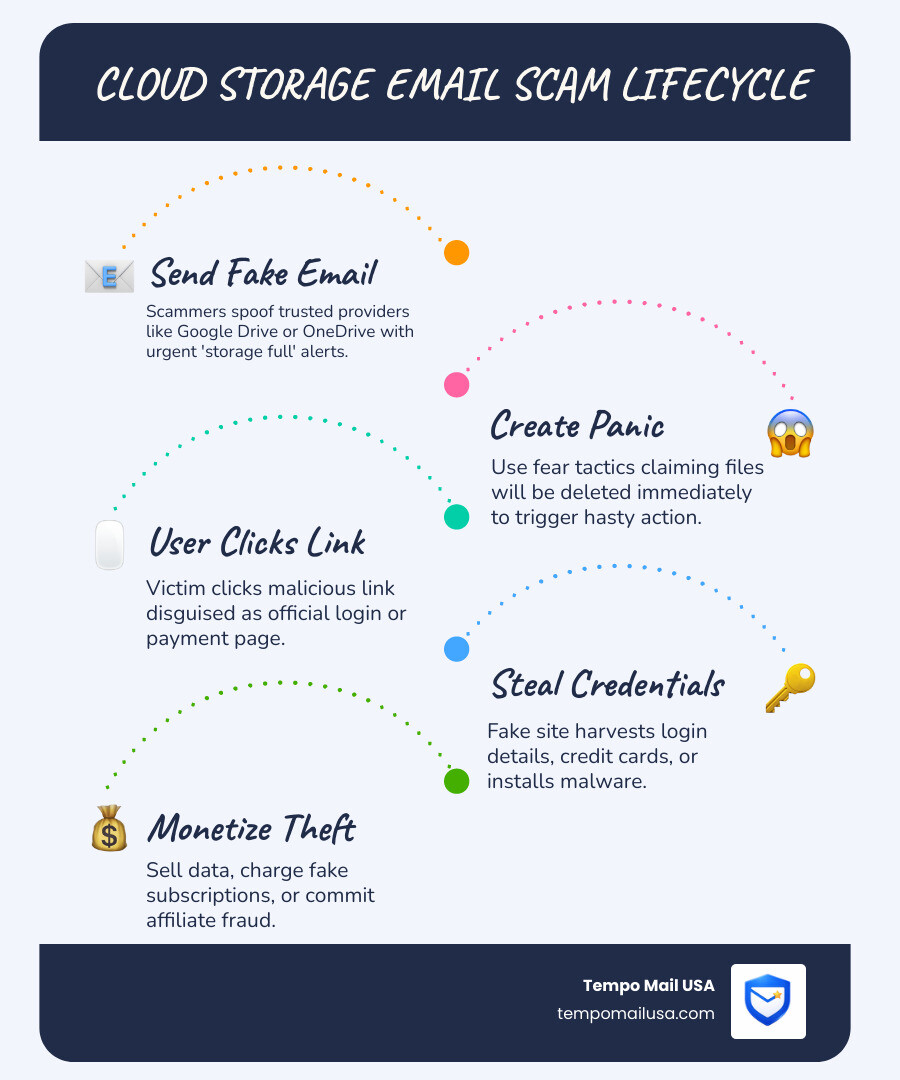
Understanding how these attacks are built can help us spot them a mile away. A typical Cloud Storage Email Scam doesn't just happen in one step; it’s a carefully orchestrated chain of events.
- The Hook (The Email): You receive an email with an alarming subject line like "Action Required: Your iCloud storage is full" or "[Your Name] - Your store is full, click to check and save 80%."
- The Sender: While the name might say "Apple Support" or "Google Drive," the actual email address is usually a random string of characters or a domain that has nothing to do with the company.
- The Personalization: Thanks to data breaches, scammers often know your name or your location. Seeing your real name in a scam email can make it feel much more legitimate.
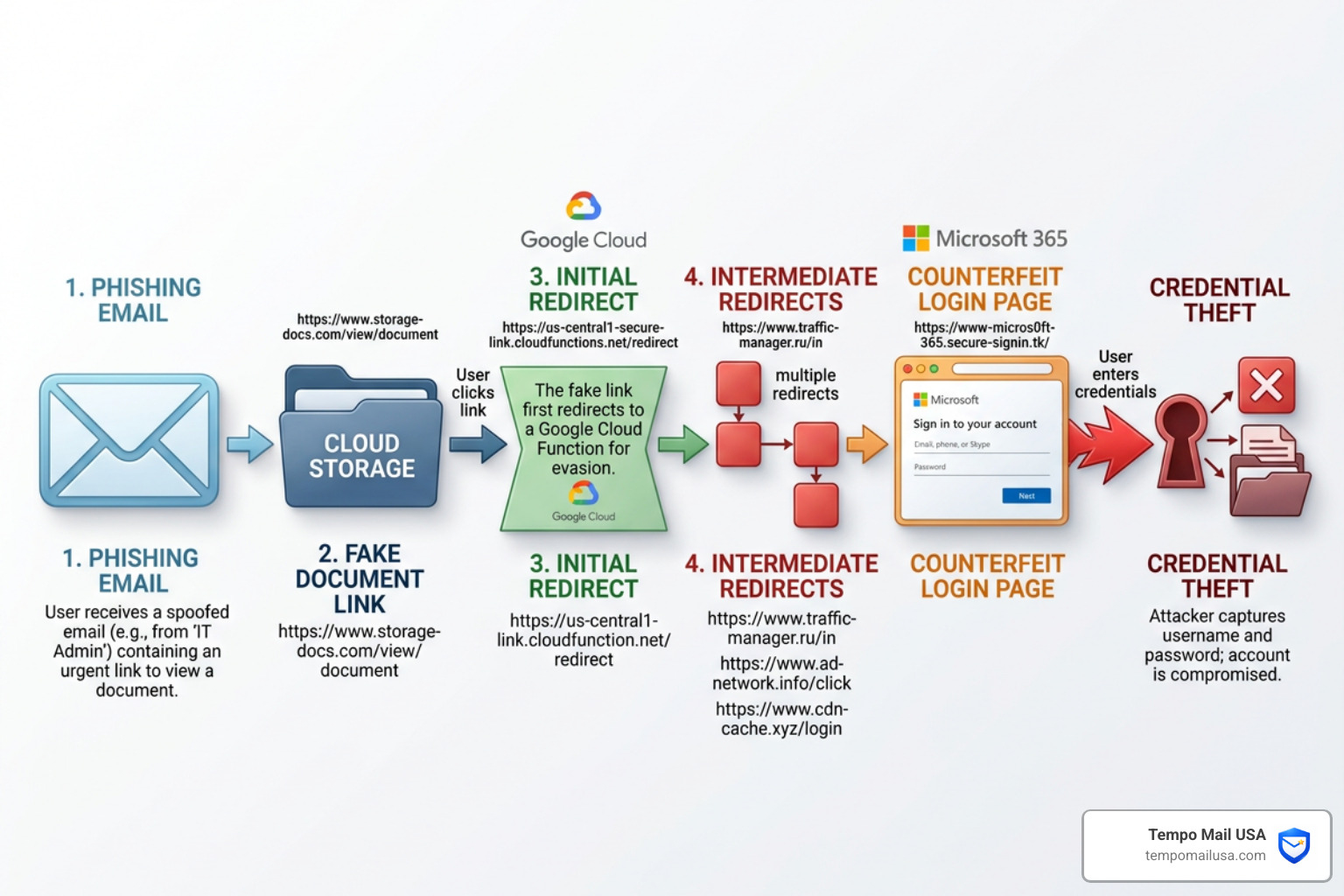
- The Redirect Chain: This is where it gets technical. Scammers often use legitimate services like Google Cloud Storage (
storage.googleapis.com) to host their initial landing pages. Because these links look "safe" to email filters, they often land right in your primary inbox. - The Phishing Page: Clicking the link takes you through a series of redirects to a page that looks like a real login portal. It might even run a "fake scan" of your storage, showing a red bar at 99% capacity to freak you out.
- The Payoff: You are offered a "discounted" upgrade—often just $1.95 or $1.99—to fix the problem. This is a lure to get your credit card details.
Interestingly, some of these scams don't even try to steal your card directly. Instead, they use an affiliate marketing model. They redirect you to legitimate (but aggressively marketed) software like VPNs or antivirus tools. The scammer gets a commission for every person who signs up, turning your fear into their profit. You can learn more about these mechanics from the FTC: Phishing & Cloud Scams resources.
Common Red Flags in a Cloud Storage Email Scam
Even the most sophisticated scams usually leave breadcrumbs. Here are the red flags we should all look for:
- Generic or Odd Greetings: If the email starts with "Dear Customer" or "Valued Member" instead of your name, be suspicious. Conversely, if it uses your full legal name but feels "off," stay alert.
- Mismatched Branding: We’ve seen scam emails that mention Apple iCloud but include a Google logo, or use low-resolution images that look blurry.
- The "$1.99" Lure: Legitimate cloud storage plans usually follow standard monthly pricing (e.g., $0.99, $2.99, $9.99). A "one-time special offer" of $1.95 for 50GB is a classic scam tactic.
- Threatening Language: Phrases like "Immediate Action Required," "Your files will be deleted in 24 hours," or "Account Blocked" are designed to make you act without thinking.
- Suspicious Links: Always hover your mouse over a button or link before clicking. If the URL doesn't match the official website (like
apple.comorgoogle.com), it’s a trap.
Risks of Clicking: From Data Theft to Malware
What actually happens if you click that link? It’s rarely just a "wrong turn" on the internet. The risks are layered and can have long-term consequences.
Credential Harvesting This is the most common goal. By entering your username and password into a fake login page, you are handing the keys to your digital life to a criminal. They can then use those credentials to access your email, social media, and bank accounts—especially if you reuse passwords.
Financial Fraud and Unwanted Subscriptions If you enter your credit card details for that "discounted storage," you aren't just losing $1.99. Scammers may use your card for much larger unauthorized purchases or sign you up for expensive, recurring "membership" subscriptions that are nearly impossible to cancel.
Malware and Spyware In some variations of the Cloud Storage Email Scam, clicking a link or downloading an "account report" attachment installs malware on your device. This could include:
- Spyware: Which records your keystrokes to steal bank logins.
- Ransomware: Which locks your files and demands payment to get them back.
- Adware: Which floods your browser with pop-ups and redirects.
Session Hijacking Sophisticated attackers can steal your "session cookies." This allows them to bypass two-factor authentication (2FA) and log into your accounts as if they were you, without ever needing your password. This is why it’s so important to understand What is a Phishing Scam? Protect Yourself.
How to Verify Your Storage and Respond Safely
If you get an email saying your storage is full, the absolute worst thing you can do is click the link inside that email. Instead, we recommend a "trust but verify" approach—mostly leaning on the "verify" part.
The Manual Check Always go directly to the source. Open a new browser tab and type in the official address yourself:
- iCloud: https://www.icloud.com/ or check via your iPhone Settings.
- Google Drive: https://drive.google.com/ or https://one.google.com/storage.
- OneDrive: https://onedrive.live.com/.
- Dropbox: https://www.dropbox.com/.
Know the Real Policies Scammers count on you not knowing how these companies actually work. Legitimate providers are surprisingly patient:
- Google Drive: Google says that if your plan is canceled, you simply lose access to additional storage space. Your files are only eligible for deletion after 2 years of non-payment or inactivity.
- Microsoft OneDrive: Microsoft follows a similar approach. If you exceed your limit, your account is "frozen." You can still access your files, but you can't upload new ones. Files may only be deleted after 6 months of being frozen.
Legitimate Alerts vs. Scam Emails
| Feature | Legitimate Alert | Scam Email |
|---|---|---|
| Sender Address | Official domain (e.g., @apple.com) | Random or misspelled (e.g., @apple-support-mail.xyz) |
| Greeting | Often includes your name or specific account info | Generic ("Dear User") or overly formal |
| Tone | Informational and helpful | Urgent, threatening, or "too good to be true" |
| Links | Leads directly to the main company site | Leads to storage.googleapis.com or unknown URLs |
| Payment | Standard plan pricing | Weird amounts like $1.95 or $1.99 |
Immediate Steps After a Cloud Storage Email Scam Interaction
If you’ve already interacted with a suspicious email, don't panic. Take these steps immediately:
- Disconnect: If you downloaded an attachment, turn off your Wi-Fi or unplug your ethernet cable to stop any malware from communicating with the attacker.
- Change Passwords: From a different, clean device, change the password for the impersonated service. If you use that password anywhere else, change those too.
- Enable MFA: If you haven't already, turn on Multi-Factor Authentication (MFA). This is your strongest defense.
- Contact Your Bank: If you entered card details, call your bank's fraud department. Tell them you were a victim of a phishing scam. They will likely cancel your card and issue a new one.
- Report It: Follow our guide on How to Report Phishing Email in USA - FTC, FBI, Gmail Steps to alert the authorities and help protect others.
- Scan for Malware: Run a full system scan using reputable security software to ensure no hidden "backdoors" were installed.
Long-Term Protection and Reporting Strategies
Staying safe in the long run requires a shift in how we handle our digital lives. We like to think of it as building a "security habit."
Use a Password Manager Password managers don't just store your passwords; they are an excellent anti-phishing tool. A password manager will only "autofill" your credentials on the real, verified website. If you land on a fake site like icloud-login-secure.com, the manager won't recognize it, which is a huge red flag.
The Power of Temporary Email Aliases One of the best ways to stop these scams before they start is to limit who has your real email address. At Tempo Mail USA, we provide temporary email aliases that act as a "PII Firewall." When you sign up for a new service or download a whitepaper, use an alias. If that service is ever breached, the scammers only get a proxy address that you can easily disable, keeping your primary inbox clean and safe from the Cloud Storage Email Scam.
Reporting is Key Reporting these scams helps the entire community.
- FTC: Submit a report at ReportFraud.ftc.gov.
- CISA: Visit the Cybersecurity & Infrastructure Security Agency (CISA) for current threat advisories.
- Scamwatch: If you are in Australia, use Scamwatch.gov.au.
- Email Providers: Use the "Report Phishing" button in Gmail or Outlook to help their filters learn.
For more tips, check out our comprehensive guide on how to Protect Yourself - How to Avoid Phishing.
Frequently Asked Questions about Cloud Scams
Why do I receive these emails if I don't use the service?
Scammers don't always know which services you use. They use a "spray-and-pray" tactic, sending millions of emails to addresses harvested from old data breaches. If they send an "iCloud" scam to 10 million people, a good percentage of them will be Apple users. It’s a numbers game.
Will my files really be deleted immediately if I don't pay?
No. As we mentioned earlier, companies like Google and Microsoft have lengthy grace periods (6 months to 2 years). Any email claiming your files will be deleted "tonight" or "within 24 hours" is almost certainly a Cloud Storage Email Scam.
Why do scammers use Google Cloud Storage links?
Scammers host their phishing files on storage.googleapis.com because it is a trusted domain. Most email filters see a link starting with "google" and assume it is safe. It’s a clever way to bypass security software and borrow the "legitimacy" of a major tech brand.
Conclusion
The Cloud Storage Email Scam is a persistent threat, but it relies entirely on your reaction. By staying calm, verifying information through official channels, and using the right security tools, you can render these attacks powerless.
At Tempo Mail USA, we believe that privacy is your best defense. By using temporary email aliases, you can shield your personal information and keep your "real" identity away from the hands of scammers. Think of it as a firewall for your identity—one that lets you enjoy the convenience of the cloud without the constant fear of phishing.
Stay skeptical, stay safe, and remember: if an email is trying to scare you into clicking, it’s probably time to delete it. Visit us at https://tempomailusa.com to learn how we can help you take control of your digital footprint today.