
Why You Need a Secure Temp Mail Service for Privacy

Why Every Privacy-Conscious Person Needs a Secure Temp Mail Service
A secure temp mail service gives you a disposable email address that shields your real inbox from spam, data breaches, and unwanted tracking. By using a temporary alias, you ensure that your primary email remains private and protected from the constant barrage of marketing and security risks.
Key benefits of using a secure provider include:
- Spam Prevention: Keep your real inbox clean by using a temporary address for one-off signups.
- Data Breach Protection: If a site is compromised, your real email address isn't in the leaked database.
- Identity Masking: Prevent advertisers and data brokers from linking your online activity to your real identity.
- Automated Cleanup: Messages and inboxes are automatically deleted after a set period, leaving no digital footprint.
Nearly 99% of apps and services require an email address to sign up. That means almost every app you try, every forum you join, and every free trial you claim puts your personal email at risk.
Your inbox becomes a target. Spam floods in. Data brokers harvest your address. And when a company gets hacked, your real email is in that breach.
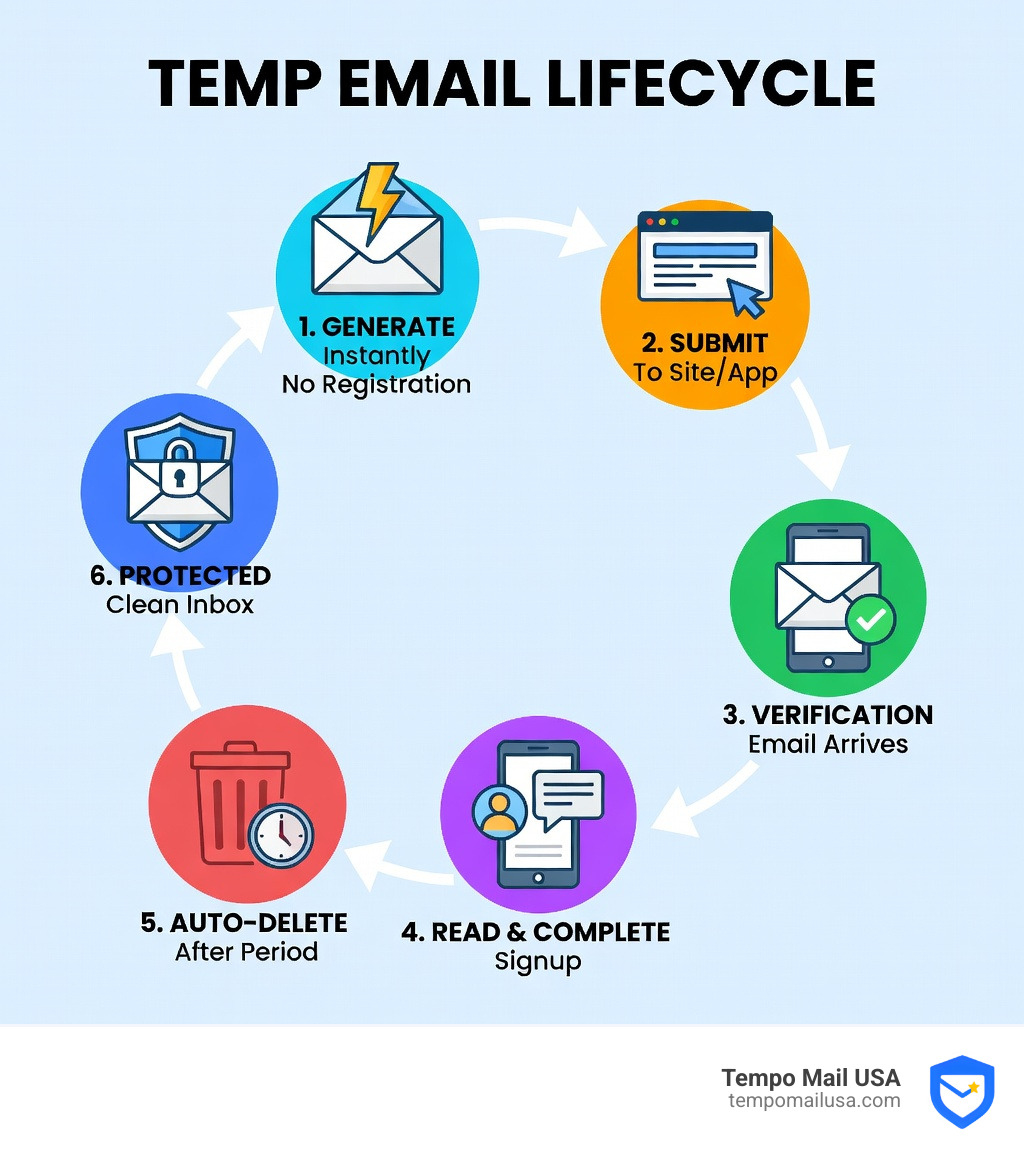
A secure temp mail service solves this by acting as a privacy firewall between you and the internet. You get a working email address, receive what you need, and walk away without leaving a trace.
No spam. No breach exposure. No tracking.
What Defines a Secure Temp Mail Service?
When we talk about a secure temp mail service, we aren't just talking about a random inbox that disappears. We are talking about a sophisticated tool designed to protect your Personally Identifiable Information (PII). In cybersecurity, we call this "identity proxying." Instead of handing over your real identity to a website you might only use once, you use a proxy.
A truly secure provider must go beyond just providing a "fake" address. It needs to handle your data with extreme care. This starts with Zero-Knowledge Architecture. In this setup, even the service provider cannot read your emails. By using client-side encryption, the server only ever receives encrypted text (ciphertext), while the decryption key stays safely in your browser.
Furthermore, What is Temporary Email? Learn to Create One Today is a question many ask when they realize their primary inbox is becoming a landfill for marketing junk. A secure service ensures that the connection between you and the temporary inbox is protected by TLS (Transport Layer Security), preventing anyone from "sniffing" your verification codes as they travel across the web.
Data retention is the next pillar of security. Most traditional email services keep your data forever. A secure temporary provider does the opposite. They have strict policies on when data is wiped. For instance, some services automatically purge inactive mailboxes after a few days, while others let the inbox self-destruct after just ten minutes. This ensures that even if the service were compromised later, there is no historical data to steal. This is a critical part of How Secure Temp Mail Protects You from Data Breaches.

Top Features of a Secure Temp Mail Service
Not all disposable emails are created equal. If you are looking for the best protection, we recommend keeping an eye out for these specific features:
- Malware Prevention: Some advanced services block file attachments entirely. Why? Because attachments are the primary way malware and viruses are distributed. By restricting the inbox to text and HTML, the service eliminates a massive attack vector.
- Auto-Purge: This is the "self-destruct" button. Whether it’s 10 minutes or 30 days, the service should have a clear, automated schedule for deleting messages.
- Session Persistence: Have you ever refreshed a page and lost your temporary email address? A secure service uses LocalStorage to keep your session alive even if you accidentally close the tab, ensuring you don't get locked out of a signup process.
- Secure Message Viewing: The interface should be clean and free of tracking pixels. Many marketers hide tiny images in emails to see if you've opened them; a secure temp mail service strips these out.
- Instant Generation: You shouldn't have to fill out a form to get an anonymous email. If a service asks for your name or phone number to give you a "temporary" address, run the other way!
Privacy Standards and Compliance
We believe that a secure temp mail service should treat your privacy as a legal right, not just a feature. This means aligning with global standards like the GDPR (General Data Protection Regulation). Even if the service is free, it should follow data minimization principles—only collecting the bare minimum needed to function.
A key standard to look for is Zero-Logging. The provider should not store your IP address, your browser fingerprint, or your physical location. When you create a mailbox, the only data points should be a randomly generated name and a timestamp.
Furthermore, Protect Yourself - Why Email Privacy Matters because your email is essentially your digital passport. If a service doesn't mask your IP, a website could still link your "anonymous" temp mail back to your home network. Secure providers use their own servers as a shield, so the destination website only sees the temp mail's server info, not yours.
Comparing Secure Temp Mail Options
Choosing the right type of disposable email depends on what you are trying to achieve. Some users need a quick address for a one-time download, while others need a more "reputable" domain to bypass strict signup filters.
| Feature | Standard Disposable Domains | Custom/Premium Domains |
|---|---|---|
| Reputation | Often blacklisted by major sites | High (looks like a real email) |
| Deliverability | Medium - Some emails go to spam | High - Bypasses filters |
| Privacy | High - No link to real identity | High - Professional proxy |
| Use Case | Quick downloads, pranks | Business trials, SaaS signups |
Standard disposable domains are great, but many big companies have caught on. If you've ever tried to sign up for a service and got an error saying "Please enter a valid email address," it's because that domain is on a blacklist.
To solve this, some services maintain pools of real Gmail and Outlook accounts. When you use these, you get the deliverability of a "Big Tech" domain without the privacy invasion. This is a deep topic we cover in The Ultimate Guide to Private Disposable Email.
Why a Secure Temp Mail Service is Superior to Basic Email Tricks
You might have heard of the "plus trick" or "subaddressing." This is where you add a plus sign to your Gmail address (e.g., yourname+service@gmail.com). While it helps with filtering, it is terrible for privacy.
First, any advertiser can simply strip away the "+service" part to reveal your real email. Second, it doesn't protect you from data breaches. If "service.com" gets hacked, your real email prefix is still exposed. If you want to see if your real address has already been compromised, you should Check if your email has been leaked immediately.
Using a dedicated secure temp mail service provides a total break in the chain. There is no mathematical way to link a random temp address back to your personal Gmail. This is the gold standard for Email Privacy & Cybersecurity.
Custom Domains vs. Random Generators
Random generators are the "fast food" of the email world—quick, easy, and effective. However, if you are testing a professional software product or signing up for a high-end SaaS tool, you might need something that looks a bit more "real."
Custom domain support allows you to use a professional-looking address while still maintaining the "disposable" nature of the service. Some services even offer a "Smart Inbox Preview," which lets you monitor multiple temporary inboxes at once without having to flip between tabs. This is particularly useful for developers or marketers who are testing multiple platforms simultaneously.
Best Use Cases for Temporary Addresses
We see users finding creative ways to use temporary mail every day. Here are the most common (and smartest) ways to use them:
- Free Trials and Downloads: Want to try Amazon Prime, Hulu, or a new AI tool without the commitment? Use a temp mail. If you forget to cancel, they can't nag your real inbox forever.
- Software Testing: Developers use secure temporary email APIs to test email workflows. With API access, you can programmatically fetch mailboxes and messages to ensure your app's "Forgot Password" or "Welcome" emails are working perfectly.
- Avoiding "Gated" Content: We've all been there—you just want to read one article or download one PDF, but the site demands an email. A disposable email gets you in and out in seconds.
- Loyalty Cards and Retailers: Stores love to hack their own databases (accidentally, of course). Don't give your real email to a clothing brand just for a 10% discount. Use a temp address and save the coupon code.
- Social Media Verifications: If you are creating a secondary account for a specific hobby or project, a temp mail keeps that account completely separate from your personal life. Check out Tempomail - Your Go-To Solution for Disposable Emails for more ideas.
Security Risks of Unsecure Temp Mail
It is important to remember that not every "free" service is actually safe. Some low-quality temp mail providers have major security flaws:
- Shared Inboxes: Some services don't generate unique addresses. If you use "hello@tempmail.com," someone else might be able to see your emails if they type in the same address.
- Unencrypted Databases: If the provider doesn't use encryption, their staff (or hackers) can read every verification code and private link sent to you.
- Domain Blacklisting: If a service uses "spammy" domains, your emails won't even arrive.
- The Attachment Trap: As mentioned before, if a temp mail service allows attachments without scanning them, you are one click away from a ransomware infection.
Always choose a service that emphasizes its security architecture. Your goal is to Safeguard Your Online Identity, not exchange one risk for another.
Frequently Asked Questions about Disposable Email
How long do temporary emails last?
It varies by provider. Some last only 10 minutes, while others stay active as long as your browser window is open. Premium services may keep an address alive for 30 days or until you manually delete it. Secure providers typically offer clear expiration policies, such as deleting after a period of inactivity or after a set duration like a few hours.
Is it legal to use a temporary email for signups?
Yes, it is perfectly legal to use a secure temp mail service for lawful purposes. While some websites' Terms of Service might discourage it, there is no law against protecting your privacy. However, never use them for illegal activities or to bypass security on government or banking sites.
Can I recover a deleted temporary inbox?
In most cases, no. This is actually a security feature! Once an inbox is destroyed, the data is wiped from the server to ensure your privacy. If you receive something important, make sure to copy the text or save the information before the timer runs out.
Conclusion
In an era where your data is the most valuable currency, a secure temp mail service is your best defense. By acting as a proxy for your identity, it ensures that your real inbox remains a private space for friends, family, and important business—not a target for every marketer on the planet.
At Tempo Mail USA, we believe in the power of the "Identity Firewall." Whether you are a developer testing a new app, a shopper looking for a deal, or a privacy advocate hiding from trackers, using a disposable email is the simplest cybersecurity upgrade you can make today.
Keep your real identity safe, keep your inbox clean, and take control of your digital footprint.
Ready to protect your privacy? TempomailUSA - Privacy-Focused TempMail is here to act as your secure shield in the digital world.
Need a disposable temporary email?
Protect your real inbox from spam and promotional clutter instantly and free.
Received a suspicious email, text, or charge alert?
Verify whether the sender domain is disposable, spoofed, or unverified before clicking links.