

What Is Email Verification? The Checks, the Verdicts, and What They Can't Tell You
What Is Email Verification? The Checks, the Verdicts, and What They Can't Tell You
Ask ten people what email verification is and you will get at least three different answers, and two of them will be describing something else entirely. One person means the code a website texts or emails you when you sign up. Another means a tool that cleans a mailing list. A third means the padlock-and-checkmark machinery — SPF, DKIM, DMARC — that decides whether a message is really from who it claims to be from. All three use the same two words. They are not the same job, they do not answer the same question, and confusing them is how people end up trusting a result that never promised what they think it promised.
This guide is about the middle one: the verifier. What it checks, in what order, what each verdict actually means, and — the part the verifier companies rarely put on their homepages — what no verification can ever tell you. I also ran the checks myself on live domains, including a real temporary inbox, so the examples below are observed, not assumed.
Three different things are hiding under one name
Before the definition, the disambiguation, because this is where most of the confusion lives.
A verification email is the message a service sends you when you create an account: a link to click or a six-digit code to type in. Its question is narrow — does the person signing up control this inbox right now? It proves ownership, and it proves it in the moment. It says nothing about whether the address will still exist next month, and it says nothing about whether the address belongs to a real person rather than a throwaway inbox created thirty seconds ago. The code that lands in your inbox is a different tool from the verifier, and we wrote separately about how those verification codes actually work, including why they expire and why they sometimes never arrive.
A verifier is a tool that examines an address without sending it anything and estimates whether mail sent to it would arrive. Its question is deliverability: is this address shaped correctly, does its domain exist, does that domain accept mail, does the specific mailbox exist? No message is ever sent in the process. No human is involved. It is a pre-send audit, not a proof of identity.
Email authentication — SPF, DKIM and DMARC — is a third thing again. It checks the sender, not the recipient: does this message really come from the domain it claims to come from? It answers a forgery question. It cannot tell you whether the address you are sending to exists.
Keep those three apart and the rest of this guide reads cleanly. Mix them up and every verdict below will look like it means more than it does.
The short answer: what email verification actually is
Email verification is the process of checking whether an email address is genuine and able to receive mail, before you send anything to it.
A verifier takes an address and runs it through a sequence of checks that get progressively more expensive — starting with instant, local questions (is it even shaped like an email?) and ending, for the addresses that survive, with a network conversation that asks the domain's mail server whether the mailbox exists. The output is not a plain yes or no. It is a status (deliverable, risky, undeliverable, or unknown), a reason, and a set of flags describing what kind of address it is.
Two properties of that definition matter more than the rest. First, verification happens before sending. The entire point is to find dead addresses without paying for the bounce. Second, it is an estimate built from evidence, not a fact. A verifier can prove that a mailbox answered "yes, I exist" a minute ago; it cannot prove that a human will ever read what you send, that the address was not created to catch spammers, or that the person behind it consented to hear from you. Hold that thought — the limits section below is the most useful part of this article.
If you want the practical side — how to actually verify an address yourself, step by step, with free tools — our companion guide on how to verify an email address walks through the process from the doer's side. This article is the explainer: what the term means and what the machinery underneath it does.
What a verifier checks — and what each check can prove
Under the hood, verification is a pipeline of filters. Each one answers a single question and hands the survivors to the next. The order is deliberate: cheap checks first, so the expensive network conversations only happen for addresses that have already passed everything else. Here is the pipeline, with what each stage can and cannot prove.
1. Syntax: is it shaped like an address? The verifier checks the string against the format rules for email addresses (RFC 5322): one @, a local part before it, a domain after it, no spaces, no illegal characters. This catches the pasted commas, the missing @, the ".con" typos, the accidental space at the end of a form field. It proves nothing about the real world — "nobody@nowhere12345.fake" is perfectly valid syntax — but it kills the largest single class of bad addresses for free, in microseconds.
2. Domain: does the domain exist? The verifier looks the domain up in DNS. If the domain does not exist at all — it was mistyped, it lapsed, it was invented — the address cannot receive mail, and the check stops here. This is the stage that catches "gmial.com" and domains that expired since the contact was collected.
3. MX records: does the domain accept mail? A domain can serve a website perfectly well while being incapable of receiving email. The verifier asks DNS for the domain's MX records — the list of mail servers nominated to receive its mail. No MX records means no inbox exists behind that domain, full stop. I tested this live: guccimail.com, a domain that turns up in temp-mail lists, currently returns no MX records at all, which means any address at that domain is undeliverable right now, whatever it looked like when it was collected.
4. Disposable and role-based flags: what kind of address is it? Before the expensive check, most verifiers consult lists. Is the domain a known disposable or temporary-mail provider? Is the local part a role address like admin@, support@, or info@? Neither flag makes an address undeliverable — a disposable address receives mail just fine, and role addresses are usually real — but both change what the address is worth. A disposable address will stop existing; a role address is rarely the person you think you are reaching.
5. SMTP mailbox check: does the mailbox exist? This is the check the whole industry is named after, and the only one that talks to the receiving server. The verifier opens a connection to the domain's mail server and begins the delivery conversation defined by SMTP (RFC 5321): it says hello, states a sender, and asks about the recipient with an RCPT TO command. The server answers with a code — 250 means the mailbox exists and will accept mail; 550 usually means no such mailbox. Then the verifier disconnects without ever sending a message. No email is delivered, no human sees anything, and the mailbox owner never knows the check happened. It is a knock on the door to see if anyone answers, then leaving before the door opens.
6. Catch-all detection: does this domain accept everything? Some domains are configured to accept mail for any local part, real or invented — a catch-all. When a verifier's probe gets a "yes" for an obviously fake address, it knows the SMTP answer cannot be trusted for that domain, and the address gets flagged catch-all instead of valid. This matters because a catch-all "valid" is a guess wearing a lab coat.
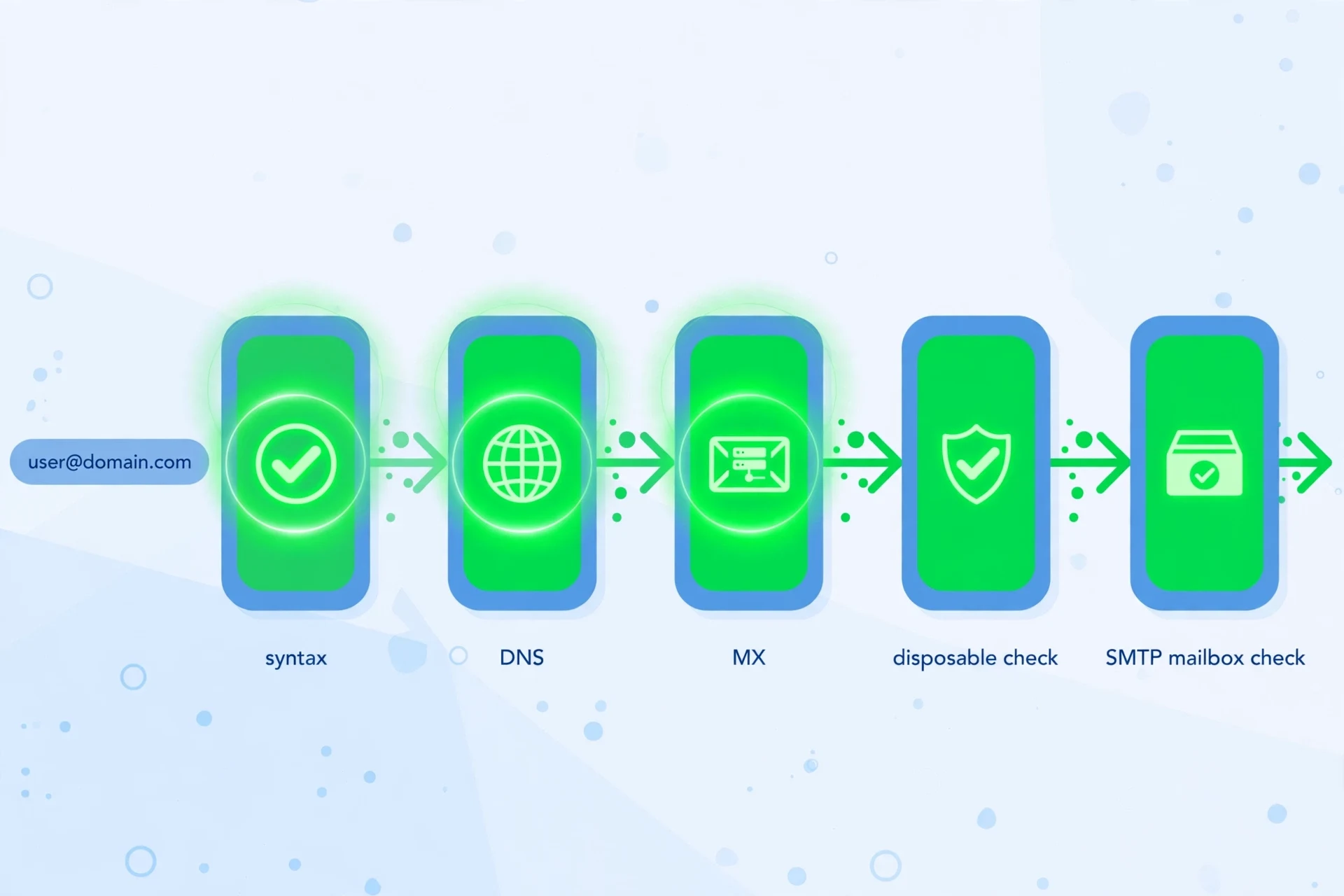
That is the whole machine. Six checks, each cheaper than the one after it, each proving a little more and each with a hard limit on what it can say. A verifier that skips the SMTP stage is really a validator with ambitions; a verifier that trusts the SMTP answer on a catch-all domain is guessing. The honest ones tell you which stage produced the verdict.
The verdicts, decoded: Valid, Risky, Catch-all, Disposable, Unknown
The output of all that work is a status, and the statuses are where people get into trouble — because they read like certainties and they are not. Here is what each one actually means, and what to do with it.
| Status | What it actually means | What to do |
|---|---|---|
| Valid / Deliverable | Every check passed: syntax, domain, MX, and the mail server confirmed the mailbox | Safe to send to, as far as anyone can tell without sending |
| Invalid / Undeliverable | At least one check proved the address cannot receive mail — bad syntax, dead domain, no MX, or the server rejected the mailbox | Remove it. Sending to it only earns you a bounce |
| Risky | The address exists but something about it is unreliable — a catch-all domain, a role address, or a server that gave an ambiguous answer | Send only if you have a real relationship with the person; never to a cold list |
| Catch-all | The domain accepts every address, so the SMTP check proved nothing about this specific mailbox | Treat as a guess. It might be real, it might be invented — the verifier could not tell |
| Disposable | The domain belongs to a temporary or throwaway-mail service | Expect it to vanish. Fine for a signup test, useless for a list you will mail next month |
| Unknown | The check could not finish — the mail server was unreachable, timed out, or blocked the probe | Retry later, or accept it as a coin flip. Do not treat it as valid by default |
Read that table again and notice what is missing: there is no status for "a real person who wants your email." Verification has never been able to produce one. A pristine spam trap — an address created by a blocklist operator specifically to catch senders who mail addresses they should not have — passes every check on this list with flying colours. It is syntactically perfect, its domain exists, its MX records are correct, and its mail server cheerfully confirms the mailbox. The only thing wrong with it is that mailing it gets you listed. No verifier can see that, because the thing that makes it dangerous is not in any check the verifier runs. That is the single most important limitation in this entire article, and it is the reason verification is a hygiene step, not a safety guarantee.
I ran the checks live: three domains, one temp inbox
Claims are cheap, so here is what I actually did, on the morning of 24 November 2026, from this machine — and where I hit a wall.
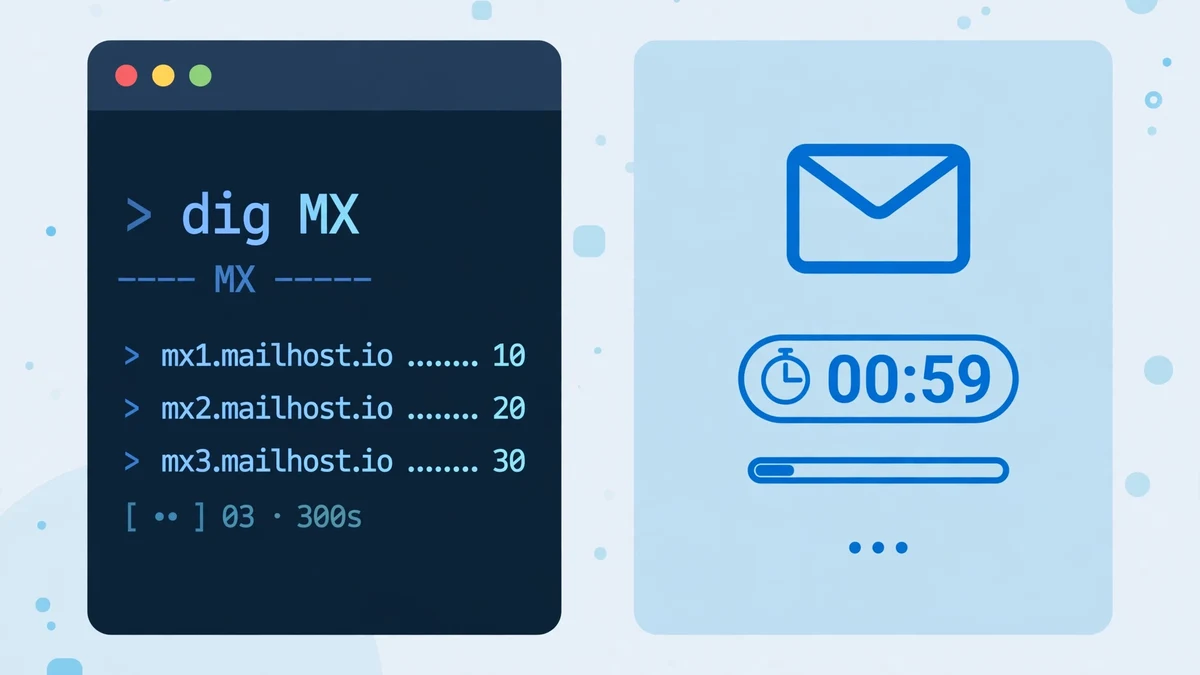
The DNS half ran cleanly. A live MX lookup for gmail.com returned five mail hosts (alt1 through alt4 plus the primary gmail-smtp-in host, priorities 10 to 40). A lookup for rover.info — the domain behind the temporary inbox I generated on the tempomailusa.com homepage, address olnjp77@rover.info — returned exactly one MX host, mx.fex.plus. And guccimail.com returned nothing at all: no MX records, which settles that domain as undeliverable without any further work. Three domains, three different answers, all from the same cheap DNS query that any verifier runs in its second and third stages. Nothing here required a paid tool.
The temp inbox behaved exactly as the disposable flag predicts. The address olnjp77@rover.info was generated instantly on the tempomailusa.com homepage, the live inbox loaded empty with auto-refresh running, and the page showed "Expires in 29d 8h 8m 58s" — free inboxes last 30 days, Pro inboxes 365. Two observations worth noting: the same address persisted across visits in the same browser (it was the same address an earlier check had generated hours before, its countdown simply ticked down), and the domain behind it has exactly one MX record. A verifier looking at this address would pass it through syntax, DNS and MX without blinking — and then flag it disposable, because rover.info is a known temporary-mail domain. The address works. It receives mail. It will also stop existing, and any list that keeps it is keeping a dead address with a timer on it.
The SMTP half hit a wall I will not pretend away. My attempt to run a live SMTP handshake — connecting to a mail server on port 25 and issuing the RCPT TO probe — hung: outbound port 25 is blocked from this environment, and the connection attempts never completed. So the SMTP stage in this article is described from the protocol (RFC 5321) and from how verifiers document their own behaviour, not from a handshake I completed myself. That is a limitation of my test setup, not of the technique — verifiers run this probe from servers where port 25 is open — but I would rather say so than dress up a description as an experiment. The DNS results and the temp-inbox test above are the parts I observed directly.
For the hands-on version of the DNS half — running these lookups yourself and reading the results — our guide to email verification online covers the free tools that do exactly this without you touching a terminal.
Where temp mail fits — and why signups reject it
This is the question that brings most readers of this site to the topic, so here is the honest answer: a temporary email address passes most of email verification. It passes syntax. Its domain exists. Its MX records are real — one host, mx.fex.plus, in the case I tested. If a verifier bothers with the SMTP probe, the server will confirm the mailbox, because the mailbox genuinely exists and genuinely receives mail.
What it does not pass is the disposable flag, and that is the whole story. Verification tools keep lists of disposable domains, and a temp-mail domain is on those lists within days of appearing. The verdict comes back "disposable," and then the service you are signing up for makes its own decision: some accept it, many do not. That is why the same temp address sails through one signup form and gets rejected by the next with a polite "please use a real email address." Nothing about the address changed between the two forms. The receiving service's policy did.
There is a second, quieter reason signups reject temp mail, and it has nothing to do with verification at all. A signup is the start of a relationship: password resets, security alerts, receipts, and the "was this you?" message after a login from a new device all travel by email. A temp inbox that expires in 30 days breaks that relationship by design. Services that reject disposable addresses are not really objecting to the address — they are objecting to the account becoming unrecoverable the moment the inbox vanishes. If you are the person signing up, that is worth weighing too: the same inbox that protects your privacy also locks you out of your own account if you ever need a reset link after it expires. A burner email has the same trade-off, and it is worth understanding before you use one for anything you might need back.
None of this makes temp mail useless — it makes it a tool with a specific job. Testing a signup flow, keeping a one-off download out of your real inbox, reading a verification code without handing over your permanent address: all legitimate, all exactly what a disposable inbox is for. Building a mailing list out of disposable addresses, or signing up for an account you will need in a year, is the opposite job, and verification is the mechanism that tells the two apart.
When verification is worth paying for, and when it is not
Verification is a tool for lists, not for single addresses. If you are checking one address — your own, a colleague's, a signup you are testing — the free tier of any online verifier, or even a manual MX lookup, tells you everything a paid service would. The paid products earn their money at volume: cleaning an imported list before a campaign, checking addresses at the point of signup so typos never enter your database, and keeping your bounce rate low enough that providers keep delivering your mail. Google tells bulk senders to keep their spam complaint rate under 0.1%, and while that number is about complaints rather than bounces, the direction is the same: providers watch how much of your mail fails, and they throttle senders whose lists are dirty.
Pay for it when you are about to mail a list you did not collect yourself, when you inherited a list from a merger or a purchased company, or when your list has not been mailed in six months and some meaningful share of it has gone stale. Do not pay for it to check a handful of addresses, to "verify" a list of people who already open your emails every week, or to re-verify the same list every month out of anxiety — addresses do not decay that fast, and re-verifying an engaged list is paying to be told what your open rates already said. And never pay a verifier that promises to confirm a person consents to your mail, or that its "valid" verdict protects you from spam traps. It cannot do either, and a vendor that says otherwise is selling the confusion this article started with.
If you want to try the free tier before spending anything, our roundup of free email verification tools compares the genuinely free options — what each one checks, where each one stops, and which ones are just a signup form for a paid plan.
Frequently asked questions
What is email verification in simple terms? It is checking whether an email address can receive mail, without sending it anything. A verifier runs the address through syntax, domain, MX-record and mailbox checks, and returns a verdict: deliverable, risky, catch-all, disposable, or unknown. It estimates deliverability; it does not prove a person owns the address or wants your mail.
Is email verification the same as email validation? Mostly, but not exactly. Validation is usually the lighter half — syntax and format, sometimes domain checks. Verification is the heavier process: validation plus DNS, MX, SMTP mailbox probing, and disposable and catch-all detection. People use the two words interchangeably, and most tools do both, but when a vendor says "verification" you should expect the mailbox check to be included.
What is the difference between email verification and a verification email? A verification email is a message sent to you with a link or code, and you prove you control the inbox by clicking or typing it. A verifier never sends a message at all — it inspects the address and asks the mail server about the mailbox. The first proves ownership in the moment; the second estimates whether mail would arrive. A temp inbox passes the second easily and the first only until it expires.
Can email verification tell me if an address is real? It can tell you whether the mailbox exists and will accept mail, which is the closest any automated check gets. It cannot tell you whether a human reads it, whether the person consents to your mail, or whether the address is a spam trap — a trap passes every check, because the checks only test deliverability. "Real" is doing too much work in that question; ask instead whether the address is deliverable, and whether you have a relationship with the person behind it.
Does email verification work on temporary email addresses? Yes, and that is the point most people miss. A temp address passes syntax, DNS, MX and usually the SMTP mailbox check, because it is a genuine working mailbox. What it does not pass is the disposable flag: verifiers keep lists of temp-mail domains, and the verdict comes back "disposable." Whether that matters depends on the receiver — some services accept disposable addresses, many reject them at signup.
How accurate is email verification? For the question it actually answers — will mail to this address bounce — good verifiers are accurate on clear-cut cases: dead domains and nonexistent mailboxes are caught reliably. Accuracy falls apart at the edges: catch-all domains, servers that block probes, and greylisting all produce "unknown" or guessed verdicts. Treat the output as a decision signal with a confidence level, not a fact, and treat "valid" as "safe to try," not "guaranteed to reach a human."
How long does email verification take? A single address usually takes under a second for the cheap checks, longer if the SMTP stage has to wait on a slow mail server. A list of ten thousand addresses takes minutes to a few hours depending on the provider, because responsible verifiers throttle their probes rather than hammering mail servers. A vendor that claims to verify a million addresses instantly is either skipping the SMTP stage or lying about it.
Need a disposable temporary email?
Protect your real inbox from spam and promotional clutter instantly and free.
Received a suspicious email, text, or charge alert?
Verify whether the sender domain is disposable, spoofed, or unverified before clicking links.