

Therapy Secure Email: The HIPAA Rules Therapists Actually Break — and the Setup That Holds Up
Therapy Secure Email: The HIPAA Rules Therapists Actually Break — and the Setup That Holds Up
A prospective client finds your practice online, clicks the contact form, and types three sentences about why they need help. They are not your client yet. No intake paperwork is signed, no consent form exists, and no money has changed hands. Under HIPAA, that message is already protected health information.
That is the fact most therapy practices get wrong first, and it is the reason this guide starts there instead of with a list of email providers. Protected health information covers information about a person's past, present, or future health care — and the word future does the work. An inquiry about booking therapy is PHI from the first keystroke. The email system that receives it has to be compliant before the person ever becomes a patient, not after.
I am not a lawyer and this is not legal advice. What follows is the plain-English version of what HIPAA requires of a therapist's email, the two categories of records that carry stricter rules than most clinicians expect, what the main providers actually cost, and the setup order that covers the basics without turning your practice into an IT department. I also tested a disposable inbox live while writing this, because the fastest way to understand what secure email is not is to watch the wrong tool do its job perfectly.
The one-sentence answer
For a therapy practice, HIPAA-compliant email means email brought under the HIPAA Security Rule with a signed Business Associate Agreement from every vendor that handles protected health information, encryption in transit and at rest, unique logins, and audit controls — plus a documented risk analysis that includes email. Personal Gmail fails that test. So does personal Outlook, Yahoo, or any free account, no matter how strong the password is. The account is not the problem. The missing contract is.
What HIPAA actually requires of your email
The Security Rule does not hand you a shopping list of products. It hands you safeguards, and some are required while others are "addressable" — meaning you must assess them and either adopt them, adopt an equivalent, or document why neither is reasonable (45 CFR 164.306(d)(3)). Encryption is addressable, which surprises people, but the assessment is not optional, and properly encrypted PHI that is lost does not trigger breach notification — a strong practical reason to encrypt anyway.
| Requirement | Citation | Required or addressable | What it means for a solo practice |
|---|---|---|---|
| Risk analysis covering email | 45 CFR 164.308(a)(1)(ii)(A) | Required | A written look at where client email lives, who can reach it, and what could go wrong |
| Business associate agreement | 45 CFR 164.308(b)(1), (b)(3) | Written contract required | Your email vendor signs a BAA or it is not your vendor |
| Unique user identification | 45 CFR 164.312(a)(2)(i) | Required | Every clinician and staff member gets their own login — no shared inbox password |
| Audit controls and activity review | 45 CFR 164.312(b), 164.308(a)(1)(ii)(D) | Required | The system logs access and someone actually reviews the logs |
| Encryption of stored ePHI | 45 CFR 164.312(a)(2)(iv) | Addressable | Messages and attachments encrypted where they sit, not just while moving |
| Transmission encryption | 45 CFR 164.312(e)(2)(ii) | Addressable | Messages encrypted on the wire and, ideally, still encrypted in the recipient's mailbox |
| Workforce training | 45 CFR 164.308(a)(5) | Required | Staff know the rules — including the front-desk person who answers the intake email |
A solo therapist carries the same requirements as a group practice, with the flexibility the rule allows for "the size, complexity, and capabilities" of the practice and "the costs of security measures" (45 CFR 164.306(b)(2)). You are also, in most solo practices, the security official the rule requires every practice to name (45 CFR 164.308(a)(2)). There is no smaller version of the rule for a one-person office. There is only a proportionate version of the effort.
Two categories that catch therapists out
Most of HIPAA treats all protected health information alike. Two categories do not, and both sit squarely in a therapy practice.
Psychotherapy notes. These are the notes a mental health professional records documenting or analyzing the contents of a conversation during a private counseling session, kept separate from the rest of the record (45 CFR 164.501). A practice generally must obtain the patient's authorization before disclosing them — even to another provider for treatment (45 CFR 164.508(a)(2)). That is stricter than ordinary treatment records, which can move between providers without authorization. The practical consequence for email: psychotherapy notes should never travel by ordinary email at all. If a note has to move, it moves through the same encrypted, BAA-covered channel as everything else, with an authorization on file — and if your email habit includes forwarding session notes to yourself at a personal address "to work on later," that habit is the violation, not the convenience.
Substance use disorder records. Records covered by 42 CFR Part 2 — the federal rules for substance use disorder patient records — carry their own consent requirements that are stricter than HIPAA's. A practice that treats addiction alongside general therapy has to know which records fall under Part 2 before it decides how email handles them. If your practice touches substance use treatment, ask your attorney which of your records Part 2 covers before you choose an email setup, not after.
What getting it wrong costs in 2026
HHS enforces HIPAA through four civil penalty tiers set by culpability, under 42 U.S.C. § 1320d-5 and 45 CFR § 160.404. The January 28, 2026 inflation adjustment sets the current amounts, and HHS published no further adjustment in October 2026, so these are the operative figures: $145 to $73,011 per violation for a practice that did not know and could not reasonably have known; $1,461 to $73,011 for reasonable cause; $14,602 to $73,011 for willful neglect corrected within 30 days; and $73,011 to $2,190,294 per violation for willful neglect left uncorrected, with a calendar-year cap of $2,190,294 per violation type. HHS also still applies lower discretionary annual caps for the lower tiers under its 2019 notice of enforcement discretion.
Those are the maximums, and most small-practice enforcement ends in a corrective action plan rather than a headline fine. But the number that should worry a therapist is not the maximum. It is the tier. An unencrypted inbox with no BAA, discovered after a breach, is very hard to describe as "did not know." The difference between tier 1 and tier 4 is the difference between a mistake and a decision — and the decision is made the day you keep using the free account, not the day something leaks.
The context around you is not getting quieter, either. GoodRx agreed to pay $32 million over health data shared with advertisers, and the claim window is still open until December 29 — our GoodRx settlement post has the deadline and the scam emails already riding it. Your clients read those stories. The next one asks, before sending you anything sensitive, how their email is protected.
The providers, priced honestly

Every provider below will sign a BAA. That is the entry ticket, not the differentiator. The differences are price, how much friction your clients feel, and whether the service was built for a practice or adapted to one.
Hushmail for Healthcare is the one built for therapists first. Encrypted email, secure web forms for intake, and a BAA included. Healthcare plans start at $11.99 a month, with a 60-day money-back guarantee. Clients receive a notification with a link and read your message through a secure portal — one extra click for them, which is the price of the model. If your intake volume is mostly forms and appointment emails, this is the default recommendation, and it is the one most therapist communities name first.
MailHippo takes the opposite approach: it layers HIPAA-compliant sending on top of the email you already use, including Gmail and Outlook. Basic plans start at $4.95 a month after a 30-day free trial, and a BAA is included. It is the cheapest honest option, and the right pick if you refuse to change inboxes but accept that your underlying account still needs its own BAA and configuration.
Proton Mail offers end-to-end encryption and will sign a BAA on its business plans. It is the strongest on pure encryption, and the weakest on therapy-specific workflow — no intake forms, no practice tooling. Choose it if encryption is your top priority and you already handle intake elsewhere.
Google Workspace can meet HIPAA requirements, but only as Workspace with proper configuration and a signed BAA — personal Gmail never qualifies, whatever the settings. The same is true of Microsoft 365: Outlook is compliant through business-level plans with a BAA, not through a personal account. Both are good choices if your practice already lives in Google or Microsoft, and traps if you assume the familiar logo means the familiar account is covered. It does not.
Paubox encrypts without making your clients log into a portal, which removes the one friction point Hushmail introduces. That convenience costs more than Hushmail's entry plan, and it is worth it for practices whose clients are older, less technical, or already confused enough about starting therapy.
None of these is "the best." The best is the one your clients will actually use and your staff will actually maintain. A portal your clients ignore produces phone calls with clinical details left on voicemail, which is worse than a slightly less elegant encrypted message. Pick on that basis, not on a feature table.
I tested a disposable inbox. It is the opposite of what you need.
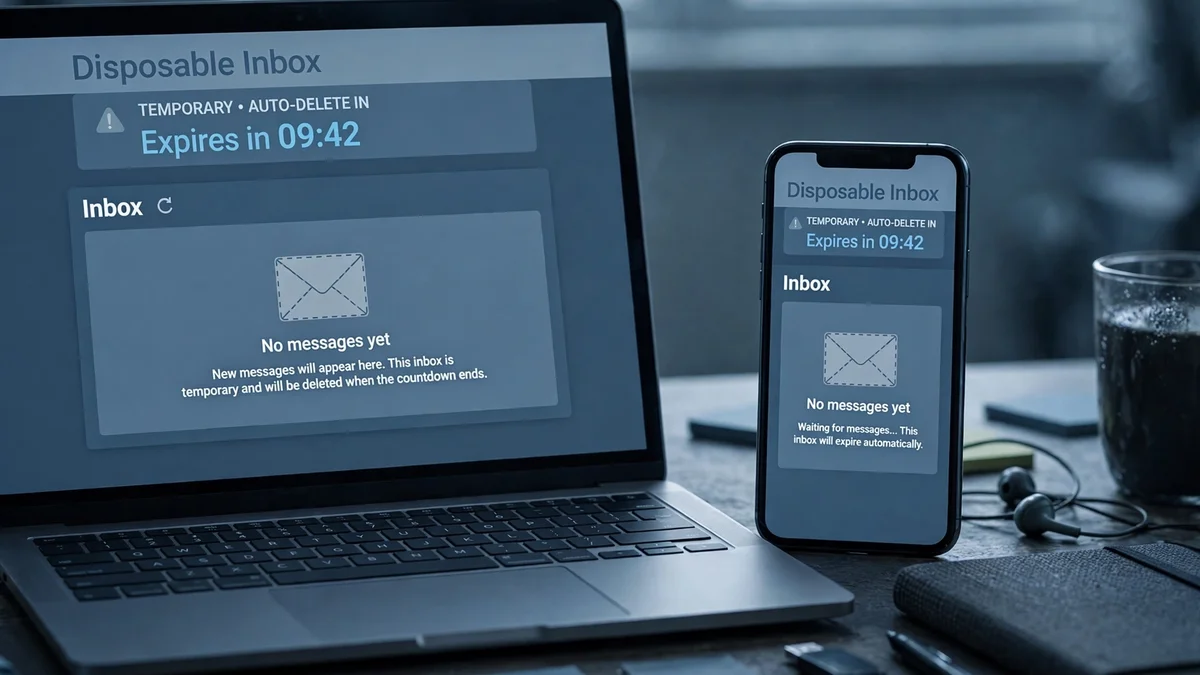
While writing this, I opened TempoMailUSA and watched it do exactly what it promises. The page loaded with no sign-in, generated an address automatically — testfix123@tempomailusa.com — and showed an empty inbox with auto-refresh running and a countdown: the free inbox expires in about 30 days. The counters on the page read 484,444 emails created and 609,973 messages received at the time of the test.
It is a good tool, and it is the wrong tool for every part of a therapy practice. A disposable inbox has no BAA, no encryption under your control, no audit trail, and no one to call when a message disappears — and the address itself expires in a month, taking any unanswered client thread with it. The short version of what disposable email is for lives here, and the answer is signups that do not need to reach you again — a newsletter, a download, a trial. A therapy practice is the opposite case: every message must reach you, must be attributable, and must still exist in six months when someone asks what was said.
There are two narrow, legitimate uses of a temp address in a practice. The first is testing: when you want to check whether your own mail lands in the inbox instead of spam, a disposable address is a clean test target — our guide to testing spam mail walks through the twenty-minute version. The second is signing up for a vendor trial without handing your practice address to another marketing list. Neither involves a client, a diagnosis, or a single word of PHI. That line is the whole rule: if the message could identify a person and their care, it never touches a disposable address.
The setup order that actually holds up
Do it in this order. Each step depends on the one before it, and skipping ahead is how practices end up with an encrypted inbox and an unencrypted intake form.
- Sign the BAA first. Choose the provider, sign the Business Associate Agreement, and only then move a single client message onto it. A BAA signed after the migration is a contract that covers the future while the past sits unprotected.
- Move the intake form before the inbox. The form is where PHI enters your practice, and it is usually the least protected part. A secure form that delivers encrypted beats an encrypted inbox fed by a plain form every time.
- Give everyone their own login. Shared inbox passwords fail the unique-user-identification requirement outright. If your front desk shares a login with you, fix that before you buy anything else.
- Turn on encryption at rest, not just in transit. Most providers encrypt in transit by default. At-rest encryption is the setting people forget, and it is the one that decides whether a stolen laptop or a breached server is a breach notification or a non-event.
- Write the one-page risk analysis. It does not need a consultant. One page: where client email lives, who can access it, what happens if a device is lost, and what you decided about encryption and why. Date it. Review it yearly. This document is the difference between "we thought about it" and "we can show we thought about it."
- Train the front desk. The person who answers the intake email decides, a dozen times a day, whether a clinical detail goes into a secure reply or a quick personal-email forward. That decision is the practice's compliance in miniature.
Five mistakes I keep seeing
Using personal Gmail "just for scheduling." Scheduling emails carry names, appointment times, and often the reason for the visit. That is PHI, and personal Gmail has no BAA. There is no de minimis version of this mistake.
Forwarding client mail to a personal inbox. The secure system you paid for stops being secure the moment a message is forwarded somewhere it does not cover. If you need mail on your phone, configure the compliant account on your phone.
Assuming "encrypted" means end-to-end. Transport encryption protects a message while it moves. End-to-end encryption protects it where it lands. Ask your provider which one you have, in writing, and do not accept "we use encryption" as the answer.
Letting the intake form stay plain. A contact form that emails you the client's story in clear text undoes everything downstream. Secure the form first, as above.
No risk analysis on file. The rule requires it, auditors ask for it first, and it is the cheapest document in this entire guide. Its absence reads as indifference even when the practice is careful.
The bottom line
Therapy secure email is not a product decision. It is three decisions in order: a signed BAA, encryption you can describe, and access controls you actually enforce. The providers above all clear the first bar; they differ on price, friction, and workflow, and the right one is the one your clients will use. What no provider can fix is the intake form that collects PHI in the open, or the habit of forwarding clinical mail to a personal inbox, or the disposable address that expires in 30 days with a client's unanswered message inside it. Fix the flow first, then buy the tool that fits it. Your clients are already asking how their email is protected — the legal sector learned the same lesson this week, and the standard there is identical in shape, even if the rulebook differs. Answer them with a setup you can describe in one paragraph, and keep that paragraph true.
FAQ
Is personal Gmail HIPAA compliant for therapists? No. Personal Gmail has no Business Associate Agreement, and HIPAA requires a signed BAA with every vendor that handles PHI. Google Workspace with a signed BAA and proper configuration can comply; a personal account cannot, regardless of settings.
Do I need a BAA if I only email appointment reminders? Yes. Appointment reminders carry names and the fact of treatment, which is PHI. Any vendor that handles that mail needs a signed BAA before it touches a single message.
What is the cheapest HIPAA-compliant email for a solo therapist? MailHippo's basic plan starts at $4.95 a month after a 30-day free trial, with a BAA included. Hushmail for Healthcare, the most therapy-specific option, starts at $11.99 a month. Both prices were listed at the time of writing.
Can I use a temporary or disposable email address for client mail? No. Disposable inboxes have no BAA, no audit trail, and expire — the one I tested live expires in 30 days. They are fine for testing whether your own mail lands in spam, and never for anything containing PHI.
Do psychotherapy notes need special handling in email? Yes. Psychotherapy notes generally require the patient's authorization before disclosure, even to another provider for treatment (45 CFR 164.508(a)(2)), and they should never travel by ordinary email. Keep them separate from the rest of the record and move them only through your encrypted, BAA-covered channel with authorization on file.
What happens if a therapist's email is breached? It depends on culpability and correction. Civil penalties in 2026 run from $145 per violation for unknowing violations to $2,190,294 per violation for willful neglect left uncorrected, with a calendar-year cap of $2,190,294 per violation type. Properly encrypted PHI that is lost does not trigger breach notification, which is one more reason the encryption decision matters.
Does HIPAA apply to private-pay therapists who take no insurance? HIPAA applies to covered entities, which includes most health care providers who transmit health information electronically — including many cash-only practices. Even where it arguably does not apply, state law and professional ethics require the same protections in practice, and clients expect them either way.
Need a disposable temporary email?
Protect your real inbox from spam and promotional clutter instantly and free.
Received a suspicious email, text, or charge alert?
Verify whether the sender domain is disposable, spoofed, or unverified before clicking links.