

Temp Mail for Zoom Signup: The Honest 2026 Guide (Start With the Join Link)
Most guides about temp mail and Zoom start in the wrong place. They walk you through generating a disposable address, pasting it into Zoom's signup form, and clicking the verification link — as if the signup were the whole story. It isn't. The signup is the easy part, and for the most common Zoom job it isn't even necessary.
Here is the fact that reframes everything: to join a Zoom meeting, you do not need a Zoom account, an email address, or anything else. Someone sends you a link, you click it, you type a display name, you are in. No signup form exists on that path at all. Temp mail only enters the picture when you want to host — to schedule your own meetings, to own the room, to be the person sending the link instead of clicking it. And hosting is where a disposable address starts to cost you things.
So this guide is organised around that distinction, not around the generic temp-mail template. If you only ever join meetings, you can stop reading after the next section and save yourself a signup entirely. If you want to host, keep going — because the question stops being "does temp mail work on Zoom" and becomes "what breaks first when your hosting account is tied to an address that expires."
The one thing to check before you sign up for anything

Click the meeting link first. Zoom's join flow asks for a display name and, if the host enabled it, a passcode. It does not ask for an email. It does not ask you to create an account. Millions of people have attended Zoom meetings for years without ever holding a Zoom login, and nothing about that has changed.
This matters because a surprising number of "temp mail for Zoom" searches come from people who were about to create a throwaway account for a meeting they could have joined as a guest. A guest join is not a workaround or a hack. It is the normal, supported path, and it leaves zero accounts, zero addresses, and zero recovery problems behind. If your only job is attending, the best disposable email for Zoom is no email at all.
The same logic covers the second most common case: a one-off meeting you need to host once, for friends or a study group, with no follow-up. Zoom's free Basic plan lets a signed-in host run meetings, and group sessions on the free tier are capped at 40 minutes — a limit that has been in place for years and is the real constraint on casual hosting, not the email you signed up with. But even here, ask whether you need an account of your own, or whether the person who invited you can host, or whether a friend with an existing account can schedule it. Every account you create is an account you may one day need to recover.
The three Zoom identities, and which one you actually need
It helps to name the three ways a person relates to Zoom, because temp mail fits exactly one of them badly, one of them fine, and one of them not at all.
The guest. Joins by link, no account, no email. Temp mail is irrelevant. This is the right answer for attending, and it is the answer for most people most of the time.
The free Basic host. Signs up with an email, verifies it, schedules meetings, hosts up to the free tier's limits. This is the only identity where temp mail is a live question — and the answer, as the rest of this guide shows, is "it can work, but the account is only as durable as the inbox, and that durability is the whole problem."
The work account. Uses a company or school domain, often with single sign-on, and is tied to a calendar, a paid licence, and colleagues who need to find you. Temp mail is flatly wrong here. If your employer or university provisions your Zoom account, or if anyone at work needs to schedule with you, a disposable address will break the calendar invites, the directory listing, and the IT help desk's ability to help you — all before it breaks the signup.
Be honest about which of the three you are before you generate anything. Most people who search this topic are guests who think they are hosts, or free hosts who are about to build something they will wish they could recover.
Signing up as a free host: what Zoom actually asks
Zoom's free signup asks for an email address and sends a verification message to it. Click the link, set a password, and the account exists. There is no phone step in the basic flow, no ID check, and no payment step for the free tier. That simplicity is why temp mail looks like a natural fit: the entire gate is one email.
But the gate is not the account. The email address you verify becomes, from that moment on, the address Zoom writes to for everything that matters later: password resets, sign-in alerts, meeting invitations you send to yourself, billing notices if you ever upgrade, and the "is this really you" checks that appear when you sign in from a new device. A disposable address receives all of that mail exactly as well as a real one — for as long as the inbox exists. The question is never whether the first message arrives. It is whether the twentieth message, six months later, still has somewhere to go.
Zoom does not publish a disposable-domain blocklist, and I will not pretend otherwise. What that means in practice is the familiar domain lottery described in our blocking directory: whether a given disposable domain is accepted depends on the domain you drew, on lists Zoom's providers consult, and on behaviour signals around the signup — not on a published Zoom policy you can read. If the form rejects your address, try one different domain before concluding anything, and if that fails too, take the hint: this is a low-stakes account, and a real secondary address costs you minutes and removes the entire category of failure.
The five places a throwaway Zoom account breaks
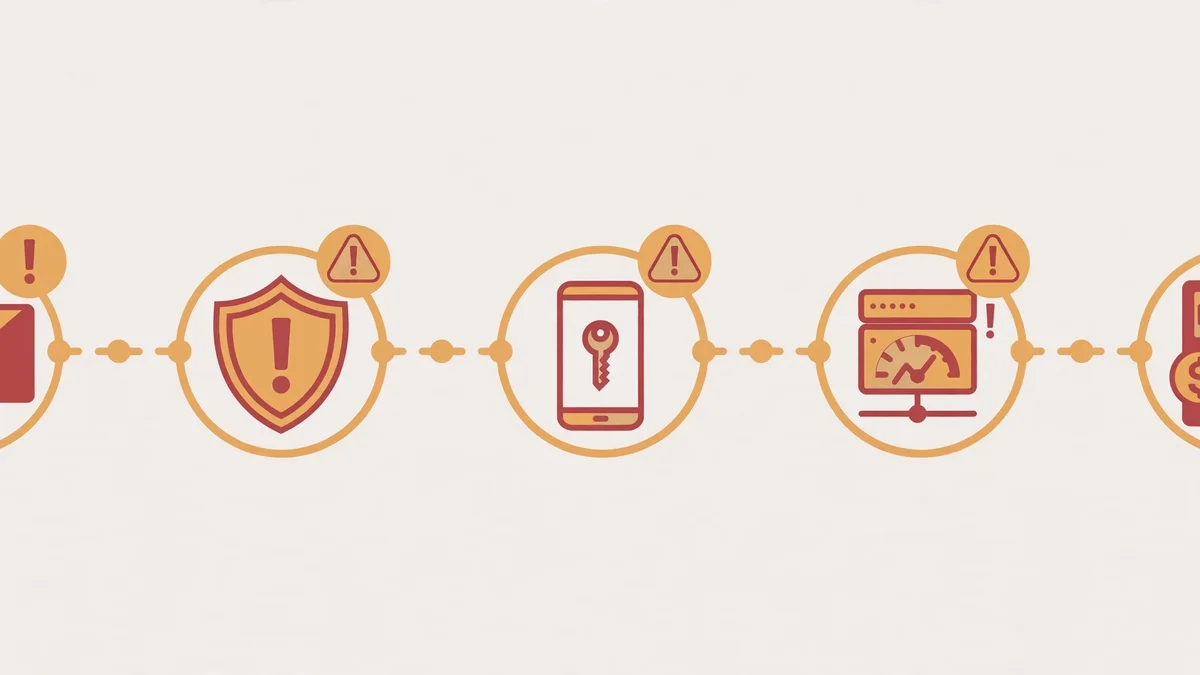
This is the section other guides skip, and it is the section that decides the verdict. A temp-mail Zoom account does not usually fail at signup. It fails later, in one of five places, and each failure is worse than a rejected form because by then you have something to lose.
1. The password reset that goes nowhere. You forget the password — everyone does eventually — and Zoom sends the reset link to the address on the account. If the inbox expired, the link is gone, and with it the account. There is no support path that restores access to an account whose recovery address no longer exists, because from Zoom's side there is nothing to verify you against. A hosting account with a year's worth of scheduled meetings, recurring links your group relies on, and a personal meeting ID people have saved is not a throwaway anymore, even if it started as one.
2. The calendar invite that never lands. Hosts schedule from Zoom and invite from their calendar, and the email on the account is the identity those invites carry. If you schedule a recurring meeting and then lose the address, you lose the thread that ties the meeting to you: reschedules, cancellations, and "the host changed the link" notices all go to an inbox you cannot open. Your attendees get a dead link and no explanation. And remember the other one-way street of temp inboxes: you cannot reply to anyone from the address either, as our send-from-temp-mail guide explains, so a reschedule conversation has nowhere to go.
3. The waiting room and the name problem. Hosts use the waiting room to admit people they recognise. A guest joins with any display name; a host's account name is the identity attendees learn to trust. An account created on a throwaway, then abandoned and recreated on another throwaway, produces a trail of similar-but-different host identities, and attendees stop knowing which link is really yours. For a study group this is an annoyance. For a tutor, a coach, or anyone charging for sessions, it is a credibility problem.
4. The upgrade that demands a real address anyway. The moment a free host wants to lift the 40-minute group limit, host longer sessions, or add cloud recording, the account meets billing — and billing meets identity. Payment methods, invoices, and tax receipts all need a durable contact. An account built on an expiring address hits this wall exactly when it starts to matter commercially, and migrating a paid licence to a new address mid-stream is the kind of admin task that eats an afternoon.
5. The sign-in check from a new device. Sign in from a new laptop or a new city and Zoom may ask you to confirm via email. This is the failure people least expect, because it arrives months after a signup that "worked." The account is fine, the password is right, and the confirmation code is sitting in an inbox that expired in January. You are locked out of a working account by a security feature doing its job. The same clock pressure that makes OTP delivery fragile applies here: a code is only useful while both the inbox and the window are alive.
None of these are exotic. They are the ordinary lifecycle of an account that outlives its address, and they are the reason the honest answer to "temp mail for Zoom" is not a yes or a no but a time limit: temp mail is fine for a Zoom account whose useful life is shorter than the inbox's life, and wrong for anything longer.
When temp mail is the right call for Zoom
There are real cases, and naming them honestly is better than a blanket ban. Temp mail fits Zoom when all of these are true at once:
- You are hosting a one-off or short-run set of meetings — a weekend study sprint, a single workshop, a family call — and you will not need the account, the links, or the history after it ends.
- Nobody else depends on your host identity lasting: no recurring group, no paying clients, no saved personal meeting ID circulating anywhere.
- You accept that the account is disposable too: if the inbox dies, the account dies with it, and that is fine because there is nothing in it worth recovering.
- You keep the inbox alive for the whole run — you do not generate a ten-minute address for a meeting series that spans a month.
In that narrow window, the privacy benefit is real. Your real address stays out of Zoom's marketing database, out of any attendee list that gets forwarded, and out of the breach-risk pool for one more service. That is a legitimate trade, made with eyes open.
The test I use is simple: write down what you lose if the inbox vanishes tomorrow. If the answer is "nothing — the meetings are over and nobody has the link," proceed. If the answer contains a person's name, a recurring link, a payment, or a reputation, use a real secondary address instead. A dedicated alias or a second real mailbox gives you nearly all the privacy with none of the expiry risk, and it is the right middle ground for any host who is on the fence.
What to do when Zoom rejects your disposable domain
If the signup form refuses your address, work through this order and stop at the first step that fits the stakes:
First, try one different domain from the same service. Zoom's acceptance, like most platforms', turns on domain reputation, and one listed domain says nothing about the next. Do not burn ten domains on one form — rapid repeated attempts look automated and can trigger behaviour filters that follow you to your real address.
Second, check whether the block is really about email. A VPN exit node, a rate limit, or a region mismatch can reject a signup that the email field takes the blame for. Try once from a normal network without a VPN before concluding the domain is the problem.
Third, match the address to the stakes using the test above. If the account is a one-off host, a different domain or a different disposable service is a reasonable next try. If the account is anything you will still need in a month, stop fighting the filter and use a real secondary address. The filter is doing you a favour by forcing the decision early, before you have anything to lose.
And if you only wanted to attend a meeting in the first place, remember the first section: click the join link, type a name, and skip the account entirely. No filter in the world can block a guest join, because there is no form to reject.
The verdict, in one table
| Your situation | What to do | Why |
|---|---|---|
| Only joining meetings | Click the link as a guest | No account, no email, nothing to lose or recover |
| Hosting once, nothing lasting | Temp mail is fine | The account's life is shorter than the inbox's life |
| Hosting a recurring group | Real secondary address | Links, invites, and trust outlive any disposable inbox |
| Work, school, or paid hosting | Work domain or real address | SSO, billing, and calendar all assume a durable identity |
| Form rejects your domain | One different domain, then stop | A second failure is information: use a real address |
Zoom is unusual among the platforms in this series because the guest path removes the signup question for most people entirely. That is worth celebrating rather than working around. Temp mail is a good tool, and Zoom hosting is a real use for it — but only inside the short window where the account itself is disposable. Outside that window, the privacy you gain is smaller than the account you stand to lose.
Frequently asked questions
Do I need an email address to join a Zoom meeting?
No. Clicking a meeting link and entering a display name is enough; Zoom does not require an account or an email to attend. An email only becomes necessary when you want to host and schedule your own meetings.
Can I sign up for Zoom with a temp mail address?
Usually, for a free Basic host account, yes — acceptance depends on the disposable domain you draw, since Zoom does not publish a disposable-domain policy. Expect the domain lottery: one domain may be rejected while another passes. If two domains fail, use a real secondary address rather than burning more.
What happens to my Zoom account when the temp inbox expires?
The account itself is not deleted immediately, but you lose the recovery path. Password resets, sign-in confirmations, and billing notices all go to the expired address, so the first time Zoom needs to verify you, you are locked out of an otherwise working account.
Is Zoom's free plan really limited to 40 minutes?
Group meetings on Zoom's free Basic plan are capped at 40 minutes; one-on-one meetings are not subject to the same cap. That limit, not the signup email, is the real constraint on casual free hosting, and lifting it requires a paid plan tied to a durable billing contact.
Should I use temp mail for a work or school Zoom account?
No. Work and school accounts rely on a durable identity for single sign-on, calendar invites, directory listings, and IT support. A disposable address breaks all four, and it breaks them after colleagues have already learned to find you at the old identity.
What is better than temp mail for a recurring Zoom host?
A real secondary address or an alias forwarder: an address you control, that will still exist in a year, and that is not your primary inbox. You keep the privacy benefit — your main inbox stays out of Zoom's marketing lists — without the expiry risk that kills throwaway host accounts.
Topic research (3-source system, 2026-10-27 night slot): Queue was empty (all TODO entries exhausted by earlier slots), so this topic comes from a fresh sweep. Source 1 (Trends-adjacent): Zoom signup is a perennial work-tool query, distinct from the social-signup topics already covered. Source 2 (competitor): no competitor runs a Zoom-specific temp-mail guide — SERP top 10 = generic temp-mail tool pages only (zmails.net, tempmailer.net, dispoemail.org, fasttempmail.org, onetimeemail.com, tmpmail.pro, devhunt.org summary, EmailOnDeck app listing); zero Zoom-specific guides from tmailor, TempMailo, guerrillamail, temp-mail.org, or mohmal. Source 3 (SERP mining): PAA/autocomplete angle "do I need an account to join a Zoom meeting" is unanswered by any temp-mail guide. Weak-SERP case (one line): top 10 = 8 generic tool pages + 1 directory summary + 1 app listing, no dedicated Zoom guide, no independent test. Duplicate check: newest 120 blog_posts queried live — no Zoom post exists; nearest neighbours are other platform signups (Reddit id 5865, Pinterest, Snapchat, GitHub, Telegram, Twitch, TikTok, Spotify). No search volume or KD claimed. Internal links (all verified 200 via browser.open 2026-10-27): which-sites-block-temp-mail-honest-directory-2026, best-temp-mail-for-otp-codes-2026, can-you-send-email-from-temp-mail-2026. Images: featured zoom-featured.webp 2048x1152 under no H2 (featured); in-content zoom-in1-join.webp 1920x1280 under "The one thing to check before you sign up for anything"; zoom-in2-breakpoints.webp 1200x675 under "The five places a throwaway Zoom account breaks". Alt texts: featured — "Person joining a video meeting from a laptop with a guest join link on screen, no signup form"; in1 — "A meeting join link opening directly into a video call without any account signup step"; in2 — "Five warning markers along a timeline of a hosting account, from password reset to billing, where a temporary inbox fails".
Need a disposable temporary email?
Protect your real inbox from spam and promotional clutter instantly and free.
Received a suspicious email, text, or charge alert?
Verify whether the sender domain is disposable, spoofed, or unverified before clicking links.