

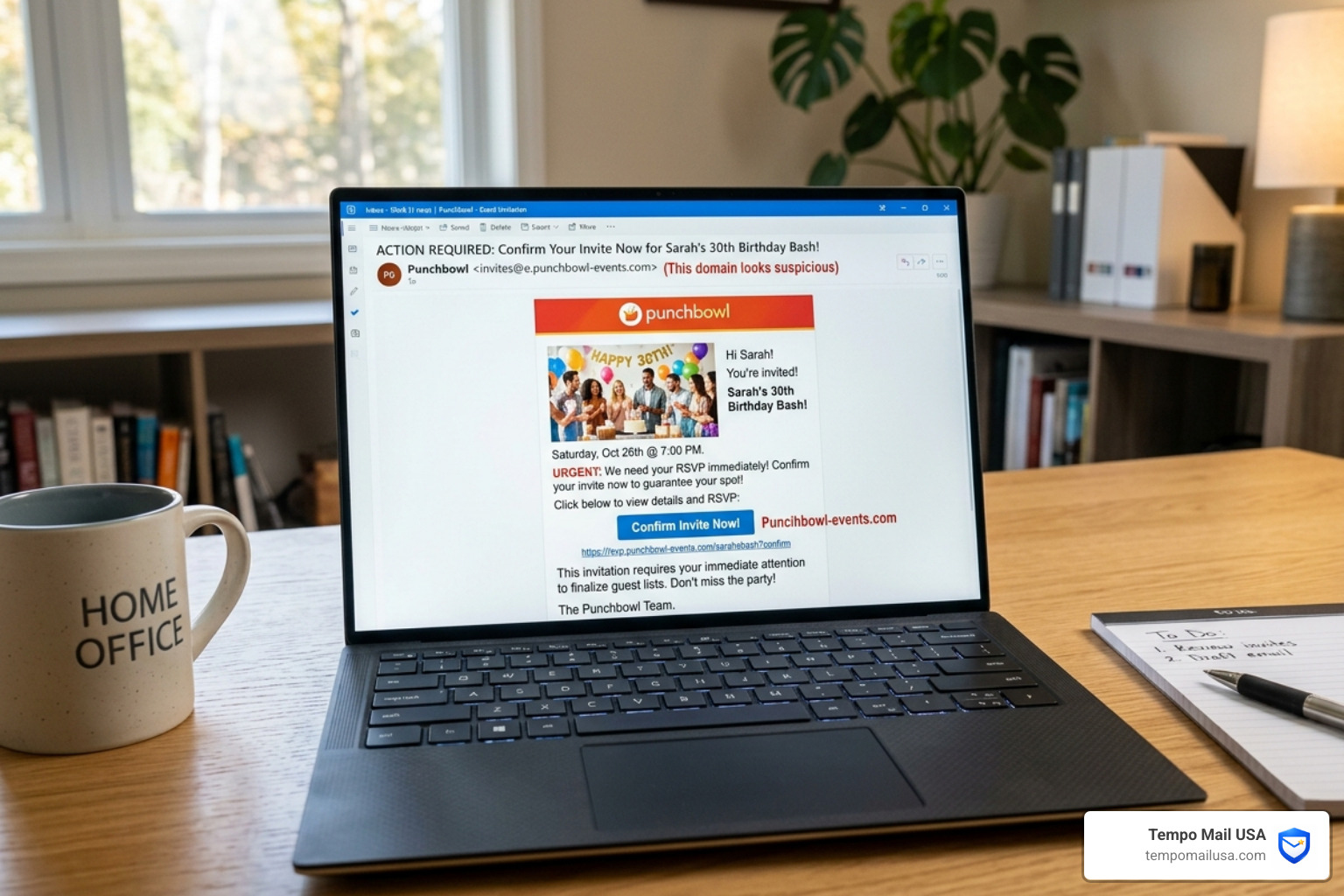

The Punchbowl Invite Scam: What to Do Right Now
If you're dealing with the punchbowl invite scam what to do is simple — here's what matters most, fast:
- Do not click any links in the suspicious invitation
- Forward the email to help@punchbowl.com and mark it as spam
- Change your email password immediately if you already clicked
- Enable two-factor authentication (2FA) on your email and linked accounts
- Warn your contacts — scammers use your hacked account to spread the scam further
- Run a malware scan if you opened a link on a desktop or laptop
- Report the scam to the FTC at reportfraud.ftc.gov if you lost money or data
It starts innocently enough. You get what looks like a party invitation from a friend — colorful, familiar, and completely convincing. But the moment you click "RSVP," you're not going to a party. You're handing your login credentials to a scammer.
That's exactly how the Punchbowl phishing scam works. And it's more common than most people realize.
Impersonation scams caused over $2.7 billion in losses in 2023 alone. Since 2022, reports to the FTC and Better Business Bureau show a staggering 340% increase in phishing campaigns that impersonate Punchbowl invitations. Cybersecurity researchers have found these fake invites achieve click-through rates up to 68% higher than typical phishing emails — because they exploit something deeply human: social trust.
One victim described receiving what appeared to be an Easter dinner invite from a well-known local publisher. She clicked, entered her credentials on a fake login page, and within hours her account was sending fake invites to everyone in her contacts list. She spent the next 30 minutes calling people to warn them not to open it.
Many users now rely on advanced security tools and VPN protection to prevent these attacks from reaching them in the first place — but knowing what to do after the scam lands in your inbox is just as critical.
This guide walks you through every step: how to spot a fake invite, what to do if you already clicked, how to recover your account, and how to stop the chain reaction before it reaches your contacts.
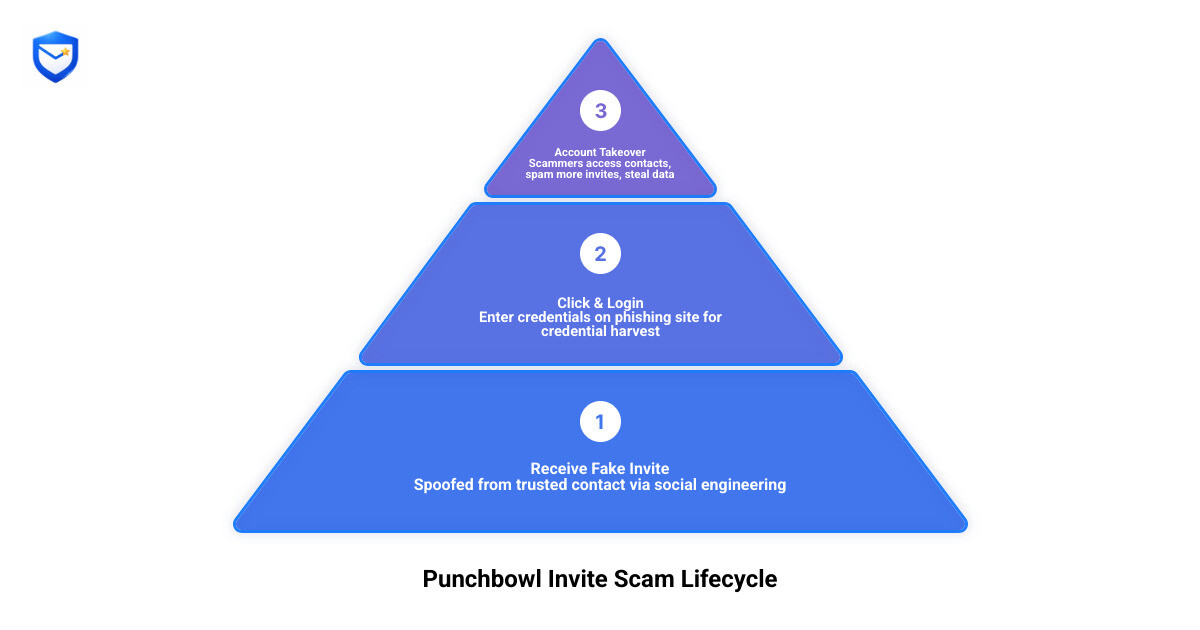
Understanding the Punchbowl Invite Scam: What to Do First
To effectively manage a Punchbowl Invitation Scam, we first need to understand the mechanics of the trap. This isn't a random "Prince from a distant land" email; it’s a highly targeted form of social engineering.
The scam works by exploiting the trust you have in your friends and family. When a contact's email is compromised, the attackers use that account to send out mass invitations. Because the email comes from a name you recognize, your guard is naturally lower. The goal is credential harvesting—tricking you into "logging in" to view the invitation, which actually sends your username and password directly to the attacker.
In some cases, the goal is malware delivery. Scammers may include instructions to open the link specifically on a laptop or desktop. Why? Because desktop operating systems are often more susceptible to the specific types of malware payloads they want to drop, which can give them full control over your device.
Many users now rely on advanced security tools and VPN protection to prevent these attacks. By masking your IP and filtering malicious traffic, these tools act as a first line of defense. However, if the email has already reached your inbox, your best weapon is immediate, informed action.
Punchbowl Invite Scam What to Do if You Clicked a Link
If you’ve already clicked the link, don't panic, but act quickly. Malicious URLs in these scams often lead to a "multi-brand" login page. You might see options to sign in with Google, Yahoo, Outlook, or AOL. This is a classic Punchbowl Invitation Scam Fake Party Invites tactic designed to cast the widest possible net for credential exfiltration.
If you entered your password, the attackers now have it. Even if you saw an "error message" after logging in, assume your data was stolen. Scammers often program fake error messages to stay on the page and prompt you to try a second or third password, harvesting even more of your data.
Punchbowl Invite Scam What to Do to Warn Your Contacts
One of the most insidious parts of this scam is the chain reaction. Once a scammer has access to your account, they don't just stop there. They perform an account takeover and immediately begin contact spamming.
They use your "social proof" to trick your friends. If your sister gets an invite from you, she’s almost certain to click it. To stop this:
- Send a mass BCC email or a group text to your frequent contacts immediately.
- Be direct: "My email was compromised. If you get a Punchbowl invite from me, DO NOT open it."
- Post on social media: If you use the same email for Facebook or Instagram, a quick status update can save dozens of people from the same fate.
Red Flags: How to Identify a Fake Punchbowl Invitation
Identifying a fake is easier when you know what a real Punchbowl invite looks like. Punchbowl takes security seriously and has specific visual indicators that scammers often fail to replicate perfectly.
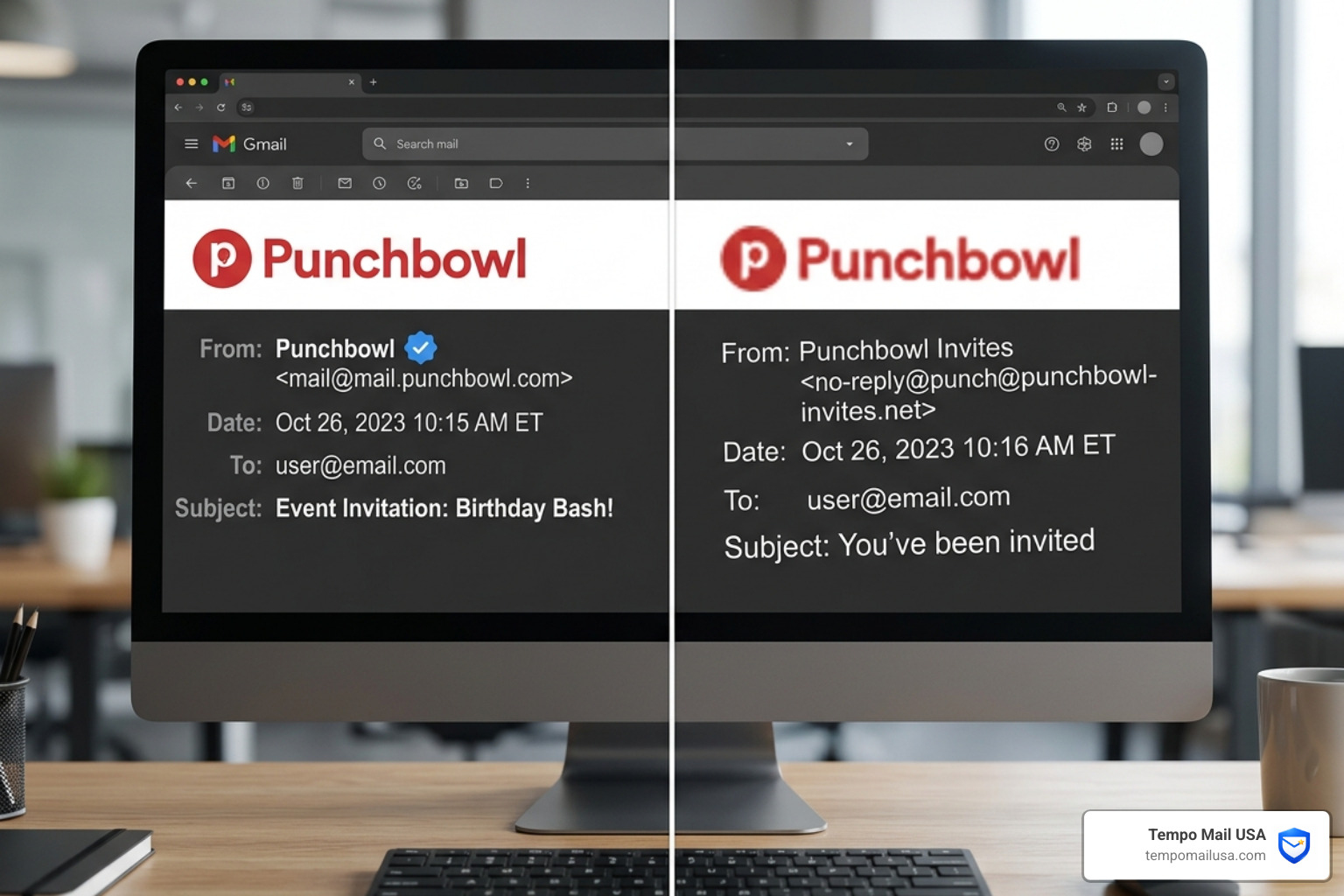
Here is a checklist of red flags to look for:
- The Sender Domain: Legitimate Punchbowl invitations come from mail@mail.punchbowl.com. If the "From" field shows a personal Gmail address, a string of random characters, or a domain like "punchbowl-invites.net," it is a scam.
- The Blue Checkmark: In major email clients like Gmail or Outlook, official Punchbowl emails often feature a blue verified checkmark and the official red logo. If these are missing, be wary.
- Visual and Design Errors: According to the Punchbowl Help Center, you should look for broken layouts, misaligned text, or low-resolution logos.
- ALL CAPS and Urgency: Scammers love using "URGENT" or "ACTION REQUIRED" in all caps to bypass your critical thinking. Real invitations are usually celebratory and polite.
- Forced Sign-In: A real Punchbowl invite allows you to view the event details without forcing you to log into your email provider first. If you are prompted for a Google or Yahoo password just to see the "where and when," close the tab immediately.
- Suspicious Attachments: Punchbowl sends links, not files. If there is a PDF or .zip attachment, it likely contains malware.
Recovery Guide: How to Respond to a Security Breach
If you realize you've been caught in a Punchbowl Invitation Scam, follow this recovery checklist to lock down your digital life.
- Immediate Password Reset: Change the password for the email account that was targeted. If you use that same password for banking, social media, or shopping, change those too. Each account needs a unique, strong password.
- Enable Two-Factor Authentication (2FA): This is your most powerful defense. Even if a scammer has your password, 2FA prevents them from logging in without a code from your phone.
- Check Logged-In Sessions: Go to your email security settings and look for "Active Sessions" or "Devices." Log out of every device you don't recognize.
- Run a Deep Malware Scan: Use a reputable antivirus program to scan your device. Some Punchbowl scams install "keyloggers" that record everything you type, including new passwords.
- Monitor Financials: If you entered credit card info on a fake "gift fund" or "guest fee" page, call your bank immediately. Request a new card and put a freeze on your credit.
- Report the Incident:
- Forward the scam email to abuse@punchbowl.com or help@punchbowl.com.
- File a report with the FBI Internet Crime Complaint Center (IC3) at ic3.gov.
- Report the phishing attempt to the FTC.
Best Security Tools to Prevent Phishing (Compared)
While manual vigilance is great, human error is inevitable—especially when we're busy or tired. Using a "layered" security approach is the best way to ensure a fake invite never results in a stolen identity.

Comparison of Security Layers
| Tool Type | Primary Function | Effectiveness Against Punchbowl Scams |
|---|---|---|
| Antivirus Software | Detects and removes malware/keyloggers. | High (for "Desktop-only" malware variants). |
| VPN (e.g., NordVPN) | Encrypts data and blocks known malicious domains. | Medium-High (prevents navigating to fake sites). |
| Identity Theft Protection | Monitors the dark web for your leaked credentials. | High (essential for post-breach recovery). |
| Temporary Email (Tempo Mail USA) | Provides an anonymous alias to keep your real PII safe. | Very High (Firewalls your primary account). |
How to Choose the Right Protection
When selecting security software, look for "Real-time Link Scanning." This feature automatically checks the destination of a link before you even click it, identifying the "initvm.zofrice.my.id" type domains that scammers use. For mobile safety, ensure your protection includes SMS filtering, as some Punchbowl scams are now moving to text messages (smishing).
Frequently Asked Questions about Punchbowl Scams
Is Punchbowl itself ever hacked or compromised?
There have been no reports of a large-scale breach of the Punchbowl platform itself. Punchbowl maintains high security standards, including SOC 2 Type II compliance and end-to-end encryption for certain data. Most "Punchbowl scams" are actually the result of credential stuffing—where scammers use passwords leaked from other websites to log into individual user accounts.
Can I get malware just by opening a fake Punchbowl email?
In 2026, simply opening an email is much safer than it used to be, but it isn't zero-risk. Some sophisticated scams use malicious scripts hidden in auto-loading images to "ping" your device and confirm your email is active. To be safe, disable "Auto-load images" in your email settings and never click "Enable Content" if prompted.
What should I do if I entered my credit card on a fake site?
This is a high-priority emergency. Call your credit card issuer's fraud department immediately to cancel the card. You should also place a credit freeze with the three major bureaus (Equifax, Experian, and TransUnion) to prevent scammers from opening new accounts in your name. Finally, report the theft to the FTC at IdentityTheft.gov.
Conclusion
The punchbowl invite scam what to do conversation usually starts with a moment of panic, but it should end with a commitment to better digital hygiene. Scammers succeed by hijacking our social trust, turning a friendly "Happy Birthday" or "Easter Dinner" invite into a weapon.
At Tempo Mail USA, we believe the best way to stop a scam is to never let it reach your "real" life in the first place. By using temporary email aliases, you create a "PII Firewall." When you sign up for events or services using an alias, your primary, sensitive email address remains hidden. If an alias receives a scam invite, you can simply delete it without ever worrying about your main account, your contacts, or your identity being compromised.
Stay vigilant, verify before you click, and consider using Tempo Mail USA for your next event RSVP to keep the scammers out of your personal business. Protecting yourself isn't just about security—it's about preserving the joy of the real celebrations in your life.