


The PayPal Transfer Fee Scam Is Stealing Money from Real People Right Now
The PayPal transfer fee scam is a fraud where someone pretends to send you money through PayPal, then asks you to pay an upfront "clearance fee," "receiver fee," or "conversion fee" before the funds can be released to you. No such fee exists. If you pay it, the money goes straight to the scammer - and you'll never see the promised payment.
Quick answer:
- PayPal never requires a receiver to pay any upfront fee to access incoming funds
- Any message - email, screenshot, or chat - claiming you must pay a fee to "release" a payment is a scam
- Do not send money, gift cards, or crypto to anyone claiming to be the sender or PayPal support
- Report suspicious messages to phishing@paypal.com and do not click any links
This scam has become alarmingly common. One in three fraud reports involves imposter scams - exactly the kind of fraud behind the PayPal transfer fee scheme.
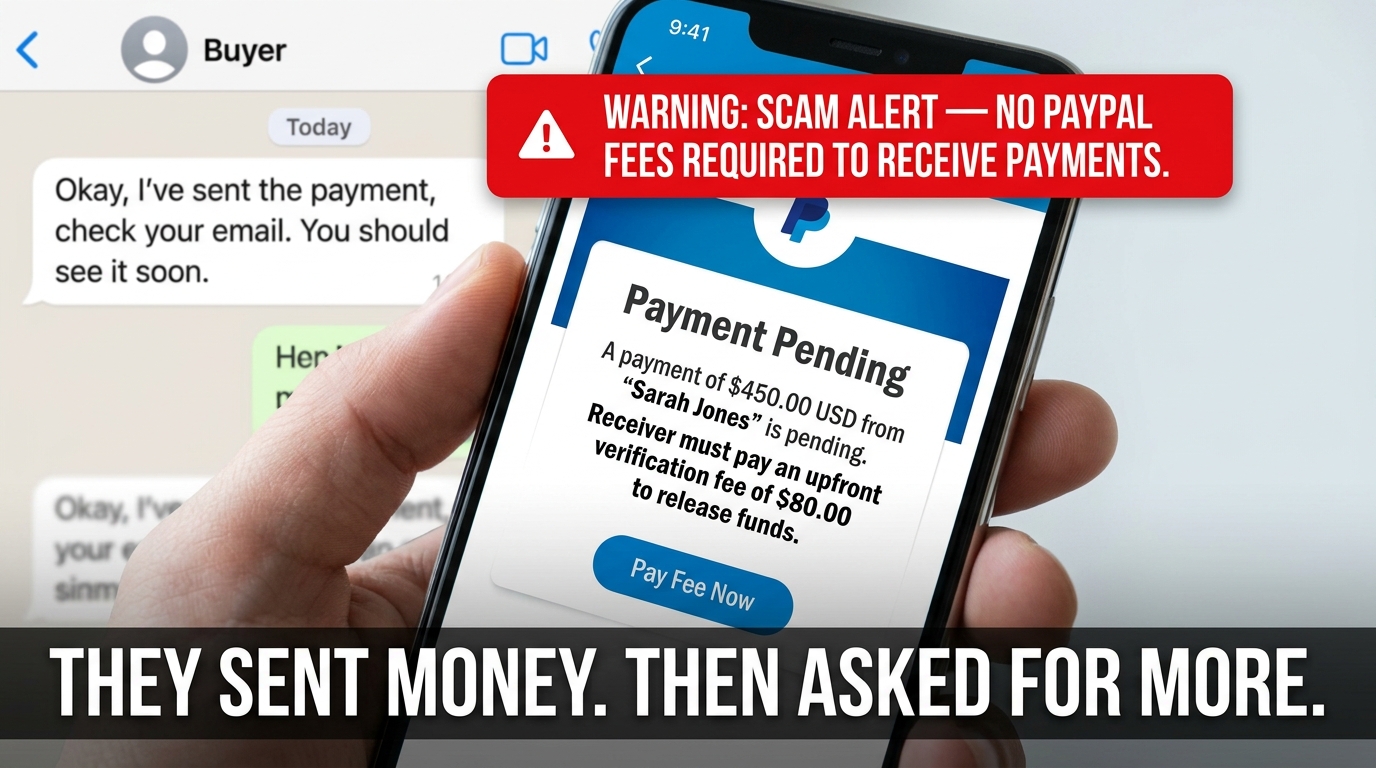
A typical scenario looks like this: you're selling something online, a buyer contacts you, and they claim to be sending payment from a "company PayPal account." You receive a screenshot showing the transaction is "pending" - and a note saying you need to pay $80 (or more) to complete it. It feels real. It isn't.
The urgency, the professional-looking screenshot, the friendly tone - all of it is designed to make you act before you think.
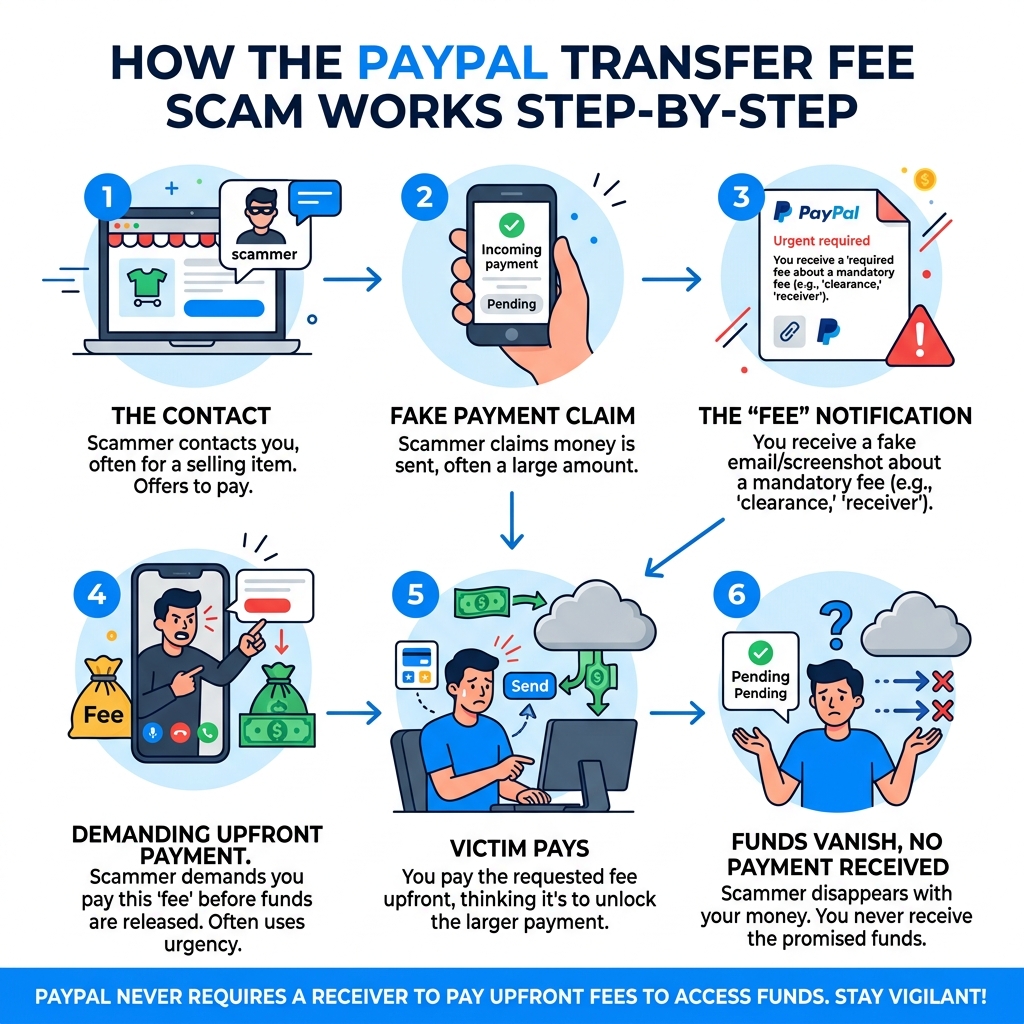
Anatomy of the PayPal Transfer Fee Scam
To protect ourselves, we first need to understand how the paypal transfer fee scam operates. At its core, this is a form of "advance fee fraud." The scammer promises a large benefit (the payment for your item or a prize) but insists you must pay a small fee first to unlock it. This is a significant threat; US consumers lost $8.7 billion to scams in 2022 alone, and fraud reports have risen 47% since 2019.
The scam usually begins on a marketplace like Facebook Marketplace, Craigslist, or even through a direct email. The "buyer" is often very eager and may even offer to pay more than your asking price. They will claim they have sent the money, but then you’ll receive a notification - often a very convincing fake email or a doctored screenshot - stating that the transaction is "pending" until a "clearance fee" is paid.
According to Common Scams and How to Protect Yourself | PayPal, scammers rely on creating a sense of urgency. They might say the money is stuck in a "business portal" or that because they are using a "company account," PayPal requires the receiver to verify their account by paying a refundable fee.
Why Scammers Claim a "Clearance Fee" is Required
The "clearance fee" or "receiver fee" is a clever psychological trick. By claiming the money is coming from a "company PayPal account," the scammer adds a layer of unearned authority to the request. They might explain that company accounts have higher security protocols or that the "international" nature of the transfer requires a currency conversion fee.
In many cases reported on the Receiver Transaction Fee Scam | PayPal Community, victims are shown fake screenshots that look exactly like the PayPal interface. These images might say: "Transaction pending... Receiver needs to pay $80 to complete the transaction."
We must remember: PayPal does not work this way. If there is a fee for a transaction (such as a Goods and Services seller fee), PayPal automatically deducts it from the money sent. You never have to pay out of your own pocket to receive money that someone else has sent you.
How This Relates to Overpayment and Advance Fee Frauds
The paypal transfer fee scam is a close cousin to the overpayment scam. In an overpayment scenario, the scammer "accidentally" sends you too much money - say, $1,500 for a $1,000 item. They then ask you to refund the $500 difference via a different method, like Western Union or cryptocurrency.
The catch? The original $1,500 payment was made with a stolen credit card or a hacked account. Eventually, PayPal will reverse that fraudulent $1,500 payment, leaving you out of the $500 you "refunded" plus the item you shipped.
As noted in Avoid Invoice and Money Request Scams | PayPal US, these tactics often involve fake invoices or money requests that appear in your PayPal activity. If you see an unexpected request for money or a notification of an overpayment, it is almost certainly a trap.
Red Flags: Spotting a Fake PayPal Transfer Fee Scam Notification
Scammers are getting better at mimicking official branding, but they almost always leave "digital fingerprints" that we can spot if we look closely.

- The Sender's Email Address: A real PayPal email will always come from
@paypal.com. Scammers often use addresses likepaypal-support@gmail.comorservice-clearance@outlook.com. - Generic Greetings: Legitimate PayPal communications will address you by your full name or your business name. If an email starts with "Dear User," "Hello Customer," or "Dear PayPal Member," be extremely wary.
- Urgent or Threatening Language: Scammers want you to panic. They might claim your account will be suspended or that the sender will take legal action if you don't pay the "clearance fee" within the hour.
- Links to Fake Websites: Hover your mouse over any link in an email without clicking it. If the URL looks like
secure-paypal-login-check.cominstead ofpaypal.com, it is a phishing site designed to steal your credentials.
According to That PayPal 'Automatic Payment Status' Email Is a Scam | Lifehacker, even "official-looking" emails that appear in your inbox can be fraudulent. Scammers have found ways to abuse PayPal's own systems to send notifications that look legitimate but contain scam instructions in the notes section.
Identifying Tampered Subscription and Invoice Emails
One of the most sophisticated versions of this scam involves abusing PayPal's subscription and invoice features. Scammers create a fake merchant account and send you a legitimate PayPal invoice. Because the invoice is generated by PayPal, the email comes from a real service@paypal.com address, which helps it bypass spam filters.
However, the scam is hidden in the "Note to Customer" field. As detailed by Beware: PayPal subscriptions abused to send fake purchase emails, scammers often use Unicode characters (letters that look normal but are technically different symbols) to bypass keyword detection. They might include a fake customer service number and tell you to call immediately to "cancel" a large, unauthorized charge. When you call, a fake agent will try to trick you into providing remote access to your computer or paying a "reversal fee."
The Consequences of Paying the Requested Fee
If you fall for the paypal transfer fee scam and pay the requested amount, the consequences are often worse than just losing that initial fee.
- Financial Loss: Once you send money via non-reversible methods like gift cards, wire transfers, or crypto, that money is gone forever.
- Data Theft: By clicking links or calling fake support numbers, you may inadvertently give scammers your login credentials, credit card numbers, or Social Security information.
- Malware Risks: Some scammers will ask you to install "security software" to help process the transfer. In reality, this is often remote-access trojans (RATs) that allow them to monitor your bank accounts.
- Becoming a "Mark": Once you pay once, scammers add you to a "sucker list," meaning you will be targeted by even more aggressive and frequent scam attempts in the future.
As PayPal Fake Transaction Emails: The Phone Number Scam That Steals Your Money points out, these "support" calls often end with the scammer asking you to buy gift cards to "verify" your identity or "refund" your money. No legitimate company will ever ask for payment in gift cards.
Verification and Protection: Is the PayPal Transfer Fee Scam Real?
The short answer is: The fee is fake, but the danger is very real.
To stay safe, we need to distinguish between how PayPal actually charges fees and how scammers claim they do. Here is a quick reference table:
| Feature | Legitimate PayPal Transaction | PayPal Transfer Fee Scam |
|---|---|---|
| Who pays the fee? | The seller (receiver) usually pays a percentage. | The receiver is asked to pay an upfront fee. |
| How is it paid? | Automatically deducted from the incoming funds. | Must be paid separately via gift card, crypto, or wire. |
| Notification | Appears in your official "Activity" feed. | Often only exists in an email or a screenshot. |
| Upfront Cost | $0.00 to receive money. | Usually $50 - $200 "clearance fee." |
| Support | Contacted via the official Resolution Center. | Provides a random phone number in the email. |
For a deeper dive into identifying these messages, check out our guide on PayPal Scam Emails: How to Spot Them.
Why PayPal Never Requires Upfront Receiver Fees
PayPal's business model is built on taking a small cut of successful transactions. They have no reason to ask you to send money to them (or a third party) just to receive money. Their "Seller Protection" and "Buyer Protection" programs are designed to handle disputes, but they never involve "clearance fees."
When you receive a "Goods and Services" payment, the fee is taken out before the balance hits your account. For example, if someone sends you $100, you might see $97.11 land in your account after the standard fee is deducted. You never have to "pre-pay" that $2.89.
We discuss how to stay one step ahead of these phishing tactics in our article on Stay Safe: Combatting PayPal Phishing Attacks Effectively.
How to Verify a Transaction is Legitimate
If you receive a notification that you've been sent money, never trust the email alone. Follow these steps to verify:
- Log in directly: Open a new browser tab and type
www.paypal.comyourself, or use the official PayPal app. - Check your Activity: If the money doesn't show up in your "Activity" or "Recent Activity" feed as "Completed" or "Pending," the email you received was a fake.
- Look for "Money on Hold": Sometimes PayPal does hold funds for new sellers, but the money will still be visible in your account balance as "Pending." You do not need to pay a fee to release it; you simply need to provide tracking information or wait for the buyer to confirm receipt.
- Ignore Screenshots: Anyone can use Photoshop or "Inspect Element" to change the text on a webpage. A screenshot is never proof of payment.
As suggested in What are common scams and how do I spot them? - PayPal, the best defense is to ignore the "buyer's" instructions and rely solely on the data inside your official PayPal dashboard.
Immediate Action Plan: What to Do if Targeted
If you've received a suspicious request for a "clearance fee," don't panic. As long as you haven't sent money or clicked any links, you are safe.
Reporting Fraud to Authorities and PayPal
We have a responsibility to help stop these scammers by reporting them. Here is how:
- Forward the Email: Send any suspicious emails to phishing@paypal.com. After forwarding, delete the email from your inbox.
- Report the Invoice: If a scammer sent you an actual invoice or money request through PayPal, log into your account, click on the request, and select "Report this invoice" or "Cancel."
- Government Agencies: In the US, you should report scam attempts to the FBI’s Internet Crime Complaint Center (IC3) and the Federal Trade Commission (FTC).
For more details on keeping your inbox clean, see our guide on how to Stop PayPal Spam: How to Effectively Report Email Scams.
Securing Your Account After a Scam Attempt
If you realize you've clicked a link or provided information to a scammer, you must act fast.
- Change Your Password: Do this from a different, "clean" device if possible.
- Enable Two-Factor Authentication (2FA): This adds a second layer of security, requiring a code from your phone to log in.
- Check Your Permissions: In your PayPal settings, look for "Log in with PayPal" permissions and remove any apps or websites you don't recognize.
- Contact Your Bank: If you provided credit card or bank details, call your financial institution's fraud department immediately.
According to Report Fraud & Unauthorized Activity | PayPal US, you should also check your credit reports with Equifax, TransUnion, and Experian. Placing a "fraud alert" on your credit file is free and makes it harder for scammers to open new accounts in your name.
If you suspect unauthorized activity has already occurred, use the Resolution Center to file a formal dispute.
Frequently Asked Questions about PayPal Fees
Does PayPal ever ask for a fee to "upgrade" an account to receive money?
No. While there are different account types (Personal vs. Business), you never have to pay an upfront "upgrade fee" to receive a payment. If your account needs to be a Business account to accept a certain type of payment, PayPal will prompt you to switch for free within the app.
Can a sender require me to pay a fee before the money is released?
Never. In a legitimate transaction, the sender pays the amount they want you to receive, and PayPal handles the fees behind the scenes. If a sender tells you that you must pay a fee to "unlock" or "clear" the funds, they are lying.
What should I do if I already paid a "clearance fee" to a scammer?
Stop all communication with the scammer immediately. If you paid via credit card, contact your bank to dispute the charge. If you paid via gift card, contact the company that issued the card (e.g., Apple or Google) to see if the funds can be frozen. Unfortunately, money sent via wire transfer or crypto is usually unrecoverable.
Conclusion
The paypal transfer fee scam succeeds because it exploits our desire to be helpful and our excitement about receiving money. But by staying informed and following the "Log in Directly" rule, we can make ourselves impossible targets.
At Tempo Mail USA, we believe that privacy is your best defense. Scammers can't target you if they don't have your real email address. By using our temporary email aliases, you can create a "secure proxy" for your online transactions. Think of it as a firewall for your personal identity—protecting your real PII (Personally Identifiable Information) from being harvested by scammers on marketplaces and forums.
Stay safe, stay skeptical, and always verify before you pay.