



Report PayPal Spam: Your Guide
Spam that pretends to be from PayPal is common — and risky. This guide walks you through how to spot fake PayPal messages, report them correctly, and tighten your inbox security. Follow these practical steps to protect your personal info and finances, and learn how using temporary email spam filters can cut down on unwanted messages.
How Can You Identify Fake PayPal Emails and Phishing Attempts?
Spotting fake PayPal emails is the first line of defense. Scammers copy PayPal’s look and tone to trick you, but there are reliable clues to watch for: vague greetings, pressure to act fast, and links that don’t point to PayPal. Knowing these signs helps you avoid traps and keep your accounts safe. Stay safe combating PayPal phishing attacks effectively.
What Are Common Signs of PayPal Scam Emails?
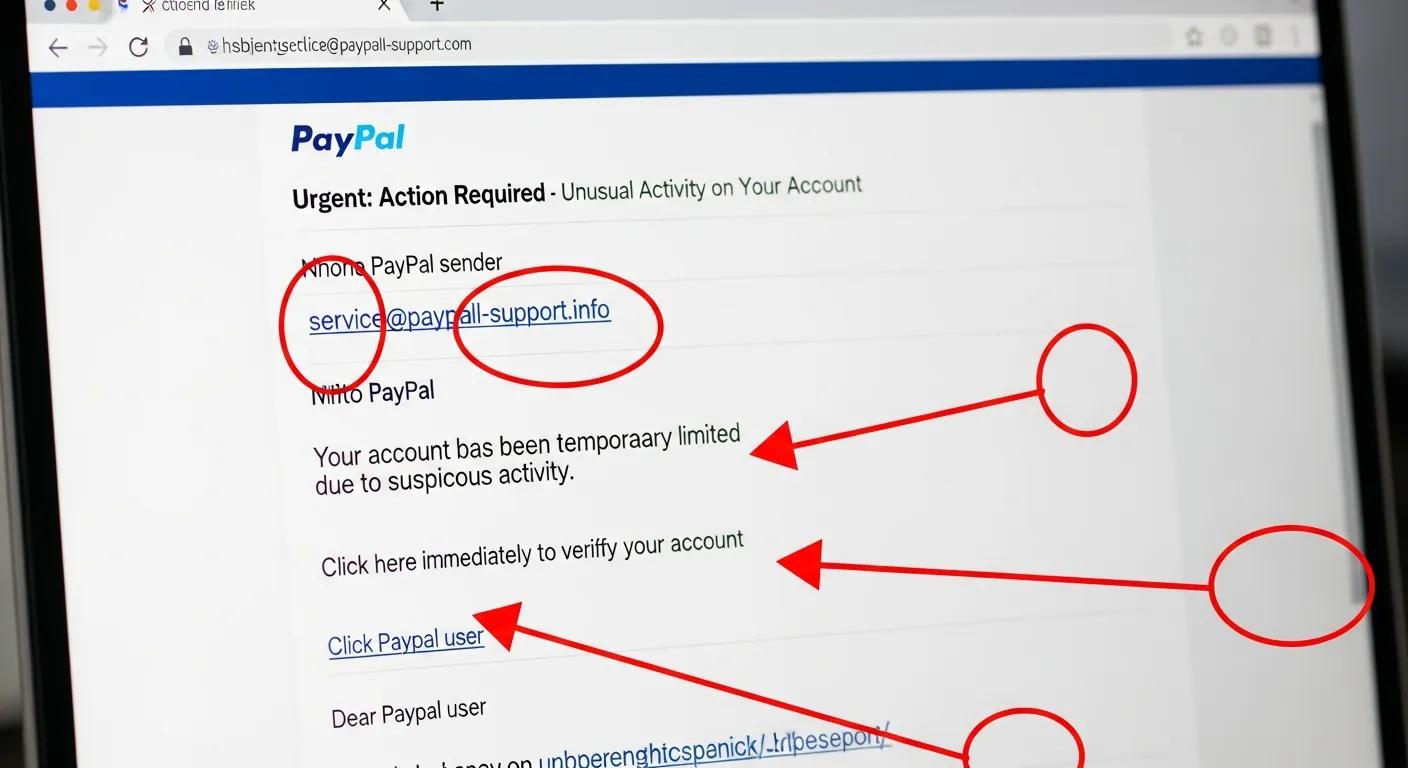
Fake PayPal emails often share a few clear warning signs:
- Generic Greetings: Real PayPal messages usually use your full name or business name. If it opens with “Dear Customer” or similar, be suspicious.
- Urgent Language: Scammers try to panic you into acting — phrases like “Your account will be suspended” are red flags.
- Suspicious Links: Hover (or long-press on mobile) to preview links. If the URL doesn’t go to the PayPal domain (paypal.com), don’t click it.
Spotting these clues early reduces the chance you’ll fall for a phishing attempt.
How to Analyze Suspicious Links and Attachments in PayPal Emails?
Before interacting with anything in a questionable email, inspect links and attachments carefully. Use these quick checks: stop spam.
- Hover Over Links: Preview the full web address before clicking. If it’s not the official PayPal domain (paypal.com), avoid it.
- Check Attachment Types: Be wary of .exe files or odd formats. PayPal rarely sends attachments; requests for downloads are usually scams.
- Use a Link Checker: If you’re unsure, run the URL through a reputable online link scanner before visiting.
These simple steps lower your risk and keep your devices safe from malicious content.
What Is the Official Process to Report PayPal Phishing Emails?

Reporting phishing to PayPal helps protect everyone. It’s straightforward: forward the suspicious message so PayPal can trace and block the source. Your report makes a real difference in stopping scams.
How to Forward Suspicious Emails to phishing@paypal.com Correctly?
Send PayPal a proper report by following these steps:
- Forward the Email: Open the suspicious message and use your email client’s forward option — don’t copy and paste the text alone.
- Do Not Alter the Subject Line: Keep the original subject intact so PayPal can match the message details.
- Include Full Email Headers: Headers show routing information PayPal needs. Your email client’s settings can show how to include them.
Doing this preserves the data PayPal needs to investigate and act on the threat.
What Information Should Be Included When Reporting to PayPal and FTC?
When you report phishing to PayPal or the FTC, include the following:
- Email Content: Forward the full message (attachment or inline) so headers and formatting stay intact.
- Sender Information: Make sure the sender’s email address is visible in your forwarded message.
- Date Received: Note when the email arrived to help investigators track it.
Complete reports speed up investigations and improve the chances of stopping the fraudster.
What Steps Should You Take After Receiving a Fake PayPal Email?
If you suspect a message is fake, act quickly. The following steps help limit damage and secure your account:
- Secure Your PayPal Account: Change your password right away to block potential access.
- Enable Two-Factor Authentication: Turn on 2FA to add a second verification step for sign-ins.
- Monitor Account Activity: Check recent transactions and activity for anything you don’t recognize.
Quick action reduces risk and gives you control over your account’s safety.
How to Secure Your PayPal Account After Exposure?
After exposure to a phishing attempt, take these protective measures:
- Change Security Questions: Update them to answers only you would know.
- Review Account Settings: Look for unfamiliar payment methods, email addresses, or linked accounts.
- Contact PayPal Support: Report suspicious activity to PayPal so they can help secure your account.
These steps help close any gaps an attacker might try to exploit.
When and How to Change Passwords and Monitor Account Activity?
Change passwords immediately if you suspect compromise. Follow these practical tips:
- Change Passwords Immediately: Don’t wait — update passwords as soon as you suspect a problem.
- Use Strong Passwords: Pick unique passwords with a mix of letters, numbers, and symbols.
- Set Up Alerts: Enable email or SMS alerts for transactions so you’re notified of account activity right away.
Routine checks and good password hygiene make it harder for attackers to succeed.
What Are Best Practices for PayPal Email Security to Prevent Spam and Phishing?
Keep your PayPal account safer by adopting these reliable habits:
- Use Strong Passwords: A unique, complex password for PayPal prevents credential reuse attacks.
- Enable Two-Factor Authentication: 2FA blocks many unauthorized access attempts, even if your password is stolen.
- Recognize Phishing Attempts: Keep an eye out for impersonation tactics and suspicious links or attachments.
Small, consistent changes to how you manage accounts go a long way toward better security.
How Does Two-Factor Authentication Enhance PayPal Account Security?
Two-factor authentication (2FA) requires two proofs of identity — typically a password plus a code sent to your phone or generated by an app. That extra step dramatically lowers the chance an attacker can access your account, even with a stolen password.
Why Use Temporary Emails for PayPal Sign-Ups and Online Privacy?
Disposable email addresses reduce spam and limit exposure of your primary inbox. TempoMailUSA’s temporary emails are useful when you want to sign up quickly without tying your main address to every service you try.
- Protecting Your Primary Email: Use a temporary address for less-trusted sites so your main inbox stays clean.
- Reducing Spam Exposure: Disposable emails stop newsletters and promo mail from piling up in your personal account.
- Enhanced Privacy: A temporary email prevents casual linking of your name or primary address to online activity.
Disposable addresses are a practical, low-effort layer of privacy for everyday browsing and sign-ups.
How Does TempoMailUSA’s AI Spam Email Checker Help Detect PayPal Spam?
TempoMailUSA’s AI Spam Email Checker analyzes incoming messages quickly, flagging likely spam, phishing, and other scams so you can decide what’s safe and what to report.
What Are the Benefits of Using AI Tools for PayPal Phishing Detection?
AI tools offer concrete advantages when hunting phishing attempts:
- Speed of Detection: AI inspects messages in real time, catching threats faster than manual review.
- Accuracy of AI Tools: Advanced patterns and heuristics reduce false positives while highlighting real threats.
- Continuous Learning: AI systems adapt as scammers change tactics, keeping protection current.
AI complements good habits and makes inbox protection more scalable and reliable.
How to Use TempoMailUSA’s AI Spam Email Checker for Enhanced Protection?
Get the most from the AI Spam Email Checker with these steps:
- Sign Up for the Service: Create an account at TempoMailUSA to access the tool.
- Integrate with Your Email: Connect the checker to your inbox for ongoing analysis.
- Review Alerts: Check flagged messages and follow suggested actions to stay safe.
Pairing the AI checker with healthy email habits gives you better, faster protection from phishing.
How Can Temporary Email Services Prevent PayPal Spam and Protect Your Privacy?
Temporary email services reduce the real-world impact of spam and tracking. By using a disposable address, you can avoid clutter, limit data exposure, and keep your main account private.
In What Scenarios Should You Use Disposable Emails for PayPal and Online Services?
Disposable emails are especially useful in these situations:
- Signing Up for Promotions: Use a temporary address for deals and sign-ups to avoid follow-up marketing.
- Testing Websites: Create accounts for testing or one-off access without polluting your main inbox.
- Online Purchases: For single-use transactions, a disposable email helps keep your identity separate.
Using temporary addresses in these cases keeps your primary email cleaner and more private.
What Privacy Advantages Does TempoMailUSA Offer with Temporary Email Addresses?
TempoMailUSA builds privacy features into its service to give you more control online: stop spam in its tracks
- No IP Logging: We don’t log your IP address, so your activity stays private.
- Encrypted Mail: Messages are encrypted in transit to protect content from interception.
- User Control: Create and delete temporary addresses on demand so you decide how long an address lives.
Those features make TempoMailUSA a practical choice for staying private and avoiding spam.
Frequently Asked Questions
What should I do if I accidentally clicked a link in a phishing email?
If you clicked a suspicious link, disconnect from the internet if possible and run a full antivirus scan. Change your PayPal password and enable two-factor authentication immediately. Check your account for unauthorized transactions and report any suspicious activity to PayPal support right away.
Can I report PayPal spam emails from my mobile device?
Yes. Open the suspicious message in your mail app, forward it to phishing@paypal.com, and keep the original subject line. On many mobile apps you can include headers via the settings or advanced options — include them when possible to help PayPal investigate.
How can I educate others about PayPal phishing scams?
Share clear examples and simple tips: check sender addresses, avoid clicking unknown links, and forward suspicious messages to PayPal. Post short guides on social media, send a quick how-to to friends and family, or run a small talk at work — practical steps and real examples make the advice stick.
What are the risks of ignoring suspicious PayPal emails?
Ignoring warnings can lead to identity theft, unauthorized charges, and a compromised account. Scammers can use stolen details to drain funds or open accounts in your name. Treat suspicious messages seriously and report them to reduce the risk to you and others.
Are there any tools to help identify phishing emails besides AI checkers?
Yes. Browser phishing filters, email client spam detection, and URL scanners all help. Email verification services can flag suspicious senders, and browser extensions can warn you about shady sites. Combine these tools with cautious habits for the best protection.
How often should I change my PayPal password for security?
Change your PayPal password every three to six months, or immediately if you suspect a security issue. Use a unique password you don’t use elsewhere, and consider a password manager to generate and store strong credentials. Always enable two-factor authentication for added safety.
What should I do if I receive a follow-up email after reporting a phishing attempt?
Review the reply carefully. Legitimate PayPal responses will confirm receipt and may offer next steps. If the follow-up asks for sensitive information or looks off, do not reply — instead report it to PayPal through official channels and verify the sender’s domain before taking any action.
Conclusion
PayPal phishing is common, but it’s manageable. Learn to spot the red flags, report suspicious messages properly, and lock down your account with strong passwords and two-factor authentication. Using temporary emails can cut your exposure to spam. Stay alert, act quickly when something looks off, and share these best practices to help others stay safe online.