



Why the Geek Squad Subscription Scam is a Growing Threat
The geek squad subscription scam is a phishing attack where criminals impersonate Best Buy's tech support service to steal your money and personal information. Here's what you need to know right now:
Quick Facts:
- What it is: Fake emails claiming you owe money for a Geek Squad subscription renewal
- The hook: Large fake charges ($300-$500) to create panic
- The trap: Phone numbers or links that connect you to scammers, not Geek Squad
- The goal: Steal your credit card details, bank login, or install malware on your computer
- The scale: Over 52,000 reports to the FTC in 2023 alone
You open your inbox and see an urgent message: "Payment order settled - Geek Squad membership renewal $417". You panic. You never signed up for this. The email says to call immediately to dispute the charge.
Stop. This is exactly what the scammers want.
In 2023, Best Buy and Geek Squad became the most impersonated companies in the United States. Scammers sent over 52,000 phishing messages pretending to be from this trusted tech support service. The reported losses from business impersonation scams exceeded one billion dollars - three times what was reported in 2020.
These aren't amateur operations. The fake emails look professional. They use official logos, realistic invoice formats, and even your real email address. Some scammers have gotten so sophisticated that they're using AI to write polished, natural-sounding messages, making traditional red flags like obvious grammar errors less reliable.
The scam works because it exploits trust and creates urgency. Geek Squad is a legitimate service that millions of people use. When you see a large unexpected charge, your first instinct is to call and fix it. But that phone number doesn't connect you to Best Buy - it connects you to criminals who will try to steal your financial information or trick you into installing remote access software on your computer.
Your email address is your digital identity. When scammers get it - through data breaches, social media scraping, or purchased lists - you become a target for these attacks. Understanding how this scam works is your first line of defense.
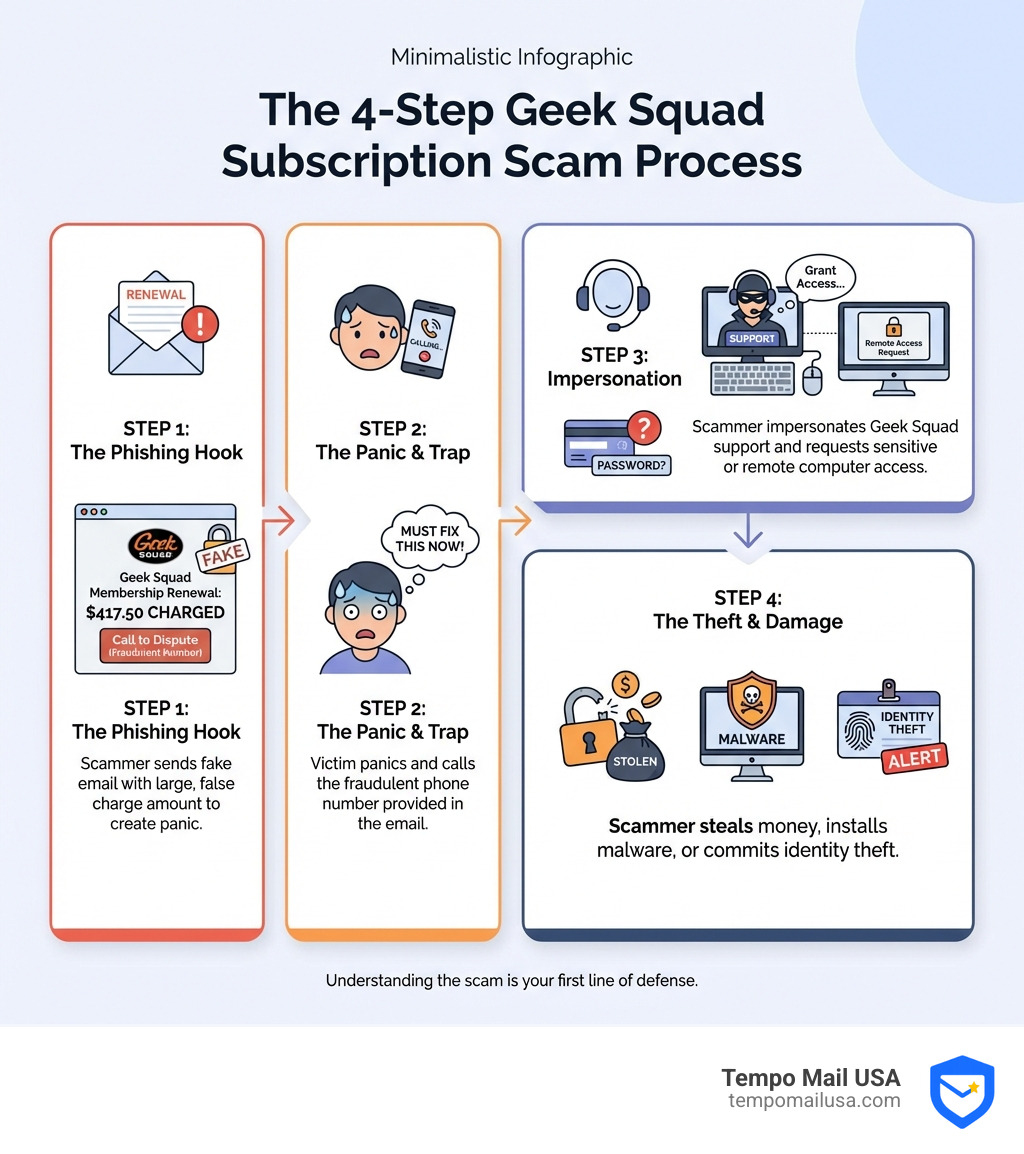
What is the Geek Squad Subscription Scam and How Does It Work?
The geek squad subscription scam is a prevalent form of imposter fraud where cybercriminals pose as legitimate Geek Squad representatives, often leveraging the trusted brand reputation of Best Buy. Their primary goal is to trick you into believing there's an issue with a non-existent or expired Geek Squad subscription, typically an auto-renewal, and then guide you through a series of steps that ultimately lead to financial theft or data compromise.
It usually begins with a sudden, alarming message - an email or a text - informing you about a substantial charge for a Geek Squad service or renewal. The amounts are often strategically set to be high enough (think $300-$500) to cause immediate panic, but not so high as to seem completely unbelievable. This manufactured panic is the scammers' secret sauce; it compels you to act quickly without thinking critically, which is exactly what they want.
The message will then instruct you to call a specific phone number or click a link to "dispute the charge," "cancel the renewal," or "get a refund." This contact information, of course, does not belong to the real Geek Squad or Best Buy. Instead, it leads directly to the scammers. Once you engage, they use social engineering tactics to manipulate you into revealing sensitive information or granting them access to your devices. It's a classic phishing scheme, but with a tech support twist. For more insights into these types of attacks, you can read our article on More info about what a phishing scam is.
The Scammer's Playbook: From Email to Theft
Let's walk through the typical steps scammers take to execute a geek squad subscription scam:
- Obtaining Your Email: Before they can send you a fake invoice, scammers need your contact information. This is often acquired through data breaches from other companies, social media scraping, or by purchasing lists of email addresses from the dark web. Your email address is a valuable commodity in the cybercriminal underworld.
- Sending the Fake Invoice/Renewal Notice: This is the bait. You'll receive a professional-looking email or text, complete with Geek Squad logos and branding, claiming an auto-renewal for a service you never subscribed to, or an invoice for a "network shield" or "protection plan" you certainly didn't order. The message will highlight a large, impending charge and create a false sense of urgency, urging you to act within a short timeframe (e.g., "call within 24 hours").
- The Deceptive Phone Call: If you fall for the urgency and call the number provided, you'll be connected to a scammer impersonating a Geek Squad technician or customer service agent. These individuals are often skilled in social engineering. They'll sound professional and empathetic, pretending to help you resolve the "issue." Their goal is to build trust and keep you on the line.
- Stealing Financial Information: Under the guise of processing a refund or cancelling a subscription, the scammer will ask for your credit card details, bank account credentials, or other Personally Identifiable Information (PII). They might claim they need it to "verify your identity" or to "process the refund directly to your account."
- Gaining Remote Access: A particularly insidious tactic is when scammers convince you to install remote access software on your computer. They might say they need to "diagnose the problem," "cancel the subscription remotely," or "process the refund through a secure portal." Once installed, this software gives them control over your computer.
- Installing Malware or Spyware: With remote access, scammers can do more than just steal information. They might install malware or spyware, which can then track your keystrokes, steal files, or gain access to all your online accounts without your knowledge. They might even "accidentally" refund you too much money and then demand you pay back the "overage" using gift cards, which are untraceable and non-refundable.
Understanding how to spot these initial deceptive emails is crucial for your online safety. Our comprehensive guide, A guide on how to spot phishing emails, offers detailed strategies for identifying these threats before they can cause harm.
Common Tactics and Red Flags to Spot the Scam
Scammers are constantly evolving their methods, but there are always tell-tale signs that give away a geek squad subscription scam. Our job is to recognize these red flags before we become victims.
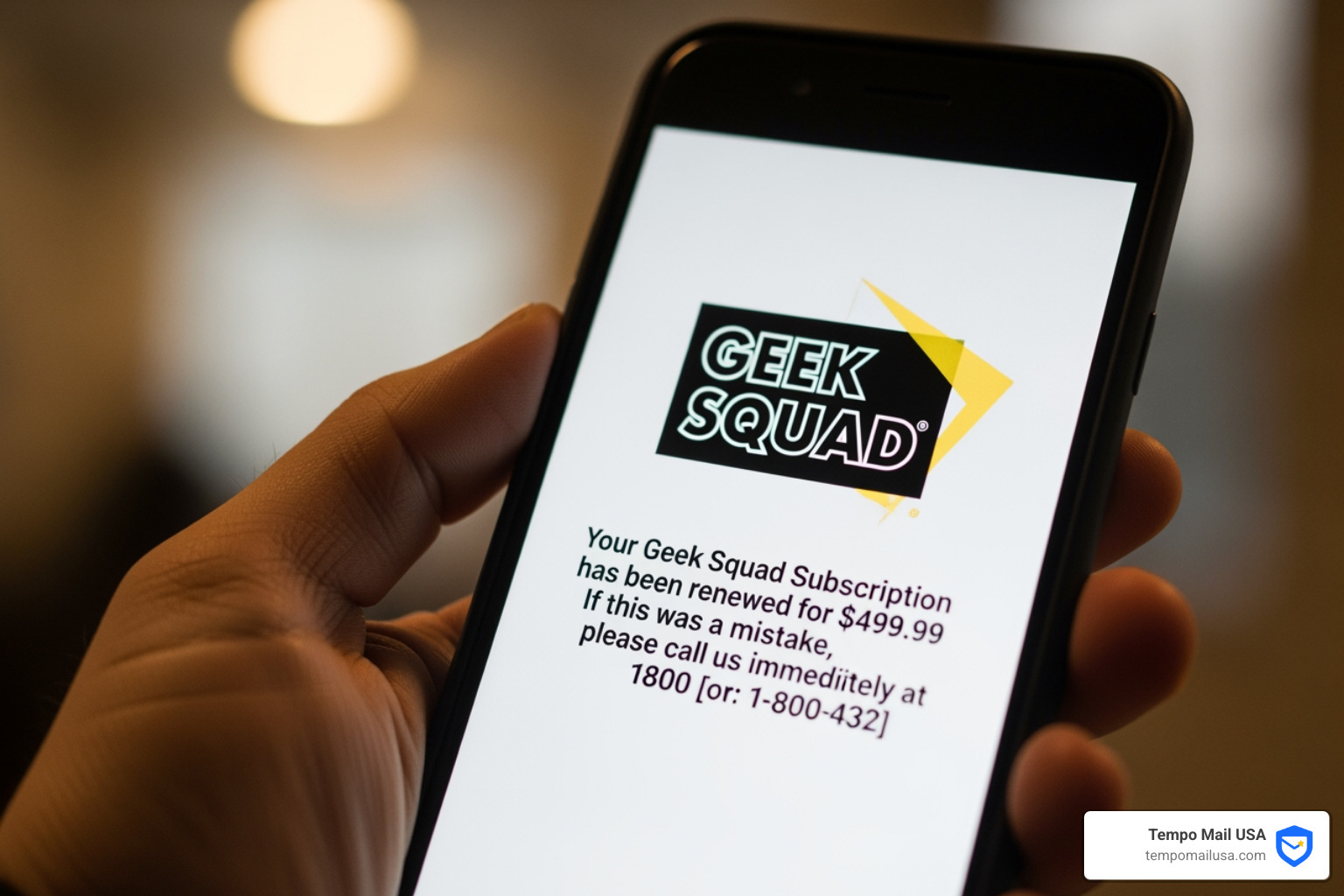
Here are the common tactics they use and the red flags to watch out for:
- Urgent or Threatening Language: Scammers thrive on panic. Messages often contain phrases like "Your account will be charged within 24 hours," "Immediate action required," or "Failure to respond will result in account suspension." Legitimate companies rarely use such high-pressure tactics.
- Generic Greetings: If an email starts with "Dear User," "Dear Customer," or even something like "TO: KAREN HILL" when your name isn't Karen Hill, that's a huge red flag. Legitimate communications from Geek Squad or Best Buy will almost always address you by your actual name.
- Mismatched Sender Email Addresses: This is one of the easiest giveaways. While the email might display "Geek Squad" as the sender name, check the actual email address. It will likely be from a public domain like
@gmail.com,@outlook.com, or a string of random characters, rather than an official@bestbuy.comor@geeksquad.comaddress. Sometimes, they use cleverly spoofed addresses that are just slightly off (e.g.,geeksquad-support@bestbuys.com). - Grammatical Errors and Typos: Although AI is making scam emails more polished, many still contain awkward phrasing, misspellings, or grammatical mistakes. While not a definitive sign on its own, especially with AI's help, it should still raise your suspicion.
- Unsolicited Attachments or Links: Be extremely wary of any unexpected attachments or links in these emails. Clicking a link could take you to a fake website designed to steal your login credentials, or an attachment could contain malware.
Top 5 Red Flags in a Scam Email
- Unexpected Communication: You receive an email or text about a Geek Squad subscription you don't recall having or renewing.
- Unusual Sender Address: The email comes from a generic domain (e.g., Gmail) or a slightly misspelled official domain.
- High-Pressure Tactics: The message creates extreme urgency, demanding immediate action to avoid a large charge or consequence.
- Requests for Unusual Payment Methods: You're asked to pay with gift cards, wire transfers, or cryptocurrency for a "refund" or "overpayment."
- Requests for Remote Access: An unsolicited call or email asks you to download software or grant remote access to your computer.
Anatomy of a Fake Geek Squad Subscription Scam Email
Let's dissect a typical fake Geek Squad email:
- Suspicious Sender Address: It might look like it's from Geek Squad, but a quick check of the full email address reveals it's from a non-official domain. For example, instead of
support@geeksquad.com, it might begeeksquad.billing@service-update.infoor evenbestbuy.support.id2345@gmail.com. This is a dead giveaway that it's a scam. - High-Pressure Tactics: The email often uses bold, attention-grabbing text to emphasize a large, impending charge. It might say something like, "Your Geek Squad Protection Plan is set to auto-renew for $499.99," followed by instructions to call immediately if you wish to cancel. The aim is to make you panic and react without thinking.
- Fake Invoice with Large Amounts: The email will often include a convincing-looking "invoice" or "order summary" detailing the hefty charge. This document might even include a fake order number, your email address, and a non-official phone number for "support" or "cancellations." The amount, often between $300 and $500, is strategically chosen to be impactful.
- Non-Official Phone Number for Support: This is the critical component. The email will prominently display a phone number, encouraging you to call it to dispute the charge. This number is your direct line to the scammer. They're waiting to ensnare you in their web of deception.
When in doubt about any suspicious communication, you have tools at your disposal. You can always use an AI-powered tool to help you identify potential scams. Use our AI Phishing Detector to quickly analyze suspicious emails, texts, or links.
The Dangers: What Scammers Want and the Consequences
Falling victim to a geek squad subscription scam can have severe and long-lasting repercussions. Scammers aren't just looking for a quick buck; they're after a treasure trove of your personal data and direct access to your finances.

Here's what scammers typically try to obtain:
- Personally Identifiable Information (PII): This includes your full name, address, phone number, date of birth, and even your Social Security number. With this information, scammers can open new credit accounts in your name, file fraudulent tax returns, or commit other forms of identity theft.
- Credit Card Details: Under the guise of processing a refund or payment, they'll ask for your credit card number, expiration date, and CVV. Once they have this, they can make unauthorized purchases or sell your card details on the dark web.
- Bank Account Credentials: If they trick you into providing your bank login information, they can directly access your bank accounts, drain your funds, or initiate fraudulent transfers. This is often achieved by convincing you to log into a fake banking portal while they have remote access to your computer.
- Remote Access: By tricking you into installing remote access software, they gain control over your computer. This allows them to browse your files, access sensitive documents, install further malware, or even manipulate your screen to make it appear as though they're "fixing" an issue while they're actually stealing your data.
- Malware Infection: The remote access software itself, or other downloads they coerce you into installing, can be malware or spyware. This malicious software can silently record your keystrokes (keyloggers), capture screenshots, steal passwords saved in your browser, or even activate your webcam and microphone without your knowledge.
Potential Consequences of a Geek Squad Subscription Scam
The immediate and long-term consequences of falling for this scam can be devastating:
- Direct Financial Theft: This is the most immediate impact. Scammers can directly charge your credit cards, empty your bank accounts, or trick you into sending them money via gift cards or wire transfers, which are almost impossible to recover. Victims can lose hundreds or even thousands of dollars.
- Unauthorized Purchases: Your stolen credit card details can be used for online shopping sprees, leaving you with a hefty bill and the headache of disputing fraudulent charges.
- Account Takeover: If scammers get your email password, they can gain access to a cascade of other online accounts linked to that email, such as social media, shopping sites, or even other financial services. This can lead to a complete digital identity crisis.
- Long-Term Identity Fraud: With your PII, scammers can engage in long-term identity theft, opening new lines of credit, taking out loans, or even committing crimes in your name. This can severely damage your credit score and take years to resolve.
- Malware and Data Loss: If malware is installed, your computer's security is compromised. You risk losing important files, having your personal photos or documents stolen, and your device becoming part of a botnet.
The best defense is prevention. Understanding these dangers highlights why it's so important to be vigilant and protect your information. For more comprehensive strategies on how to avoid these traps, please refer to our guide on Protect Yourself: How to Avoid Phishing.
How to Protect Yourself and Respond to an Attack
Protecting ourselves from the geek squad subscription scam requires a combination of proactive measures and knowing how to react if we encounter a potential threat. It's like having a digital shield and knowing your emergency exit strategy!
Proactive Protection:
- Verify, Verify, Verify: Never trust unsolicited emails or calls. If you receive a suspicious communication claiming to be from Geek Squad or Best Buy, do NOT call the number provided in the message or click any links. Instead, if you suspect it might be legitimate, contact Geek Squad or Best Buy directly using a phone number or website you know is real. Always steer to their official website (
BestBuy.com) and find their customer service or Geek Squad contact information there. You can Contact the real Geek Squad directly via their official channels. - Never Grant Remote Access to Unsolicited Contacts: Legitimate tech support will not call you out of the blue and ask for remote access to your computer. If someone does, hang up immediately. Remote access is a powerful tool that should only be granted to trusted individuals you have initiated contact with.
- Be Wary of Gift Card Requests: No legitimate business or government agency will ever ask you to pay for services, refunds, or penalties using gift cards, wire transfers, or cryptocurrency. These payment methods are untraceable and a huge red flag.
- Use Strong, Unique Passwords and 2FA: Protect your online accounts with strong, unique passwords for each service. Consider using a password manager to help you keep track. Furthermore, enable Two-Factor Authentication (2FA) wherever possible. This adds an extra layer of security, making it much harder for scammers to access your accounts even if they steal your password.
- Keep Software Updated: Regularly update your operating system, web browser, and antivirus software. These updates often include critical security patches that protect against known vulnerabilities exploited by scammers and malware.
- Monitor Your Accounts: Regularly check your credit card and bank statements for any unauthorized transactions. If you spot anything suspicious, report it to your financial institution immediately.
For a deeper dive into preventing these types of attacks, check out our guide on Effective strategies to prevent phishing attacks.
What to Do if You've Been Scammed
Even the most cautious among us can sometimes fall victim. If you believe you have been caught in a geek squad subscription scam, don't panic, but act quickly:
- Contact Your Bank/Credit Card Company Immediately: This is the absolute first step if you've given out financial information or made a payment. Report the fraud, cancel your cards, and ask your bank to reverse any unauthorized transactions. Time is of the essence here.
- Freeze Credit Cards and Accounts: If you've provided sensitive information, consider freezing your credit with the major credit bureaus (Experian, Equifax, TransUnion) to prevent scammers from opening new accounts in your name.
- Change All Critical Passwords: If you suspect any of your online accounts have been compromised, especially your email, banking, and shopping accounts, change your passwords immediately. Make them strong and unique. Our guide on A guide on email hacking prevention offers valuable advice here.
- Run a Full Antivirus Scan on Your Devices: If you granted remote access or downloaded any software, disconnect your computer from the internet and run a thorough scan using reputable antivirus software. Remove any suspicious applications or files found. You might even consider having a professional check your device.
- Document Everything: Keep records of all communications with the scammers (emails, texts, call logs) and any actions you've taken to mitigate the damage. This documentation will be crucial for reporting the scam to authorities.
Where to Report a Scam
Reporting scams is vital not only for potentially recovering your losses but also for helping authorities track cybercriminals and prevent others from falling victim.
- Federal Trade Commission (FTC): The FTC is the primary agency for collecting scam reports. Visit Report to the Federal Trade Commission (FTC) and complete the online form with all the details of the incident. The FTC uses these reports to investigate large-scale scams and fraudulent schemes.
- Internet Crime Complaint Center (IC3): This is a division of the FBI that tracks cybercrime. Filing a complaint with the File a complaint with the Internet Crime Complaint Center (IC3) helps law enforcement agencies investigate and prosecute cybercriminals.
- Your Local Police Department: Report the scam to your local police, especially if you have suffered significant financial loss or identity theft. They may not always be able to recover funds, but a police report can be helpful for disputing charges with banks or credit card companies.
- Best Buy's Official Abuse Reporting Channel: You can also report the incident directly to Best Buy. Contact the real Geek Squad directly by emailing their official investigation department at
abuse@BestBuy.comor calling(888) 237-8289, providing as many details as possible about the scam.
Frequently Asked Questions about Geek Squad Scams
We've covered a lot, but let's quickly address some common questions we hear about these tricky scams.
Is Geek Squad itself a scam?
Absolutely not! This is a crucial point to understand. Geek Squad is a legitimate and trusted tech support and repair service operated by Best Buy, a well-known electronics retailer. The problem isn't with Geek Squad, but with cybercriminals who exploit its reputable name to trick unsuspecting individuals. They impersonate Geek Squad to lend an air of authenticity to their fraudulent schemes.
How can I verify if a communication from Geek Squad is real?
Verifying legitimacy is key to staying safe. Here's our best advice:
- Check the Sender's Email Address: This is your first line of defense. Official Geek Squad communications will come from
@bestbuy.comor@geeksquad.comdomains. Be wary of any email from generic providers like Gmail, Outlook, or domains that are slightly misspelled. - Look for Personalization: Legitimate emails will typically address you by your name, not "Dear User" or "Dear Customer."
- Examine the Content: Look for poor grammar, awkward phrasing, or unusual requests. While some scammers use AI to improve their language, many still have tell-tale signs.
- Don't Click Links or Call Numbers in the Message: Never use the contact information provided in a suspicious email or text. Instead, if you think the message might be legitimate, independently verify it.
- Go Directly to the Source: The safest way to verify any communication is to go directly to the official Best Buy or Geek Squad website (
BestBuy.com). Log into your account or use the contact information found on their official site (not from the suspicious message) to inquire about your subscription or any alleged charges.
What's the first thing I should do if I paid a scammer?
If you've unfortunately fallen victim to a geek squad subscription scam and paid money, or given out financial details, the very first thing you should do is:
- Contact your bank or credit card company immediately. Explain that you've been scammed and ask them to halt payments, reverse charges, or freeze your accounts. Time is critical here, as the sooner you act, the better your chances of recovering funds.
After contacting your financial institutions, then proceed with these crucial steps:
- Change all your critical passwords, especially for your email, banking, and any other accounts you suspect might be compromised.
- Run a comprehensive antivirus and anti-malware scan on your computer if you granted remote access or downloaded any software.
- Report the scam to the FTC and IC3 (as detailed in the "Where to Report a Scam" section above).
Conclusion
The geek squad subscription scam is a persistent and evolving threat, preying on our trust in well-known brands and our natural inclination to resolve urgent financial matters. As we've seen, scammers are becoming increasingly sophisticated, using everything from convincing fake invoices to AI-generated messages to trick us.
Our key takeaways for staying safe are vigilance, verification, and reporting. Always be suspicious of unsolicited communications, especially those that create urgency or demand immediate action. Never click on suspicious links, download unexpected attachments, or call phone numbers provided in these messages. Instead, always verify any claims by contacting companies directly through their official, independently sourced contact information. And if you do encounter a scam, reporting it helps protect not only yourself but also the wider community.
One of the most effective ways to bolster your defense against these types of phishing and impersonation scams is by safeguarding your primary email address. Scammers often gain access to our emails through data breaches, which then become the launchpad for targeted attacks. This is where tools that provide identity proxying services become invaluable. By using a 'firewall' alias for your Personally Identifiable Information (PII) when signing up for services or subscriptions, you create an extra layer of defense. This means that even if a service you use suffers a data breach, your real email address remains protected, significantly reducing your exposure to scam attempts like the geek squad subscription scam.
Protecting your digital identity is an ongoing process, but with awareness and the right tools, we can significantly reduce our risk. Stay informed, stay cautious, and let's work together to make the internet a safer place.
To explore how our tools can provide that extra layer of security and improve your online privacy, we invite you to Check out our tools to enhance your online security.