



Your Email Alias Name Sets the Tone — Here's How to Get It Right
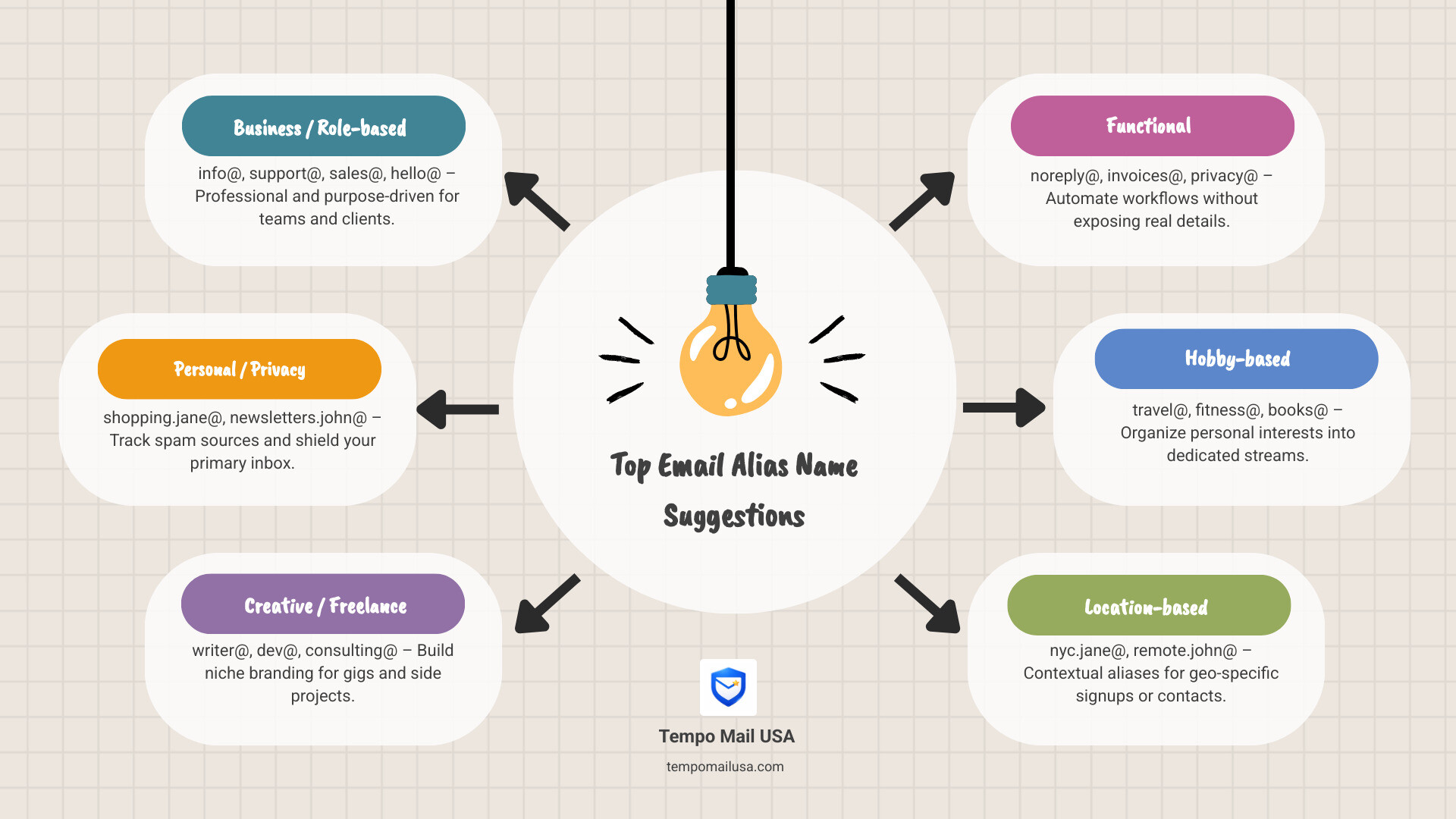
The best email alias name suggestions for most people fall into four categories: business roles (info@), personal privacy (shopping@), creative functions (writer@), and automated processes (invoices@).
| Use Case | Alias Examples |
|---|---|
| Business / Role-based | info@, support@, sales@, hello@ |
| Personal / Privacy | shopping.jane@, newsletters.john@ |
| Creative / Freelance | writer@, dev@, consulting@ |
| Functional | noreply@, invoices@, privacy@ |
Pick a format that matches your goal — then stick to it.
Your email alias is more than a technical workaround. It's the first thing someone sees when they get a message from you, and the thing you hand over every time a website asks for your email.
That second part is where it gets risky. Every time you sign up for a newsletter, a free trial, or a shopping account with your real email address, you're handing over a piece of your identity. If that company gets breached — or sells your data — your primary inbox pays the price. According to research, 47% of digital workers already struggle to find critical information buried in overwhelmed inboxes. Spam makes that worse.
Email aliases solve this cleanly. Instead of exposing your real address, you create a separate forwarding address that delivers to your inbox — but keeps your primary identity hidden. You can disable it the moment spam starts. You can use different aliases for different services and know exactly who leaked your data when junk mail arrives.
But here's where most guides stop short: they tell you what an alias is, not what to name it.
A well-named alias is memorable, purposeful, and protects you without looking suspicious. A poorly named one gets ignored, rejected by sign-up forms, or gives away more than you intended.
This guide covers exactly that — how to build a naming scheme that works for your privacy, your inbox, and your reputation.
What is an Email Alias and Why Do You Need One?
An email alias is a secondary email address that forwards all incoming messages to your primary inbox, acting as a digital firewall to protect your identity. It allows you to receive mail without revealing your actual account credentials to the sender.
Think of your primary email address as your home’s front door. An alias is like a PO Box located at the end of the street. Mail sent to the PO Box still ends up at your house, but the sender never actually sees your front door or knows your house number.
Technically, an alias is a forwarding address that routes messages to your primary inbox without requiring a separate login or additional storage. Unlike a separate account, which requires its own password and inbox management, an alias is just a layer on top of what you already have.
Why You Need This "Digital Firewall"
We live in an era where our email address is essentially our "key to the kingdom." It’s linked to our bank accounts, social media, and health records. When you use your primary address for everything, you're leaving a trail of Personally Identifiable Information (PII) across the web.
Beyond disposable: a deep dive into email masking is about more than just avoiding one-time spam. It's about creating a permanent buffer. Here is why aliases are essential:
- Identity Shielding: You can sign up for services without revealing your real name or primary contact info.
- Spam Tracking: If you sign up for a site using
brandname@youralias.comand start getting "Weight Loss" emails to that specific address, you know exactly who sold your data. - Inbox Organization: Aliases allow you to automatically filter mail. You can set a rule that says "anything sent to
newsletters@goes to the Reading folder," keeping your main inbox clear for humans. - Security: If a specific alias is compromised or starts receiving 1,000 spam emails a day, you can simply delete the alias. Your primary address remains untouched and secure.
Professional Email Alias Name Suggestions for Businesses
Professional email alias names should be role-based (e.g., info@, support@, sales@) to establish brand authority and ensure that customer inquiries are routed correctly regardless of staff changes.
For a business, aliases are about more than just privacy; they are about scalability and brand identity. A customized email domain isn’t just for show; it instills trust. Imagine receiving a quote from plumber.bob99@gmail.com versus estimates@bobsplumbing.com. The latter carries significantly more weight.
Using email alias name suggestions that are role-based allows your team to grow without changing how customers contact you. If "Sarah" leaves the company, the billing@ alias can simply be pointed to the new hire, "Mark."
Common Business Alias Frameworks
| Alias Type | Purpose | Examples |
|---|---|---|
| Role-Based | Directs mail to a specific function | info@, support@, sales@, jobs@ |
| Location-Based | Useful for regional branches | nyc@, london@, west-coast@ |
| Functional | Internal or automated processes | invoices@, returns@, dev-alerts@ |
| Engagement | Friendly, front-facing contact | hello@, ask@, community@ |
The "Big Three" for Credibility
Data shows that info@ is the most commonly registered email alias globally, followed closely by support@ and sales@. These are "expected" addresses. If a customer has a problem, they will instinctively try support@yourcompany.com. Having these set up makes even a one-person startup look like an established organization.
Creative Strategies for Personal and Professional Branding
To create a professional personal alias, use name variations, middle initials, or industry-specific keywords like dev@ or studio@ to maintain a clean digital footprint.
If you have a common name like John Smith, finding an available primary address is a nightmare. This is where email alias name suggestions involving name variations and middle initials save the day. Instead of johnsmith98234@gmail.com (which looks like a bot), try j.m.smith@ or smith.consulting@.
The Power of the Middle Initial
Adding a middle initial is often the cleanest way to find an available, professional name. It adds a touch of authority and distinguishes you from the sea of other "Johns" out there.
If you are looking for the right platform to manage these, the best email alias providers to keep your inbox can help you set these up on custom domains or private namespaces.
Industry-Specific Email Alias Name Suggestions
- For Creatives (Writers, Designers, Photographers):
portfolio@,creative@,hello.jane@,studio@ - For Technical Roles (Developers, Engineers):
dev@,root@,code@,builds@ - For Consultants and Coaches:
strategy@,ask@,results@,coaching@
Unique Personal Email Alias Name Suggestions for Daily Life
For your personal life, aliases are your best defense against the "overwhelmed inbox" syndrome.
- The Shopping Alias: Use
shop@ororders@. When you sign up for a 10% discount at a retail store, give them this. - The Travel Alias: Use
trips@orexplore@. Use this for flight bookings and hotel reservations. - The Newsletter Alias: Use
read@ornews@. This is a "firewall" for all the content you want to read later. - The "Burner" Alias: Use a random string or a UUID like
b373f9e0@yourdomain.comfor one-time downloads.
Best Practices for Naming an Email Alias
When naming an email alias, follow these five best practices: avoid numbers and birth years, keep the name under 20 characters, use dots instead of underscores, and choose a name that remains professional over time.
1. Skip the Numbers (Unless Necessary)
Unless you're a James Bond fan using 007, avoid random numbers. jane.doe2938@ looks like an automated spam account. If your name is taken, use a middle initial, a professional suffix (like CPA or MBA), or a Top-Level Domain (TLD) like .tech or .io instead of adding numbers.
2. Never Use Your Birth Year
This is a security and professional nightmare. john.doe1985@ tells every hacker exactly what year you were born, making it easier to answer security questions. Professionally, it can also lead to unconscious age bias.
3. Keep it Simple and Short
Long addresses like the.official.contact.email.for.smith.consulting@ are impossible to type on a mobile phone without making a mistake. Aim for under 20 characters before the @ symbol.
4. Use Dots, Not Underscores
In email alias name suggestions, dots (.) are generally preferred over underscores (_). Dots are cleaner, easier to see, and are standard across almost all platforms.
5. Plan for the Future
Don't use a nickname that you'll be embarrassed by in five years. Your "Sk8erBoi" days might be over, but that email address lives forever. Choose a naming scheme that can grow with you.
Frequently Asked Questions about Email Aliases
What is the difference between an alias and a separate account?
A separate account has its own login credentials, its own storage quota, and its own inbox. An alias is simply a "re-routing" instruction. Mail sent to an alias lands in your existing primary inbox. You don't need a new password, and you don't have to check two different apps.
How can aliases help me track and stop spam?
By using a unique alias for every service (e.g., netflix@yourdomain.com, amazon@yourdomain.com), you can see exactly which company leaked your data. If you start getting spam for "Online Casinos" sent to your netflix@ alias, you know their database was either breached or sold. You can then delete that specific alias to stop the spam instantly without affecting your other mail.
Conclusion: Take Control of Your Identity
Your email address is your digital identity. When data breaches are a matter of "when," not "if," using the same primary address for everything is a massive risk.
At TempoMailUSA, we believe in providing a secure identity proxy. We act as a digital firewall, shielding your real PII from services that don't need it. By implementing a smart naming scheme—using role-based aliases for work and categorized aliases for your personal life—you aren't just organizing your inbox; you're protecting your future.
If you're ready to stop being the product and start being the owner of your data, check out more info about the best email alias providers and start building your own naming scheme today. Your inbox (and your privacy) will thank you.