


The Crypto.com Email Scam Is Draining Wallets Right Now
The crypto.com email scam is a phishing attack where criminals send fake Crypto.com security emails to trick you into handing over your wallet recovery phrase or login credentials — after which your funds are gone permanently.
Here's what you need to know at a glance:
- What it is: A fraudulent email impersonating Crypto.com, typically claiming your NFT account needs security upgrades like 2FA or an anti-phishing code
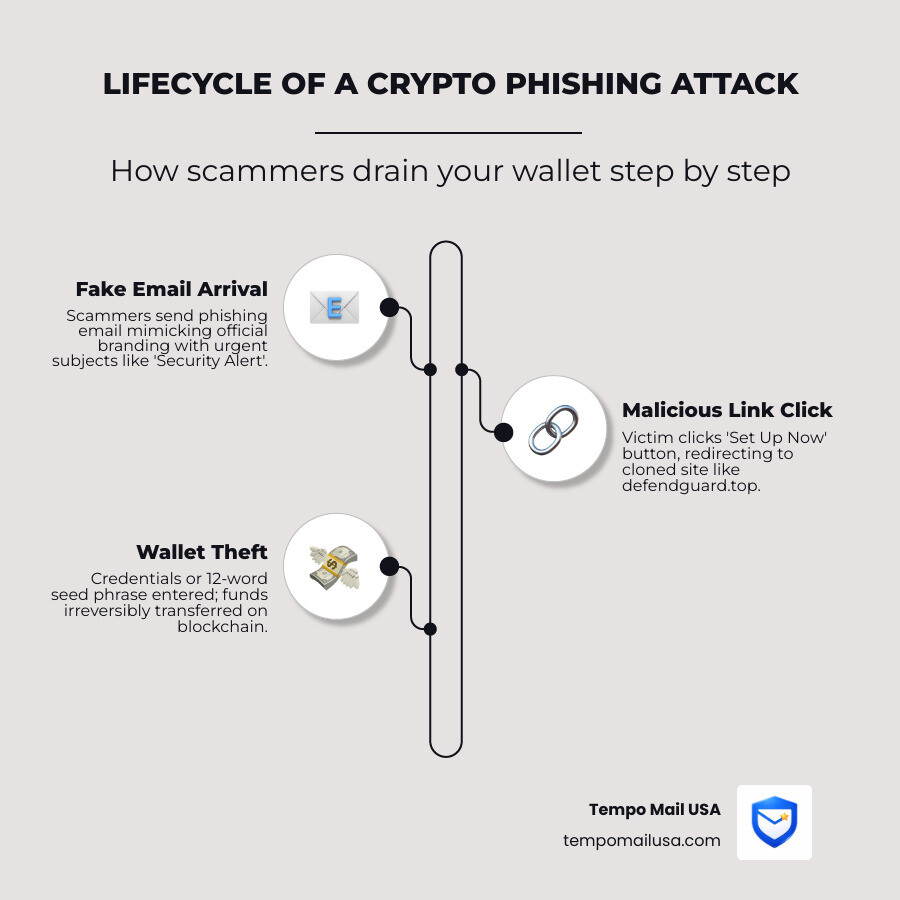
- How it works: You click a "Set Up Now" button, land on a cloned site (such as
defendguard.top), and are prompted to enter your wallet recovery phrase - What gets stolen: Your 12-word seed phrase, login credentials, or 2FA codes — giving scammers full access to your crypto
- Can you recover funds? No. Blockchain transactions are irreversible. Once funds leave your wallet, they're gone
- How to stay safe: Never click links in unsolicited emails, check every email for your personal Anti-Phishing Code, and shield your primary inbox using a PII firewall like Tempo Mail USA to stop scammers before they reach you.
Crypto.com is one of the world's most recognized crypto platforms, which is exactly why scammers impersonate it so aggressively. A platform with tens of millions of users is a high-value target — and cybercriminals know that even a tiny fraction of recipients clicking a malicious link translates into real money stolen. Protecting your digital footprint is the first step in avoiding these attacks. By using a PII firewall like Tempo Mail USA, you can ensure your primary email address never ends up on the leaked databases that scammers use to find their targets.
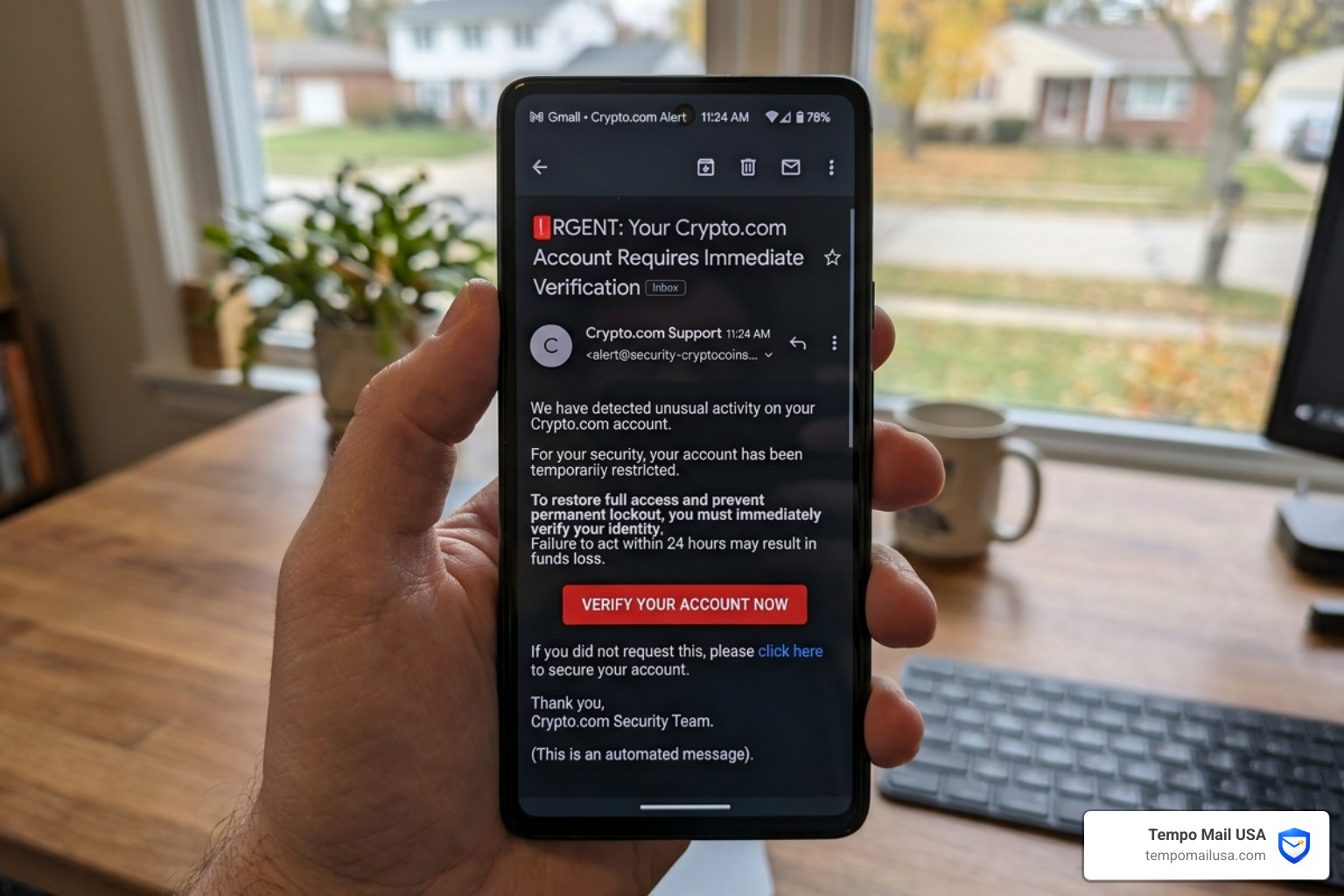
What makes this scam particularly dangerous isn't technical sophistication. It's social engineering. The emails look legitimate. The websites they link to look legitimate. And the urgency baked into subject lines like "Protect Your NFTs With These Extra Security Features" or "Security Alert: Account Temporarily Locked" is designed to make you act before you think.
Thousands of users have reported receiving these fake alerts. And because crypto transactions run on a decentralized blockchain, there's no bank to call, no chargeback to file, and no customer service team that can claw back what was taken.
The good news? This scam has a very clear fingerprint — and once you know what to look for, it's not hard to spot.
Anatomy of the Crypto.com Email Scam
To protect ourselves, we first need to understand how the crypto.com email scam actually functions. Unlike a crude "Prince from a distant land" email, these messages are often carbon copies of official Crypto.com branding. They use the correct logos, fonts, and color schemes to lull you into a false sense of security.
The scam typically centers on a "security update" narrative. We’ve seen a massive surge in emails claiming that users need to secure their NFT accounts by setting up Two-Factor Authentication (2FA) or a personal Anti-Phishing Code. Ironically, the scammers use the promise of security to steal your security credentials.
The primary goal is to get you to click a button. Once you do, you aren't on Crypto.com anymore; you are on a "cloned" site designed to look identical to the real exchange. These sites use "Wallet Drainers"—malicious scripts that, once you connect your wallet or enter your seed phrase, immediately sweep every token you own into the scammer's address. According to Crypto.com Email Scam: Stay Informed and Protected, these deceptive messages are meticulously crafted to bypass your initial skepticism.
Common Subject Lines for the Crypto.com Email Scam
Scammers rely on "The Big Three" of social engineering: Urgency, Fear, and Curiosity. In April 2026, we are seeing these specific subject lines appearing in inboxes:
- "Protect Your NFTs With These Extra Security Features" – Plays on the fear of losing valuable digital art.
- "Account Temporarily Restricted" – Creates immediate panic that your funds are locked.
- "Action Required: Verify Your Identity" – Mimics standard KYC (Know Your Customer) procedures.
- "Security Alert: Unauthorized Login Detected" – Forces you to "log in" to check your account, which is when they steal your password.
The "Set Up Now" Trap and Malicious Domains
The centerpiece of the crypto.com email scam is the "Set Up Now" or "Verify Now" button. When you hover your mouse over these buttons (without clicking!), you’ll see they don't lead to crypto.com.
Instead, they point to malicious domains like defendguard.top, cryptocomverifymail.com, or crypto-com-verification.com. Some advanced attackers even use "zero-width spaces" or homograph attacks—using characters from different alphabets that look like "c" or "o"—to make the URL look legitimate in your browser's address bar. Once on these sites, you are prompted to select your wallet provider (like MetaMask or Trust Wallet) and enter your 12 or 24-word recovery phrase. Never do this. No legitimate exchange will ever ask for your recovery phrase.
The High Cost of Compromise: Wallet Theft and Identity Fraud
If a scammer successfully tricks you, the consequences are immediate and often devastating. The moment you enter your recovery phrase into a fake site, a bot usually executes a transaction to drain your wallet. Because of the nature of the blockchain, these transactions are irreversible.
We have seen reports where users lost their entire life savings in under three minutes. As highlighted in our report on the NFT Rug Pull Investment Scam, the crypto world is rife with "one-way" traps. Once the digital assets are moved to the scammer's wallet, they are often "tumbled" or moved through decentralized mixers, making them nearly impossible to track or recover.
Furthermore, if you entered your login email and password, scammers will attempt "credential stuffing." This is where they take your Crypto.com password and try it on your Gmail, your bank account, and your social media. This can lead to a total identity takeover. If you've been hit, you should read our guide on how to Report Bitcoin Scam - $17 Billion Stolen - Do This First to mitigate further damage.
How to Verify and Secure Your Account
Staying safe requires a "Zero Trust" mindset. We recommend using a multi-layered defense strategy. This starts with technical tools like NordVPN, which can help block known malicious domains and phishing sites before they even load. When deciding on a security suite, tools like NordVPN are essential because they provide real-time "Threat Protection" that cross-references URLs against a database of known phishing sites, acting as a crucial second opinion before you click.
| Feature | Legitimate Crypto.com Email | Phishing Scam Email |
|---|---|---|
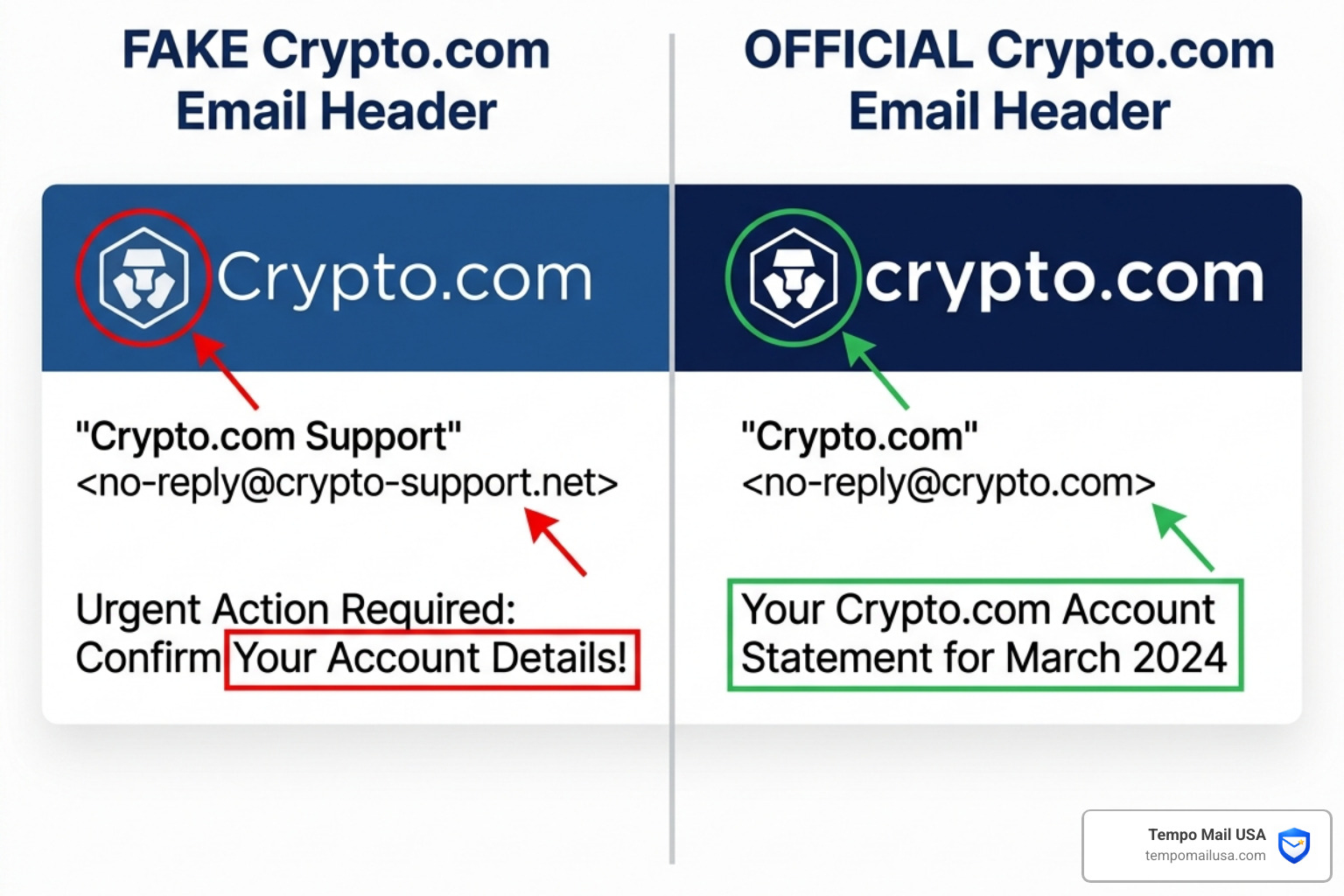
| Sender Address | Ends strictly in @crypto.com | Ends in @gmail.com, @outlook.com, or weird domains |
| Anti-Phishing Code | Contains your specific, custom code | Missing or shows a generic code |
| Greeting | Often uses your actual name | "Dear Valued Customer" or "Dear User" |
| Links | Leads to https://crypto.com/... | Leads to defendguard.top or similar |
| Tone | Informational and professional | Urgent, threatening, or "too good to be true" |
Using the Official Crypto.com Email Scam Verification Tools
Crypto.com provides several built-in tools to help us stay safe:
- Anti-Phishing Code: This is your most powerful weapon. In your app settings, you can set a secret word (e.g., "BlueMonkey77"). Every legitimate email from the exchange will display this code at the top. If an email claims to be from them but doesn't have your code, it is 100% a crypto.com email scam.
- Channel Verify: Crypto.com has an official tool where you can paste a URL, email address, or Telegram handle to see if it belongs to an authorized representative.
- Ambassadors List: Always check the official list before taking advice from someone claiming to be a "Crypto.com Expert" on social media.
Best Practices for Crypto Security in 2026
As we navigate the digital asset space in 2026, we must adopt better habits. First, bookmark the official exchange website and only use that bookmark to log in. Never click a link in an email to access your account.
Second, move away from SMS-based 2FA. Scammers can use "SIM swapping" to intercept your text messages. Instead, use an authenticator app like Google Authenticator or, better yet, a physical security key (YubiKey). For those with significant holdings, a hardware wallet (cold storage) is the only way to ensure your private keys never touch the internet. You can find more tips in our Coinbase Text Scam Alert - Stay Safe Online guide, as many of these tactics are used across all major platforms.
Immediate Steps if You’ve Been Targeted
If you realized too late that you clicked a link in a crypto.com email scam, don't panic—but act fast. Every second counts.
- Move Remaining Funds: If you still have access to your wallet and there are funds left, move them to a brand-new wallet with a different recovery phrase immediately.
- Change Passwords: Change your Crypto.com password and the password of the email account associated with it. Enable 2FA immediately if you haven't already.
- Contact Support: Use the official in-app chat to report the compromise. While they likely cannot recover stolen crypto, they can freeze your account to prevent further withdrawals or changes to your settings.
- Run a Malware Scan: If you downloaded any attachments, your device might be infected with a keylogger. Use a reputable antivirus or follow the Crypto.com Email Scam - Removal and recovery steps (updated) to clean your system.
- Report the Crime: File a report with the FBI's Internet Crime Complaint Center (IC3) or the Anti-Phishing Working Group (APWG). This helps authorities track and shut down the scammer's infrastructure.
Proactive Defense: Shielding Your PII from Scammers
The reason you received that scam email in the first place is likely because your "Personally Identifiable Information" (PII) was leaked in a data breach. Scammers buy lists of emails known to be associated with crypto users from the dark web.
At Tempo Mail USA, we believe the best way to stop a scam is to never let the scammer find your inbox. We provide a "PII Firewall" through secure email aliases. When you sign up for newsletters, airdrops, or new DeFi platforms, you shouldn't use your primary "vault" email.
Instead, use a temporary alias. If that alias starts receiving phishing attempts, you can simply delete it. Your real identity and your primary inbox remain shielded. This is especially vital for high-risk activities; check out our specialized tools like Temp Mail for Metamask and Temp Mail for Airdrops. By using an alias, you break the link between your crypto activity and your real-world identity.
Frequently Asked Questions about Crypto Phishing
How can I tell if a Crypto.com email is real?
Check for your personalized Anti-Phishing Code at the top of the email. If the code is missing or incorrect, it’s a scam. Additionally, verify the sender's domain is strictly @crypto.com and use the official "Verify" tool on the Crypto.com website to double-check any links before clicking.
What happens if I click the link in a scam email?
Clicking the link usually redirects you to a cloned website designed to steal your login credentials, 2FA codes, or your 12-word wallet recovery phrase. In some cases, simply visiting the site can trigger a "browser exploit" or download malware like keyloggers onto your device.
Can Crypto.com recover my stolen funds?
No. Because cryptocurrency transactions are recorded on a decentralized blockchain and are irreversible, it is virtually impossible for the platform to claw back funds once they have been sent to a scammer's wallet address. This is why prevention is the only real cure.
Conclusion
The crypto.com email scam is a sobering reminder that in decentralized finance, you are your own bank. This comes with incredible freedom, but also total responsibility. Vigilance is your best defense. By using tools like Anti-Phishing Codes, hardware wallets, and identity-shielding services like Tempo Mail USA, you can enjoy the benefits of the crypto revolution without becoming a statistic.
Stay skeptical, stay updated, and always protect your PII. The best way to win the game against scammers is to refuse to play by their rules. Protect your PII with Tempo Mail USA today and build your own digital firewall.