

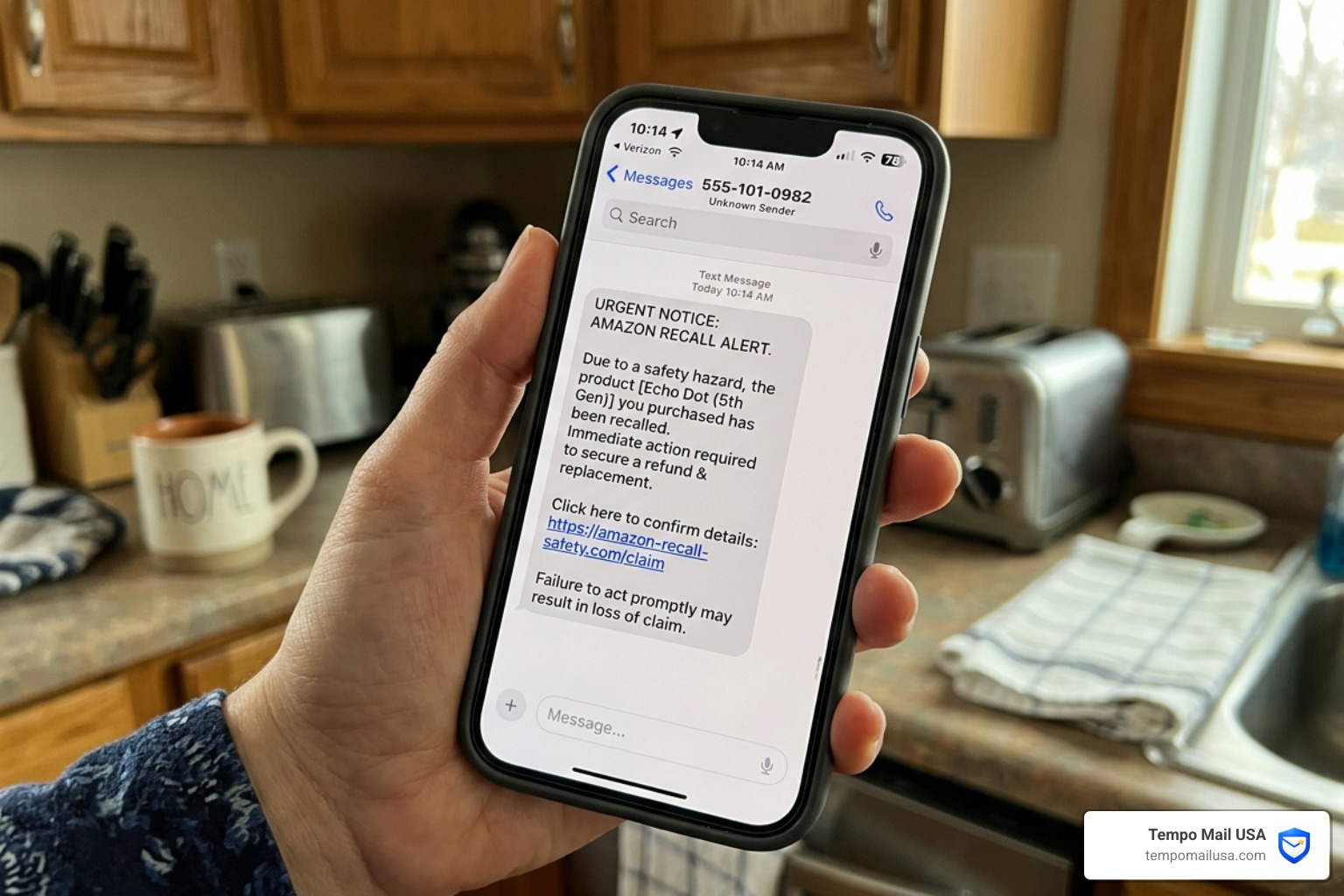

The Amazon Recall Text Scam Is Targeting Shoppers Right Now — Here's What You Need to Know
If you've ever wondered about the Amazon Recall Text Scam How to Verify Messages and Protect Your Account, here's the short answer before we go deeper:
Quick Answer: How to Handle a Suspicious Amazon Recall Text
- Do not click any links in the message
- Go directly to the Amazon app or website and check "Your Orders"
- Amazon does not send recall notices via text — if you got one, it's almost certainly a scam
- Report the message as spam to your carrier, and forward it to stop-spoofing@amazon.com
- Verify real product recalls at recalls.gov or cpsc.gov
- Secure your account immediately with two-factor authentication or a passkey if you clicked anything
Imagine getting a text out of nowhere: "Your Amazon order has been recalled due to a quality and safety concern. Click here to arrange your refund." Your stomach drops. You've got kids. You order constantly. What if it's the baby sleepsuit you bought last month?
That's exactly what scammers are counting on.
These messages are engineered to trigger panic — and they're working. In 2024 alone, Amazon was forced to take down more than 55,000 phishing websites and shut down 12,000 phone numbers being used in impersonation schemes. Over two-thirds of Amazon impersonation scams reported globally in 2023 were tied to fake order or account issues — the exact kind of fear these recall texts manufacture.
The texts look convincing. They reference real-sounding order numbers. They mimic Amazon's tone and branding. And thanks to AI, the fake websites they link to are increasingly difficult to distinguish from the real thing at a glance.
One shopper — a diligent online buyer who makes a habit of registering her products for official recall notices — received a text about a purchase she'd made in December. Something felt slightly off. She went directly to Amazon instead of clicking the link. Amazon confirmed it was a scam. That gut check saved her account.
Not everyone catches it in time.
This is a privacy and financial risk hiding inside a familiar brand name. And if you're someone who already worries about your personal information floating around online — from data breaches, spam sign-ups, or account leaks — this scam hits especially close to home.
Here's everything you need to know to spot it, verify it, and protect yourself.
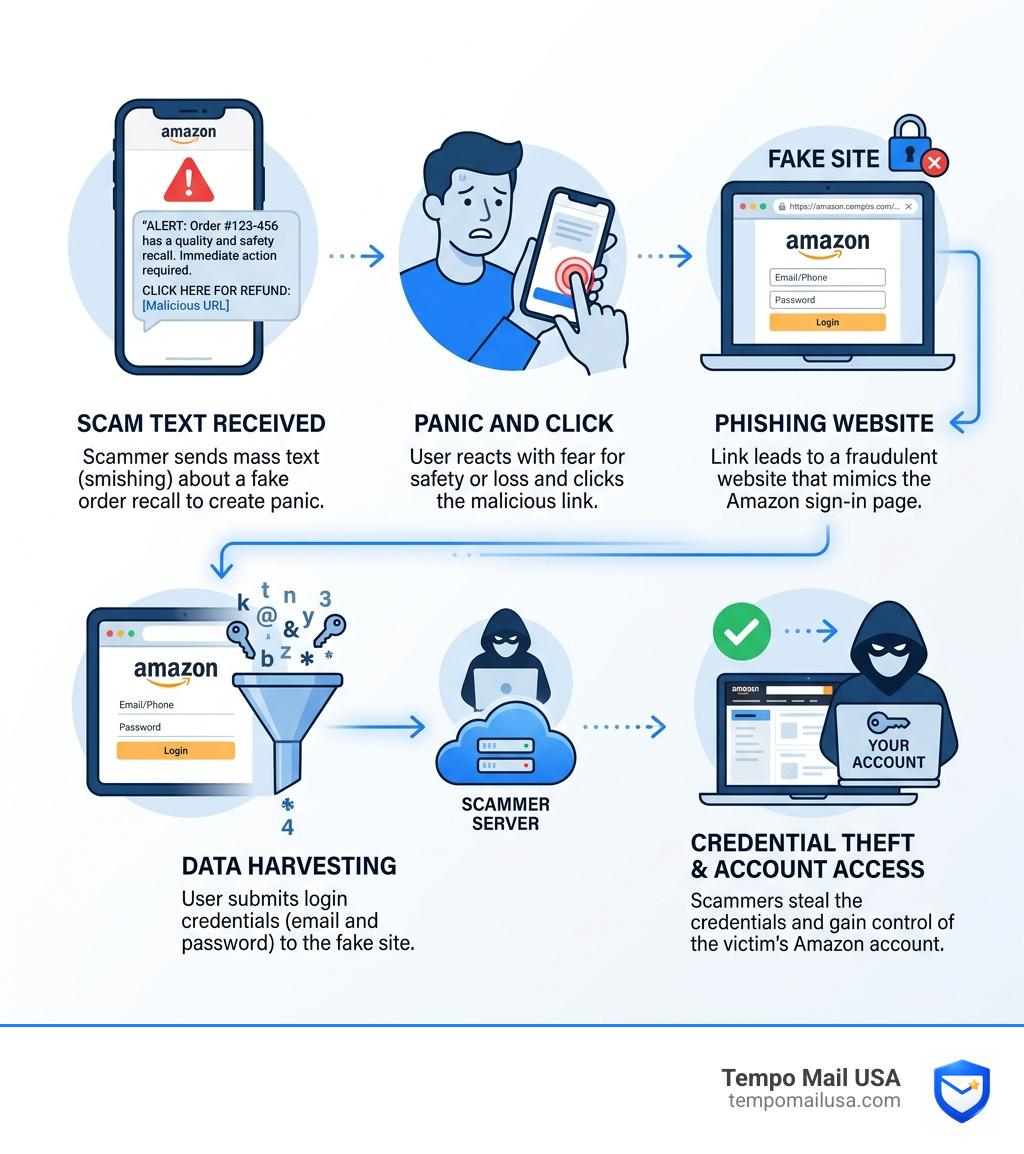
Anatomy of the Amazon Recall Text Scam How to Verify Messages and Protect Your Account
To protect ourselves, we first need to understand how this trap is set. The Amazon Recall Text Scam How to Verify Messages and Protect Your Account relies on a technique called "smishing" (SMS phishing). Unlike traditional email phishing, which often gets caught by spam filters, text messages land directly in your pocket with a notification chime that demands immediate attention.
Scammers typically acquire your phone number through massive data breaches, third-party marketing lists, or even automated "war dialing" software. Once they have a target list, they blast out thousands of messages using The Latest Amazon Scam Blows Up Your Phone With Fake Texts tactics.
The core of the scam is a fake order number. By including a string of digits that looks like a standard Amazon ID (e.g., 329-5185641-1929522), the message gains instant credibility. They often reference a specific time period, such as "your purchase from December 2025," to make you scan your memory for what you might have bought. As noted in the Amazon Recall Scam Alert Fake Texts Stealing Accounts report, the goal is to drive you to a high-quality copycat website that looks identical to the Amazon login page.
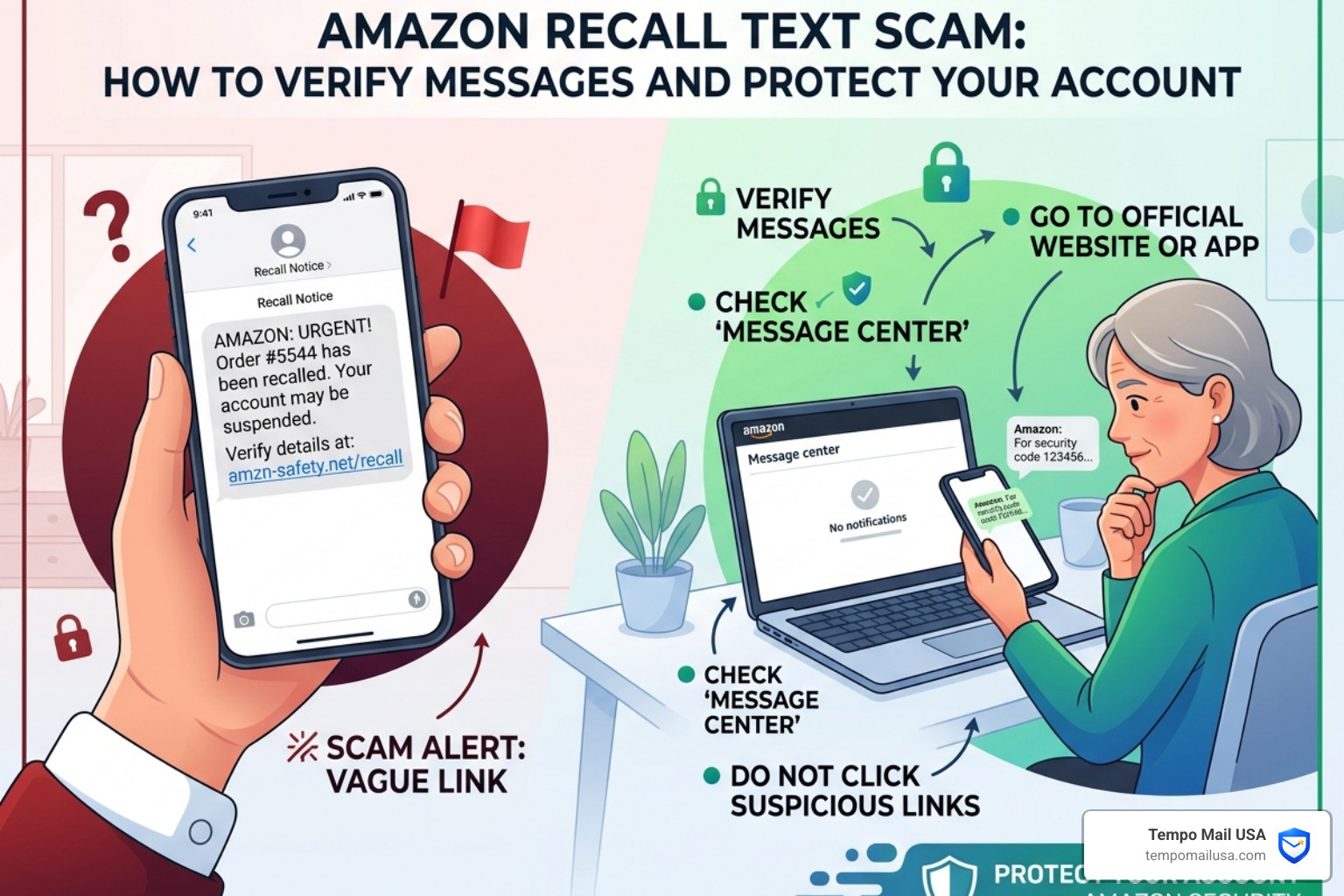
Identifying Red Flags in an Amazon Recall Text Scam How to Verify Messages and Protect Your Account
While these texts are getting more sophisticated, they almost always leave "digital fingerprints" that give them away. If you see any of the following, delete the message immediately:
- URL Shorteners: Amazon doesn't use "cutt.ly," "bit.ly," or "t.co" links for official safety notices. If the link doesn't end in ".amazon.com," it’s a trap.
- Foreign or Unrecognized Numbers: Many of these texts originate from 10-digit personal numbers or international country codes that Amazon would never use for official automated alerts.
- Generic Greetings: Messages starting with "Dear Amazon Customer" instead of your actual name are a classic sign of a bulk phishing campaign.
- Spelling and Grammar Errors: Look for "Amazon Safety Team" written with odd capitalization or slight typos in the body of the text.
According to experts at Beware The FAKE Amazon Safety Recall Notification Scam Texts, legitimate recall notices will never pressure you to act via a text link; they will direct you to log in securely through the app.
Why Scammers Use Product Recalls to Steal Data
Why a recall? Why not just say there's a problem with your payment?
The "recall" pretext is uniquely effective because it leverages fear and safety. If a scammer tells you your credit card failed, you might be annoyed. If they tell you the baby sleepsuit you bought is flammable or a toy is a choking hazard, you experience a visceral protective response.
This psychological manipulation bypasses our natural skepticism. We want the "dangerous" item out of our house, and the promise of a "full refund" acts as the bait to get us to click. As reported by Scammers now use fake recall texts to steal your money, this is the "DNA" of a modern scam: urgency, fear, and a financial incentive. Once you click and "log in" to the fake site, they have your password. If you enter your card details for the "refund," they have your wallet.
How to Verify Legitimate Amazon Communications
Verification is your strongest shield. Amazon is a massive company with very specific ways of talking to its customers. They rarely, if ever, use SMS for high-stakes safety notifications.
If you receive a text, the first thing you should do is open the official Amazon app or go to the website directly in your browser. Do not use the link in the text. Once logged in, check your "Your Orders" dashboard. If a product has been recalled, Amazon will typically display a prominent alert next to the item in your order history.
Furthermore, Amazon has introduced Rufus, a generative AI-powered shopping assistant. You can actually ask Rufus within the app, "Was my recent order recalled?" or "Is this text message a scam?" to get immediate verification. For more on spotting these tactics, see How To Identify Amazon Refund Text Scams.

Using Official Resources for Recall Verification
If you are still worried about a product's safety but don't see anything on Amazon, go to the source. Government agencies maintain centralized databases for every consumer product recall in the country:
- CPSC.gov: The Consumer Product Safety Commission handles most household goods.
- Recalls.gov: A "one-stop shop" for all U.S. Government recalls.
- FDA.gov: For food, medicine, and cosmetics.
- NHTSA.gov: For car seats and automotive equipment.
If you can't find the recall on these sites, the text you received is a total fabrication. As detailed in the Amazon Recall Text Scam Explained: What It Is, How It Works, And How To Stay Safe guide, these official channels are the only 100% reliable way to confirm a safety issue.
Best Options Compared: Official vs. Fake Notifications
| Feature | Official Amazon Communication | Fake Recall Text Scam |
|---|---|---|
| Channel | Email (@amazon.com), App Notification, or Mail | SMS / Text Message |
| Link Structure | Direct links to amazon.com/recalls | Shortened links (cutt.ly, t.co, bit.ly) |
| Sender ID | Verified Amazon Short Code or Email | 10-digit mobile number or hidden ID |
| Tone | Professional, informative, non-urgent | Urgent, threatening, or safety-focused |
| Request | View details in your account | Enter password or credit card for refund |
Immediate Steps to Take if You Are Targeted
If a suspicious text hits your inbox, don't just ignore it—report it. By reporting, you help Amazon and mobile carriers block these numbers for everyone else.
- On iPhone/Android: Use the "Report Junk" or "Block and Report Spam" feature built into your messaging app.
- Email Amazon: Take a screenshot and forward it to stop-spoofing@amazon.com.
- FTC Reporting: File a report at reportfraud.ftc.gov.
For those interested in how these scams evolve into other areas, like gift card fraud, check out our guide on the Amazon Gift Card Scam.
Recovery Actions for Compromised Accounts
What if you already clicked? What if you entered your password? Do not panic, but act fast.
- Change Your Password: Go to the real Amazon.com immediately and update your password. Use a long, unique phrase you don't use anywhere else.
- Enable Two-Factor Authentication (2FA): This is non-negotiable in 2026. Even if a scammer has your password, they can't get in without the secondary code.
- Check Your Devices: Go to "Login & Security" and look at "Registered Devices." Sign out of anything you don't recognize.
- Review Recent Orders: Look for "archived" orders. Scammers often buy items and then archive the order so you don't see the notification.
For a deeper dive into securing your digital life, our article on Amazon Recall Scam Alert Fake Texts Stealing Accounts provides a comprehensive checklist.
Protecting Your Financial Data from Identity Theft
The financial risk of an account takeover is significant. Scammers can use your saved credit cards to buy high-value electronics or gift cards. If you entered payment info on a fake site, contact your bank immediately to freeze the card and request a new one.
Many users now rely on secure platforms, insurance coverage, and advanced privacy tools to avoid financial or data-related risks. If you are worried about the long-term costs of identity recovery, you can calculate potential recovery costs to see why prevention is so much cheaper than the cure. For added security, using a VPN can help encrypt your traffic and prevent some types of data interception while you're managing your accounts.
Advanced Security Measures for Your Amazon Account
In 2026, a password is no longer enough. Scammers are using AI to crack passwords and build phishing sites that bypass basic security. To stay ahead, you need to adopt a "defense-in-depth" strategy.
Strengthening Your Amazon Recall Text Scam How to Verify Messages and Protect Your Account Defense
One of the best ways to stop scammers from even finding your phone number or email is to use a PII (Personally Identifiable Information) Firewall. This is where Tempo Mail USA comes in. By using a Burner Mail For Amazon or an Anonymous Email For Amazon, you create a buffer.
If a third-party site you used once gets breached, the scammers get your temporary alias, not your real identity. They can't find your phone number through your email, and they can't link your Amazon account to your bank account. It’s a simple privacy habit that prevents you from becoming a target in the first place.
Why 300 Million Users Have Switched to Passkeys
The biggest leap in security recently is the Passkey. Over 300 million Amazon customers have already upgraded. Unlike a password, a passkey is a digital credential tied to your specific device (your phone or laptop). It uses your face, fingerprint, or device PIN to log you in.
The beauty of a passkey is that it is phishing-resistant. Even if you land on a fake Amazon website, your device will refuse to share the passkey because the URL doesn't match the official Amazon domain. It effectively kills the Amazon Recall Text Scam How to Verify Messages and Protect Your Account because there is no password for the scammer to steal. You can set this up in your Amazon "Login & Security" settings today.
Frequently Asked Questions about Amazon Recall Scams
Does Amazon ever send product recall notices via text message?
No. Amazon officially communicates product recalls through email (sent from an @amazon.com address), physical mail for registered products, or via notifications within the Amazon app. They do not send unsolicited text messages with links to claim refunds for recalled items.
What should I do if I clicked a link in a fake recall text?
If you clicked the link but didn't enter information, immediately run a malware scan on your device using a reputable security tool. If you entered your login credentials, change your Amazon password immediately, enable 2FA, and check your "Your Orders" and "Payments" sections for any unauthorized activity. If you provided credit card details, contact your bank to cancel the card.
How can I report a fake Amazon recall text?
You should report the message in three ways:
- Forward the text to 7726 (SPAM) to alert your mobile carrier.
- Forward a screenshot or the message details to stop-spoofing@amazon.com.
- Report the scam to the Federal Trade Commission at reportfraud.ftc.gov.
Conclusion
The Amazon Recall Text Scam How to Verify Messages and Protect Your Account is a reminder that our digital safety requires constant vigilance. Scammers are experts at using our own emotions—fear for our family's safety and the lure of a quick refund—against us.
By sticking to official channels, using the Amazon app for verification, and upgrading to modern security like passkeys, you can make your account an impossible target. Privacy is a habit, not a one-time setup. Tempo Mail USA provides a secure PII firewall by generating temporary email aliases that shield your real identity from data brokers and potential scammers. Whether you are signing up for a new service or managing your Temp Mail For Amazon Prime, using an alias ensures that your real data stays where it belongs: with you.