



Your Digital Footprint Is Being Harvested — Here's What Privacy Shield Pro Does About It
What is Privacy Shield Pro is one of the most common questions asked by people who are tired of being tracked online — and the answer matters more in 2026 than ever before.
Quick Answer:
Privacy Shield Pro is a lightweight browser extension that blocks online trackers, prevents ad targeting, and resists browser fingerprinting — all with zero data collection from the developer. It runs entirely on your device and is available for Chrome and Firefox, with a free tier and a one-time Pro upgrade for $12.99.
Here is what it does at a glance:
- Blocks trackers — stops analytics scripts, ad pixels, and third-party tracking
- Prevents fingerprinting — neutralizes canvas, WebGL, and audio-based identification techniques
- Manages cookies — auto-deletes them when you close a tab
- Protects your IP — prevents WebRTC leaks that expose your real address
- Collects zero data — all logic runs locally, nothing is sent to any server
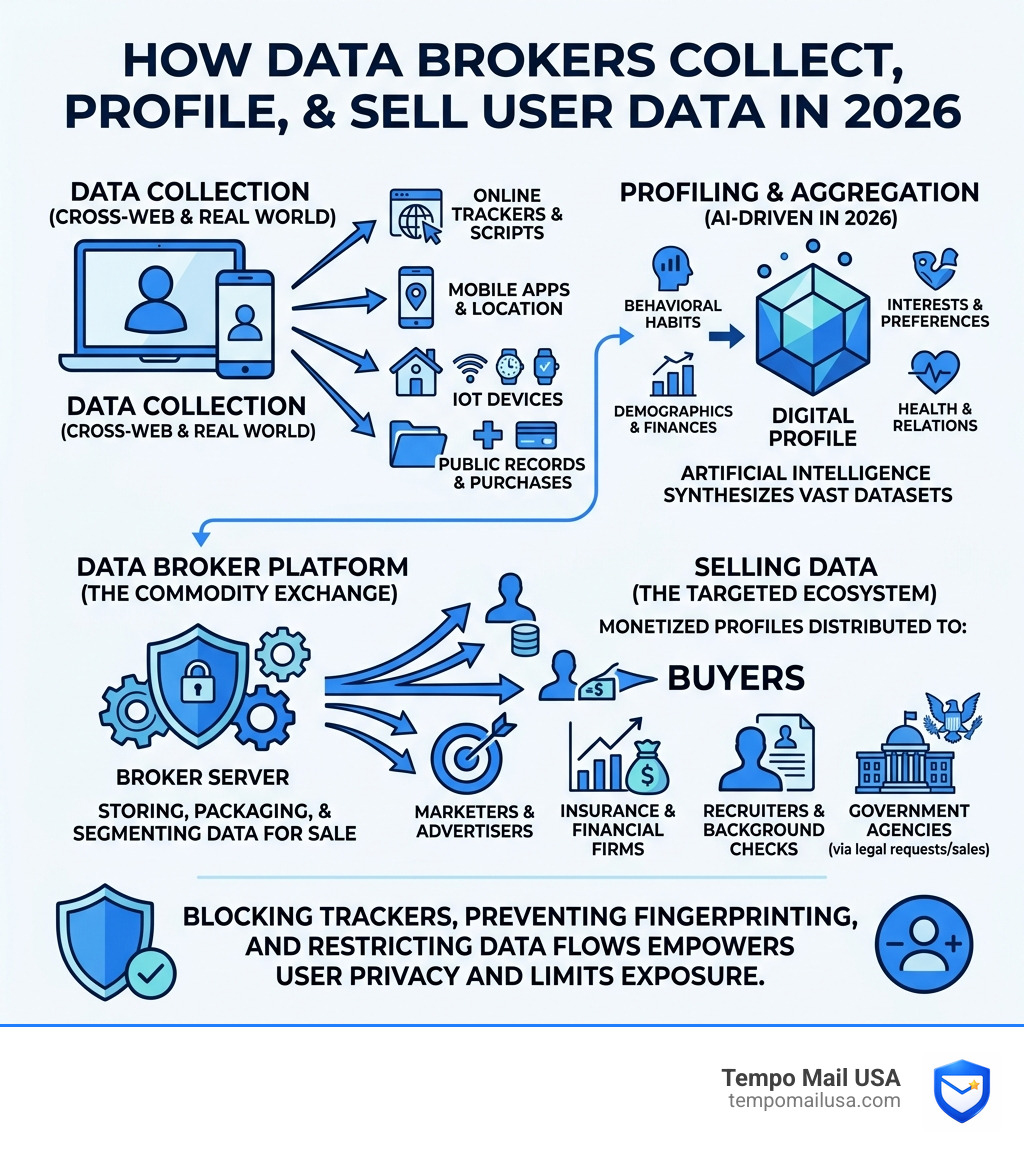
Every time you visit a website, dozens of invisible scripts log your behavior, build a profile, and sell it. The average user faces over 200 tracking attempts per day. That results in an 85% reduction in data collection for people who use tools like Privacy Shield Pro consistently.
This is not just about ads. It is about your identity, your inbox, and your financial safety. Many users now rely on advanced security tools and VPN protection to prevent these attacks from reaching their personal accounts.
What is Privacy Shield Pro?
In an era where your browsing history is a commodity, understanding what is Privacy Shield Pro becomes essential for digital survival. At its core, Privacy Shield Pro is a fast, lightweight privacy extension designed for modern browsers like Chrome and Firefox. Unlike many "free" tools that actually collect your data to sell it later, this tool is built on a "local-only" philosophy.
Technically, it utilizes Firefox’s and Chrome’s declarativeNetRequest API. This is important because it allows the extension to block malicious network requests at the system level without slowing down your browser. Instead of your computer working hard to process every ad, the browser simply ignores the tracking requests before they even load.
Many users now rely on advanced security tools and VPN protection to prevent these attacks. Privacy Shield Pro fits perfectly into this ecosystem as the "front-line" defense for your browser. Historically, the term "Privacy Shield" referred to legal frameworks for EU-U.S. data transfers, as noted by Proskauer on Privacy, but today's Pro software version is a technical solution designed to enforce those privacy rights directly on your screen.
Core Functionality: What is Privacy Shield Pro?
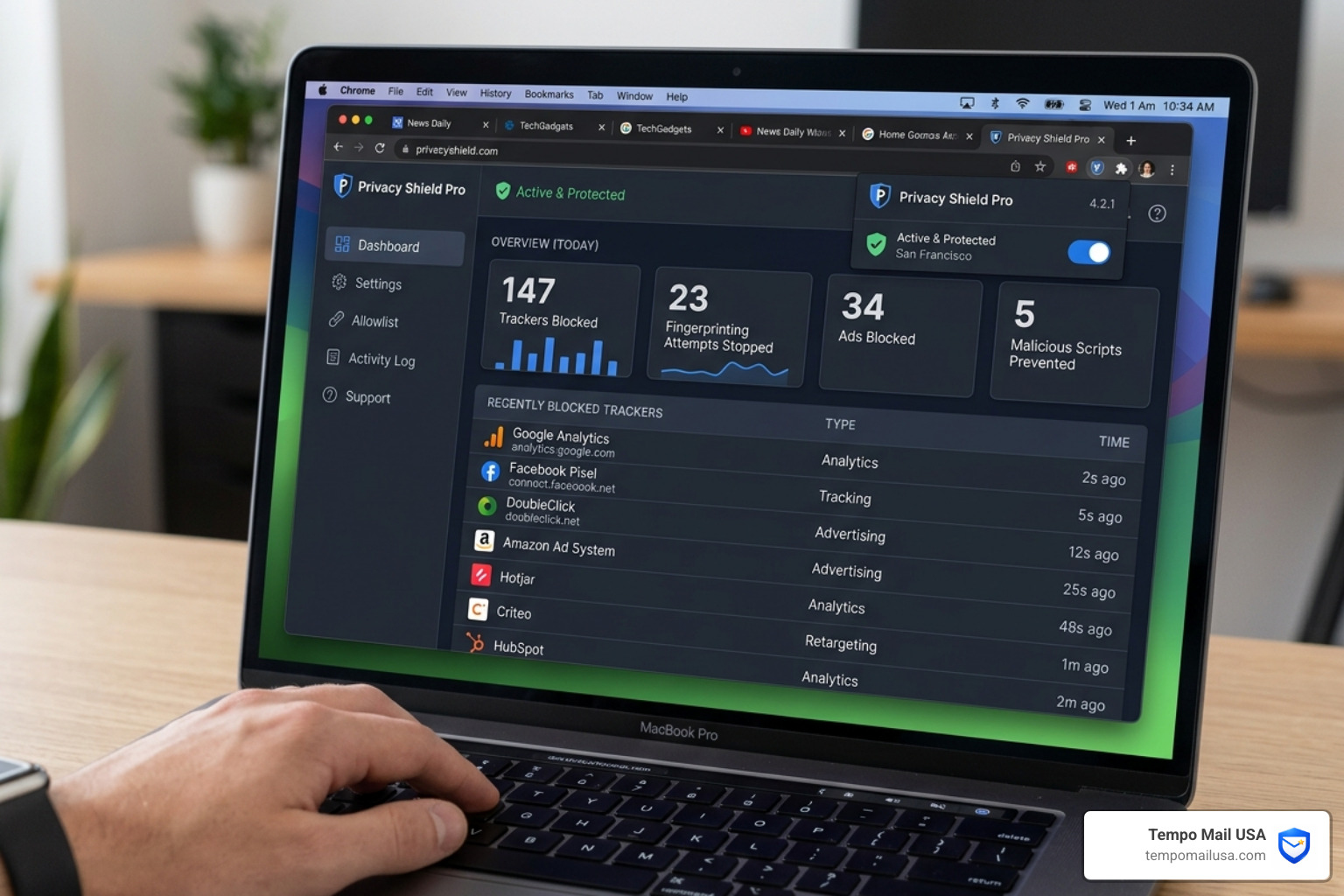
The primary mission of Privacy Shield Pro is to break the "tracking cycle." Most websites use invisible trackers to build a profile of your interests, location, and habits. Privacy Shield Pro stops this by:
- Ad Blocking: Removing intrusive pop-ups and auto-play videos that drain your battery and data.
- Tracker Prevention: Blocking the scripts that follow you from site to site.
- Fingerprinting Resistance: Stopping websites from identifying your unique hardware and software configuration.
Whether you are using the version found on the Chrome Web Store or the Firefox Add-ons gallery, the experience is seamless. It offers cross-platform support, meaning your privacy settings can stay consistent whether you are on a Windows desktop, a Mac, or a mobile device that supports extensions.
Step-by-Step: What is Privacy Shield Pro Setup?
Setting up your digital defense shouldn't require a computer science degree. We love tools that respect our time, and Privacy Shield Pro is a "set it and forget it" solution.
- One-Click Installation: Simply add the extension to your browser from the official store.
- Real-Time Dashboard: Click the shield icon to see exactly how many trackers are being blocked on your current page.
- Whitelisting: If a specific site you trust breaks, you can easily toggle the protection off for just that one site.
- Automatic Updates: The extension updates its blocklists automatically to stay ahead of new tracking techniques.
- User Agent Rotation: For advanced users, the Pro version can periodically change how your browser identifies itself, making it even harder for data brokers to pin you down.
Key Features: Blocking Trackers and Fingerprinting
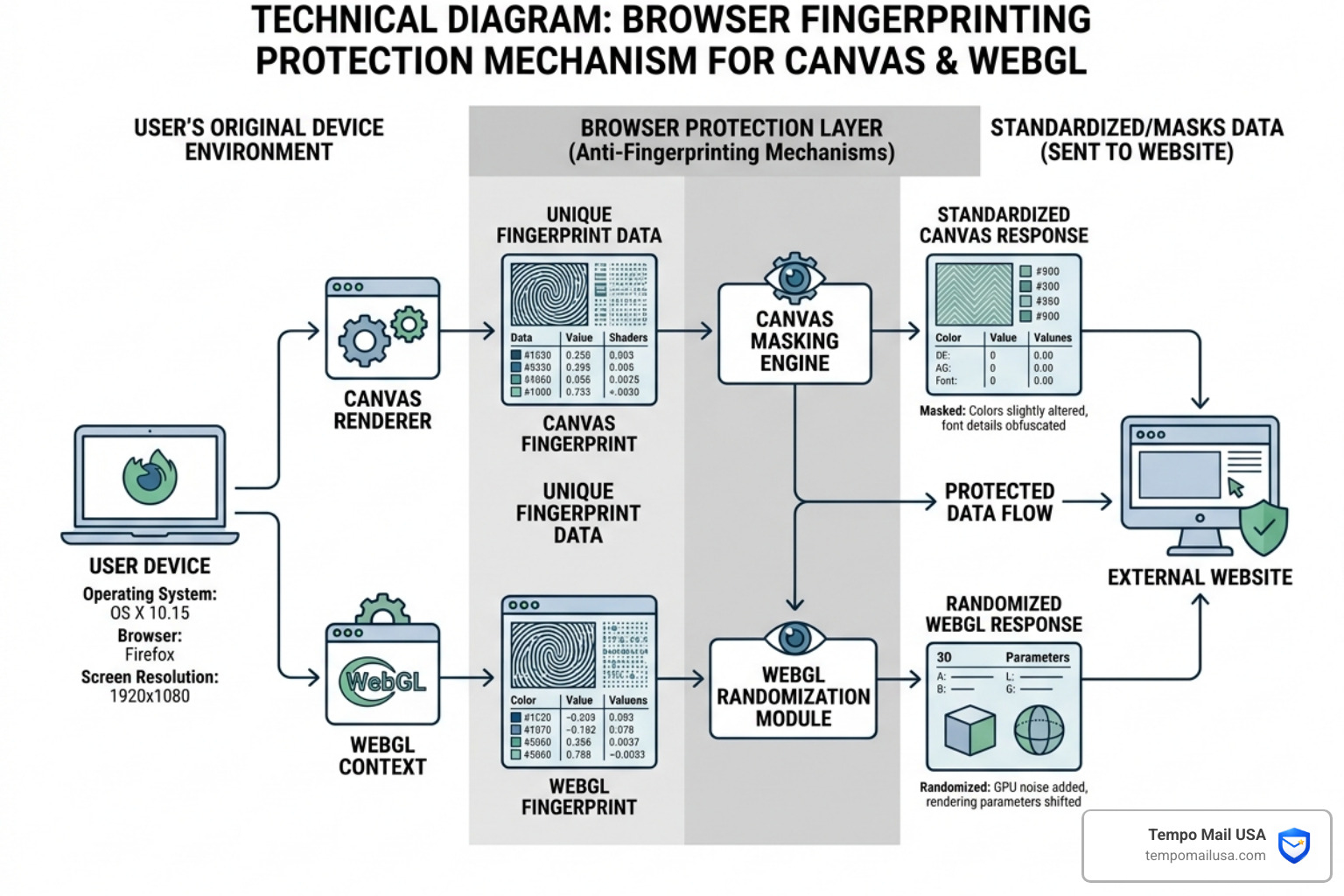
The real power of Privacy Shield Pro lies in its ability to fight "fingerprinting." You might think that clearing your cookies makes you invisible, but data brokers have gotten smarter. They use "fingerprints"—unique combinations of your screen resolution, installed fonts, and even the way your computer renders graphics—to identify you with 99% accuracy.
Privacy Shield Pro uses Canvas normalization and WebGL standardization. Instead of letting a website see your unique graphics hardware, the extension provides a "standard" response that makes you look like every other user. It’s like wearing a generic mask in a crowd of people.
The performance impact is virtually non-existent. Research shows that Privacy Shield Pro uses minimal resource usage (< 5MB RAM). This means your browser actually runs faster because it isn't wasting energy loading 46+ trackers and heavy ad scripts. As we've discussed in our guide to Privacy Shield Pro: The Ultimate Protection, this efficiency is what sets it apart from bloated antivirus suites.
Real-World Benefits of Advanced Privacy
Why should the average person care about what is Privacy Shield Pro? The benefits go beyond just "privacy" as an abstract concept:
- Faster Page Loads: By blocking 85% of data collection attempts, pages load significantly quicker.
- Reduced Data Usage: Especially helpful on mobile or metered connections where ads eat up your data plan.
- Spam and Phishing Protection: By blocking trackers in web-based emails, you prevent scammers from knowing if you’ve opened a message.
- Identity Proxying: Using this tool alongside a service like Tempo Mail USA creates a "PII Firewall." You use a temporary email for the signup and Privacy Shield Pro to block the trackers once you're in.
Privacy Shield Pro vs. The Digital Security Stack
We often tell our readers that privacy is like an onion—it has layers. You shouldn't rely on just one tool. To build your complete digital privacy stack in 2026, you need to think in concentric rings.
- Network Layer: Use a top-tier VPN to encrypt your entire internet connection.
- Browser Layer: This is where Privacy Shield Pro lives, blocking site-specific trackers.
- Identity Layer: This is where Tempo Mail USA comes in, providing temporary aliases so you never have to give out your real email address.
- Credential Layer: A password manager to ensure every account has a unique, 20+ character key.
Choosing Between Privacy Shield Pro and AdShield Pro
You might encounter other tools like AdShield Pro. While both are excellent, they serve slightly different needs. AdShield Pro is an offline-first blocker that focuses heavily on rule-based and cosmetic filtering to make the web look beautiful and ad-free. Privacy Shield Pro, however, leans more into the technical "anti-fingerprinting" and "anti-tracking" side of the house.
If you want zero telemetry and a tool that focuses on performance benchmarks, Privacy Shield Pro is often the winner for those who want a "stealth" browsing experience.
Pricing and Performance: Free vs. Pro Versions
Is the upgrade worth it? Let's look at the numbers. While the free version offers substantial protection, the Pro version is designed for those who want a comprehensive "clean sweep" of their digital footprint.
| Feature | Privacy Shield Pro (Free) | Privacy Shield Pro (Paid) |
|---|---|---|
| Tracker Blocking | 15+ common trackers | 46+ advanced trackers |
| Fingerprinting Protection | Basic | Advanced (Canvas/WebGL/Audio) |
| Data Broker Removal | Manual tips | Automated monitoring for 750+ sites |
| Support | Community | Priority Email & Human Oversight |
| Cost | Free Forever | $12.99 (One-time payment) |

Evaluating the ROI: What is Privacy Shield Pro?
With a 4.0 out of 5 rating from 72 users and a perfect 100% 5-star rating on recent reviews, the return on investment is clear. For a one-time payment of $12.99—less than a month of many streaming services—you get lifetime access to identity theft defense tools. The Pro version doesn't just block ads; it uses automated technology to monitor and remove your personal data from over 610 sites, backed by human oversight to ensure those removals actually stick.
Compliance and Data Safety Standards
We take data safety seriously. A privacy tool that tracks you is a contradiction. Fortunately, Privacy Shield Pro is built with GDPR alignment and CCPA compliance at its heart.
Following the "Schrems II" ruling, which invalidated older data transfer frameworks, modern tools must ensure that user data never leaves the device. Privacy Shield Pro handles everything locally. It is open-source ready and often distributed under the MIT License, meaning the code is transparent and can be audited by anyone.
Technical Integrity and Transparency
The extension avoids "remote scripts." This is a critical security feature. Many lesser extensions download new instructions from a server every day, which could technically be used to inject malware. Privacy Shield Pro uses:
- declarativeNetRequest API: For secure, browser-level blocking.
- Content Scripts: To clean up the visual "holes" left by blocked ads.
- Cryptographic Purging: Ensuring that when you close a tab, the session data is not just hidden, but digitally shredded.
A recent privacy audit confirmed that the extension has a no-data-collection policy. There is no telemetry, no "anonymous usage stats," and no phoning home.
Frequently Asked Questions about Privacy Shield Pro
Does Privacy Shield Pro collect or track my browsing data?
Absolutely not. Privacy Shield Pro operates with a strict no-data-collection policy. Unlike some competitors that might sell "anonymized" data, this extension performs all logic locally on your machine. There are no remote servers involved in the blocking process, and no telemetry is sent back to the developers.
How does Privacy Shield Pro differ from a standard VPN?
Think of a VPN as a secure tunnel for your entire house, while Privacy Shield Pro is a set of high-tech blinds for your windows. A VPN encrypts your network connection and hides your IP address from your ISP. Privacy Shield Pro, however, works inside the browser to block the specific scripts and trackers that try to identify you even when your IP is hidden. You should ideally use both together.
Is Privacy Shield Pro compatible with mobile browsers?
Yes! While it started as a desktop tool, it now supports major browsers like Firefox on Android and specialized mobile browsers that allow for Chrome extension integration. This ensures your 85% reduction in data collection follows you whether you are on your laptop or your phone.
Conclusion
In 2026, privacy is no longer a luxury—it’s a necessity. Understanding what is Privacy Shield Pro is the first step toward reclaiming your digital autonomy. By combining this powerful extension with a robust VPN and a smart identity strategy, you create a "digital identity firewall" that is nearly impossible for data brokers to breach.
At Tempo Mail USA, we believe in the "PII Firewall" approach. Use our temporary email aliases to sign up for services without giving away your real identity, and use Privacy Shield Pro to ensure those services can't track you across the rest of the web. Together, these tools provide the ultimate defense against data misuse and identity theft.
Protect your real inbox from spam and data harvesting today with Tempo Mail USA and take the first step toward a cleaner, safer internet experience.