



The Robinhood Alert Text Scam Is Targeting Your Money Right Now
The robinhood alert text scam is a phishing attack where criminals send fake security alerts pretending to be from Robinhood, tricking you into calling a fraudulent phone number or clicking a fake link so they can steal your account credentials and money.
Quick answer — here's what you need to know:
- It's fake. Robinhood does not send unsolicited texts asking you to call a number or verify your account.
- Do not call any phone number listed in the text.
- Do not click any links in the message.
- Check your account only by opening the official Robinhood app directly.
- Report it by forwarding the text to 7726 (SPAM) and emailing reportphishing@robinhood.com.
- Delete the message after saving a screenshot as evidence.
These texts are crafted to feel urgent and official. They often include a fake IP address, a reference to an "API key," and a polished Robinhood logo — all designed to make a recipient panic and call the number. Taking a moment to pause before reacting is often what saves an account from being compromised.
The messages are not targeted. They are sent in bulk to phone numbers harvested from data breaches and marketing lists. You don't even need to have a Robinhood account to receive one. Police departments, cybersecurity journalists, and Reddit threads have all documented the same wave of identical texts hitting thousands of people on the same day.
This guide walks you through exactly how the scam works, what to do if you got one, and how to protect yourself going forward.
Anatomy of the Robinhood Alert Text Scam
To beat a scammer, we have to understand their playbook. The robinhood alert text scam is a classic example of "smishing" (SMS phishing). Unlike traditional email phishing, which often gets caught by spam filters, text messages land directly in your pocket, usually triggering an immediate notification and a sense of urgency.
Scammers don't necessarily know you have a Robinhood account. They play a numbers game, sending millions of messages at once using automated software. These phone numbers often come from massive data breaches. For instance, a SoundCloud breach once exposed nearly 30 million user accounts, providing a goldmine of contact info for bulk messaging campaigns just like this one.
The "hook" is always a security scare. You might get a message claiming an "unauthorized access attempt" or that a "new device" has logged into your account. By making you think your money is currently being stolen, they hope you'll bypass your critical thinking and react emotionally.
Common Tactics and Fake Technical Jargon
Scammers love to sound smart. They use technical-sounding words to create a "veneer of validity." If a text message mentions an "API key" or an "IP address," it sounds like a real system alert. In reality, Robinhood would almost never include these specific technical details in a standard SMS alert to a retail user.
We’ve seen reports of these texts mentioning specific high-end devices to make the "threat" feel more real. You might see a message saying:
- "Safety Reminder from Robinhood: New device access using (Google Pixel 9) in Dubai, UAE. If NOT you, please call support..."
- "Robinhood Alert: Your account is being accessed by an iPhone 15 Pro Max from London. Call +1 (888) 497-XXXX to secure your funds."
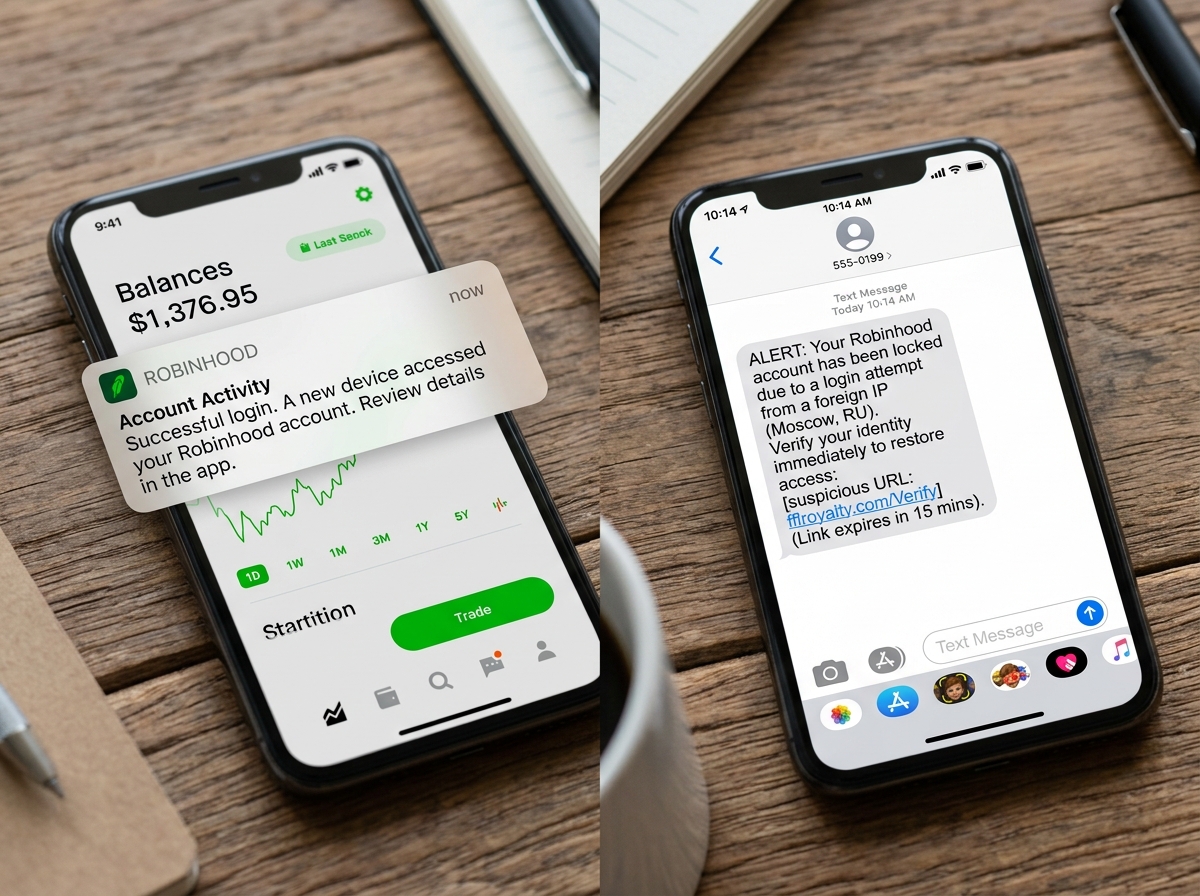
| Feature | Legitimate Robinhood Alert | Scam Message |
|---|---|---|
| Sender | Verified short code or official email | Random 10-digit number or international code |
| Links | Usually none; directs you to the app | Suspicious URLs (e.g., fflroyalty.com/Verify) |
| Call to Action | Check the app directly | "Call this number immediately" |
| Tone | Informational and calm | Urgent, threatening, or alarmist |
| Personalization | Often uses your actual name | Generic ("Dear User") or no name at all |
For more detailed guidance on phishing from the FTC, you can see how these patterns repeat across many different industries.
Why the Robinhood Alert Text Scam Seems Legitimate
Why do people fall for it? It’s not because they are "gullible"—it’s because the scammers are professionals. They use official branding, including the Robinhood logo and brand colors, in their profile pictures or linked websites.
One of the sneakiest tactics in the current robinhood alert text scam wave is the absence of a link. Many savvy users have learned never to click links in texts. Scammers adapted by providing a "Support Number" instead. When you call, you aren't talking to Robinhood; you're talking to a scammer who has been trained to sound helpful, professional, and calm. They might even have "hold music" to make the experience feel authentic while they slowly extract your password or a one-time 2FA code.
Immediate Steps: What to Do (and Never Do)
If you just received one of these texts, take a deep breath. Your account is likely perfectly fine. The mere act of receiving a text does not mean you've been hacked. However, what you do next determines whether you stay safe.
The "Golden Rules" of SMS Security:
- Do NOT click any links. Even if the URL looks close to the real thing (like "robinhood-secure-login.com"), it is a trap designed to harvest your credentials.
- Do NOT call the number. These are not official support lines. Robinhood does not even have a direct-dial support number for inbound calls; they use an in-app callback system.
- Do NOT reply. Responding "STOP" or "Who is this?" only confirms to the scammer that your phone number is active and monitored, which will lead to even more scam attempts.
- Block the sender. Once you’ve identified it as a scam, use your phone’s "Block Contact" feature to silence future attempts from that specific number.
If you want to dive deeper into why clicking these links is so dangerous, check out our more info about avoiding login scams.
How to Safely Verify Your Account Status
The only way to check your Robinhood account is through the official "front door."
- Use the Official App: Close your messaging app, find the Robinhood app on your home screen, and log in as you normally would. If there is a real security issue, you will see a notification or a banner inside the app.
- Manual URL Entry: If you are on a computer, type
https://robinhood.comdirectly into your browser's address bar. Never use a bookmark or a link provided in an email or text. - Check Account Activity: Once logged in, go to your "Account" tab and look at "History" or "Security." This will show you a list of all recent logins and devices. If you don't see a Google Pixel 9 from Dubai listed there, the text was a total fabrication.
Think you're a pro at spotting fakes? Test your knowledge with Google’s Phishing Quiz to see if you can catch the subtle clues scammers leave behind.
What to Do if You Already Fell for the Robinhood Alert Text Scam
If you clicked a link, shared a code, or gave information to someone over the phone, you need to act fast. Scammers often wait until "off-hours" (like late at night or weekends) to strike so that you have fewer resources to help you.
Follow this emergency checklist:
- Change your password immediately. Do this from a clean device. Ensure the new password is strong and unique.
- Enable (or Reset) Two-Factor Authentication (2FA). If the scammer got your 2FA code, they might have tried to disable it or switch it to their own device. Re-secure this immediately.
- Contact Robinhood Support. Use the in-app "Help" section to report an account takeover. They can freeze your account to prevent withdrawals.
- Notify your bank. If your Robinhood account is linked to your checking account, tell your bank there has been a potential compromise.
- Scan for malware. If you clicked a link on a computer or Android device, run a malware scan to ensure no "keyloggers" were installed.
- Place a credit freeze. If you suspect your Social Security Number or other PII (Personally Identifiable Information) was stolen, contact the three major credit bureaus to freeze your credit.
Reporting and Long-Term Protection Strategies
Reporting these scams helps the entire community. When you report a scam number to your carrier, they can eventually block that number across their entire network, protecting thousands of other people.
Where to report the robinhood alert text scam:
- Forward to 7726: This is a free service provided by most major carriers. Forward the scam text to this number to help them identify and block spam sources.
- Email Robinhood: Send a screenshot of the text and the sending number to
reportphishing@robinhood.com. - The FTC: Use the FTC Report Fraud website to file an official complaint.
- Local Authorities: If you actually lost money, file a report with your local police department. While they may not be able to catch the international hacker, the paper trail is often required for insurance or bank reimbursement claims.
Advanced Security Measures for Investors
Being "reactive" isn't enough. We recommend a "proactive" security posture to make yourself a "hard target" for scammers.
- Use Authenticator Apps: SMS-based 2FA is vulnerable to "SIM swapping." Instead, use an app like Google Authenticator or Authy. These generate codes locally on your device and cannot be intercepted by hackers.
- Password Managers: Use a manager to create 20-character random passwords for every site. This ensures that even if one site has a data breach, your Robinhood account remains safe.
- Data Removal Services: Many companies sell your data to marketers (and indirectly to scammers). Services that "opt you out" of these databases can significantly reduce the number of scam texts you receive.
- Verify Your Sources: Before taking any financial advice or responding to "advisors" on social media, you should verify financial advisors via the FCA register if you are in the UK, or the SEC/FINRA registers in the US.
Why Scammers Target Financial App Users
You might wonder why Robinhood is such a popular target compared to, say, a Netflix account. The answer is simple: Liquidity.
Robinhood accounts often contain cash, stocks, and cryptocurrency. Crypto, in particular, is a favorite for scammers because transfers are usually irreversible. Once a scammer moves your Bitcoin to their wallet, it is effectively gone. There is no "reversing the charge" like there is with a credit card.
Furthermore, Robinhood has a younger, mobile-first user base. Scammers know that these users are comfortable managing their entire financial lives on a smartphone, making them more likely to trust a text message that looks like a legitimate app notification.
Frequently Asked Questions about Robinhood Scams
What happens if I clicked the link in a scam text?
Clicking the link usually takes you to a "cloned" website that looks exactly like the Robinhood login page. If you enter your username and password, the scammer records them instantly. In some cases, the site might also attempt to download malicious software onto your device. If you clicked, you should immediately log out of all sessions, change your password, and run a virus scan.
Why did I receive a text if I don't have a Robinhood account?
This is proof that the scam is not a "targeted hack." Scammers send these texts to millions of random numbers. They know that statistically, a certain percentage of people will have a Robinhood account. If you don't have one, just delete the text and move on—it’s just digital junk mail.
Does Robinhood ever call or text for security alerts?
Robinhood primarily uses in-app notifications and verified emails (from @robinhood.com) for security alerts. While they may occasionally send an automated text with a login code that you requested, they will never send an unsolicited text asking you to call a number or click a link to "verify" your identity.
Conclusion: Building a Privacy Firewall
The robinhood alert text scam relies on one thing: your personal phone number and email being out in the open. Every time you sign up for a random app, a newsletter, or a loyalty program, you increase your "attack surface." When those companies eventually get hacked, your info ends up in a scammer's database.
At Tempo Mail USA, we believe the best way to stop a scam is to never let the scammer find you in the first place. We provide temporary email aliases that act as a secure identity proxy. Think of it as a "privacy firewall." By using an alias for your online accounts, your real, permanent email address stays hidden. If a service you use gets breached, you can simply delete the alias, cutting off the scammer's access to you entirely.
Securing your financial future starts with good digital hygiene. Stay skeptical, stay alert, and protect your real email with Tempo Mail USA. By layering your security with 2FA, password managers, and identity proxying, you can trade with confidence, knowing your "real" self is safely behind the firewall.