


Receive Verification Codes Without Giving Out Your Real Email
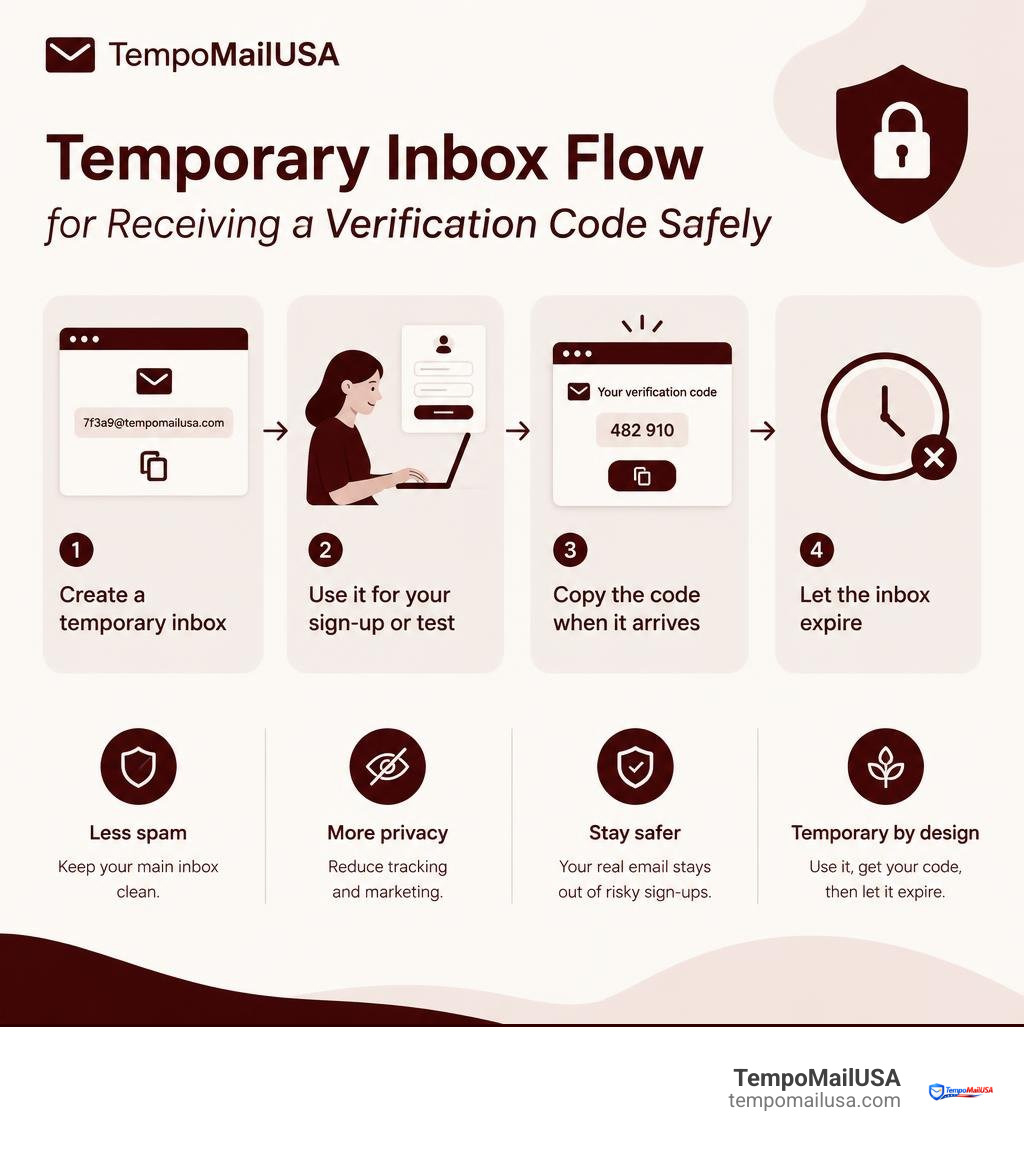
To safely receive verification codes without sharing your personal address, create a disposable inbox, use it only for the sign-up or test you need, copy the code when it arrives, and let the inbox expire afterward. A fake email receive service can help reduce marketing spam, limit tracking, and keep your main inbox separate from one-time registrations.
This is useful for low-risk accounts, trial sign-ups, shopping offers, and app testing. Do not use a temporary address for banking, health care, work accounts, password recovery, or anything you may need to access later.
A disposable inbox also creates a useful boundary: if a site is breached, sells its mailing list, or sends unwanted promotions, your real email address is not part of that exposure. And when a message looks suspicious, treat it carefully. Phishing emails often use urgency, spoofed sender names, and unsafe links to steal login details or deliver malware. For a broader overview of how phishing works, see Wikipedia's article on phishing.
The Growing Threat of Inbox Exploitation and Phishing
Every time we type our primary email address into an unvetted web form, we hand over the master key to our digital footprint. Email remains the primary gateway for cyberattacks across the internet, with 94% of malware delivered directly via email. Cybercriminals no longer rely on obvious, poorly constructed messages; they craft sophisticated, high-pressure lures that look identical to authentic service notifications. In fact, fake emails impersonating trusted brands account for 83% of all phishing attacks.
The sheer volume of these attacks is staggering. Across the globe, approximately 3.4 billion phishing emails circulate every single day. For businesses, falling victim to these deceptive campaigns is devastating, with the average cost of a successful phishing attack on a mid-sized company reaching $1.6 million. Furthermore, 60% of organizations experienced a successful phishing attack in 2022, proving that traditional perimeter defenses alone cannot eliminate human error.
These threats manifest in various damaging forms:
- Business Email Compromise (BEC) and Invoice Scams: Attackers impersonate vendors, executives, or billing departments to redirect legitimate payments into fraudulent accounts. You can read more about how organizations fall victim to a fake invoice email scam and how to spot altered payment instructions.
- Credential Harvesting and Extortion: Scammers manufacture urgent scenarios, such as threats of legal action or account suspension, to trick individuals into disclosing sensitive data. Users often encounter predatory schemes like fake debt collector fraud, which rely on panic to bypass critical thinking.
- Malware Infiltration: Attachments containing malicious macros, disguised PDF exploits, or trojan droppers can silently compromise an entire local system upon download.
- Data Harvesting via Identity Brokers: Unscrupulous sites harvest verified primary emails to package and sell to third-party telemarketers, data brokers, and dark-web aggregate lists.
By maintaining strict inbox isolation, we prevent these malicious vectors from ever reaching our primary digital devices or work environments.
Why Use a Fake Email Receive System for Daily Accounts
Digital privacy is not about having something to hide; it is about controlling who accesses our personal data. When you set up a disposable inbox to handle incoming messages, you construct an impermeable barrier between your real identity and untrusted online platforms.
Every registration form you fill out connects your personal address to trackers, analytics engines, and cross-site behavioral cookies. Over time, data aggregators build an exhaustive profile of your browsing habits, shopping tendencies, and geographic locations. Using burner addresses breaks this chain of attribution.
Consider these key operational advantages of disposable aliases:
- Zero Exposure to Data Breaches: If an online merchant or forum experiences a backend database leak, hackers obtain a burner address that has already been purged from our servers, rather than your permanent personal email.
- Complete Mitigation of Spam Cascades: Marketing engines share email lists endlessly. A single sign-up can trigger dozens of automated drip campaigns. With an ephemeral inbox, the entire communication stream simply vanishes when the session ends.
- Streamlined Account Separation: We often need to create separate user profiles on major e-commerce platforms. For instance, creating anonymous email accounts on Amazon or setting up unique profiles for discreet shopping on Nike ensures your personal inbox stays uncluttered by marketing announcements, flash sale notifications, and algorithmic recommendations.
Developers looking to integrate automated inbox testing and disposable mail handling into their own applications can also deploy TempoPlay, our dedicated script product engineered for turnkey inbox lifecycle management.
When to Fake Email Receive Verifications for Shopping and Gaming
E-commerce stores and online gaming environments frequently gate discounts, rewards, or community features behind an email capture modal. In many instances, you only need to interact with the platform once to claim a specific benefit.
- One-Time Retail Discounts: Many stores offer immediate percentage discounts on your first order. Utilizing a temporary inbox to capture an Ulta coupon code allows you to secure promotional pricing without signing up for perpetual marketing newsletters.
- Ephemeral Gaming Profiles: When setting up alternate accounts or entering competitive matches, using a disposable address for Fortnite gaming registration keeps your main communication channels separate from platform announcements and forum notifications.
- Secondary Marketplace Listings: Browsing classifieds or interacting with casual peer-to-peer sellers can expose your contact details. Managing these initial stages via disposable addresses shields your identity until transactions are confirmed.
How to Fake Email Receive Codes for Media and Streaming
Media platforms, digital publications, and entertainment portals frequently require account registration before granting temporary access to articles, videos, or trial content.
- Trial Activations: Exploring trial access on entertainment services like Disney Plus lets you test platform catalogs without committing your permanent email to automated billing notifications or persistent subscription emails.
- Event Ticketing and One-Off Purchases: When buying concert or sports passes through specialized event portals such as Ticketmaster, utilizing an alias prevents your primary contact information from being distributed to third-party venue promoters and tour organizers.
- Gated Web Content: Online magazines and educational archives often demand an email address before revealing a single research article. A disposable inbox satisfies the verification gate instantly without cluttering your daily email workflow.
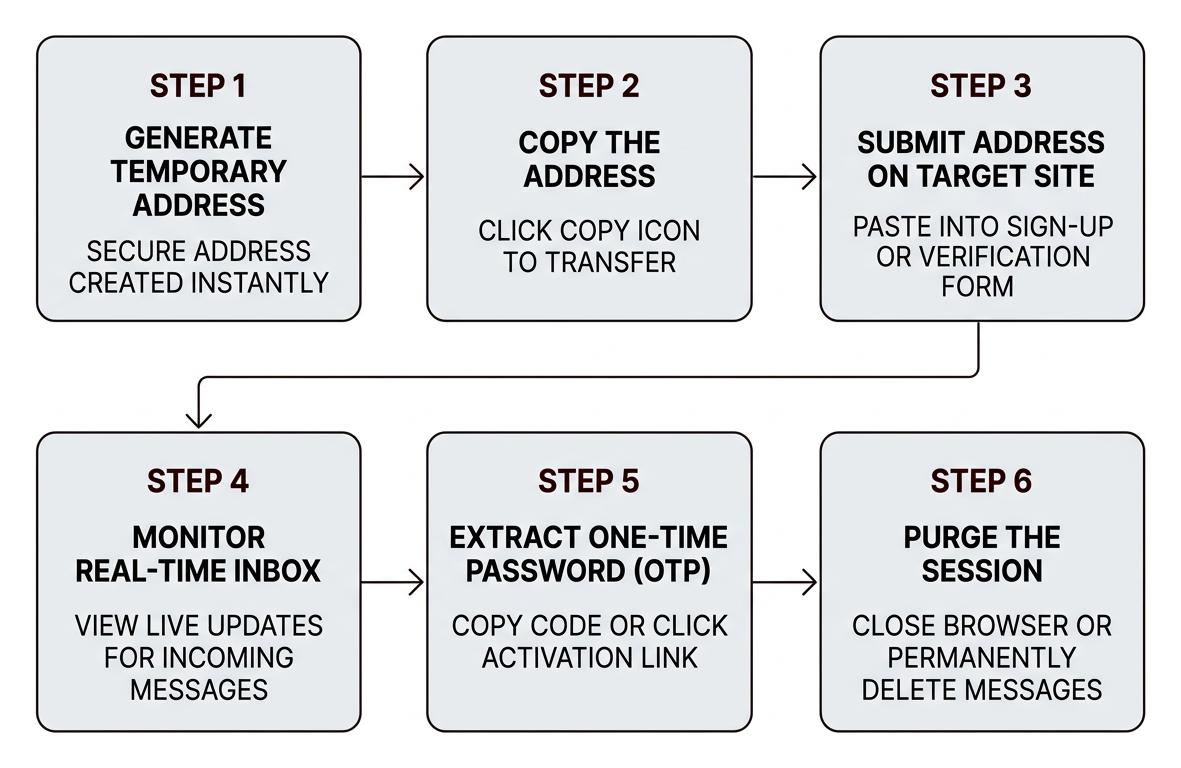
Step-by-Step Guide: How to Safely Receive Verification Emails
Capturing verification codes through a secure, no-registration temporary email service takes only a few seconds. Follow this step-by-step workflow to maintain complete privacy during any online sign-up:
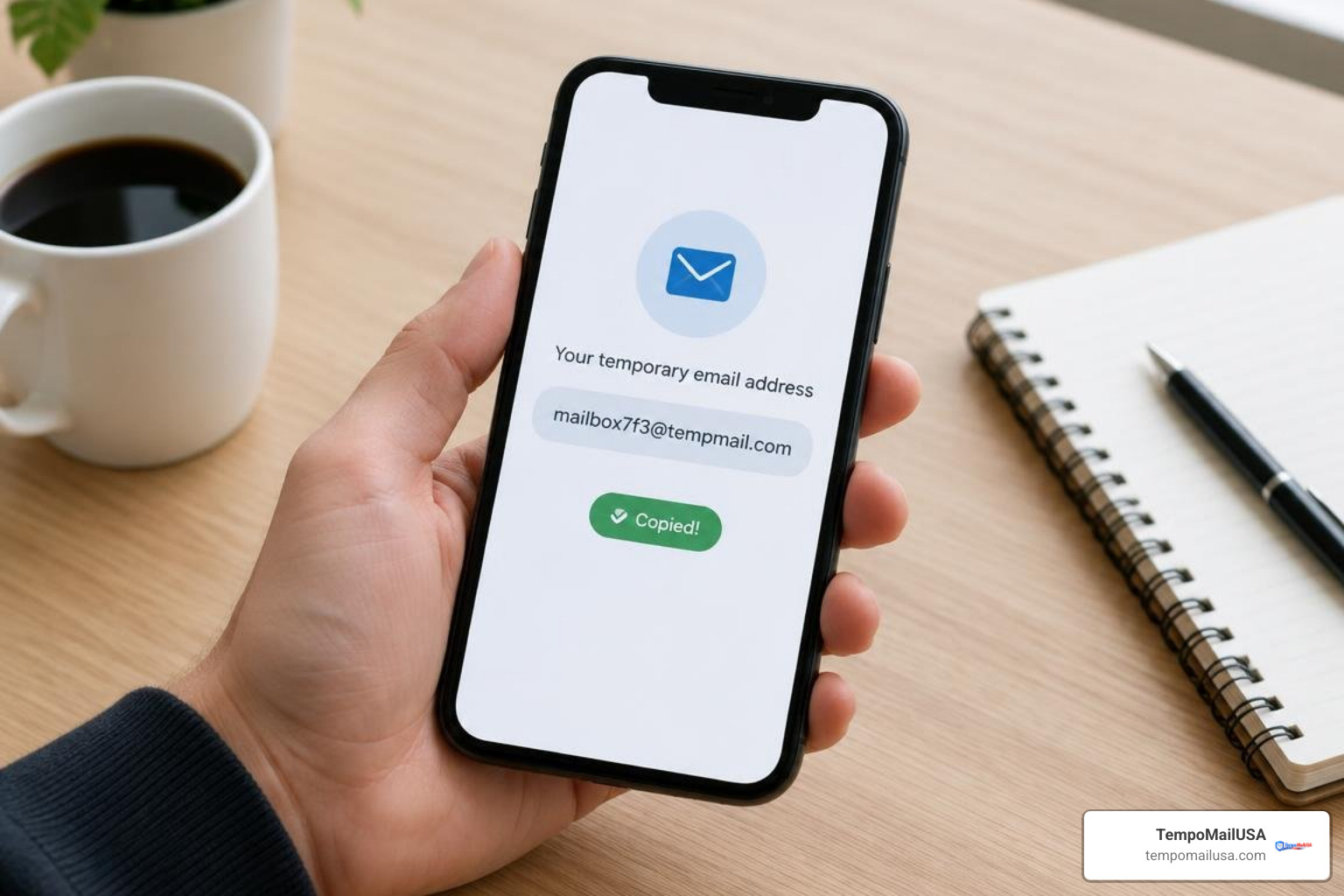
- Generate Your Temporary Address: Navigate to our homepage. A secure, randomly generated disposable email address is created instantly. There is no password to create, no account registration, and no personal data collected.
- Copy the Address: Click the copy icon to transfer the disposable address directly to your clipboard.
- Submit the Address on the Target Site: Paste the temporary address into the sign-up or verification form of the platform you wish to access, such as when conducting AI testing on ChatGPT or connecting to untrusted public networks via Airport WiFi registration portals.
- Monitor the Real-Time Inbox: Return to your temporary inbox tab. Our live updates display incoming messages instantly without requiring manual page refreshes.
- Extract the One-Time Password (OTP): Open the incoming verification email, copy the numerical code or click the activation link, and complete your registration on the target service.
- Purge the Session: Once your registration is confirmed, simply close the browser window or use our cryptographic purge feature to permanently delete all messages and session associations from our infrastructure.
Managing Attachments and File Downloads Privately
Not all online verifications consist of simple plain-text codes; many web services deliver receipts, activation keys, whitepapers, or contracts as email attachments. Opening unexpected attachments in an unprotected personal inbox carries significant malware risks.
When managing digital files via disposable inboxes:
- Download Screening: Ephemeral inboxes provide an isolated environment to review files before introducing them to your permanent storage systems.
- Gated Asset Access: Many professional platforms require contact details before providing whitepapers. Using disposable routing for secure PDF access ensures you receive your document without consenting to aggressive sales cadences.
- Cloud Storage Transfers: When exchanging temporary collaboration files via services like Dropbox, a disposable address allows you to collect download links without linking your primary personal cloud ecosystem.
Always ensure that any downloaded file is scanned with updated security software before running or extracting it locally.
Identifying Malicious Emails Versus Legitimate Verifications
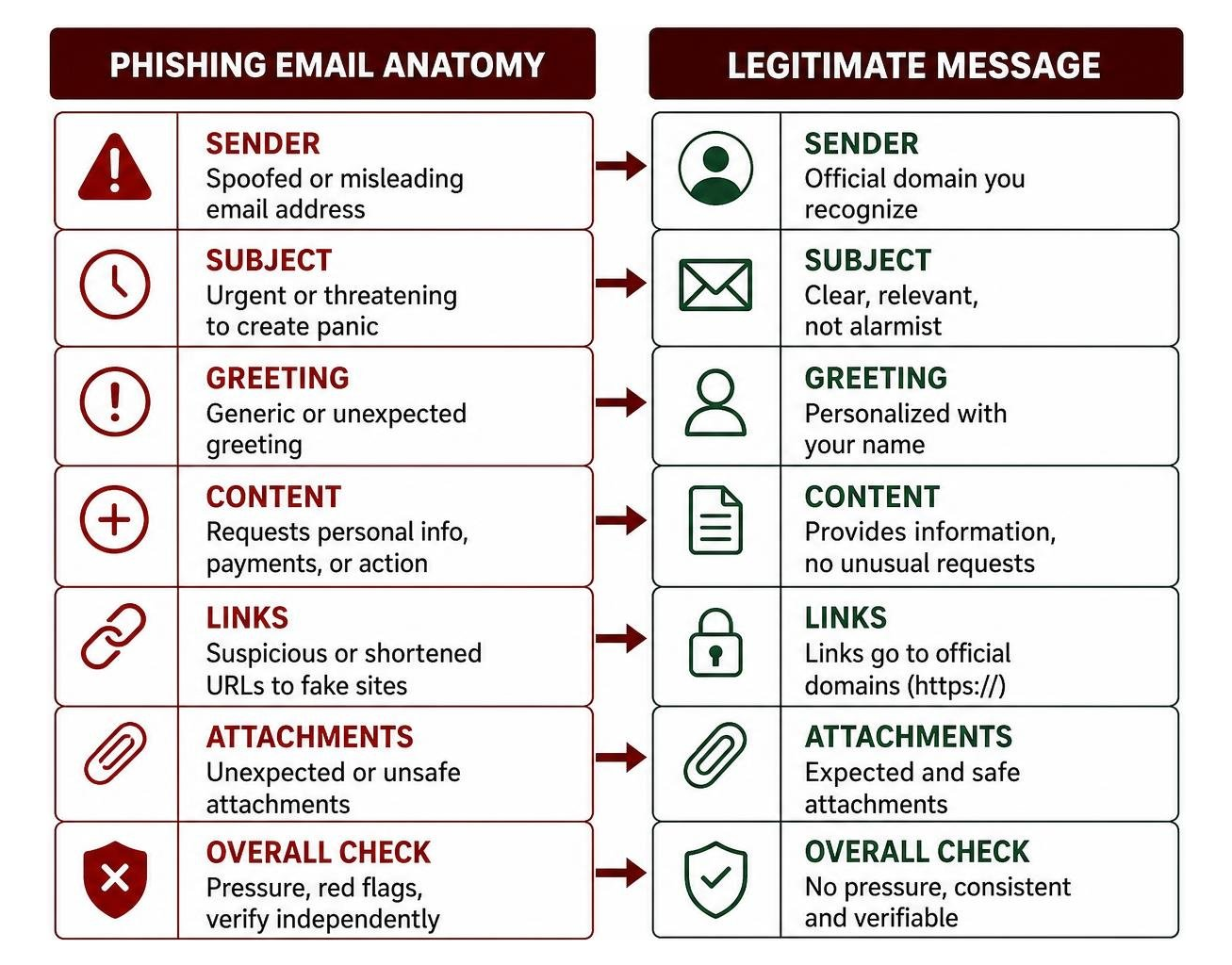
Even when utilizing temporary inboxes, developing strong visual threat-assessment skills is critical. Scammers routinely leverage psychological triggers, domain spoofing, and forged branding to trick recipients into revealing sensitive data or downloading malware.
Understanding the direct differences between genuine service confirmations and sophisticated phishing attempts can prevent serious digital compromises:
| Feature | Legitimate Verification Email | Phishing or Malicious Email |
|---|---|---|
| Sender Address | Matches official domain exact records (e.g., support@service.com) | Spoofed or lookalike domains (e.g., support@ser-vice-security.com) |
| Tone & Urgency | Neutral, transactional, and informative | High panic, urgent deadlines, threats of immediate account termination |
| Call to Action | Provides a clean OTP or standard "Verify Email" link | Demands immediate login, credential re-entry, or payment updates |
| Hyperlinks | Directs to verified root HTTPS domain | Obfuscated links, shortened URLs, or suspicious redirects |
| Email Authentication | Passes SPF, DKIM, and DMARC checks cleanly | Fails cryptographic alignment or originates from compromised relays |
| Attachments | Rare for standard OTPs; clearly labeled documents | Unsolicited .zip, .iso, .exe, or macro-enabled .doc files |
Cybercriminals frequently target high-value sectors with these deceptive techniques. For instance, users active in digital asset markets must remain vigilant against fake crypto exchange scams that mimic login security alerts to steal private wallet keys. Similarly, job seekers often encounter sophisticated fake recruiter identity theft operations, where fraudulent hiring agents send fake onboarding documents designed to harvest social security numbers and banking details.
If you suspect an email in your inbox is fraudulent:
- Do not click any embedded links or open attached files.
- Inspect the full sender address header to verify domain authenticity.
- Hover over links to inspect destination URLs without clicking.
- Delete the message immediately to prevent accidental interaction.
If you have already clicked an unverified link or entered credentials on an external site, immediately navigate to the authentic platform via a fresh browser tab, update your password, enable multi-factor authentication (MFA), and run a thorough endpoint security scan on your device.
Frequently Asked Questions About Temporary Inboxes
Are temporary inboxes safe for receiving sensitive verification codes?
Disposable inboxes are safe for one-time registrations, testing environments, and non-sensitive web sign-ups. Because our service operates on a strict zero-log architecture with cryptographic purges, your incoming data is never indexed, stored permanently, or monetized. However, we do not recommend using temporary addresses for high-security accounts such as primary banking, government portals, personal healthcare records, or critical password recovery channels, as these services require permanent, recoverable access.
Can online platforms detect disposable email addresses?
Some platforms maintain blocklists of known temporary email domains to prevent automated sign-ups. To ensure optimal deliverability, we continuously rotate our domain pool, maintain authentic Mail Exchange (MX) records, and implement standard mail delivery protocols. This ensures your verification codes and sign-up confirmations arrive promptly and reliably.
What happens to incoming emails once the session expires?
Once an inbox session reaches its expiration threshold or when you manually trigger a mailbox purge, all associated messages, attachments, and metadata are permanently scrubbed from our systems. We do not retain backup archives or recoverable server logs, ensuring your temporary communications leave zero digital footprints.
Conclusion
Guarding your personal inbox against spam, surveillance, and automated phishing threats is essential for maintaining digital safety in September 2026. By offloading temporary registrations, shopping discounts, and trial activations to disposable email addresses, you eliminate unnecessary data exposure while keeping your primary inbox clean and secure.
At TempoMailUSA, we are dedicated to providing fast, reliable, and privacy-focused disposable mailboxes. With real-time updates, secure aliasing, and automatic cryptographic data purging, protecting your online identity has never been easier. When you need a fast, private sign-up solution without passwords or registrations, create your secure disposable email inbox in seconds and take control of your digital privacy today.