


Generate Temp Mail for Quick, Private Sign-Ups
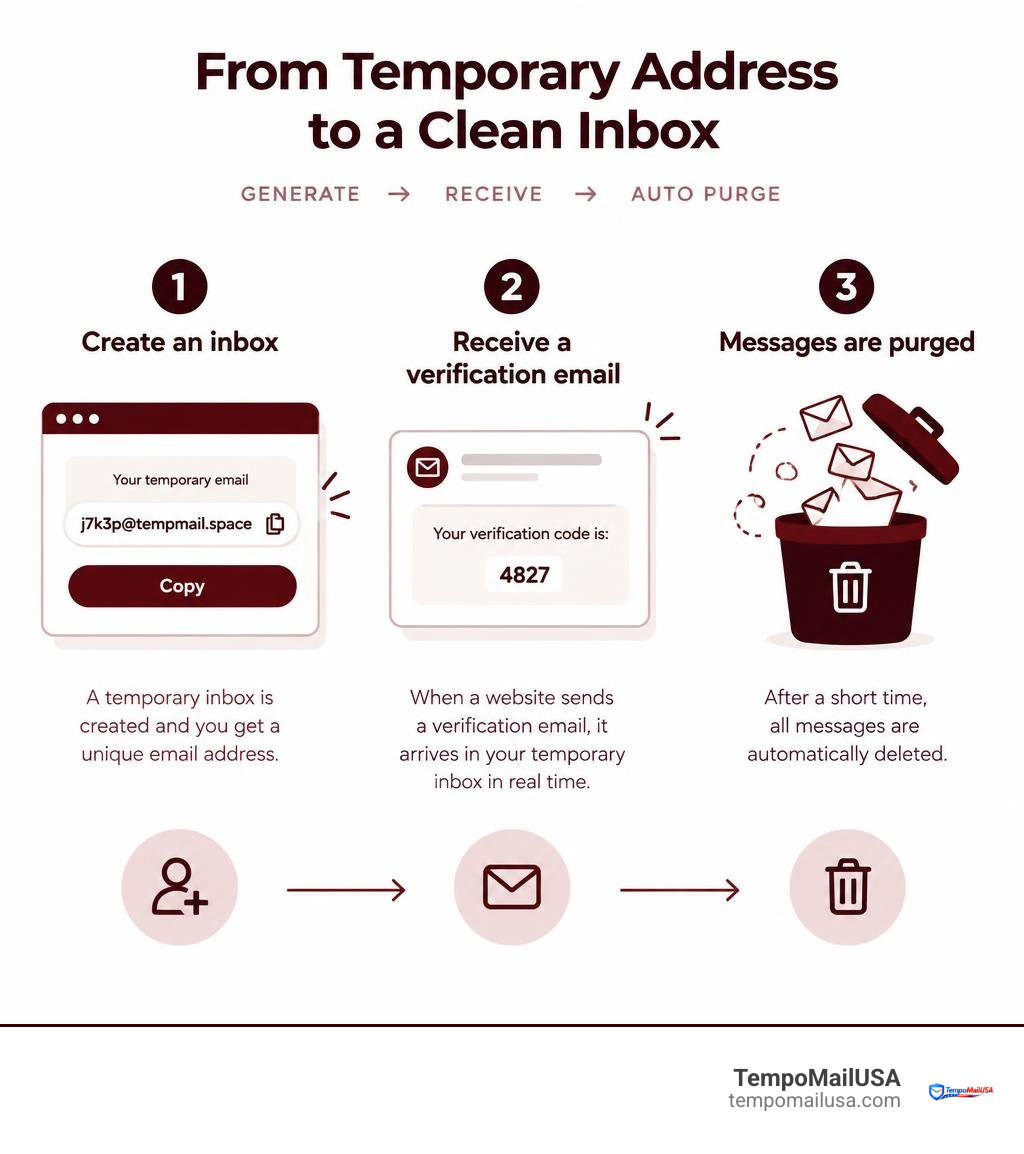
Temp mail gives you a disposable inbox for receiving sign-up links, verification codes, and one-time messages without sharing your main email address. To use it, open a temporary inbox, copy the generated address into a website's form, then return to the inbox to read the incoming message.
Use it when you want to:
- Test a website or app without creating a lasting account.
- Download gated content without joining a marketing list.
- Receive a one-time verification email while limiting spam.
A disposable address can reduce exposure of your personal inbox, but it is not a safe place for bank notices, password resets, medical information, or any account you may need to recover later. Temporary inboxes can expire, and many websites block known disposable email domains.
For developers who need to run their own disposable-email workflow, TempoMailUSA also offers TempoPlay, its script product.
What Is Temp Mail and How Does It Work?
At its core, temporary mail functions like a digital shredder connected directly to a mailbox. Traditional email providers require your name, phone number, recovery contacts, and personal information before assigning a permanent inbox that stores messages indefinitely. In contrast, ephemeral mail generates an on-demand routing address linked to a short-lived storage container on a server.
When a platform transmits an email to your generated address, our mail transfer agents (MTAs) intercept the incoming packets, validate the destination header, and render the payload in your browser view in real time. The entire process relies on ephemeral storage architecture. Instead of indexing your personal identity or committing files to long-term databases, the system assigns a lightweight session token to your browser. Understanding how to use temporary email safely allows you to shield your primary identity across thousands of daily web interactions without breaking a sweat.
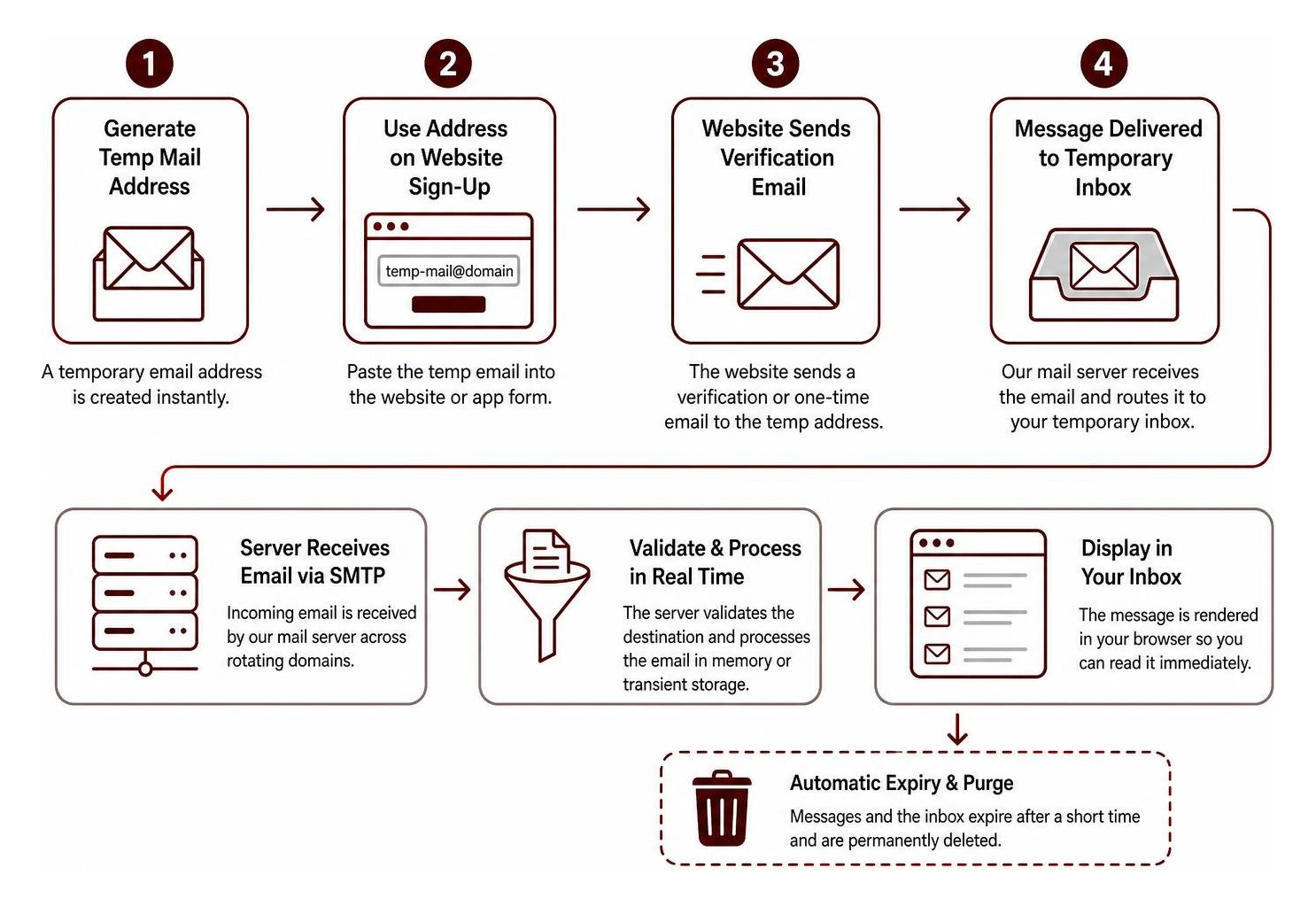
The magic behind this architecture lies in domain aliasing and automatic garbage collection. Behind the scenes, the mail server listens for inbound SMTP traffic across rotating domain names. Once an email arrives, it is processed entirely in memory or stored in transient cache files, ready to be displayed to you immediately without any manual configuration or credentials.
How to Generate a Temp Mail Inbox for Instant Verification
Getting a functional inbox takes less than two seconds. Because modern privacy services eliminate authentication hurdles, there are no passwords to create, no verification CAPTCHAs to complete, and zero personal details required.
Here is how the streamlined process works:
- Access the service: Open the platform in your browser. An active, fully functional address is created for you instantly.
- Copy the address: Use the one-click copy tool to grab the random handle. If you need a fresh alias, you can generate a random fake email address with a single click.
- Submit the address: Paste the copied string into whatever registration form, whitepaper download, or app onboarding screen demands it.
- Read the incoming message: Watch the inbox refresh automatically via real-time WebSocket connections. As soon as the verification token or confirmation link lands, open it, complete your task, and leave the page.
Ephemeral Storage and Cryptographic Purge Cycles
Unlike standard email hosts that archive your correspondence forever, disposable email architectures are built on strict time-to-live (TTL) counters. Every message entering our network is assigned an automated expiration timestamp.
Once this timer expires, our system initiates an unrecoverable data wipe. In accordance with our automatic deletion retention policy, incoming messages and attachments are zeroed out and removed from cache. There are no backup tapes, no hidden shadow copies, and no lingering analytical tracking logs. When a message is purged, it vanishes from existence completely.
Top Practical Use Cases for Disposable Inboxes
The modern web is walled off by mandatory email prompts. Whether you want to read a single industry report, test an open-source software build, or evaluate a SaaS platform, everyone demands an email address. Handing out your permanent contact details every time turns your primary inbox into a chaotic stream of promotional noise.
Using a disposable inbox solves this friction across multiple everyday scenarios:
- Exploring new SaaS platforms: Test trial versions of tools without committing to ongoing sales sequences or automated drip campaigns.
- Downloading research reports and eBooks: Access whitepapers and guides hidden behind aggressive lead generation forms without getting on weekly newsletters.
- Testing development workflows: Developers can test registration pipelines, notification templates, and welcome sequences without polluting company databases.
- Creating AI sandbox accounts: Platforms like OpenAI, Midjourney, or independent LLM hubs frequently ask for account creation during sign-up; utilizing a disposable address prevents those experiments from cluttering your daily workspace.
Bypassing Spam Traps and Public Wi-Fi Portals
Have you ever tried connecting to an airport, coffee shop, or hotel Wi-Fi network, only to be stopped by an invasive captive portal demanding your personal email? These portals rarely check if you actually own the address for long-term communication—they simply want an entry point to add to marketing lists.
Feeding these portals a burner address lets you get online instantly while stopping data leaks and phishing before they reach your primary communication channels. Your permanent email stays off third-party ad exchanges, location-tracking broker lists, and automated telemarketing databases.
Handling One-Time Activation Links and Access Codes
Authentication mechanisms have largely moved away from static passwords toward magic links and one-time passwords (OTPs). While secure, this means signing up for a casual forum or single-use discount code floods your real email with transactional clutter.
Disposable inboxes handle these quick token deliveries seamlessly. You can complete secure OTP verification within seconds: paste the address, watch the six-digit code appear on your screen, input the number, and walk away. You accomplish your goal without leaving a breadcrumb trail tied to your real identity.
Disposable vs. Long-Term Email: Privacy, Security, and Spam Defense
To understand why disposable addresses are essential for digital hygiene, we must compare how they stack up against conventional email providers.
| Feature / Metric | Traditional Permanent Email | Disposable Temp Mail |
|---|---|---|
| Primary Purpose | Long-term communication, identity anchoring | Single-use sign-ups, spam defense, quick verification |
| Personal Data Required | Phone number, name, recovery email, birthday | Zero personal data or registration |
| Data Retention | Permanent storage until manually deleted | Ephemeral (auto-purged after short lifespan) |
| Credential Stuffing Risk | High (same address reused across hundreds of sites) | None (isolated address discarded after use) |
| Inbox Inundation / Spam | High cumulative marketing noise over years | Zero ongoing clutter in personal workspace |
| Account Recovery Ability | Full recovery via security keys and phone prompts | Limited or non-existent once session ends |
| Cost | Free (monetized via data/ads) or paid subscription | Completely free, no login required |
Identity Protection and Data Leak Mitigation
The greatest security vulnerability for most internet users is address reuse. When you use your primary email address for everything—from banking and healthcare to obscure gaming forums and recipe blogs—that address becomes your global unique identifier.
When an obscure site suffers a database leak, malicious actors obtain your email address and cross-reference it with compromised password dumps. By isolating non-critical accounts using disposable aliases, you partition your digital presence. If a site you joined for a quick coupon gets breached six months later, the leaked address leads nowhere and connects to nothing.
Security Architecture and Zero-Knowledge Mail Handling
Privacy-focused disposable mail platforms are engineered to process data with zero-knowledge principles. Because there is no persistent user account, our servers do not build behavioral profiles, track browser footprints across sessions, or monetize user data.
When inbound mail hits our infrastructure, tracking pixels are disabled, external telemetry scripts are isolated, and raw headers are stripped before display. This ensures that opening a message inside your browser will not reveal your real IP address, physical location, or device hardware to overzealous marketers. For a broader look at how this fits into modern privacy practices, see Email privacy.
Service Limitations, Ethical Use, and Best Practices
While disposable inboxes are powerful tools for personal privacy, they are not a universal replacement for standard email accounts. Knowing their limitations ensures you stay protected without accidentally locking yourself out of critical services.
Disposable addresses operate on public or semi-private domains that rotate periodically. Because the underlying storage is transient, any reliance on long-term access will lead to frustration. Furthermore, legitimate platforms employ automated heuristics to detect throwaway domains, which may occasionally require switching to an alternative alias if an address is flagged.
Critical Mistakes to Avoid When Using Temp Mail
To ensure smooth browsing, never use disposable inboxes in situations where you need long-term account ownership or sensitive record-keeping:
- Financial and banking platforms: Never register credit cards, investment accounts, or banking apps with an ephemeral address. You will inevitably lose access to two-factor recovery prompts.
- Government and administrative portals: Official tax documents, passport applications, and legal communication require permanent, auditable email addresses.
- Primary e-commerce accounts: If you purchase physical goods that require tracking numbers, shipping updates, or warranty claims over several years, use your main email.
- Cloud infrastructure and domain hosting: Services like AWS, domain registrars, or server hosting platforms require reliable communication channels to prevent catastrophic service cutoffs.
Best Practices for Safe and Effective Disposable Mail
To maximize privacy while maintaining complete control over your sign-up workflows, follow these simple best practices:
- Keep the tab open during verification: Because messages are purged quickly, keep your temporary inbox window open until you have received your activation link or OTP code.
- Use recovery keys when provided: If your disposable provider provides a private session token or recovery key, save it temporarily in case your browser refreshes before the verification message lands.
- Combine with strong password hygiene: Even if an email address is temporary, use unique, generated passwords for every service you create.
- Separate critical from casual: Mentally sort your online activities into two distinct buckets: high-trust (financial, professional, personal communication) and low-trust (content access, testing, public Wi-Fi). Route low-trust interactions exclusively through disposable mail.
Frequently Asked Questions About Disposable Email
How long do messages stay in a disposable inbox before deletion?
Message lifespans vary depending on server load and platform configuration, but most disposable inboxes retain messages anywhere from 10 minutes to a few hours. Once the retention timer finishes, the server runs an automated cryptographic wipe that permanently removes the message body, headers, and attachments from storage.
Can I recover an account registered with a temporary email?
In most cases, no. Temporary inboxes are intentionally designed without persistent login credentials, meaning once a session ends and the cache clears, you cannot request a password reset for accounts tied to that address. For this reason, disposable mail should strictly be reserved for non-essential accounts that do not require future recovery.
Is it legal to use a temporary email address for web registrations?
Yes, using a disposable email address is entirely legal. It is a standard privacy practice designed to protect personal data from unwanted harvesting, marketing tracking, and spam. However, users must always adhere to the terms of service of the individual platforms they visit and avoid using disposable communication tools for fraudulent activities, abusive behavior, or unauthorized access.
Conclusion
Every time you share your personal email address, you hand over a key piece of your digital identity to servers, marketing databases, and potential breach targets you cannot control. Taking back control of your privacy does not require complex technical knowledge—it simply requires using the right tool for the job.
By using TempoMailUSA to generate a disposable inbox for quick registrations, one-time verification codes, and non-essential downloads, you keep your personal inbox clean, secure, and spam-free. And for teams or developers building custom testing environments, TempoPlay provides a complete, robust script solution for managing ephemeral email infrastructure on your own terms.
Start protecting your personal inbox today by visiting our disposable temporary email service and experience a faster, cleaner, and more private way to navigate the web.