



Inbox overload and malicious emails cost time and create real risk. A free AI-powered spam checker can be your first line of defense—whether you’re managing personal mail or a small team. This guide shows how AI inspects subjects, bodies, headers, links and attachments, why disposable temporary emails limit exposure, and how to run practical, free deliverability and spam tests. You’ll learn how to read spam scores, which fixes usually help deliverability, and a compact workflow that pairs temporary addresses with an AI checker so you can test signups, vet suspicious messages, and keep your main inbox safe without complex tools. Follow the sections below for clear mechanisms, hands-on steps, mitigation checklists, and examples you can use right away to reduce spam and phishing risk.
The opening section explains how an AI spam checker protects your inbox and what signals it analyzes. Next, we cover the privacy advantages of disposable email. The middle sections walk through free deliverability testing, content improvements guided by AI, and priority best practices to avoid scams. Finally, a step-by-step how-to demonstrates using a free AI spam checker together with temporary email generation, including sample output interpretation. Each part includes practical examples and checklists so you can act on findings immediately.
How Does an AI-Powered Free Email Spam Checker Protect Your Inbox?
An AI-powered free email spam checker protects your inbox by breaking messages into pieces, scoring risk, flagging phishing signs, and suggesting next steps before you interact with anything suspicious. It examines subject lines, body text, headers, links, attachments and sender metadata, extracts suspicious features, and runs trained models that return a numeric risk score plus readable flags. The practical gain: faster triage—dangerous items stand out, safe mail surfaces more reliably, and senders get guidance to improve deliverability. Below we outline the technical checks an AI performs and give short examples of common indicators it reports.
Detection starts by tokenizing subject lines and bodies to find spammy language and link patterns, then combines that content view with reputation signals like authentication and blacklist status. Models weigh features such as urgent wording, mismatched URLs, heavy image use, and risky attachment types to produce composite indicators that become user-facing warnings or suggested edits. This output helps you decide whether to open, mark safe, report, or delete a message. Knowing the core analysis points also makes it easier to validate recommendations and reduce false positives with a few quick checks.
What Is AI Email Spam Detection and How Does It Work?
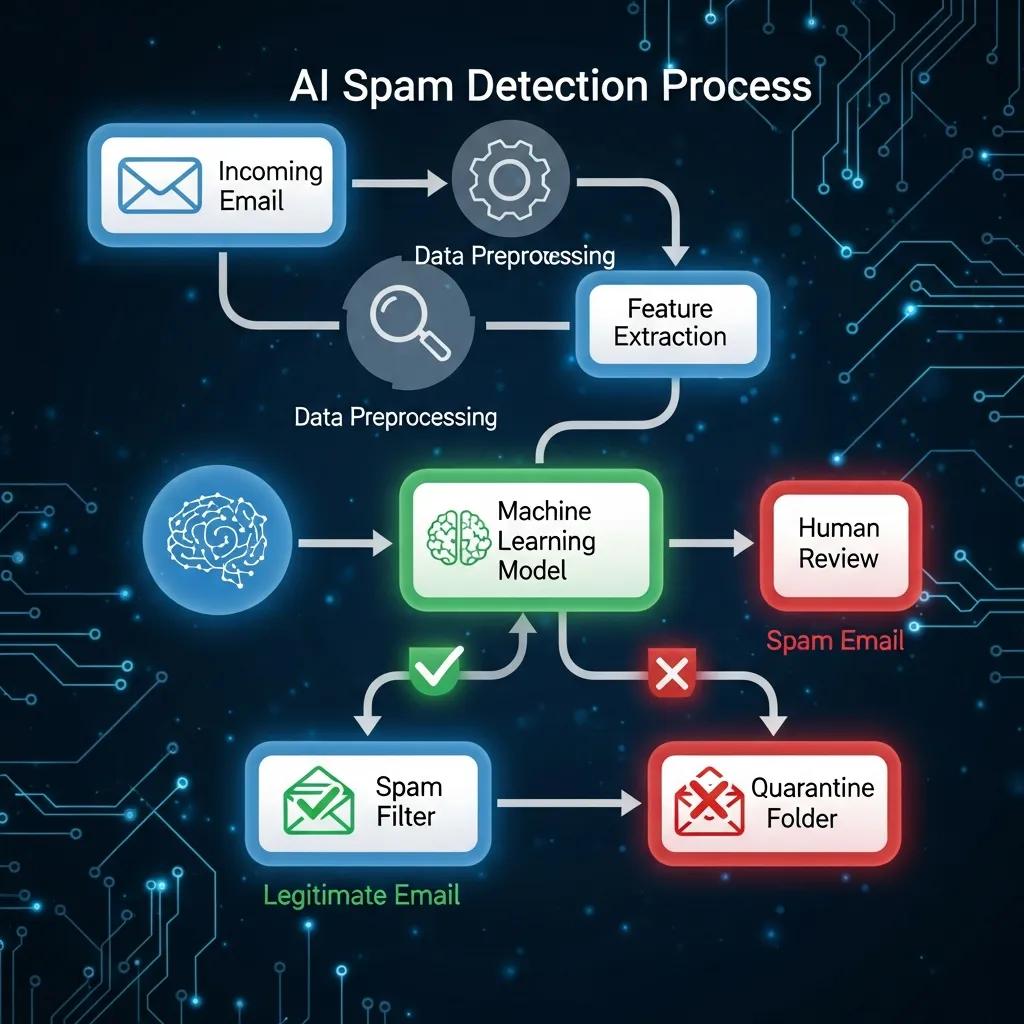
AI email spam detection uses machine learning trained on large sets of spam and legitimate mail to recognize patterns and flag risky messages in real time. The pipeline parses headers and body text, extracts features (keywords, link domains, attachment types, header anomalies), and scores messages using model inference. Results typically include a numeric spam score plus clear flags like “suspicious link” or “spoofed sender.” By combining contextual content signals with metadata checks, this hybrid approach outperforms simple rule lists because it generalizes from examples and adapts to new tactics. For example: a short, urgent subject, a mismatched reply-to, and an obfuscated download link will trigger multiple flags and a high-risk score that signals caution.
Models are trained on labeled datasets and retrained periodically to keep up with changing phishing methods, improving detection of new scam variants. Still, human review matters: AI surfaces likely issues, but you should validate suspicious items against your expected workflows. Understanding how the model reasons about a message makes its recommendations easier to trust or question and supports better feedback into the system.
How Accurate Is TempoMailUSA's AI Spam Email Checker?
TempoMailUSA reports strong detection performance and positions the tool as fast and privacy-friendly; published figures indicate high accuracy for common spam and phishing detection. Accuracy numbers measure correct classifications, but real-world use needs context: false positives and false negatives still happen—even a very high accuracy rate doesn’t eliminate occasional misflags or novel attacks. Treat the AI score as a helpful guide and use quick validation steps—preview headers, confirm sender identity, and inspect link targets—before making irreversible decisions.
To calibrate the tool for your needs, run a few known-good and simulated-suspicious messages through the checker. Hands-on testing helps you understand the trade-offs between sensitivity and specificity and lets you tune how much weight to give automated flags across personal email, transactional mail, or bulk sends.
Why Use a Disposable Email Service to Prevent Spam and Enhance Privacy?

Disposable email services protect your main inbox by giving you short-lived addresses for signups, trials, and one-off verifications—reducing promotional noise and exposure from breaches. These services spin up anonymous addresses instantly and are designed to prevent long-term tracking and list harvesting that feed marketing and malicious campaigns. Using disposable addresses for unknown or single-use interactions limits exposure of your real address, cuts inbox clutter, and reduces the surface for phishing. Below we summarize core benefits and compare temporary email features with their privacy implications.
Temporary addresses are handy for testing, trials, or verifying accounts on unfamiliar sites: you get the verification email without sharing personal identifiers or creating a persistent record. Paired with auto-delete policies and no-signup options, disposable mail stops many unwanted messages at the entry point. Next, we list the main benefits and compare key features to practical privacy outcomes.
- Isolation of Primary Address: Keeps your main inbox free from marketing and third-party breaches.
- Reduced Tracking: Prevents easy correlation across sites by avoiding reuse of the same email.
- No Long-Term Data Retention: Auto-delete policies limit exposure after the interaction ends.
- Instant Access Without Signup: Create an address quickly—ideal for low-risk, short tasks.
These advantages make temporary email a practical, proactive layer for people who want tighter control over exposure and simpler inbox hygiene. The next subsection outlines typical scenarios where disposables shine and why lifecycle features reduce long-term spam risk.
| Feature | Characteristic | Privacy / Use Case |
|---|---|---|
| Instant generation | Create an address without registration | Use for one-time signups and testing |
| Auto-delete | Messages removed after fixed lifespan | Prevents long-term list harvesting and reduces post-breach exposure |
| No-login usage | Access without account creation | Minimizes personal data collection and friction for quick tasks |
| Short lifespan | Addresses expire in hours/days | Ideal for verification codes and temporary access |
What Are the Benefits of Using Temporary Email Addresses?
Temporary email addresses cut down clutter, block persistent marketing flows, and preserve privacy by keeping your real account off lists that get sold or leaked. They’re perfect for newsletter trials, short product tests, or screening less-trusted services during signup—letting promotional streams and breach fallout stay away from your primary inbox. Because the disposable address simply expires or is discarded, you often avoid unsubscribes and complex filtering later. For important or recurring communications, switch to a permanent contact; but for one-off needs, temporary addresses save time and protect privacy.
Common uses include claiming a discount, joining a time-limited trial, or validating an app registration where long-term contact isn’t needed. For ongoing relationships, migrate to a reliable email channel; for everything else, disposables keep interactions ephemeral and low-risk.
How Does Disposable Email Reduce Spam and Protect Online Privacy?
Disposable email reduces spam by breaking the persistent link between your identity and the services you use, stopping aggregated profiles and the resale of contact lists that fuel unsolicited mail. The lifecycle—instant creation, single-use verification, and automatic expiration—breaks the identifier chains ad networks and data brokers rely on. This containment also shrinks the blast radius if a site leaks data, since the exposed address is temporary and non-identifying. Using disposables alongside careful account habits noticeably lowers ongoing spam risk.
People who routinely use disposables for low-value signups need less aggressive filtering and keep their main inbox focused, making real messages easier to spot and less likely to be lost in noise.
How Can You Test and Improve Your Email Deliverability for Free?
Improving deliverability with free tools is straightforward: send test messages to controlled inboxes, analyze content and headers, verify authentication, and iterate based on scored feedback. Deliverability hinges on SPF/DKIM/DMARC, sender reputation, content quality, and recipient engagement; temporary inboxes and free scanners let you simulate real-world delivery and find quick wins. Below is a step-by-step workflow plus a compact comparison of deliverability factors, impacts, and fixes.
Start with authentication checks: confirm SPF includes sending IPs, validate DKIM signatures, and set a DMARC policy that reports back. Then send samples to test inbox placement and run AI content scans for spammy wording, broken links, or heavy HTML that can lower scores. Fix flagged items, resend, and track placement and score changes. The numbered workflow below is doable without paid services.
- Create test recipients: Use disposable addresses to simulate different providers and keep noise out of your main inbox.
- Verify authentication: Check SPF, DKIM, and DMARC for proper configuration and alignment.
- Run content analysis: Use an AI spam checker to scan subject lines, body text, and links for triggers.
- Adjust and retest: Apply suggested edits, resend samples, and observe changes in delivery and spam score.
This iterative, targeted approach usually yields the biggest deliverability gains. Below is a concise comparison of key technical factors, typical impacts, and recommended remedies.
| Deliverability Factor | Issue Detected | Recommended Fix |
|---|---|---|
| SPF/DKIM/DMARC | Missing or misaligned records | Publish correct TXT records and align DKIM domains |
| Content quality | Spammy words, heavy HTML, broken links | Simplify layout, remove trigger phrases, fix links |
| Sender reputation | Low IP/domain reputation | Warm up sending IPs, remove stale lists |
| Engagement metrics | Low opens/clicks | Segment lists, personalize content, A/B test subjects |
What Factors Affect Email Deliverability and Spam Scores?
Deliverability and spam scores are shaped by authentication protocols, sender reputation, message content, and recipient engagement—each influences where messages land. SPF, DKIM, and DMARC verify sender legitimacy and limit spoofing; domain and IP reputation reflect past sending behavior and complaint rates. Content elements—subject wording, link reputation, HTML-to-text ratio, and attachments—can trigger filters, and engagement metrics like opens and clicks tell providers whether recipients value your mail. Practical checks include validating DNS records, monitoring bounces and complaints, and using content scanners to remove spam-like phrasing or formatting.
Next, we show how AI-driven content analysis helps tune messages for better placement.
How Does AI Content Analysis Help Optimize Email Deliverability?
AI content analysis inspects subject lines, body copy, link targets, and formatting to surface spam triggers and suggest precise edits that improve deliverability and trust. Models flag problematic words, suspicious URLs, too many images, and risky attachments, then recommend changes like rewording subjects, toning down promotional punctuation, or swapping short-link domains for reputable targets. For example, changing “URGENT! Claim Now!!!” to “Confirm your account access” and removing multiple short links often lowers the spam score and improves open rates. Small, iterative edits based on AI guidance usually yield measurable placement and engagement gains.
Combining AI-driven content fixes with authentication improvements addresses both content and technical factors, producing faster and more stable deliverability wins than tackling either side alone.
What Are Best Practices to Keep Your Inbox Secure from Spam and Phishing?
Protecting your inbox means layering defenses: verify sender authenticity, use disposable addresses for unknown services, scan suspicious messages with an AI checker before interacting, keep authentication and account hygiene up to date, and enable multi-factor authentication where available. These steps reduce phishing risk and limit exposure if credentials leak. The checklist below highlights the highest-impact behaviors to adopt now, followed by a simple workflow for combining these tactics.
- Verify before you click: Check the sender address, hover over links to confirm domains, and inspect headers for oddities.
- Use disposable addresses: Generate a temporary address for unknown signups and trials to avoid long-term exposure.
- Scan suspicious messages: Run unknown emails through an AI spam checker to surface phishing indicators before opening attachments.
- Harden accounts: Enable MFA, rotate passwords after breaches, and watch login notifications.
How to Identify and Avoid Phishing and Scam Emails?
Phishing emails often use urgency, unexpected attachments, mismatched URLs, and sender spoofing to trick you. Spot these red flags and follow safe-handling steps: question unexpected credential requests, check return-path and reply-to for mismatches, avoid opening attachments from unknown senders, and never enter credentials through links in unsolicited messages. If a message appears legitimate but unexpected, verify via an independent channel rather than replying directly. These simple checks form a quick triage routine that blocks many social-engineering attacks.
If you find a suspicious email, report it to your provider, block the sender when appropriate, and only change credentials after confirming a security incident. These containment steps reduce the downstream impact of successful phishing attempts. Next we describe how to combine AI checking with disposable email strategies for stronger protection.
How to Combine AI Spam Checking with Temporary Email for Maximum Protection?
Pairing AI spam checking with disposable email addresses creates a practical defensive workflow: use a temporary address for initial signups, route incoming messages through an AI scanner to assess risk, and only migrate trusted contacts to your primary inbox. Generate a disposable address for new services, test any verification or follow-up mail with the AI checker, and adopt important contacts only after the report and authentication look clean. If the AI flags problems, discard the disposable and avoid further contact. This layered pattern preserves privacy while using automated analysis to reduce risky interactions.
A typical sequence—generate temporary address → sign up → run first messages through AI checker → act on flags (delete, block, or adopt)—keeps your main inbox focused on legitimate communication. The next section gives a hands-on guide for using TempoMailUSA’s tools together in this pattern.
How to Use TempoMailUSA's Free AI Spam Email Checker and Temporary Email Service?
This section offers a practical workflow for combining a free AI spam checker with a disposable email generator: prepare the input, interpret the spam score, and take recommended actions while keeping privacy intact. The steps are: create a disposable address, send or paste the message into the AI checker, read flags and spam score, then apply suggested edits or containment actions. TempoMailUSA provides instant disposable addresses with no signup and auto-delete behavior, and its AI scanner focuses on privacy and fast results—making the two tools a useful pair for both proactive signups and reactive message vetting.
Start with a disposable address for untrusted signups and scan any incoming verification or promotional mail before clicking links. The table below shows typical tool outputs—spam score, flagged indicators, and suggested immediate actions—to help you interpret results quickly.
| Output Metric | Indicator | Suggested Action |
|---|---|---|
| Spam score (0-100) | Numeric risk level (higher = greater risk) | Score >70: delete or quarantine; 40–70: inspect headers and links before interacting |
| Indicators flagged | Examples: suspicious link, spoofed sender, urgent language | Follow each flagged suggestion: verify sender, hover links, don’t open attachments |
| Authentication check | SPF/DKIM/DMARC alignment status | If misaligned, treat links with caution and contact the sender via an independent channel |
Step-by-Step Guide to Using the AI Spam Email Checker Tool
To use an AI spam checker effectively, capture the full headers and body or forward the full message to the tool—headers are essential for authentication checks. Run the analysis and review the summary flags and numeric score. Look for tags like “suspicious link,” “spoofed sender,” or “malicious attachment” and cross-check them against authentication results. Then follow the recommended actions: quarantine or delete high-risk items, verify medium-risk messages manually, and use suggested content edits to reduce spam scores on outgoing mail.
Common pitfalls include submitting truncated headers, misinterpreting scores without context, and over-relying on automation. To avoid mistakes, validate suspicious messages through an independent channel and treat AI output as informed guidance rather than absolute truth.
| Tool Output | Example Value | Recommended Next Step |
|---|---|---|
| Spam Score | 82 | Quarantine and do not click links |
| Flag | Suspicious link domain | Hover over the link, check domain WHOIS, or avoid the link entirely |
| Auth Check | DKIM missing | Treat as unverified; confirm the sender through another channel |
How to Generate and Use Disposable Emails for Spam Prevention
Create a disposable email when signing up for a new service: request an instant address, use it to receive verification or initial communications, then discard the address or let it auto-delete. Pick a lifespan that fits the task—short for single-use verifications, longer for trial periods—then complete the signup with the disposable. Monitor incoming messages in the temporary inbox and run anything unexpected through the AI checker before clicking links or opening attachments. If a sender proves trustworthy, save their details and migrate them to your primary address; otherwise let the disposable expire or delete it to cut off future messages.
Using disposables this way reduces long-term exposure to marketing and breach-driven spam while keeping the option to adopt trusted contacts later. When paired with automated scanning, the disposable workflow delivers privacy and safety with minimal account management overhead.
- Generate: Create an instant temporary address for the interaction.
- Use: Complete the signup or verification with the disposable address.
- Scan: Run received messages through an AI spam checker before clicking links.
- Decide: Add the sender to your primary contact list only after verification; otherwise discard the address.
Following this generate → use → scan → decide routine reduces inbox noise, cuts security incidents, and keeps your main email reserved for high-trust communications.
Frequently Asked Questions
What types of spam can an AI email spam checker detect?
An AI spam checker can spot phishing attempts, promotional spam, and many types of malicious content. By examining subjects, body text, and sender metadata it identifies patterns linked to spam, flags suspicious links and urgent wording, and checks domains against known blacklists. That insight helps you decide whether to open, delete, or report a message—making your inbox safer.
Can I use a disposable email address for all online signups?
Disposable emails are great for many signups—trials, one-off accounts, and low-value services—but they aren’t ideal everywhere. Services that require permanent contact for account recovery or ongoing notifications usually need a stable email. Consider the service’s needs: use disposables for short-term interactions and a trusted address for important or long-term accounts.
How often should I check my spam folder?
Check your spam folder regularly—weekly is a good baseline—to ensure legitimate messages aren’t misclassified. If you’re getting lots of spam or you rely on critical messages, check more often. If legitimate mail lands in spam repeatedly, adjust filters or whitelist trusted senders to prevent future misses.
What should I do if I receive a suspicious email?
If you get a suspicious message, don’t click links or download attachments. Verify the sender’s address and look for inconsistencies. Run the email through an AI spam checker for indicators, and if it appears malicious report it to your provider and delete it. For extra safety, change passwords and enable multi-factor authentication if you suspect a compromise.
Are there any risks associated with using disposable email addresses?
Disposable emails offer strong privacy benefits but have trade-offs. Some services block disposables or require a verified address for recovery, and you may lose access if you forget to save important info tied to a temporary address. Weigh those limits before using a disposable for anything critical.
How can I improve my email deliverability?
To improve deliverability, start with correct SPF, DKIM, and DMARC setup. Clean your lists regularly to lower bounce rates, which hurt reputation. Use an AI spam checker to remove content triggers and improve subject lines, and boost engagement with relevant, segmented messaging. Better engagement and clean technical setup will improve placement over time.
Conclusion
Using a free AI-powered spam checker together with disposable email addresses is an effective way to strengthen inbox privacy and security. These tools reduce spam exposure, help improve deliverability, and lower phishing risk. Adopt the workflows and checks described here to keep your inbox cleaner and your online interactions safer. Start testing our resources today to take control of your email experience.