


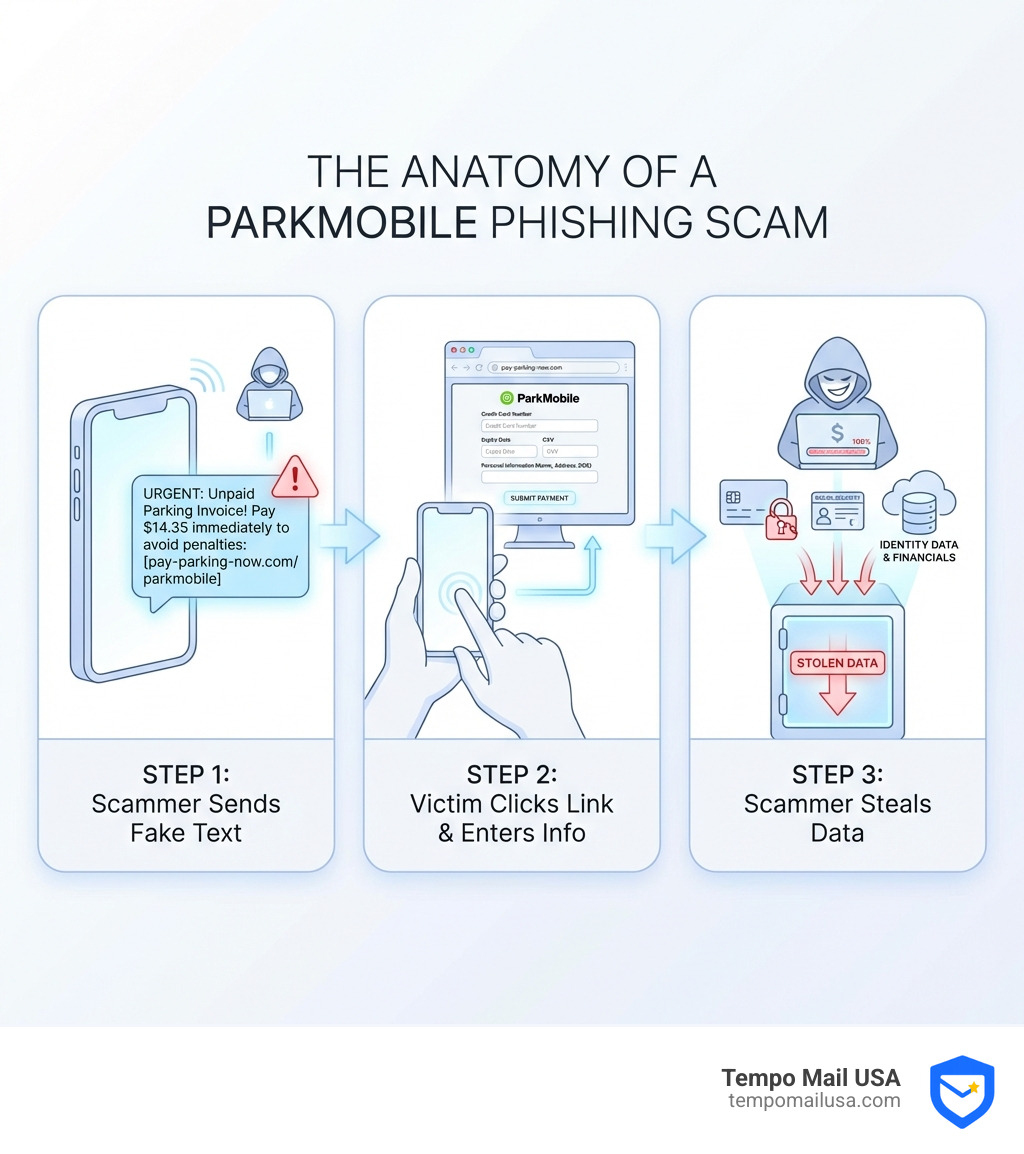
The Growing Threat of ParkMobile Scam Texts
ParkMobile scam text messages are flooding cell phones across the country, targeting drivers with fake parking invoices and urgent payment demands. These sophisticated phishing attacks impersonate the popular parking app to steal your personal and financial information.
Quick Answer: How to Confirm a ParkMobile Scam Text
- Check for red flags: Urgent language, threats of fines, grammatical errors, and suspicious links (anything other than parkmobile.io or app.parkmobile.io)
- Verify independently: Log into the official ParkMobile app or website directly—never click links in texts. ParkMobile never sends payment links via SMS.
- Take action: Don't click, don't reply. Delete the message, block the sender, and report it as spam to 7726.
Parking tickets and unpaid invoices create anxiety for drivers—and scammers know it. They're exploiting this stress with fraudulent text messages that appear to come from ParkMobile or local parking authorities. These messages typically claim you owe a small amount (often around $4.35 to $15) and threaten late fees or "DMV violation database" reports if you don't pay immediately.
The Philadelphia Parking Authority, Houston's ParkHouston, and New York City's Department of Finance have all issued consumer fraud alerts about these phishing attempts. The scam works by directing you to fake websites that mimic official parking payment portals, where they harvest your credit card details, Social Security number, and other personally identifiable information.
This guide will walk you through three simple steps to confirm whether a parking text is legitimate or a scam, protect your sensitive data, and know exactly what to do if you've already clicked a suspicious link.
Step 1: Analyze the Message for Telltale Red Flags
When a text message pops up on your phone, claiming to be from ParkMobile or a local parking authority and demanding immediate payment, our first instinct might be to panic. Don't! This is precisely what scammers want. Instead, we need to take a deep breath and scrutinize the message for telltale inconsistencies. This careful analysis is our first, and often most effective, line of defense against falling victim to a ParkMobile scam text.
Common Hallmarks of a Parkmobile Scam Text
Scammers are cunning, but they often leave breadcrumbs of their deception. Here's what we should be looking for:
- Urgent Language and Threats of Fines or Penalties: Legitimate organizations rarely demand "immediate" payment with dire consequences for non-compliance via an unsolicited text. Scam messages often use phrases like "settle your balance promptly," "avoid additional late fees," or "avoid disconnection." Some even threaten to report your name to a "DMV violation database" if you don't pay up right away. This creates a sense of panic, pushing us to act without thinking.
- Small, Specific Dollar Amounts: You might receive a text claiming you owe a minuscule sum, like "$4.35" or "around $5 to $15." This tactic makes the request seem more plausible and less likely to trigger immediate suspicion. Who would bother scamming for such a small amount, right? That's the trick!
- Grammatical Errors and Misspellings: Even sophisticated scams sometimes slip up. Keep an eye out for typos, awkward phrasing, or grammatical mistakes that a professional organization would never make. For example, some scam texts have been observed from "City of Huston" instead of "City of Houston." Such errors are a massive red flag.
- Unsolicited Contact: Did you just park? Do you have any reason to suspect an outstanding balance? If a text message about parking fees arrives out of the blue, it should immediately raise your suspicion. Unsolicited messages are a hallmark of phishing attempts.
If something feels off, trust your gut. Our intuition is a powerful tool in detecting fraud.

Scrutinize the Sender and the Suspicious Link
Beyond the message content, the sender's identity and any links included are critical indicators of a scam.
- Unknown Phone Number: While scammers can spoof numbers, an unfamiliar or generic-looking phone number sending a message about an official payment should be treated with extreme caution.
- Non-Official URL (the link!): This is perhaps the biggest red flag. A ParkMobile scam text will almost always include a link to a fake website designed to look like the real thing. These fraudulent sites are built by scammers to trick us into entering our financial information. They might have slightly altered domain names, like 'park-space.xyz' or 'parkinghou.com', instead of the official ones. As ParkMobile itself warns, Scammers build fake sites to steal financial information.
- Legitimate ParkMobile Domains: Always verify the URL. The official ParkMobile website is parkmobile.io. For their web app, the URL will typically start with app.parkmobile.io. If the link in the text directs you anywhere else, it's a scam. Do not click on it. Do not proceed.
Our rule of thumb? If the link looks suspicious in any way, do not use it. Check the URL carefully. Scammers rely on us being busy or distracted and not noticing the subtle differences in their fake domains.
Step 2: Verify Directly with Official Sources, Not the Text
Once we’ve identified those glaring red flags, the next crucial step is to bypass the scammer entirely and verify any supposed outstanding balances directly with official sources. This means using channels we know are legitimate, not the ones provided in a suspicious text.
Understand ParkMobile's Official Communication Policy
This is perhaps the most important piece of information to arm ourselves with: ParkMobile's official stance on SMS communication regarding payments.
ParkMobile is very clear about how they communicate with their users:
- No Payment Links in Texts: ParkMobile will never send private customers payment links or sensitive information via SMS. Period. They explicitly state this on their support page: ParkMobile will never send private customers payment links via SMS. Instead, they always guide users to use their official app for any transactions.
- No Sensitive Information Requests: Similarly, official ParkMobile communications will not ask for your username, password, security code, or other personal information via text message. The NYC Department of Finance (DOF) issues a similar warning, stating they "will never send you a text message or email asking you for a username, password, security code or other personal information." This policy is a universal safeguard against phishing.
If a text message from "ParkMobile" contains a link to pay or asks for sensitive details, it is undeniably a ParkMobile scam text.
How to Legitimately Check for Outstanding Balances
So, if a text message is not the way to check, what are the legitimate methods? We have several reliable options:
- Use the Official ParkMobile App: The safest and most direct way to verify any parking sessions or balances is through the ParkMobile app. Log in directly to your account. Your parking history, active sessions, and any payment issues will be clearly displayed there. You can also check your payment methods and ensure everything is up to date.
- Visit the Official ParkMobile Website: Steer directly to ParkMobile.io in your web browser (type the address yourself, don't use a link from an email or text). From there, you can log into your account and review your parking details.
- Contact Local Parking Authorities Directly: If the scam text claims to be from a city's parking authority (like the Philadelphia Parking Authority or ParkHouston), bypass the text entirely.
- Philadelphia Parking Authority: The PPA advises anyone wishing to see if they have an outstanding parking ticket to go online at philapark.org and check under "Tickets," or call the Parking Violations Branch directly at 1-888-591-3636. They explicitly urge consumers NOT to click links or respond to suspicious texts.
- ParkHouston (City of Houston): ParkHouston clearly states that they do not send text messages for unpaid parking invoices, fines, or fees. Any communication about delinquent citations from a collections vendor on their behalf would identify itself as being from the City of Houston and include an opt-out option. If you receive a text about an unpaid parking ticket in Houston, it's almost certainly a scam.
- NYC Department of Finance: Similar to Houston, the NYC DOF has a prominent warning about scams on its website, confirming they will never text or email for personal information or payment.
Legitimate parking sessions are usually paid for upfront. It's rare to have an outstanding balance unless a payment declined, which would typically be visible in your official app or bank statements. Always go directly to the source you trust, not the one that landed in your inbox or messages.
Step 3: Act Decisively to Report the Scam and Protect Yourself
Even if we've successfully identified a ParkMobile scam text, our job isn't quite done. Taking decisive action is crucial—both to protect ourselves further and to help prevent others from falling victim. Think of it as being a digital superhero, protecting the virtual streets from villainous scammers!
What to Do if You Receive a Suspicious Text
When a suspicious text arrives, our actions (or inactions) can make a big difference. Here’s our immediate checklist:
- Do Not Click the Link: We cannot stress this enough. Clicking the link is like opening the door to a stranger who says they have candy—it’s just not a good idea. The link is designed to take you to a fake website where your information will be stolen.
- Do Not Reply to the Message: Replying, even with a simple "STOP" or "NO," can confirm to the scammers that your number is active, making you a target for more unsolicited messages.
- Delete the Message Immediately: Once you've identified it as a scam, get rid of it. Out of sight, out of mind, and out of temptation.
- Block the Sender: Block the number to prevent further messages from that specific sender.
- Report as Spam: Forward the message to 7726 (SPAM). This is a free service provided by wireless carriers that helps them identify and block spam messages. The more people who report, the more effective this system becomes.
As ParkMobile wisely advises, If something feels wrong – always check the sender. Your vigilance is key!
I Already Clicked the Link! What Now?
Uh oh. We've all been there—a moment of distraction, a quick tap, and suddenly, that sinking feeling. If you've already clicked a link from a ParkMobile scam text or, worse, provided information on a fake website, don't panic, but act swiftly.
Here's what we need to do immediately:
- Contact Your Bank and Credit Card Companies: If you entered any financial information (credit card number, bank account details), call your bank and credit card companies immediately. Explain that you've been a victim of a phishing scam. They can freeze your cards, monitor your accounts for fraudulent activity, and help reverse any unauthorized charges.
- Place Fraud Alerts on Your Credit Reports: Contact one of the three major credit bureaus (Equifax, Experian, or TransUnion) to place a fraud alert on your credit file. This makes it harder for identity thieves to open new accounts in your name.
- Change All Compromised Passwords: If you entered any login credentials (username, password), change those passwords (and any others that use the same combination) on all your accounts. Use strong, unique passwords for every service.
- Monitor Your Accounts Closely: Keep a vigilant eye on your bank statements, credit card bills, and other financial accounts for any suspicious activity.
- Report the Incident:
- Federal Trade Commission (FTC): The FTC is an excellent resource for scam victims. Visit their website What to do if you were scammed resource from the FTC for comprehensive guidance and to report the scam.
- FBI Internet Crime Complaint Center (IC3): You can also report online crimes, including phishing scams, to the FBI's Internet Crime Complaint Center’s website (ic3.gov).
- Local Law Enforcement: Consider filing a police report with your local law enforcement agency. While they may not always be able to track down the scammers, it creates a record that can be useful for identity theft recovery.
Time is of the essence when dealing with potential data breaches. The quicker you act, the better your chances of mitigating any damage.
The Widespread Nature of the Parkmobile Scam Text
The ParkMobile scam text isn't an isolated incident affecting a few unlucky individuals. It's part of a larger, coordinated effort by scammers to exploit our reliance on digital payments and communication. This type of scam has a national scope, with warnings issued by authorities from coast to coast.
What Are the Scammers' Goals?
Why do scammers bother with these elaborate schemes? Their motives are clear and, unfortunately, quite lucrative:
- Personally Identifiable Information (PII): They want our PII, which includes everything from our names and addresses to birth dates and driver's license numbers. This information is a goldmine for identity theft.
- Credit Card Details and Bank Account Information: The primary goal is often to steal our financial details. Once they have our credit card numbers or bank account access, they can make fraudulent purchases or drain our accounts.
- Identity Theft: With enough PII, scammers can open new lines of credit, apply for loans, or even file fraudulent tax returns in our names. This can cause immense financial and personal distress.
- Selling Data on the Dark Web: Even if they don't use the information themselves, stolen data is often sold to other criminals on the dark web, perpetuating a cycle of fraud.
These insidious scams are designed to create a sense of panic, prompting us to hand over sensitive data without a second thought. They rely on the fact that we're often busy and might not scrutinize every detail of an unexpected text.
City-Wide Alerts: A Coast-to-Coast Problem
The prevalence of the ParkMobile scam text and similar parking-related phishing attempts is evident in the numerous warnings issued by city authorities across the United States. This isn't just a local nuisance; it's a national problem.
- Philadelphia: The Philadelphia Parking Authority issued a Consumer Fraud ALERT, warning residents about malicious text messages disguised as coming from the PPA, falsely informing them they owe money for unpaid parking tickets. The Philadelphia Inquirer also reported on the scam.
- Houston: The City of Houston issued a Public Alert regarding ParkHouston Fraudulent Texts. They specifically clarified that ParkHouston does not send text messages for unpaid parking invoices, fines, or fees.
- New York City: Scam alerts for New Yorkers have been prominent, with reports of fraudulent texts telling New Yorkers they owe money in unpaid parking fees. The NYC Department of Finance (DOF) has also stressed that they will never send texts or emails asking for personal information.
- Des Moines: Even in cities like Des Moines, ParkMobile users have been targeted by scam text messages claiming overdue balances and threatening reports to a "DMV violation database."
These widespread warnings highlight that scammers are casting a wide net, hoping to ensnare anyone who uses parking apps or might have an overdue ticket on their mind.
Frequently Asked Questions about Parking Scams
We understand you might still have questions about these sneaky parking scams. Let's tackle some common concerns to ensure we've covered all our bases.
Does ParkMobile ever send texts about unpaid tickets?
This is a critical question, and the answer is a resounding no for payment links or sensitive information. ParkMobile's official policy is clear: they will never send private customers payment links or sensitive information via SMS. Instead, they always guide you to use their app.
However, there's a nuance. While ParkMobile itself won't text you for payment, some local parking authorities or their authorized collections vendors might send text messages about delinquent citations. For example, ParkHouston states they use a collections vendor that sends text messages, but these messages will always clearly identify themselves as being on behalf of the City of Houston and offer an opt-out option. The key here is legitimacy and transparency:
- Official ParkMobile: No payment links in texts.
- Legitimate Authority/Vendor: Will identify themselves clearly, likely refer to a specific citation, and provide official contact/opt-out options, without demanding immediate payment via a suspicious link.
If you receive a text about an unpaid balance, always default to suspicion and verify through official channels.
Are other parking services targeted by similar scams?
Absolutely, yes. The tactics used in a ParkMobile scam text are part of a broader trend of phishing and smishing (SMS phishing) that targets various services, especially those related to transportation or government fees. Scammers are opportunistic; they go where the money and the anxiety are.
We've seen similar scams impersonating:
- E-ZPass and Toll Services: Many individuals have received fraudulent texts claiming unpaid tolls, often mimicking the E-ZPass system. These texts also include malicious links designed to steal financial information.
- Local Parking Authorities: Beyond ParkMobile, local city parking authorities are frequently impersonated. The Philadelphia Parking Authority's fraud alert is a prime example of scammers directly impersonating a municipal agency to trick people into paying fake tickets.
The common thread is the creation of urgency and fear, combined with a malicious link, to harvest personal and financial data. The specific service being impersonated might change, but the scam's core mechanics remain the same.
How do scammers get my phone number for a Parkmobile scam text?
It's a common and frustrating question: "How did they get my number?" Scammers employ several methods to obtain phone numbers for their bulk messaging campaigns:
- Random Dialing/Sequential Messaging: Often, scammers simply generate phone numbers sequentially or randomly dial numbers within specific area codes, hoping to hit active lines.
- Data Breaches: Unfortunately, data breaches are a common occurrence. If your phone number (along with other PII) was part of a data breach from any online service you use, scammers might acquire it.
- Public Records and Directories: Some phone numbers are publicly available through online directories or other public records.
- Bulk Messaging Services: Scammers use specialized bulk messaging services that allow them to send thousands, if not millions, of texts simultaneously, making it a numbers game. They don't necessarily know you use ParkMobile; they're just hoping to hit someone who does, or who might panic about a parking ticket.
While it's unsettling to receive these texts, knowing how they get your number can help alleviate the feeling that you've been specifically targeted. It's more often a broad, indiscriminate attack.
Conclusion: Stay Vigilant and Secure Your Digital Identity
The rise of the ParkMobile scam text is a stark reminder that in our increasingly digital world, vigilance is our most powerful tool against fraud. Scammers are constantly evolving their tactics, preying on our anxieties and our trust in familiar brands. But by arming ourselves with knowledge and following a few simple steps, we can turn the tables on them.
We've outlined our three essential steps to combat these scams:
- Analyze: Carefully scrutinize every unexpected text for red flags like urgent language, grammatical errors, and suspicious links.
- Verify: Always go directly to official sources—the legitimate ParkMobile app or website, or official city parking authority contact numbers—to confirm any supposed outstanding balances. Never trust links in unsolicited texts.
- Act: If you receive a scam text, don't engage. Delete, block, and report it. If you've accidentally clicked a link or provided information, act immediately to protect your financial accounts and identity.
Our collective skepticism is their weakness. By being smart about who we trust and where we click, we build a stronger defense for ourselves and our communities. Protecting your Personally Identifiable Information (PII) is paramount in this digital age. That's why services focused on identity proxying, like TempoMail USA, are becoming increasingly vital, creating a "firewall" for your PII.
Stay alert, stay secure, and let's work together to make it harder for scammers to succeed. Learn more about our privacy tools at TempoMail USA and empower yourself with the best defense against digital threats.