


Your Inbox is an Open Book — Here's How to Close It
This looks real—but it’s not. Every time you open your standard inbox, you aren't just reading messages; you are being read. Encrypted mail services protect your emails so only you and your recipient can read them — not your provider, not advertisers, and not hackers. In an era where data is the new currency, leaving your inbox unprotected is like leaving your front door wide open in a crowded city.
In 2026, the landscape of digital privacy has shifted. We no longer talk about "if" your data will be scanned, but "how often." Top-tier privacy providers now offer a suite of tools designed to keep your communications invisible to the prying eyes of surveillance capitalism. These services prioritize user sovereignty over corporate profit, ensuring that your private chats, financial receipts, and personal plans remain exactly that: private.
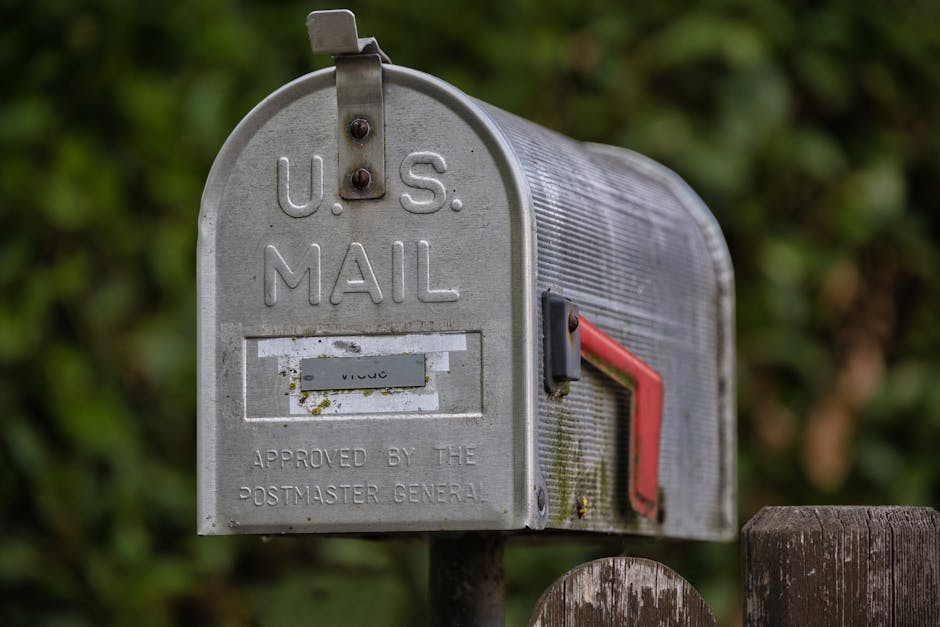
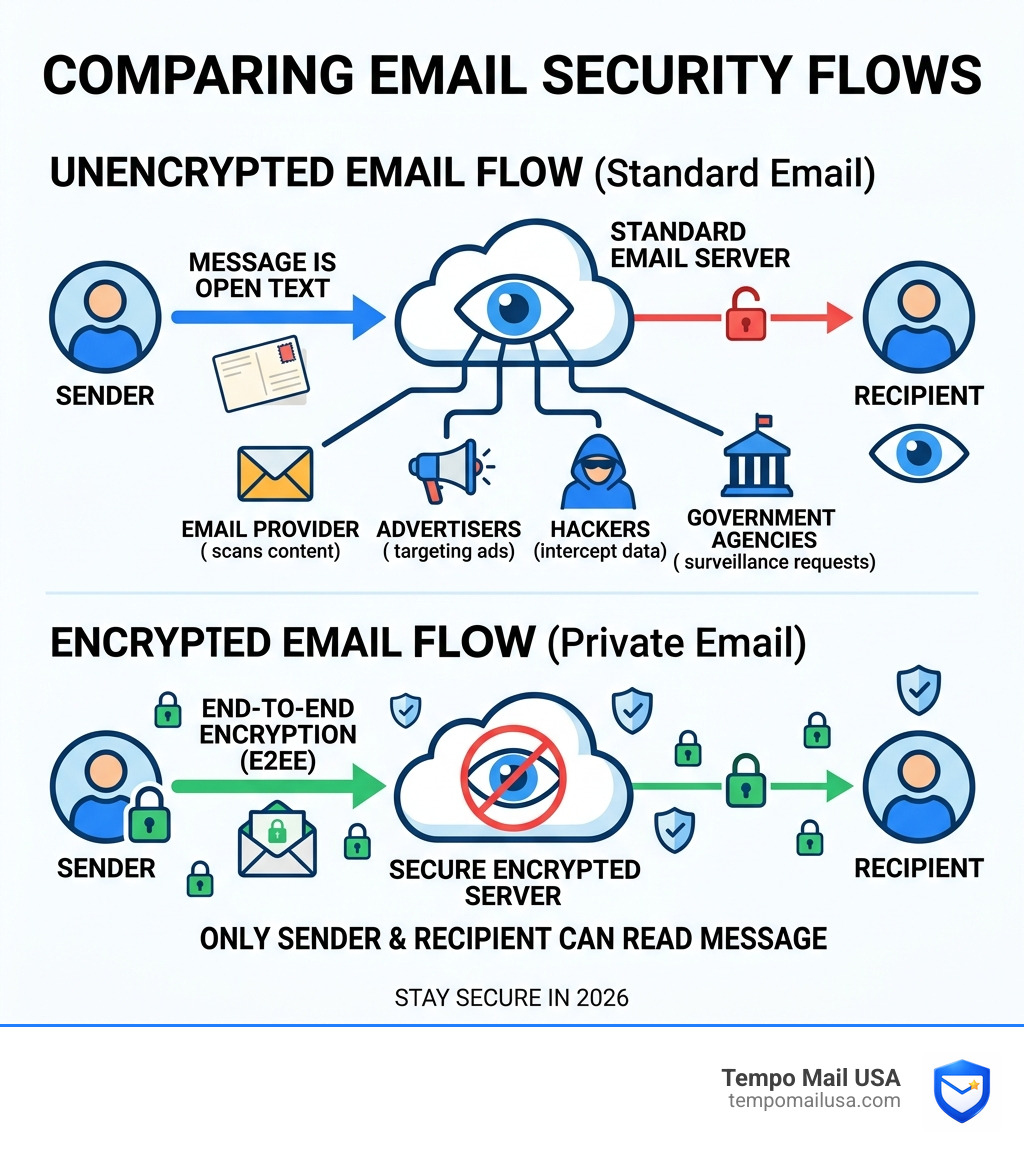
Think about how a standard email actually travels. It passes through multiple servers before reaching its destination. Any party along that route — your email provider, a hacker, or a government agency — can potentially read it. It's exactly like sending a postcard through the mail. The message is right there, open, for anyone who handles it. From the postal worker to the person sorting the mail, the content is exposed. Standard email works the same way; every server it touches is a pair of eyes looking at your data.
That's not a hypothetical risk. Major free providers have been caught sharing email data with third parties, scanning message content for ad targeting, and complying with broad government data requests. Your inbox is a goldmine of personal identifiers, shopping habits, and travel plans — and most people have no idea it's being mined for profit every single second. In 2026, with data breaches exposing hundreds of millions of records every year, the cost of doing nothing has never been higher. The good news? Switching to a genuinely private, encrypted email service is more straightforward than most people think — and many of the best options offer robust free tiers to get you started.
Why You Need Encrypted Mail Services in 2026

The "free" era of email is dead. While you don't pay for mainstream services with a credit card, you pay with your digital sovereignty. Big Tech providers treat your receipts, flight confirmations, and private chats as fuel for their marketing algorithms. In recent cases, we've seen major providers caught giving third parties full access to user communications under the guise of "improving user experience."
When you use standard encrypted mail services, you aren't just hiding from "bad guys"; you are opting out of a system designed to profile your every move. Even with regulations like GDPR in place, many mainstream companies find loopholes to profile you by analyzing metadata or using "legitimate interest" clauses to continue their data harvesting. This is where most users get tricked: they assume that because their login is "secure" (using HTTPS), their content is private. It isn't. Security is about keeping hackers out; privacy is about keeping the provider out.
If you want to understand the latest shifts in big tech data policies, it is vital to Stay Informed: New Gmail Privacy Update - Important News. This update highlights how even the most popular services are tightening their grip on user data while claiming to offer more protection.
The Hidden Vulnerabilities of Standard Email
⚠️ Warning: Standard email leaks more than just the body of your message.
- Metadata Leakage: Even if you use a secure connection, the "From," "To," and "Subject" lines are often visible to intermediate servers. This allows observers to map your social and professional network.
- Search Indexing: Mainstream providers index your emails to make them searchable. To do this, they must be able to read the content, which means the data is stored in a reversible format on their servers.
- The "Delete" Myth: Data persists in backups, server logs, and disaster recovery sites long after you hit the trash icon. Without encryption, that data remains a liability forever.
- Third-Party App Access: Many users unknowingly grant "read" permissions to third-party calendar or productivity apps, creating massive security holes in their primary inbox.
How End-to-End Encryption (E2EE) Protects Your Identity

How does this actually work? Encrypted mail services utilize End-to-End Encryption (E2EE). In simple terms, your email is scrambled on your device (the client side) before it ever hits the internet. It travels across the web as a jumble of characters that can only be unscrambled by the intended recipient who holds the matching mathematical key.
Most top-tier services use a combination of AES-256 (for the data itself) and RSA-4096 (for the key exchange). These are widely trusted encryption standards. Because the encryption happens on your computer or phone, the service provider never sees your "private key." This is known as zero-knowledge architecture. If a government subpoenas the provider, they can only hand over encrypted data they cannot directly read. If you want a technical overview of how end-to-end encryption works, it helps to see why this model is so different from standard webmail.
To keep your current inbox clean while you transition, you might need to learn How to Block Unwanted Emails on Gmail to reduce the noise and spam before you migrate your primary communications.
Choosing the Right Jurisdiction for Your Data
Jurisdiction is the legal "home" of your data, and it matters immensely. Different countries have vastly different laws regarding data retention and government access.
- Switzerland: Known for its neutrality, Swiss laws are famously strict regarding data privacy. Providers here are not subject to the same surveillance treaties as those in the US or EU.
- Germany: Operating under German GDPR, which is among the toughest in the world, German providers offer high levels of protection against corporate overreach.
- Belgium: Benefits from laws that require a local judge's order for any data access - a rare occurrence that provides a significant legal shield for users.
- Iceland: A global leader in digital rights, Iceland is known for supporting total anonymity and instant data deletion policies.
Choosing a provider outside the "Five Eyes" surveillance alliance (which includes the US, UK, Canada, Australia, and New Zealand) provides an extra layer of protection against bulk data collection and intelligence sharing.
Essential Security Features for Modern Privacy
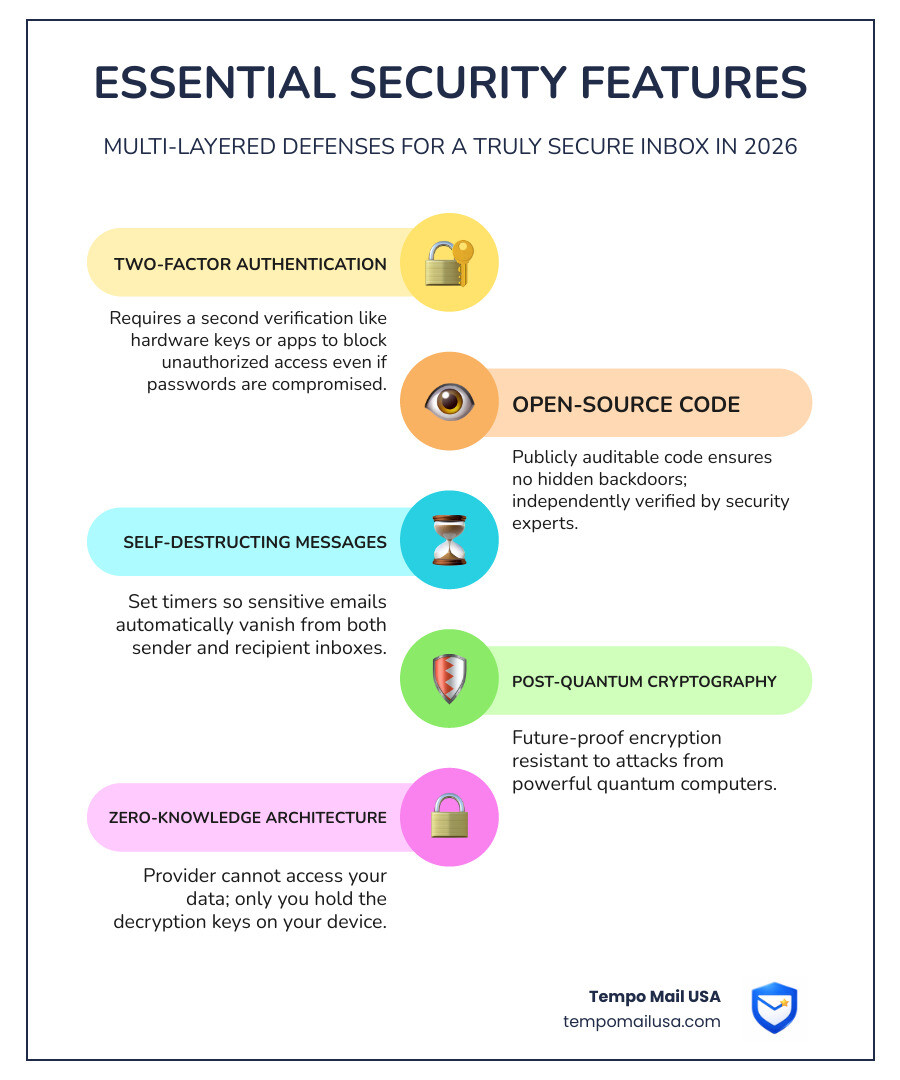
When we analyzed the top encrypted mail services for 2026, we looked for more than just basic encryption. A truly secure inbox needs a multi-layered defense to protect against sophisticated phishing and social engineering attacks:
- Two-Factor Authentication (2FA): Support for hardware security keys or time-based one-time password (TOTP) apps is non-negotiable. This ensures that even if your password is stolen, your account remains locked.
- Open-Source Code: If the code isn't public, how can we trust it? Leading privacy services are fully open-source and undergo regular independent security audits to prove they aren't hiding backdoors.
- Self-Destructing Messages: The ability to set a timer on an email so it vanishes from the recipient's inbox after it has been read. This is essential for sharing sensitive documents or temporary credentials.
- Post-Quantum Cryptography: As quantum computing advances, standard encryption may become vulnerable. The most forward-thinking services have already pioneered encryption that is resistant to future quantum computer attacks.
Advanced Privacy with Email Aliases
✅ Safe Practice: You should never give your "real" encrypted email address to a random retail site, newsletter, or social media platform. This is where most leaks and data breaches happen.
By using a Temporary Gmail Account or a dedicated alias service, you create a digital firewall. If the shop gets hacked or sells your data, your real identity remains hidden. You can simply delete the alias and stop the spam or tracking in its tracks. This "identity proxying" is the most effective way to maintain a clean, secure primary inbox while still interacting with the modern web.
Migration Strategies: Taking Back Your Digital Sovereignty
"This is where most users get tricked"—they think moving years of emails is an impossible, technical nightmare. It isn't. Most modern encrypted mail services now offer "Easy Switch" tools. These tools log into your old Gmail or Outlook account, encrypt your history on the fly, and move it to your new secure home without you having to manually download a single file.
However, you don't have to quit your old provider cold turkey. You can start by using a Temporary Email Gmail for new sign-ups while slowly moving your important contacts. For those who want to keep their current address but add a layer of security, check out Gmail Private and Secure Email at No Cost - Google Workspace for a middle-ground approach that balances convenience with protection.
Steps for a Clean Migration:
- Audit your accounts: Use a password manager to see which sites are linked to your old email. You'll be surprised how many forgotten subscriptions are still tracking you.
- Set up Forwarding: Forward your old mail to your new encrypted address. This ensures you don't miss anything, but remember: forwarded mail isn't E2EE until it reaches the new provider.
- Update "Core" Services: Move your bank, government IDs, and primary social accounts first. These are the high-value targets for hackers.
- Use Aliases for the Rest: For everything else—newsletters, e-commerce, and forums—use a Free Temp Gmail or a Google Temp Email to stay anonymous and keep your new inbox pristine.
Frequently Asked Questions about Encrypted Email
Is encrypted email safer than Gmail?
Yes, significantly. While Gmail is excellent at "security" (preventing unauthorized access to your account), it fails at "privacy." Google holds the decryption keys to your data, allowing them to scan content for advertising and comply with data requests. True encrypted mail services use E2EE, meaning even the company hosting your mail cannot read it. You are the only one with the key.
Can I send encrypted emails to people using regular providers?
Absolutely. Most professional privacy services allow you to send a password-protected message. The recipient receives a notification link, enters a password you’ve shared with them (ideally through a different secure channel), and reads the message in a secure, encrypted browser window. This ensures the message never sits unencrypted on a standard server.
Do I need a new email address to use encryption?
To get the full "Zero-Knowledge" benefit, a new address with a specialized provider is usually required. However, there are tools that allow you to add encryption layers to an existing Gmail or Outlook account. For the best privacy, we recommend starting fresh with a new provider and using a Gmail Temporary Email Address for your transitional phase to prevent your new address from being immediately scraped by data brokers.
Conclusion: Reclaim Your Digital Sovereignty
The era of being "watched" is over—if you choose it. When data is the new oil, your personal information is the most valuable commodity you own. Don't give it away for free to companies that don't respect your boundaries. The transition to encrypted mail services is more than just a technical change; it is a statement that your private life is not for sale.
Whether you choose a Swiss-based fortress, a German-hosted privacy suite, or a productivity-first secure tool, the first step is simply making the switch. You don't have to be a cybersecurity expert to protect yourself; you just have to use the right tools.
At Tempo Mail USA, we believe your real identity is your own business. By using our Temporary Gmail Account and alias services, you can create a permanent firewall between your private life and the prying eyes of the internet. Protect your inbox today with Tempo Mail USA and stop being the product.