


Why a Cash App Scam Alert Could Save Your Money (and Identity)
Cash App scam alert warnings exist for a reason — scams targeting Cash App users are growing faster and getting harder to spot. Here's what you need to know right now:
The most common Cash App scams to watch for:
- Cash flipping — Someone promises to multiply your money, then disappears
- Fake giveaways — Posts using #CashAppFriday that are not official
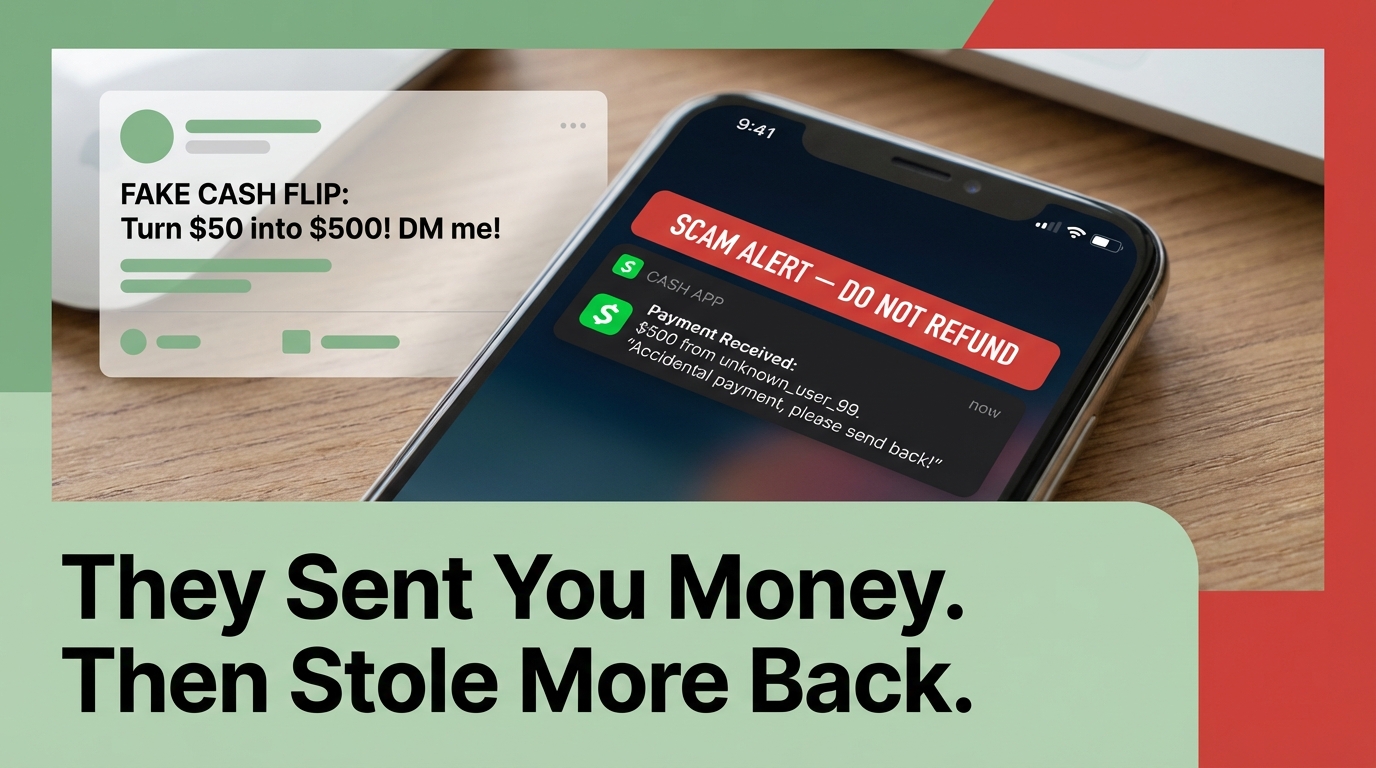
- Accidental payment tricks — A stranger "accidentally" sends money, then asks for it back (using stolen funds)
- Impersonator support — Fake agents ask for your PIN, sign-in code, or remote access
- Phishing links — Fake emails or texts that look like they're from Cash App
- Rental and pet deposit scams — Fake listings that demand upfront payment
If something sounds too good to be true — like free money in exchange for a small payment — it almost certainly is a scam.
Millions of people across the United States have been hit by digital payment fraud. And it's not just older adults — people aged 18 to 59 are more likely to lose money to digital scams like these, according to FTC data.
Cash App's own in-app warning system has helped block over $2 billion in potential peer-to-peer scams since 2020. But the technology can't catch everything. That's where you come in.
This guide breaks down every major scam tactic, the red flags to watch for, and exactly what to do if you've already been targeted.
Common Tactics Used by Digital Fraudsters
Digital fraudsters are surprisingly creative. They don't just ask for your money; they build elaborate stories to make you feel like you're getting a deal, helping someone in need, or winning a prize. We’ve seen these scams spread from the Wire Grass region of Alabama to small townships in Ohio, proving that no one is truly "off the grid" when it comes to P2P crime.
One of the most heartless tactics involves "Puppy Scams." Scammers post adorable photos of purebred dogs for sale at a discount. They’ll request a deposit via Cash App to "hold" the puppy. Once the money is sent, the "seller" vanishes, and there was never a puppy to begin with. Similarly, rental deposit scams involve fake apartment listings. The scammer claims they are out of town but will send the keys once you Cash App them a security deposit. Spoiler alert: they don't own the apartment.
Then there is the infamous "Cash Flipping." A scammer claims they have a "connection" or a "glitch" that allows them to turn $10 into $100 or $1,000. They ask you to send a small amount first to "verify" your account or pay a "clearance fee." As soon as you send that initial payment, they block you. There is no such thing as a "money flip." If someone could turn $10 into $100 instantly, they wouldn't be asking for your $10 on social media!

To protect yourself, you must understand How to spot fake Cash App payments. Scammers often use "template farms" (even finding them on sites like Pinterest!) to create fake screenshots that look like a payment was sent. They might show you a "Completed" transaction screen that is actually just a cleverly edited image.
| Legitimate App Notification | Fake Scammer Screenshot |
|---|---|
| Appears in your Activity tab instantly | Sent as a text or DM image only |
| Balance updates immediately | Balance in screenshot doesn't match your app |
| Official fonts and spacing | Slight misalignments or blurry text |
| No "fee" required to release funds | Claims you must pay a "deposit" to see the money |
The "Accidental Payment" Trap
This is one of the sneakiest entries on our cash app scam alert list. You receive a notification that a stranger has sent you $500. Shortly after, you get a frantic message saying, "Oops! I sent that to the wrong person. Can you please send it back?"
It seems like the honest thing to do, right? Wrong. Usually, the scammer sent that money using a stolen credit card or a hacked account. If you send them $500 of your clean money back, the original $500 they "sent" will eventually be disputed and clawed back by the bank. You end up losing $500 of your own funds, and the scammer walks away with your "refund."
If you receive an accidental payment, do not send a new payment back. Instead, use the official "Refund" feature within the original transaction. If you're unsure, block the sender and let Cash App support handle the dispute.
Fake Giveaways and #CashAppFriday
We all love free money, and Cash App does occasionally run legitimate sweepstakes on their official social media accounts. However, scammers exploit this by creating accounts that look almost identical to the real ones. They use hashtags like #CashAppFriday or #CashAppGiveaway to find victims.
They might message you saying you've won $1,000, but you need to pay a $5 "processing fee" to receive it. Or, they’ll send you a link to "verify" your account. These links are almost always phishing sites designed to steal your login credentials. Always check for the blue verified checkmark on social media and remember: a real giveaway will never ask you to send money to receive a prize.
The Ultimate Cash App Scam Alert: Red Flags to Watch For
The best defense is a good offense—or in this case, a very sharp eye for red flags. Scammers rely on psychological triggers to bypass your common sense. The most common trigger is urgency. They will tell you your account is about to be deleted, or a "limited time" offer is expiring in minutes. If someone is rushing you to make a financial decision, it’s a cash app scam alert in the making.
Another major red flag is any request for your PIN or sign-in code. Cash App employees will never ask for your PIN, your full debit card number, or your sign-in code. If someone asks for these, they are trying to hijack your account.
If you see something suspicious, you should report the scam online to the FTC. Reporting helps authorities track these fraud rings and prevents others from falling into the same trap.
Common Scammer Phrases to Ignore:
- "I just need you to verify your account by sending $10."
- "Download this app (like AnyDesk or TeamViewer) so I can help you."
- "Your account has been flagged for suspicious activity; click here to fix it."
- "I can flip your cash—check my testimonials!"
- "You won the giveaway! Just pay the clearance fee."
Identifying Impersonation and Fake Support
One of the most dangerous scams involves fake customer support. Scammers post fake "support" phone numbers on Google or social media. When you call, they pretend to be a Cash App representative. They might ask you to download remote access software to "fix" a glitch, giving them full control over your phone and your bank accounts.
Always remember: the official Cash App support phone number is (800) 969-1940. If you are calling any other number, you are likely talking to a scammer. The safest way to get help is through the in-app chat. To reach official support, tap your profile icon, select "Support," and navigate to your issue.
How to Verify a cash app scam alert Notification
Scammers are getting better at spoofing emails and texts. They might use a sender name like "Cash App Security," but if you look at the actual email address, it's something like security-update@gmail.com.
Official emails from Cash App will only come from:
- @cash.app
- @square.com
- @squareup.com
If you receive a text or email with a link, don't click it. Instead, open your Cash App manually to see if there are any real notifications. If the app doesn't show an alert, the message you received was fake.
Built-in Security Features to Protect Your Funds
While scammers are persistent, Cash App has invested heavily in security. Their AI-driven monitoring system is constantly analyzing hundreds of risk factors for every single transaction. This system has successfully prevented over $2 billion in scams by flagging suspicious payments before they are finalized.
One of the most powerful tools at your disposal is the ability to unlock Extra security with biometrics. By enabling this, you ensure that even if someone grabs your phone while it's unlocked, they can't send money without your face, fingerprint, or secret PIN.
Enabling the Security Lock and PIN
We cannot stress this enough: Enable your Security Lock. This is your primary firewall against unauthorized transfers.
To enable it:
- Tap the profile icon on your Cash App home screen.
- Select "Privacy & Security."
- Toggle on the "Security Lock" setting.
- You will be prompted to enter your PIN or use FaceID/TouchID.
Once this is on, every single payment request will require your biometric or PIN verification. It adds just two seconds to your transaction but provides a lifetime of peace of mind.
Managing Your Cash Card Safety
If you use the Cash Card (the physical debit card linked to your account), you have additional protections. If you lose your card or notice a weird charge, you can use the Card Lock feature. This instantly disables the card so no new transactions can be processed. You can toggle it back on just as easily if you find your card under the couch cushions.
Cash App also offers "Zero Liability" protection for unauthorized charges, but this only works if you report the fraud promptly. You should also choose Privacy Controls for your account to limit who can find you. By setting your "Incoming Requests" to "Contacts Only," you prevent random scammers from sending you "accidental" payments or annoying "money flip" requests.
Recovery Steps and Frequently Asked Questions
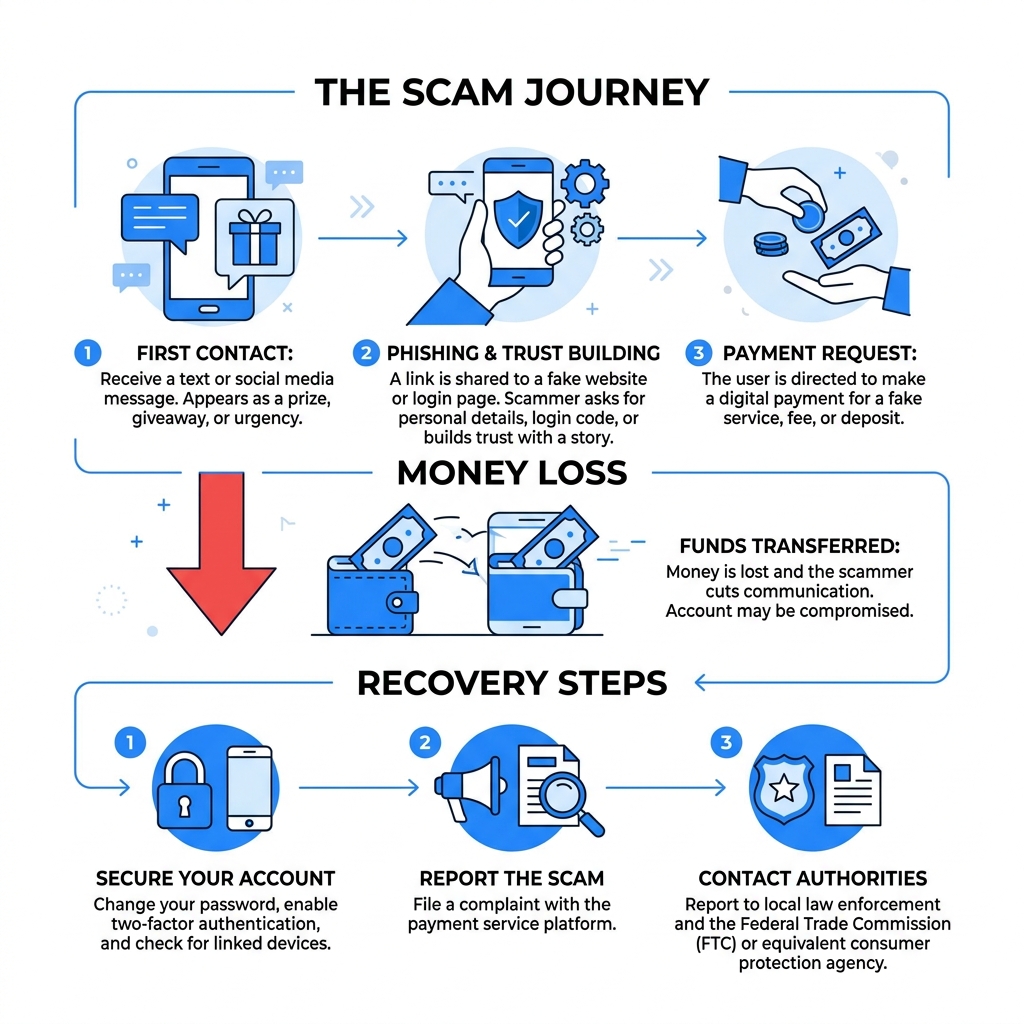
If you’ve realized you’re in the middle of a cash app scam alert situation, don't panic. Speed is your best friend. While P2P payments are generally instant and hard to reverse, taking immediate action can sometimes save your funds or at least protect your identity.
Immediate Steps After a cash app scam alert
If you think you've been scammed, follow these steps immediately:
- Report the Transaction: Inside the app, tap the activity tab, select the suspicious payment, tap "...", and select "Report a Problem."
- Block the User: Go to the scammer's profile, scroll to the bottom, and tap "Block." This prevents them from contacting you or sending further requests.
- Contact Your Bank: If your Cash App is linked to a debit card or bank account, call your bank immediately. Tell them you've been scammed and ask them to block any pending transfers or "stop payment" on the transaction.
- Update Your Security: Change your Cash App PIN and your email password. If you used the same password for other accounts, change those too.
- Document Everything: Take screenshots of the scammer's profile, the messages they sent, and the transaction details. You will need these for police or FBI reports.
If your personal information (like your Social Security Number) was compromised, you should file a complaint online with the FBI via their Internet Crime Complaint Center (IC3). We also recommend you put a freeze on your credit with the three major bureaus (Equifax, Experian, and TransUnion) to prevent identity theft.
Is Cash App safe for everyday use?
Yes, Cash App is generally safe for everyday use, provided you follow basic security hygiene. The app uses industry-standard encryption to protect your data. Furthermore, for users with a Cash Card, balances are FDIC-insured up to $250,000 through partner banks. This means your money is as safe as it would be in a traditional bank account, as long as you aren't the one "authorizing" a payment to a scammer.
Can I get a refund for a scam payment?
This is the hard truth: because Cash App payments are peer-to-peer and instant, they are usually non-cancelable. Once the money hits the other person's account, it is technically theirs. Cash App cannot simply "take" the money back without the other person's consent.
However, if you paid a merchant for a product you never received, you can start a dispute. Cash App will investigate, and if they find the merchant is fraudulent, they may be able to recover the funds. For person-to-person "scams" (like cash flipping), recovery is much more difficult, which is why prevention is so vital.
Conclusion: Staying One Step Ahead of Fraud
The digital world moves fast, and scammers move even faster. A cash app scam alert shouldn't make you afraid to use the app, but it should make you more cautious. By enabling your security lock, verifying recipients, and keeping your PIN private, you are already safer than 90% of users.
At Tempo Mail USA, we believe that privacy is the ultimate security. Many scammers find your information—like your phone number or primary email—through data breaches on other websites. Once they have your "Real" email, they can target you with sophisticated phishing attacks.
Our temporary email aliases act as a secure proxying firewall. By using a Tempo Mail alias when signing up for secondary services or social media, you protect your real PII (Personally Identifiable Information). If a site gets hacked or a scammer tries to track you, they only find a temporary alias, keeping your primary accounts—like Cash App—invisible and safe.
Stay vigilant, stay secure, and never let a scammer rush you into a mistake. For More info about privacy services and how to protect your digital footprint, visit us today.