


How Disposable Email Services Work and Why You Need One
The best disposable email services give you a temporary, no-registration inbox that receives verification codes and signup confirmations in under two seconds, then self-destructs so your real address stays private. Top options like TempoMailUSA combine cryptographic purges, session recovery keys, and automated expiration timers to block spam and credential harvesting. Every time you enter your personal email on an unfamiliar landing page, download a gated PDF, or register for a one-off promotion, you expose your primary identity. The global market for privacy-focused communication services continues to expand by over 12% annually as users seek better control over their digital footprints. Over 30% of security incidents involve compromised or harvested credentials, making primary inboxes prime targets for spam operations and credential stuffing attacks.
Disposable email providers solve this issue by acting as an ephemeral buffer between third-party senders and your real identity. When you open a temporary inbox, the platform provisions a fully functional, random email address bound to a short-lived storage container. Incoming mail routes directly to that container via secure SSL/TLS channels without requiring you to submit passwords, recovery phone numbers, or personal identifying data.
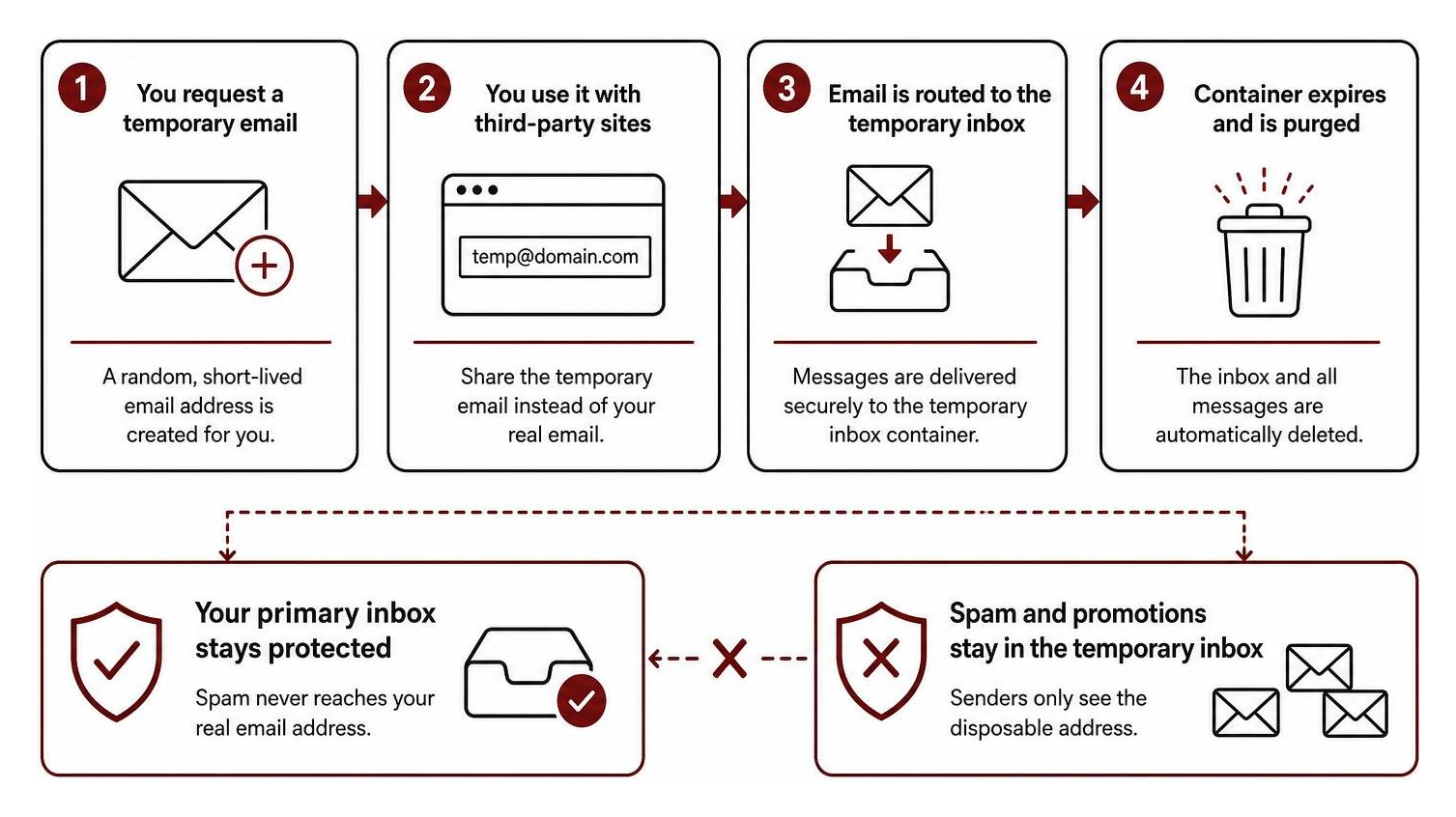
Once an address serves its purpose, the storage container self-destructs. Think of a disposable email address as a digital decoy: it receives the verification link, shields your real inbox, and vanishes before marketing bots can build a behavioral profile around your contact details.
Key Security Features of the Best Disposable Emails
Not all throwaway inboxes offer the same degree of privacy. Modern ephemeral email platforms implement specialized architectural safeguards to ensure that discarded messages cannot be intercepted or retrieved by unauthorized parties.
- Cryptographic Purge Protocols: When a temporary inbox expires, advanced providers run a cryptographic purge. The system encrypts stored messages during transit and rest, and upon expiration, destroys the corresponding decryption keys. Even if raw storage fragments remain on physical drives, the message contents become permanently unrecoverable.
- Zero-Registration Privacy: The safest temporary inboxes do not require personal accounts, passwords, or backup emails. Eliminating accounts prevents user-tracking logs and ensures that no central user database exists to be breached.
- Session Recovery Keys: While standard disposable addresses delete instantly upon closing your browser tab, advanced engines generate a private cryptographic recovery token. This string allows you to reopen the exact same mailbox during active testing sessions without associating your real name or personal credentials with the inbox.
- Automated Expiration Timers: Built-in countdowns prevent inboxes from lingering indefinitely across public web nodes. Users can either let the clock run out or manually trigger an immediate purge the moment their verification code arrives.
Real-World Use Cases for the Best Disposable Emails
Disposable email addresses are practical everyday security tools across many browsing scenarios:
- Newsletter and Ebook Signups: Access content or claim promotional discounts without signing up for endless marketing drip campaigns.
- One-Time Verification Codes: Complete SMS-alternative account activations, forum verifications, or public Wi-Fi registrations without giving away your personal contact details.
- Quality Assurance and Software Testing: Developers and QA engineers need clean email accounts to test multi-user onboarding pipelines, activation flows, and notification formatting. For automated testing pipelines, specialized tools like TempoPlay provide dedicated script capabilities to streamline repetitive email validation routines.
- Evading Tracking Beacons: Bulk marketing emails often contain hidden tracking pixels that log your IP address, general geographic location, and mail client setup. Viewing these messages through an ephemeral web inbox isolates tracking scripts away from your local device.
Key Criteria for Evaluating the Best Disposable Emails
To separate unreliable platforms from secure, high-speed temporary email engines, we evaluate services across five core technical standards:
- Inbox Delivery Latency: When registering for an online service, verification codes often expire within 60 to 120 seconds. The top temporary email engines maintain an average inbox update latency under two seconds, pushing new messages into the browser via WebSockets without requiring manual page refreshes.
- Attachment and Media Support: Many services strip out all file attachments to save bandwidth. Reliable providers let users preview and safely download essential documentation, PDF tickets, or archive files while scanning for known malware signatures.
- Domain Reputation and Diversity: Automated registration forms frequently block known disposable email domains. Premium temporary services rotate fresh domain pools and maintain legitimate MX records to ensure activation emails land smoothly.
- Expiration Control and Custom Lifespans: A rigid 10-minute timer can cut you off during a slow verification process. The best tools let you extend active sessions or trigger immediate deletion on demand.
- Strict Privacy Frameworks: Look for platforms that respect privacy regulations, operate zero-log systems, and enforce full end-to-end SSL encryption on all incoming traffic.
| Feature / Metric | Ephemeral Disposable Inboxes | Traditional Email Aliasing / Forwarding |
|---|---|---|
| Registration Required | No personal details needed | Requires linking to a primary email account |
| Inbox Location | Isolated temporary browser session | Delivered directly into your real inbox |
| Spam Isolation | 100% isolated; vanishes upon expiration | Requires manual filtering or disabling the alias |
| Message Lifespan | Minutes to hours; automated purge | Permanent until manually deleted |
| Identity Protection | High; leaves no connection to your real identity | Moderate; alias provider knows your destination inbox |
| Primary Use Case | One-off codes, public signups, QA testing | Long-term subscriptions and merchant communication |
Limitations, Risks, and Best Practices for Ephemeral Inboxes
While temporary inboxes provide strong privacy protection, they are designed for specific situations and should not replace your permanent email address.

The Limits of Ephemeral Addresses
Because disposable inboxes are built to self-destruct, they create significant risks if used for the wrong types of accounts:
- No Long-Term Account Recovery: If you register for a banking portal, stock brokerage, or primary social media account with a disposable email, resetting a lost password down the road is virtually impossible once that inbox is purged.
- Public vs. Private Access Models: Some basic disposable tools use open inboxes where anyone who types in your alias can read the messages inside. Always verify that your temporary mailbox uses a private session token or unique random hash.
- Send Capabilities: Most disposable services run on receive-only architectures to prevent bad actors from using their domains for outbound spam or phishing campaigns.
Best Practices for Ephemeral Inboxes
To get the most out of temporary email addresses while keeping your accounts secure, follow these core practices:
- Reserve Disposable Emails for Low-Stakes Accounts: Use temporary addresses for forum posts, software demos, public network logins, and one-off downloads.
- Never Re-use Aliases Across Multiple Services: Generate a unique address for each individual signup to prevent cross-platform tracking.
- Trigger Manual Purges Promptly: As soon as you click your activation link or retrieve your verification pin, delete the mailbox rather than waiting for the timer to expire.
- Verify Secure HTTPS Connections: Make sure your browser shows an active SSL/TLS padlock when viewing messages to prevent local network snooping on public Wi-Fi.
Frequently Asked Questions About Temporary Inboxes
How long do temporary email addresses last?
Standard temporary email addresses last anywhere from 10 minutes to several hours, depending on the platform settings. Some platforms feature countdown timers that you can extend in 10- or 60-minute increments if an activation message takes longer than expected to arrive. Once the timer reaches zero, the address unbinds from the routing server and all stored message payloads are deleted.
Can temporary email services receive attachments and send replies?
Most high-grade temporary email engines can receive attachments such as images, PDF documents, and compressed archives, provided the files fall within safe size limits (typically under 10MB to 20MB). However, the vast majority of disposable platforms operate strictly on a receive-only basis. Disabling outbound messaging prevents the provider's IP addresses and domain pools from being flagged by global spam blacklists.
How do disposable inboxes differ from standard email aliasing?
Email aliasing services create forwarding handles (e.g., alias@mask.com) that route incoming messages straight to your real personal inbox. This is helpful for managing ongoing shopping receipts or subscriptions, but it still connects those messages back to your main account. Disposable inboxes, by contrast, are completely self-contained, temporary web mailboxes. They require no link to your real email address, leaving zero trail back to your identity once deleted.
Conclusion
Protecting your personal data online does not require complicated setups or expensive subscriptions. By using throwaway addresses for quick sign-ups, gated content, and testing workflows, you stop unwanted marketing lists, tracking pixels, and data leaks before they reach your real inbox.
At TempoMailUSA, we make inbox privacy effortless. Our platform provides instant, zero-registration temporary email addresses with sub-second message delivery, safe attachment handling, session recovery keys, and automatic cryptographic purges. Whether you need a 10-minute inbox to grab a quick verification code or an ephemeral testing environment for your latest software release, you can protect your inbox with free disposable email in just one click. For developer teams seeking automated testing solutions, explore TempoPlay to streamline your email testing workflows. Clean up your online communications and take back control of your digital privacy today.