

Temp Email Inbox for Privacy and Spam Protection

The Digital Fingerprint You're Giving Away Every Time You Sign Up
A temp email inbox is a short-lived, disposable mailbox that receives emails on your behalf — without exposing your real address. Here's what you need to know fast:
- What it is: A temporary email address that self-destructs after use
- What it does: Receives verification codes, sign-up confirmations, and newsletters so your real inbox doesn't have to
- Who it's for: Anyone signing up for trials, forums, downloads, or any site they don't fully trust
- How to use it: Visit a temp mail service, copy the generated address, paste it into any sign-up form, done
- When NOT to use it: Banking, password recovery, or any account you'll need long-term access to
This looks like a simple "Sign Up" button. But in 2026, it's actually a data handoff.
Every time you enter your email to download a free PDF, start a trial, or join a forum, you're handing that company — and often their advertising partners — a direct line to your identity. Many websites sell user email data to third parties immediately upon registration. Nearly 99% of all apps and services require an email address just to get through the door.
Your email isn't just a communication tool. It's your digital fingerprint. It ties together your accounts, your habits, and your identity across the web.
That's exactly what a temp email inbox is designed to stop.
Think of it as a privacy firewall — a throwaway mailbox that takes the hit so your real inbox doesn't have to. You get the verification code. The site gets a dead-end address. And your personal information stays protected.
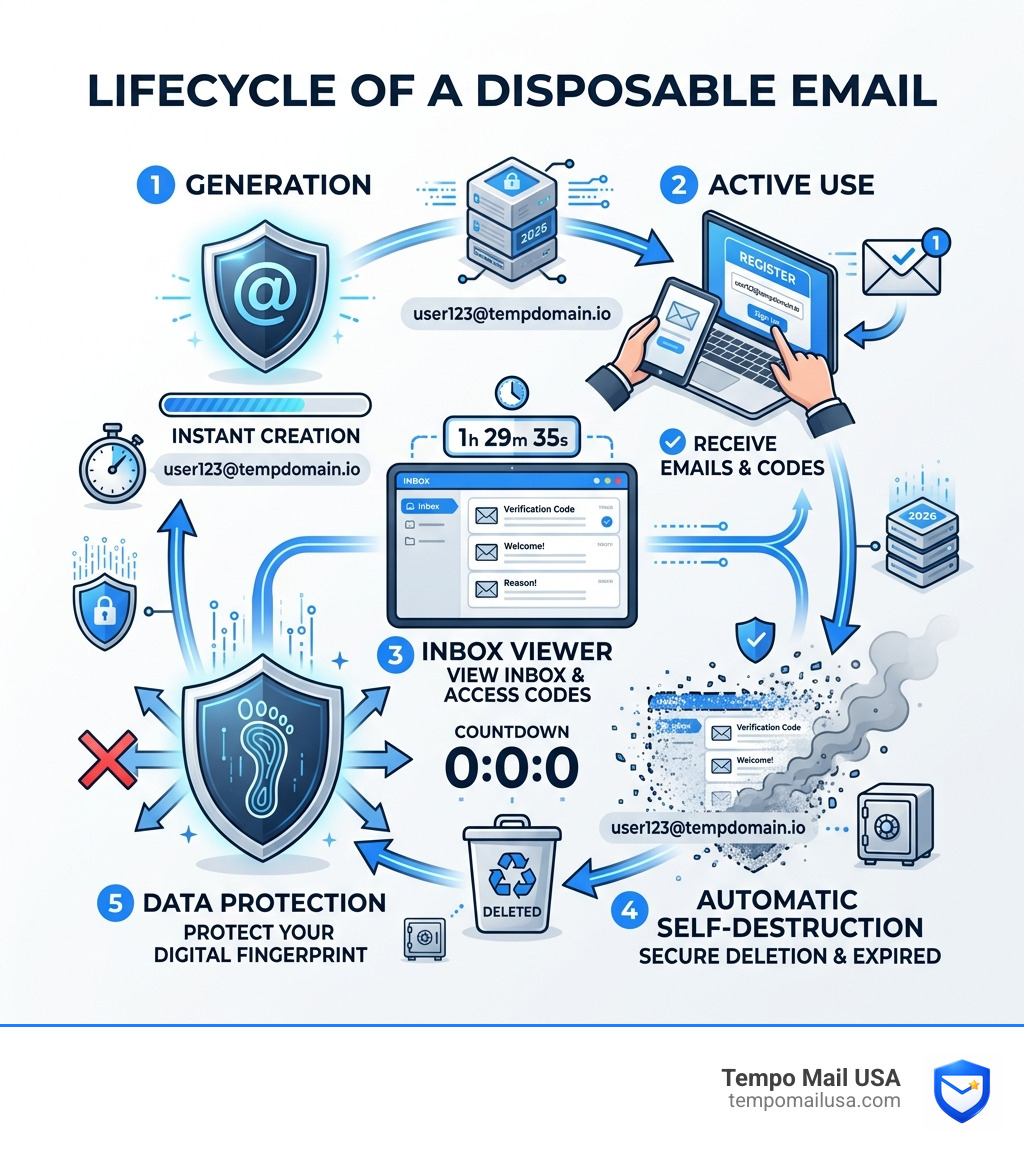
The Anatomy of a Temp Email Inbox: Privacy Firewall or Just a Fake Address?
When we talk about a temp email inbox, we aren't just talking about a "fake" address. We are talking about sophisticated identity proxying. In the cybersecurity world, these are often called DEAs (Disposable Email Addresses). Unlike your Gmail or Outlook account, which is tied to your phone number, your physical location, and your search history, a temporary address has no past and no future.
At Tempo Mail USA, we view this as a vital piece of digital DNA protection. When you use a disposable address, you are effectively putting a mask on your online persona. You can learn to create one today and immediately see the difference in your digital footprint.
Why a temp email inbox is your first line of defense
⚠️ The Mistake Most Users Make: We see it every day—users signing up for a "one-time" coupon or a single article behind a paywall using their primary work or personal email.
This is a massive lapse in cybersecurity hygiene. Once that untrusted site has your real address, they can track you across the web. Even worse, if that site suffers a data breach (and in May 2026, breaches are more common than ever), your PII is out in the wild. A temp email inbox acts as a spam firewall. It catches the marketing "noise" and the potential phishing attempts, keeping them miles away from your actual life. For a deeper dive, check out our complete guide on how temporary email works.
The mechanics of self-destructing data
How does it actually work? It’s simpler and more secure than you might think.
✅ Safe: Most high-quality services use memory-only storage. This means the emails you receive are never even written to a hard drive; they exist only in the server's temporary memory. Once the timer runs out or you close your session, that data is wiped—permanently.
We also use domain rotation to stay ahead of websites that try to block disposable addresses. By constantly refreshing the "labels" on our inboxes, we ensure you can always get through the door. Furthermore, session locking ensures that your temporary inbox is yours and yours alone while you're using it. Our automatic deletion retention policy is designed specifically to ensure that "temporary" actually means temporary.

Why You Need a Disposable Shield in 2026
We recently analyzed the landscape of modern digital threats and the numbers are staggering. AI-driven phishing attacks have surged by 347% since last year. These aren't the clunky "Nigerian Prince" emails of the past; they are highly personalized, convincing messages that use leaked data to trick you.
When your real email is leaked in a data breach, hackers use AI to cross-reference your address with other leaked databases. They build a profile of you: where you shop, what services you use, and even who your friends are. Using a temp email inbox breaks this chain. If a site you signed up for gets hacked, the hackers get a dead address that no longer exists. This is one of the most effective ways temporary emails protect you from data breaches.
Avoiding the "Free Trial" trap
❌ Scam Sign: Be wary of sites that demand a permanent, "non-disposable" email just to use a basic 5-minute tool or download a template.
This is often a precursor to a subscription loop. They want your real email so they can send "renewal" notices or marketing funnels that are notoriously difficult to unsubscribe from. They might even use credit card gates that are hard to navigate if you've lost access to the original email. By using a temporary email address for free, you can test the service without any long-term commitment or risk of "inbox rot."
Protecting your digital footprint from AI scrapers
"We analyzed recent data harvesting trends and found that your email address is now the primary key used by data brokers to link your offline identity to your online behavior."
Data scrapers and brokers are constantly building "shadow profiles." They don't just want your name; they want to know your interests so they can sell that data to advertisers. Every time you use your real email, you’re adding a brick to that wall. Using a disposable email address stops these scrapers in their tracks. It provides a "noisy" data point that is useless for long-term tracking.
How to Use a Temp Email Inbox for Maximum Security
Using a temp email inbox should be as easy as breathing. At Tempo Mail USA, we’ve boiled it down to a three-step process that anyone can follow.
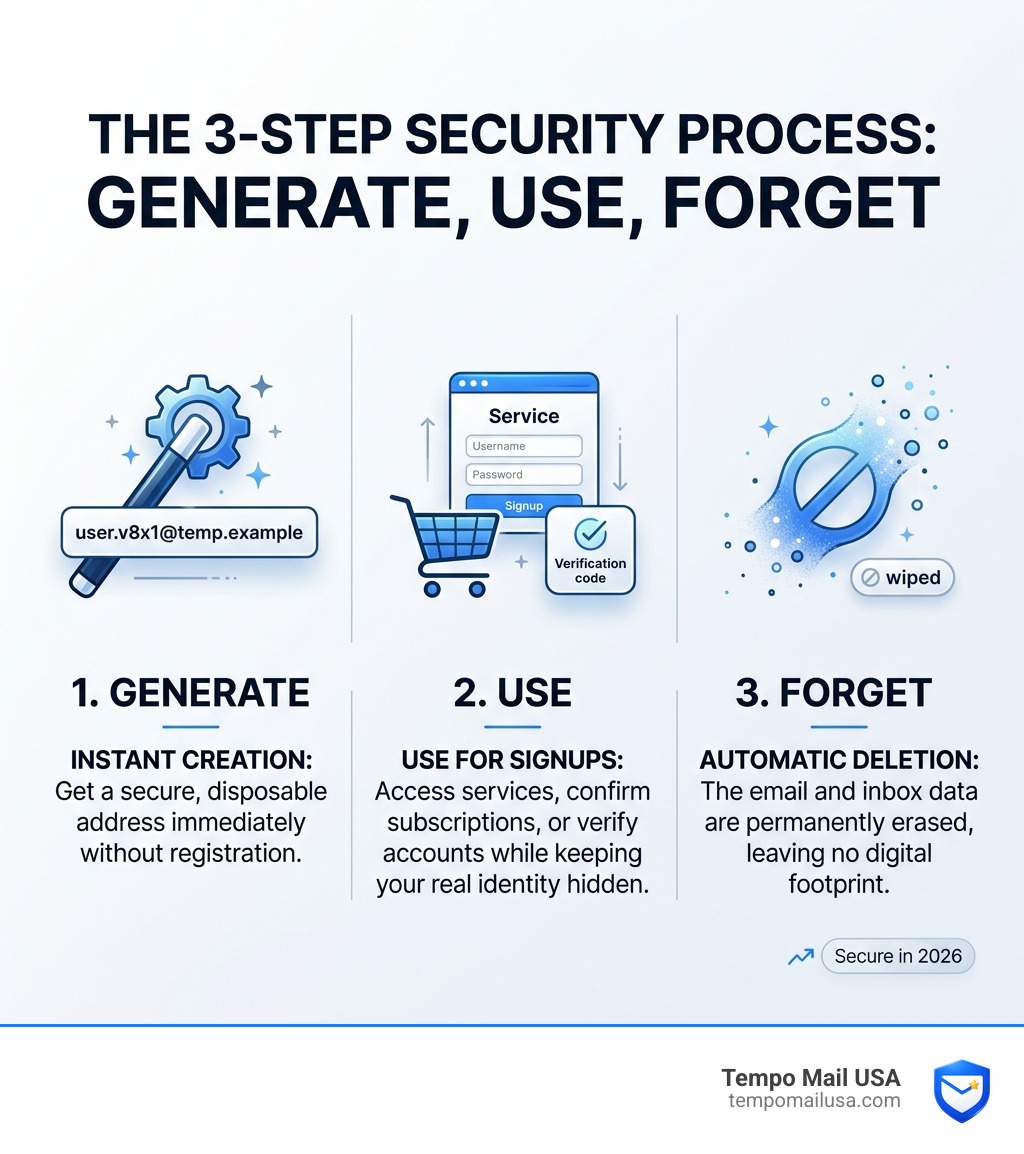
Setting up your first temp email inbox
"In recent cases, users who switched to disposable mail for all non-essential sign-ups saw an 80% drop in spam within the first 30 days."
Setting up is instant. You don't need to provide your name, your phone number, or even a backup email. You just visit the site, and your temp mail disposable email is ready and waiting. It’s browser-based, meaning there’s nothing to install and no digital trail left on your device once you clear your cache.
Bypassing verification walls with a temp email inbox
We've all been there: you just want to read one forum post or download one PDF, but the site demands an "email verification."
- Generate: Open your temp email inbox.
- Paste: Use that address on the registration form.
- Verify: Watch the email arrive in real-time in your temporary dashboard.
- Complete: Click the link or copy the disposable email verification code and get what you came for.
- Abandon: Close the tab and let the inbox vanish.
This is also an incredible tool for developers. If you're doing QA testing for an app's signup flow, you can generate hundreds of unique addresses without cluttering your real systems.
The Hidden Risks: When NOT to Use Disposable Mail
As experts in the field, we have to be honest: a temp email inbox is a specialized tool, not a total replacement for your primary email. Knowing when not to use it is just as important as knowing when to use it.
| Feature | Temp Email Inbox | Permanent Personal Email |
|---|---|---|
| Lifespan | Minutes to Hours | Years/Lifetime |
| Privacy | Maximum (Anonymous) | Low (Linked to PII) |
| Security | High (No Breach Risk) | Medium (Breach Risk) |
| Password Recovery | ❌ Impossible | ✅ Easy |
| Banking/Finance | ❌ Never | ✅ Recommended |
| Spam Protection | ✅ Perfect | ❌ Requires Filters |
The danger of "locked out" accounts
⚠️ Warning: Never use a temp email for accounts you need to access next month, let alone next year.
If you sign up for a major social media account or a professional tool using a disposable address, you are courting disaster. What happens if you forget your password? The recovery link will be sent to an email address that no longer exists. You will be permanently locked out of your account with no way to prove your identity. For important services, always check our guide to top temporary email providers to understand the retention policies of different services.
Why banking and temp mail don't mix
Financial privacy is important, but temporary mail is the wrong tool for it. Banks and government agencies require PII (Personally Identifiable Information) and permanent records for regulatory compliance. If you use a temp address for a bank account, you won't receive critical security alerts, tax documents, or fraud warnings. More importantly, most financial institutions have "blacklists" of known temporary domains to prevent fraud. Stick to your primary, secured email for anything involving your money or your legal identity.
Frequently Asked Questions about Disposable Mail
Is using a temporary email legal?
Yes, absolutely. Using a temp email inbox is a perfectly legal privacy practice. It is your right to choose what personal data you share with private companies. Just as you might choose not to give your phone number to a stranger, you can choose not to give your "digital fingerprint" to a random website. As long as you aren't using the service for fraud, harassment, or illegal activities, it is a standard tool for digital self-defense.
How long does a temporary email address last?
Lifespans vary depending on the provider and your activity. On Tempo Mail USA, our addresses are designed for immediate, "in-the-moment" use. Typically, the inbox remains active as long as your browser session is open. Once you close the tab or the automatic timer triggers (usually after a period of inactivity), the address and all its contents are purged. This ensures that no data footprint is left behind for hackers to find later.
Can I receive attachments in a temporary inbox?
While some services allow attachments, many secure providers (including us) often block them. Why? Because attachments are the primary way viruses and malware are delivered. By blocking attachments, we act as a proactive firewall, ensuring that a "quick verification" doesn't turn into a system-wide infection for your computer. If you just need a text-based code or a link, a temp email inbox is perfect.
Conclusion: Reclaiming Your Digital Sovereignty
In an era where your data is the most valuable commodity on the market, protecting your primary inbox is no longer optional—it is a necessity. By using a service like Tempo Mail USA, you create a vital buffer between your real identity and the relentless data harvesting of the modern web.
We process thousands of messages every minute, providing a secure "identity proxy" for users all over the world. Whether you're testing an app, dodging a marketing funnel, or simply exploring the web without being tracked, a temp email inbox is your most powerful ally.
Stop giving away your digital DNA to every site that asks for it. Use a temporary proxy, keep your PII secure, and reclaim control over your personal information today at https://tempomailusa.com. Your real inbox will thank you.
Need a disposable temporary email?
Protect your real inbox from spam and promotional clutter instantly and free.
Received a suspicious email, text, or charge alert?
Verify whether the sender domain is disposable, spoofed, or unverified before clicking links.