


Your Primary Email Is Too Valuable to Share With Everyone
A gmail alias generator free tool lets you create unlimited alternative versions of your Gmail address - no new accounts, no paid services, no setup headaches.
Here's how to get started in seconds:
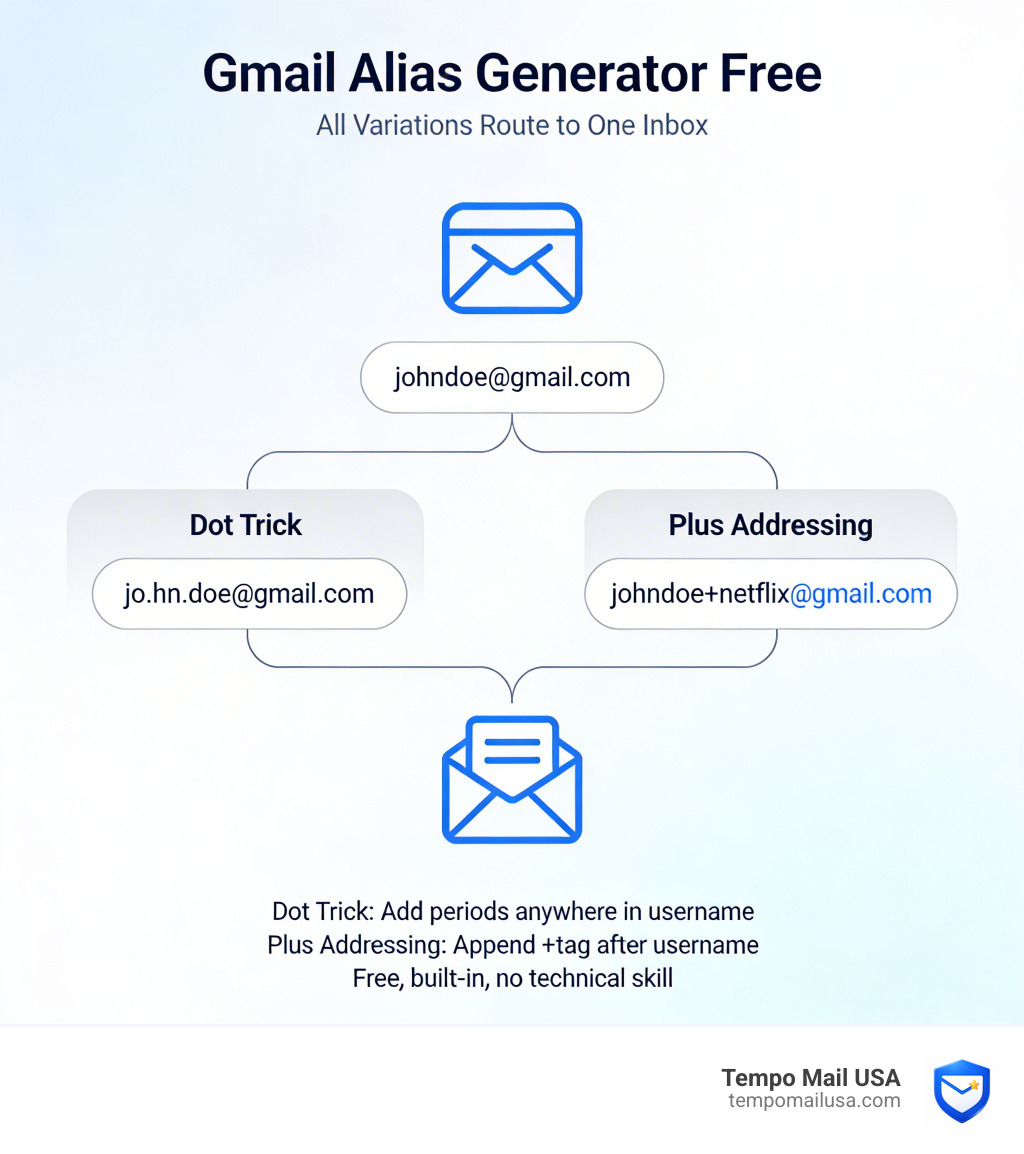
- Dot trick - Add periods anywhere in your username:
jo.hn.doe@gmail.comdelivers tojohndoe@gmail.com - Plus addressing - Append a tag after your username:
johndoe+netflix@gmail.comgoes straight to your inbox - Free generator tools - Paste your Gmail into a browser-based tool and instantly get dozens of ready-to-use variations
All of these methods are free, built into Gmail, and require zero technical skill.
Every time you hand over your real email address, you're taking a risk. That newsletter signup, that free trial, that online store checkout - each one is a potential source of spam, data breaches, or unwanted tracking.
The frustrating part? You don't need to pay for privacy.
Gmail has two built-in tricks - the dot trick and plus addressing - that let you create as many alias addresses as you want. Every variation lands in your real inbox, but websites see a different address. If spam starts arriving at johndoe+groupon@gmail.com, you know exactly who sold your data.
Free browser-based tools make generating these aliases even faster, producing hundreds of variations in one click - all processed locally, so your email address never touches a server.
Understanding the Gmail Alias Generator Free Method
At its core, a Gmail alias is an alternative email address that acts as a proxy for your primary account. Think of it like a specialized "PO Box" that forwards everything to your front door. You don't need to sign up for a new Google account or manage multiple passwords. Instead, you use specific formatting tricks that Google’s servers are programmed to recognize and redirect.
The magic happens through two primary methods: the Dot Trick and Plus Addressing (also known as subaddressing).
When you use a gmail alias generator free tool, it utilizes lightweight JavaScript to instantly shuffle these characters around your username. Because these tools operate locally in your browser, they are incredibly safe; your email data isn't being stored on a third-party server. It’s just a clever way to visualize all the possible variations your single inbox can accept.
To see these concepts in action, check out this 1-min video tutorial on how Gmail aliases work.
Dot Trick vs. Plus Addressing: A Quick Comparison
| Feature | Dot Trick (.) | Plus Addressing (+) |
|---|---|---|
| How it works | Inserts periods in the username | Appends a word/number after a + |
| Example | j.ohn.doe@gmail.com | johndoe+newsletter@gmail.com |
| Best Use Case | Unique logins for picky sites | Tracking specific sources/spam |
| Organization | Harder to filter manually | Extremely easy to filter |
| Limit | Finite (based on name length) | Virtually infinite |
How the Gmail Dot Trick Enables Alias Generation
The "Dot Trick" relies on a unique quirk of Google’s architecture: Gmail ignores periods in your username. To Google, superhero@gmail.com is exactly the same as s.u.p.e.r.h.e.r.o@gmail.com.
This is a powerful tool for identity masking. If a website doesn't allow special characters like the plus sign, the dot trick is your best friend. You can create a "unique" email for every service you use just by moving the period one space to the right.
This feature isn't just for personal @gmail.com accounts; it also works for @googlemail.com and Google Workspace accounts used by businesses. If you are an administrator for a company, you can even learn more about adding email aliases for users to help your team manage different roles like "billing" or "sales" without paying for extra seats.
Using Plus Addressing for Instant Subaddresses
While the dot trick is subtle, Plus Addressing is the "power user" choice. By adding a plus sign (+) and any string of text after your username, you create a dynamic alias on the fly.
For example, if you're signing up for a gym membership, use yourname+gym@gmail.com. If you're entering a contest, use yourname+contest@gmail.com. This "tagging" allows you to see exactly where an email came from the moment it hits your inbox.
This is also a vital security step. If you start receiving phishing emails addressed to your "contest" alias, you know that specific site had a data leak or sold your info. Before you reuse a password or trust a site, it's a good idea to check if your email has been leaked in previous breaches to see just how much of your data is already out there.
Advanced Inbox Organization with Gmail Filters
Generating the alias is only half the battle. To truly master your inbox, you need to tell Gmail what to do with the mail arriving at those addresses. This is where filters come in.
By setting up automated rules, you can ensure that emails sent to yourname+newsletters@gmail.com never clutter your primary view. You can tell Gmail to automatically apply a label, skip the inbox (archive it), or even forward it to someone else. For those running small businesses or teams, you might even want to learn how to delegate a user's email address so multiple people can manage the replies coming into a specific alias.
Identifying Data Leaks with Unique Aliases
We've all wondered: "How did this random company get my email?" With a gmail alias generator free strategy, you no longer have to guess.
When you use a unique alias for every single service, you create a digital trail. If you receive a "Your account is locked" scam email sent to yourname+amazon@gmail.com, but the email clearly isn't from Amazon, you have proof of a third-party data share or a breach at a specific source. This level of transparency is one of the biggest reasons why you should use temporary email for safe signups when dealing with sites you don't fully trust.
Setting Up Filters for Specific Alias Tags
Ready to clean up the mess? Follow these steps to filter your aliases:
- Click the Show search options icon in the Gmail search bar.
- In the To field, type your specific alias (e.g.,
johndoe+shopping@gmail.com). - Click Create filter.
- Choose what you want to happen. We recommend selecting Apply the label and Skip the Inbox for newsletters.
This keeps your primary workspace clear for important messages while categorizing everything else. Understanding what are the benefits of using temporary email variations like these can save you hours of manual sorting every week.
Privacy Benefits and Limitations of Gmail Subaddressing
While a gmail alias generator free tool is a fantastic first line of defense, it isn't a magic invisibility cloak. It’s important to understand the boundaries of what these tricks can and cannot do.
The primary benefit is compartmentalization. By separating your digital life into "buckets" (shopping, social, work, finance), you prevent a breach in one area from easily compromising your entire identity. However, your real email address is still "under the hood."
If you want to communicate back and forth, you'll need to know how to send emails from a different address or alias. Without this setup, replying to an email sent to your alias will reveal your primary address to the recipient, which might defeat the purpose of using an alias in the first place.
Why Some Websites Block Plus Aliases
You might occasionally run into a "Please enter a valid email address" error when trying to use a plus alias. This usually happens for two reasons:
- Poor Regex Validation: Some websites use outdated code that doesn't recognize the
+symbol as a valid email character. - Intentional Normalization: Savvy marketers know about the plus trick. Some systems are designed to "strip" everything between the
+and the@symbol to find your "real" email address.
In these cases, the Dot Trick is often a successful workaround because periods are almost universally accepted.
Manual Gmail Alias Generator Free Techniques for Sending Mail
If you need to send an email from an alias (like info@yourcompany.com or yourname+support@gmail.com), you have to manually configure it in your Gmail settings.
- Go to Settings > See all settings > Accounts and Import.
- Look for Send mail as and click Add another email address.
- Enter your alias. Keep "Treat as an alias" checked if you want replies to come to your main inbox.
- Verify the address if prompted.
This allows you to maintain a professional or private front while keeping your workflow centralized. This is especially useful for redirecting incoming messages from old accounts or specific project aliases to your current active inbox.
Frequently Asked Questions about Gmail Aliases
Is it safe and legal to use a Gmail alias generator?
Yes! These aren't "hacks" or illegal workarounds. They are official features of the Gmail platform. Using a gmail alias generator free tool is simply a way to automate a manual process. Since the best tools run entirely in your browser (client-side), they never see your password or access your private data. They are just text generators that follow Google’s own rules.
Can I send emails from a generated Gmail alias?
By default, Gmail aliases are "receive-only." If you simply type yourname+tag@gmail.com into a signup form, you will receive mail there, but any reply you send will come from yourname@gmail.com. To send from the alias, you must follow the "Send mail as" setup mentioned in the previous section.
Does the dot trick work on Outlook or Yahoo?
Generally, no. The dot trick is a proprietary feature of Gmail. Most other providers, like Outlook and Yahoo, treat john.doe@email.com and johndoe@email.com as two completely different, unrelated accounts. However, many modern providers (including Outlook.com and iCloud) do support plus addressing.
Conclusion
Managing your digital footprint shouldn't be a full-time job, and it certainly shouldn't cost you a monthly subscription. By leveraging a gmail alias generator free approach, you can take back control of your inbox, identify who is selling your data, and keep your primary identity shielded from the chaos of the internet.
At Tempo Mail USA, we believe your personal data belongs to you. We operate in the privacy tech industry to provide secure email alias generation that acts as a robust firewall between services and your personal PII (Personally Identifiable Information). Whether you're using native Gmail tricks or our advanced proxy tools, the goal is the same: protecting your peace of mind.
Ready to stop the spam before it starts? Start protecting your primary inbox today and see how easy a clean, private inbox can be.