


Why Temp Mail with Password Protection Matters for Your Online Privacy
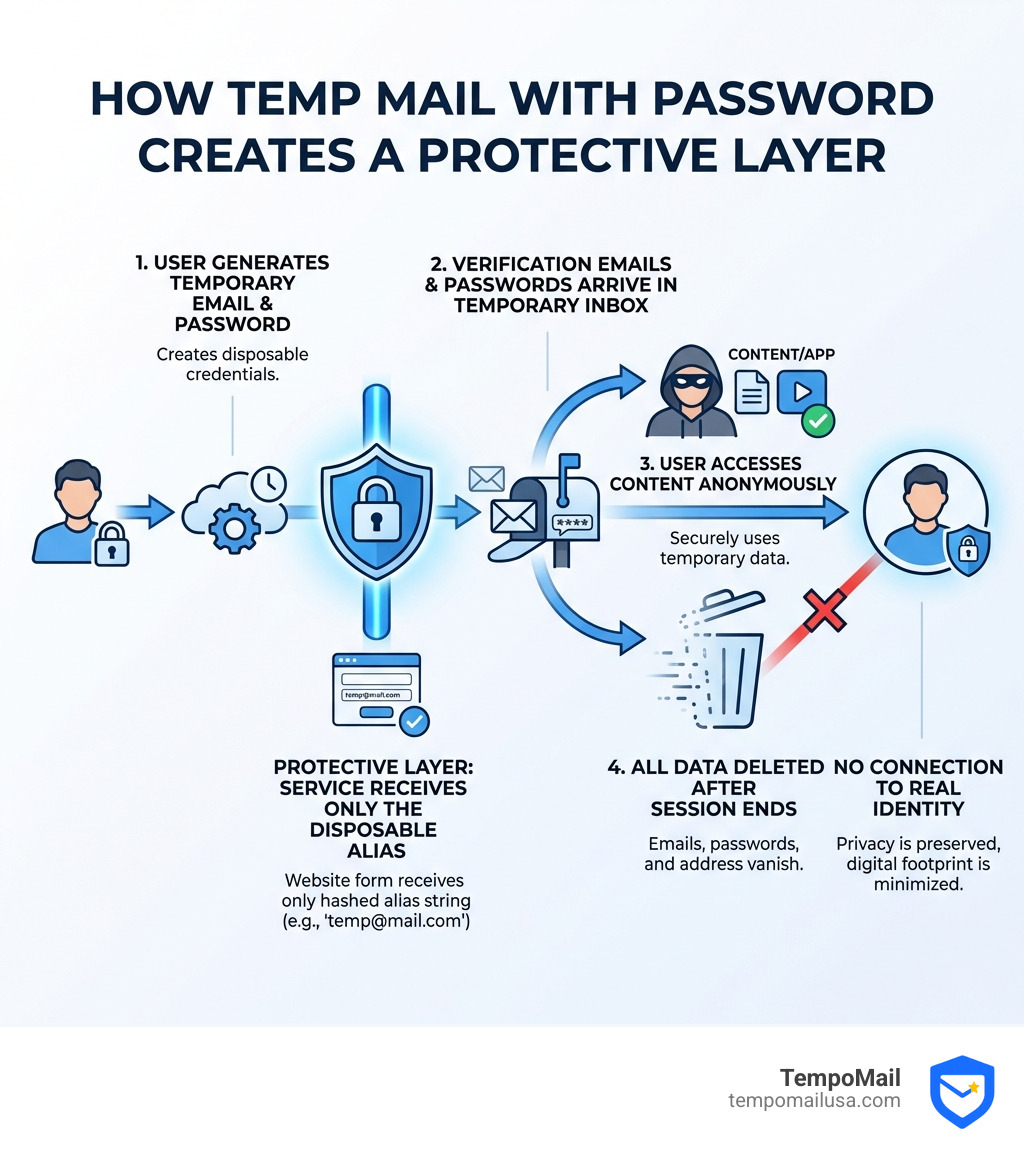
Temp mail with password services solve a critical problem: they let you sign up for accounts that require both email verification and password creation without exposing your real identity. Here's how they work:
Quick Answer: Using Temp Mail with Password
- Generate a temporary email address with password support from a service like TempoMail
- Use it to register on websites, forums, or apps that need both email and password
- Receive verification emails and passwords in the temporary inbox
- Access password-protected content without linking it to your personal identity
- Delete everything when you're done-emails, passwords, and the address itself disappear
Every time you hand over your real email address to sign up for something online, you're creating a permanent link between your identity and that service. According to the research, 81% of hacks exploit weak passwords-and when services store your email alongside those credentials, data breaches can expose your entire digital footprint.
Standard temporary email services let you receive verification codes, but they fall short when a service requires you to create an account with a password. That's where password-enabled temporary email becomes essential. These services act as what security experts call an "identity proxy"-a firewall between your real information and the endless parade of websites, apps, and services demanding your data.
The benefits are immediate: no spam flooding your inbox, no marketing trackers following you across the web, and no risk that your personal email gets sold to advertisers or compromised in the next database leak. Whether you're a developer testing registration flows, someone bypassing a paywall for a single article, or just tired of creating throwaway accounts, password-enabled temporary email addresses give you the privacy you deserve.
I'm Mohammad Waseem, and I've built and managed temporary email platforms and online tools for years, testing everything from session persistence to encryption methods. My experience with temp mail with password systems has shown me exactly which features matter for security and which are just marketing fluff.
Understanding Temp Mail with Password Support
To truly appreciate the power of a temp mail with password service, we need to look at how it differs from the "standard" 10-minute mail you might find on the corner of the internet. Most disposable email services are "read-only" and vanish the moment you refresh your browser. This is fine for a quick discount code, but it's a nightmare if you're trying to set up a testing account or a social media profile that requires a login.
At TempoMail, we provide an identity proxying service that goes several steps further. We don't just give you a random string of characters; we provide a robust environment where the email address and the password you generate for the target site work in tandem.
| Feature | Standard Disposable Mail | TempoMail (Password-Enabled) |
|---|---|---|
| Lifespan | Usually 10 minutes | Session-based / Extended |
| Session Persistence | Lost on refresh | LocalStorage persistence |
| Password Support | None | Integrated generation/management |
| Security | Plain text storage | Zero-Knowledge / Client-side encryption |
| Social Media | Often blacklisted | Premium domains (rarely blacklisted) |
| Attachments | Allowed (risk of malware) | Blocked (pure text/HTML focus) |
One of our key innovations is session persistence via LocalStorage. This means if you accidentally refresh the page while waiting for that "Welcome" email, your inbox doesn't disappear into the void. Furthermore, we implement a Master Passphrase system similar to high-end password managers. This passphrase is never stored on our servers; it’s used locally in your browser to generate unique, complex passwords for the sites you visit.
Why You Need a Temp Mail with Password for Modern Sign-ups
The internet has become a bit of a "gated community." Whether it's a forum, a niche social media platform, or a software-as-a-service (SaaS) trial, almost everything requires you to create a full account.

When you use your real email, you aren't just signing up for a service; you're handing over a "passport" that can be used to track your behavior across different platforms. Worse yet, since 81% of hacks exploit weak passwords, using the same password (or even the same email) across multiple sites puts your entire digital life at risk.
By using temp mail with password support, you break the link between your real identity and these third-party services.
- Bypassing Paywalls: Access "member-only" content without committing to a lifetime of marketing emails.
- Social Media Verification: Platforms like Facebook, Instagram, and TikTok often require an email and a password. Our premium domains are rarely blacklisted, making them perfect for these verifications.
- Avoiding Marketing Trackers: Once you're done with a service, you delete the temp mail. The trackers have nowhere to send their "We miss you" emails because the address no longer exists.
Benefits of a Temp Mail with Password for Developers
If you're a developer, you know the struggle of testing registration and login flows. Creating 50 different Gmail accounts just to test a "Forgot Password" feature is a waste of time.
Using a temp mail with password tool allows you to:
- Automate Testing: Use our API-friendly interface to generate dummy accounts for load testing or UI testing.
- Verify Registration Flows: Instantly receive One-Time Passwords (OTPs) and activation links.
- Test Security Features: Since we use browser-side encryption (like AES-JS), you can test how your application handles encrypted inputs and secure registration flows without risking real user data.
- No-Log Environment: We focus on ephemeral storage. Once you close the session, the test data is wiped from the RAM, keeping your testing environment clean.
How to Use a Temp Mail with Password Securely
Using our service is designed to be intuitive, but there are a few "pro tips" to ensure you're getting the most out of your privacy firewall.
First, steer to our generator. You'll notice that you can often choose from different custom domains. This is vital because some websites block generic "temp-mail.com" addresses. By using our premium domains, your registration looks like it's coming from a standard, professional email provider.
Once you have your address, keep the tab open. Our Smart Inbox Preview allows you to monitor incoming mail in real-time. When the OTP or verification link arrives, it will appear instantly (usually in less than 3 seconds).
Setting Up Your First Temp Mail with Password
When a website asks you to "Create a Password," don't reuse your dog's name or your birthday. Our integrated password manager helps you generate a unique alias.
- Complexity Matters: The passwords generated through our system always include at least one number, one uppercase character, and one symbol.
- The Master Passphrase: You can enter a Master Passphrase that stays in your browser's memory. This allows you to "re-generate" the password for that specific site if you need to log in again during the same session, without us ever knowing what that password is.
- Ephemeral Storage: We store emails in volatile memory (RAM). This means the moment you click "Delete" or close your browser session, the data is physically gone. It's the digital equivalent of burning a letter after reading it.
Security Implications and Best Practices
While temp mail with password services are incredible for privacy, they aren't magic. You need to understand the architecture to use them safely.
We use a Zero-Knowledge Architecture. This means we use client-side encryption—specifically AES-JS—to ensure that the content of your emails is only readable by you. Even if a government agency or a hacker gained access to our servers, all they would see is encrypted gibberish.
Best Practices for Maximum Anonymity:
- No Attachments: We made a conscious decision to block all attachments. Why? Because attachments are the #1 way malware is spread. We focus purely on text and HTML rendering to keep you safe.
- TLS 1.3: Always ensure you see the padlock icon in your browser. We use the latest TLS 1.3 encryption for all data transmission between your browser and our servers.
- IP Restriction: For added security, some of our tools allow you to restrict password viewing to your current IP address, preventing anyone else from intercepting the secure URL.
- Data Breach Isolation: By using a unique temp mail for every site, you ensure that a breach at "Website A" doesn't give hackers the credentials to try and log into "Website B."
Frequently Asked Questions about Temporary Emails
Can I use temporary emails for social media account verification?
Yes! This is one of the most popular use cases for a temp mail with password. Platforms like Discord, Facebook, and Instagram are very sensitive to "spammy" email domains. Because we use premium domains that are regularly updated and rarely blacklisted, our addresses are usually accepted as "real" emails. You can receive the verification link, set your password, and have your account ready in seconds.
Is it safe to use a temporary email for banking or government services?
No. We strongly advise against using any temporary email service for critical accounts. Banking, government portals, and primary health services require permanent access. If you lose access to your temporary session, you may never be able to recover those accounts. Use TempoMail for the "noise"—the forums, the trials, and the social apps—but keep your primary, secure email for the "essentials."
How long does a temporary email address and its password last?
Unlike "10-minute mail" which has a ticking clock, our temp mail with password sessions last as long as your browser session is active. Thanks to our LocalStorage implementation, you can refresh the page or even restart your browser (in some cases) and keep the same address. However, for your security, once you manually click "Delete" or the session naturally expires after a period of inactivity, the data is wiped from our volatile memory and cannot be recovered.
Conclusion
In an era where your personal data is the most valuable currency, protecting your "online passport" is essential. Temp mail with password support isn't just a convenience; it's a necessary layer of defense in a world of constant data breaches and invasive marketing.
By using TempoMail USA, you're choosing an identity proxying service that puts your PII (Personally Identifiable Information) behind a secure firewall. You get the benefit of premium domains, zero-knowledge encryption, and a spam-free life, all while maintaining the ability to interact with the password-protected parts of the web.
Ready to take control of your digital footprint? Secure your sign-ups with a custom temp mail domain and experience the internet without the strings attached.