
How to Stop Spam Emails, Even if You've Never Tried it Before

Why Spam Emails Are More Than Just Annoying
How to stop spam emails is one of the most common questions people ask about email security, and for good reason. Here's the quick answer:
Quick Steps to Stop Spam Emails:
- Use your email's built-in filter - Mark spam messages so your inbox learns to block them automatically.
- Block unwanted senders - Use the "Block Sender" feature in Gmail, Outlook, or your email client.
- Never reply or click links - Engaging with spam confirms your address is active.
- Report spam - Forward unwanted messages to your email provider and report fraud to the FTC.
- Protect your email address - Be selective about where you share it online.
- Use disposable email addresses - Create temporary addresses for sign-ups and forms.
Spam emails are the digital version of junk mail. They are unsolicited messages that flood your inbox, and they are becoming a bigger problem every day. While marketing spam might just clutter your inbox, malicious spam can compromise your security, steal your identity, and install malware on your devices.
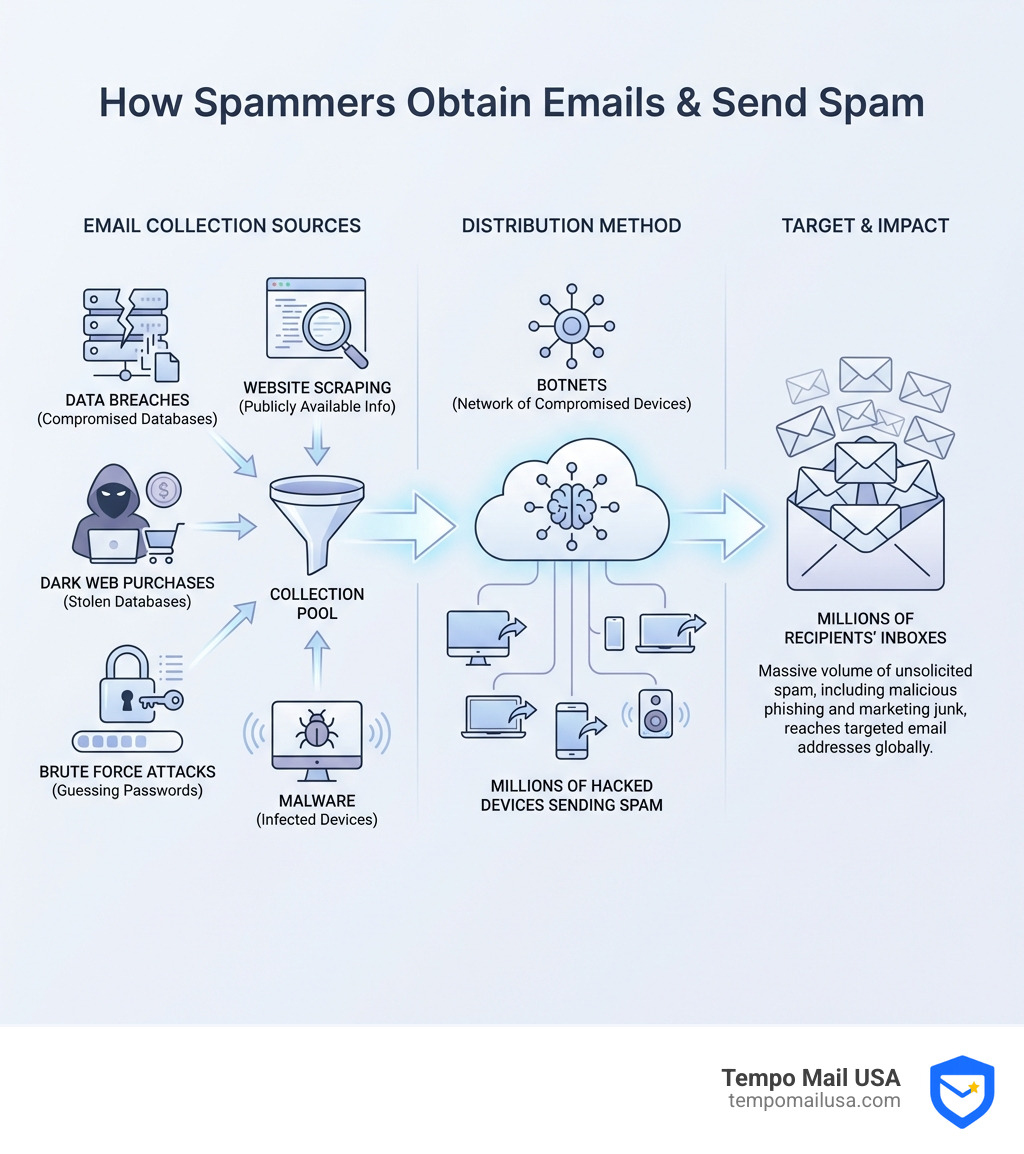
The scale of the problem is massive. Most spam comes from botnets: networks of hacked computers, phones, and even smart home devices that spammers control remotely. Sending millions of unsolicited messages is a low-risk, high-reward scheme for bad actors. Even if only a tiny fraction of people respond, the payoff can be huge.
What really matters is this: spam is not just annoying, it is dangerous. Phishing remains one of the most common tactics used by cybercriminals in data breaches. One wrong click can expose your bank account, social security number, or other personal information.
The good news is that you do not need to be a tech expert to take back control of your inbox. This guide will show you exactly how to stop spam emails, protect your personal information, and keep your email secure, even if you have never tried any of these techniques before.
Why You Get So Much Spam (And How to Spot It)
We all know the feeling: you wake up, check your email, and your inbox is flooded with messages about miracle cures, questionable investment opportunities, or urgent requests from "princes" in far-off lands. This is spam, and it's more than just a nuisance; it's a gateway to serious security risks.
While some spam is merely unwanted marketing, the truly problematic kind often involves phishing. Phishing is a type of cyberattack where criminals try to trick you into revealing sensitive information (like passwords, credit card numbers, or social security details) by disguising themselves as a trustworthy entity. They might pretend to be your bank, a government agency, or a well-known online service.
The risks associated with clicking links or opening attachments in these spam and phishing emails are significant:
- Malware Infection: Opening an attachment or clicking a link can download malicious software (malware) onto your device. This can include viruses, spyware that tracks your activity, or ransomware that locks your files until you pay a fee. Our devices, from computers to smart cameras, can unknowingly become part of a "botnet" that sends millions of spam messages, causing slowdowns and even legal trouble if attacks are traced back to us.
- Identity Theft: Phishing emails are designed to steal your Personally Identifiable Information (PII). Once they have this, criminals can open new accounts in your name, make fraudulent purchases, or even file fake tax returns.
- Financial Loss: Scams often trick us into sending money directly, providing banking details, or authorizing fraudulent transactions. Business Email Compromise (BEC) attacks, for instance, can result in millions of dollars lost in a single scam.
- Account Compromise: By tricking you into entering your login credentials on a fake website, spammers gain access to your email, social media, or other online accounts. This can lead to further spam being sent from your account or even more extensive identity theft.
So, why do we receive so much spam? It's a low-risk, high-reward scheme for bad actors. They cast a wide net, and even a small success rate is profitable. Spammers are constantly finding new ways to get our email addresses:
- Data Breaches: When a website or service you've used suffers a data breach, your email address (along with other personal data) can be exposed and sold on the dark web. This is a common way for our addresses to end up on spam lists.
- Website Scraping: Spammers use automated bots to scour the internet, looking for email addresses posted publicly on websites, forums, or social media. If you've ever listed your email online in plain text, it's likely been harvested.
- Buying Lists: There's a black market for email lists. Once an email address is compromised or collected, it can be sold and resold to various spammers.
- Brute Force Attacks: Spammers use software to generate common email address combinations (e.g.,
john.doe@example.com,johndoe123@example.com) and then test them to see which ones are valid. - Malware: If your device is infected with certain types of malware, it can steal your contacts list, providing spammers with even more addresses.
Common Spam and Phishing Tactics
Spammers and phishers are clever, often leveraging social engineering tactics to exploit our trust and urgency. Here's what to look out for:
- Sense of Urgency or Threat: Emails that demand immediate action, threaten account suspension, or warn of dire consequences if you don't respond right away are huge red flags. For example, "Your account will be closed in 24 hours!" or "Urgent: Verify Your Payment Information!"
- Unprofessional Language or Graphics: While some phishing emails are sophisticated, many contain grammatical errors, typos, awkward phrasing, or low-resolution logos. Legitimate organizations typically maintain high standards for their communications.
- Suspicious Links: Hover over any link before clicking it (without actually clicking!). If the URL displayed doesn't match the company it claims to be from, or if it looks like a string of random characters, it's likely malicious. Even unsubscribe links in spam can be traps, confirming your email is active or leading to dangerous sites.
- Unsolicited Attachments: Never open an attachment from an unknown or suspicious sender, especially if it's unexpected. These are common vectors for malware.
Here are some common scam themes we often see in our inboxes:
- Fake Invoices: You receive an email with an attached "invoice" for a product or service you didn't order, often with a large sum and a sense of urgency to pay. The goal is to trick you into opening the attachment (which contains malware) or clicking a fraudulent payment link.
- Lottery or Prize Wins: Emails claiming you've won a massive lottery or prize that you never entered. They'll ask for personal information or an upfront "processing fee" to claim your winnings.
- Fake Account Verification: Messages that look like they're from your bank, email provider, or an online store, asking you to "verify" your account details by clicking a link. This link leads to a fake login page designed to steal your credentials.
- Fake Tax Refunds: Especially common during tax season, these emails claim you're due a tax refund and ask you to click a link to "claim" it, leading to a fraudulent government-looking site that collects your sensitive financial data.
Recognizing these tactics is the first step in protecting ourselves.
Your First Line of Defense: Essential Spam Fighting Techniques
Now that we understand the enemy, let's arm ourselves with the tools to fight back. Our email providers have powerful built-in features designed to manage and filter spam. The key is to use them effectively and consistently.
The most fundamental practice is to actively use your email's built-in spam filter. When an unwanted email slips through, mark it as spam or junk. This isn't just about moving it out of your inbox; it's about teaching your email provider's system what you consider spam. Over time, the filters become smarter and better at identifying and isolating similar messages. We should also occasionally check our spam or junk folders to ensure that legitimate emails haven't been misclassified - it happens!
How to Stop Spam Emails on Gmail and Outlook
Both Gmail and Outlook offer straightforward ways to manage unwanted emails.
For Gmail users:
- Mark as Spam: Open the unwanted email. At the top right, you'll see a "Report spam" icon (an exclamation mark inside a stop sign). Click it. This moves the email to your Spam folder and reports it to Google, helping to improve their filters. You can also manage unwanted messages in Gmail.
- Block Sender: If you want to stop receiving messages from a specific sender, open one of their emails. At the top right, next to the "Reply" arrow, click the three vertical dots (More options). From the dropdown menu, select "Block '{sender}'." Future messages from this address will go directly to your Spam folder. You can find more steps on Gmail.
For Outlook users:
- Mark as Junk: Right-click on the unwanted email in your inbox. In the context menu, hover over "Junk" and then select "Block Sender." This will add the sender to your blocked senders list.
- Block Sender: To manage your blocked senders list or add an address manually, go to your Outlook settings (the cogwheel icon). Steer to "Mail" > "Junk email." Here, you can add or remove addresses and domains from your "Blocked senders and domains" list. Outlook also allows you to configure advanced blocking options, such as only trusting emails from your safe senders list or contacts.
The Unsubscribe Link: When to Click and When to Avoid
The unsubscribe link can be a double-edged sword. For legitimate newsletters and marketing emails you no longer wish to receive, it's generally safe and effective to use. We should scroll to the bottom of the email, click the "Unsubscribe" link, and follow any instructions. This is a good practice for keeping our inbox clean from unwanted, but otherwise harmless, marketing communications.
However, when it comes to unsolicited spam emails, clicking the unsubscribe link can be a trap. Often, these links are used by spammers to confirm that your email address is active and that a real person is checking the inbox. Once they know your address is live, they might sell it to other spammers or send you even more junk mail. It's best to avoid clicking unsubscribe in emails you suspect are malicious spam. Instead, use your email provider's "Mark as Spam" or "Block Sender" features.
Another subtle way spammers track us is through tracking pixels or "web guides." These are tiny, invisible images embedded in emails. When we open an email and our email client automatically downloads images, the spammers are notified that our email address is active. To prevent this, we can disable automatic image loading in our email settings. Most email clients have an option to ask for permission before displaying images from unknown senders.
How to Report Spam and Make a Difference
Reporting spam is a crucial step in our collective fight against it. When we report an email as spam or junk to our email provider (like Gmail or Yahoo), we're not just clearing our inbox; we're providing valuable data that helps train their filters. This means their systems get better at identifying and blocking similar spam for all users.
Beyond reporting to our email provider, we can also take action against fraudulent spam. The Federal Trade Commission (FTC) is a key authority for consumers in the United States. If we receive spam that is part of a scam, phishing attempt, or other fraudulent activity, we should Tell the FTC about fraud. This helps authorities track down and prosecute cybercriminals. The FTC website, ReportFraud.ftc.gov, is the place to go. Reporting spam helps everyone stay safer online.
How to Stop Spam Emails with Proactive and Advanced Strategies
While basic filtering and reporting are essential, truly mastering how to stop spam emails requires a proactive mindset and some advanced strategies. We need to think about how our email address is exposed and how we can create stronger defenses.
Guard Your Primary Email Address
Our primary email address is often our digital identity, linked to everything from banking to social media. Protecting it is paramount.
- Selective Sharing: Be extremely cautious about where you share your email address. Think twice before giving it out online, verbally, or on paper. Spammers can harvest addresses from websites, forums, and even public directories.
- Read Privacy Policies: Before signing up for a new service or making an online purchase, take a moment to review the privacy policy. Understand how the company will use your email address and whether they plan to share or sell it to third parties. This can prevent your address from ending up in marketing databases that are then sold off.
- Unchecking Marketing Boxes: Many online forms have pre-selected checkboxes that automatically opt you into receiving promotional emails or allow your data to be shared. Always look for and deselect these options if you don't want to receive marketing communications.
- Hiding Email on Social Media: Review your privacy settings on social networking sites to ensure your email address isn't publicly visible. Attackers use bots to scrape social media for contact information. The FTC provides more info on protecting your email.
How to stop spam emails with disposable addresses
One of the most effective proactive strategies is to use multiple email addresses, especially disposable or secondary ones. Think of it like this: your primary email is your home address, reserved for your closest contacts and most important services. For everything else - online shopping, forum sign-ups, contests, free trials, or any public-facing activity - we should use a secondary or disposable email address.
This approach creates a "firewall" for your primary inbox. If a secondary address starts receiving spam, you can simply discard it without affecting your main communications. This is where services like Tempo Mail USA come in handy. We provide identity proxying services, generating secure email aliases to protect your Personally Identifiable Information (PII). Our tools help you create these temporary, disposable addresses, acting as a shield for your real email. This way, you can easily cut off spam sources without impacting your core online presence. Learn about email security tools that can help you achieve this.
Bolster Your Defenses with Security Software
Our devices are often the weakest link in the spam chain. Protecting them is crucial for stopping spam emails and preventing them from turning into something much worse.
- Antivirus Software and Browser Protection: Install and maintain reputable antivirus software on all your devices (computers, phones, tablets). Ensure it's always up-to-date and set to automatically scan new files. Combine this with browser protection tools that warn you about malicious websites.
- Security Updates: Keep your operating systems, web browsers, and all software applications updated. These updates often include critical security patches that close vulnerabilities exploited by spammers and malware. Set them to update automatically whenever possible.
- Changing Default Passwords on Devices: Hackers and spammers constantly scan the internet for unprotected devices. Many internet-connected devices (like smart cameras, routers, or voice assistants) come with easy-to-guess default passwords. Change these immediately to strong, unique passwords. If your device is compromised, it can become part of a botnet - a network of hacked devices used to send millions of spam emails. This can lead to your device slowing down, and in extreme cases, even legal trouble if the botnet's activities are traced back to your IP address.
Responding to Threats: What to Do After a Spam Attack
Even with the best defenses, sometimes things go wrong. Perhaps you accidentally clicked a suspicious link, or your email account feels overwhelmed by a sudden influx of spam (a "mailbomb" attack). Knowing what to do immediately can mitigate damage and help us recover quickly.
What to Do If You Clicked a Malicious Link
If you clicked on a suspicious link or opened an unexpected attachment, don't panic, but act quickly:
- Disconnect from the Internet: Immediately disconnect your device from the internet (unplug your Ethernet cable or turn off Wi-Fi). This can prevent malware from spreading or communicating with its command-and-control server.
- Run a Full Antivirus Scan: With your device disconnected, run a full scan using your updated antivirus software. If it detects any threats, follow the instructions to quarantine or remove them.
- Look for Signs of Malware: It's sometimes hard to tell if malware has been installed, but look for warning signs:
- Your device suddenly slows down significantly.
- It won't shut down or restart properly.
- You can't remove software or new, unfamiliar programs appear.
- Your browser homepage changes unexpectedly.
- You see an increase in pop-up ads.
- Change Passwords: If you entered any credentials after clicking the link, immediately change those passwords on a different, clean device. Start with your email, banking, and social media accounts.
- Report: Even after cleaning your device, it's a good idea to Detect and remove malware and report the incident to the FTC.
How to Secure a Compromised Email Account
If you suspect your email account has been compromised, or you're experiencing a spam attack (like a mailbomb designed to flood your inbox and make you miss legitimate security alerts), these steps are crucial:
- Change Your Password Immediately: This is the most important first step. Choose a strong, unique password that you haven't used anywhere else.
- Enable Two-Factor Authentication (2FA): If you haven't already, turn on 2FA for your email account. This adds an extra layer of security, requiring a second verification step (like a code from your phone) even if someone has your password.
- Check for Suspicious Rules or Forwarding: Hackers often set up email forwarding rules to send your incoming messages to their own account, or create rules to automatically delete important emails. Check your email settings for any unfamiliar forwarding addresses or inbox rules and remove them.
- Review Recent Activity: Most email providers offer a "recent activity" or "security activity" log. Check this for any logins from unfamiliar locations or devices.
- Notify Your Contacts: Send a warning to your contacts (preferably through a different communication channel, like a text or social media message) that your email might have been compromised and they should be wary of any suspicious emails from you.
- Perform a Security Checkup: Google offers a Google Security Checkup that guides you through securing your account settings. Many other email providers offer similar tools.
Frequently Asked Questions about Stopping Spam
We hear a lot of questions about spam, and we're here to clear them up!
Why am I suddenly getting so much spam?
A sudden surge in spam can be alarming. It usually points to one of a few common issues:
- Data Breach Exposure: Your email address might have been part of a recent data breach from a website or service you use. Once exposed, it can be added to lists sold on the dark web.
- Mailbombing Attack: This is a malicious attack designed to flood your inbox with so much junk that you miss legitimate security alerts or important emails. An attacker only needs your email address to initiate this. Your email provider might even warn you if this is happening.
- Recent Online Sign-ups: If you've recently signed up for a new service, entered a contest, or made an online purchase without carefully checking privacy policies or deselecting marketing checkboxes, your address might have been shared or added to new mailing lists.
Will replying "STOP" to a spam email work?
For legitimate marketing emails and newsletters, replying "STOP" or using the unsubscribe link usually works because these companies are obligated to comply with regulations like CAN-SPAM.
However, for true spam (especially malicious or fraudulent spam), replying "STOP" or clicking "unsubscribe" is often a bad idea. It confirms to the spammer that your email address is active and that a real person is reading the messages. This can lead to an increase in spam, as your address is now marked as "responsive." Our best practice is to simply delete the message and use your email provider's "Mark as Spam" or "Block Sender" features.
Is it possible to completely eliminate all spam?
In a perfect world, yes! But in reality, completely eliminating every single spam email is incredibly difficult, if not impossible. Spammers are constantly evolving their tactics, and new data breaches can expose our information at any time.
The goal isn't necessarily 100% eradication, but rather significant control and reduction. By implementing the strategies we've discussed - using filters, guarding your address, employing disposable emails, and staying vigilant - you can dramatically reduce the amount of spam you receive and protect yourself from its dangers. It's an ongoing process, but a clean, secure inbox is absolutely achievable.
Conclusion: Take Back Control of Your Inbox for Good
We've covered a lot of ground on how to stop spam emails, from understanding why we get them to implementing advanced protection strategies. The journey to a spam-free inbox is an ongoing one, but with the right tools and habits, you can reclaim your digital peace of mind.
Remember the key strategies: be vigilant about where you share your email, actively use your email provider's spam filtering and blocking tools, and never engage with suspicious messages. Proactive protection, such as using disposable email addresses for online sign-ups, is one of the most powerful ways to create a "firewall" around your primary inbox.
At Tempo Mail USA, we believe everyone deserves a secure and private online experience. Our services are designed to help you generate secure email aliases, acting as a shield for your Personally Identifiable Information (PII) and giving you the power to manage your digital footprint. By taking these steps, you're not just dealing with an annoyance; you're actively safeguarding your security, privacy, and mental wellbeing. A clean inbox isn't just a dream - it's an achievable reality.
Ready to take back control? Explore our privacy tools and find how our secure email aliases can help you keep your inbox clean and your identity safe.
Need a disposable temporary email?
Protect your real inbox from spam and promotional clutter instantly and free.
Received a suspicious email, text, or charge alert?
Verify whether the sender domain is disposable, spoofed, or unverified before clicking links.