



Understanding the Reddit Network Security Block
Reddit blocked by network security is a frustrating error that stops you from accessing the platform entirely. If you're seeing the message "Your request has been blocked due to a network policy" or "You've been blocked by network security," don't panic—this isn't a ban on your Reddit account.
Quick Answer: What You Need to Know
| What It Means | It's a network-level restriction, not an account ban |
|---|---|
| Most Common Cause | Your IP address has been flagged by Reddit's automated security systems |
| Quick Fixes | Hard refresh (Ctrl+F5), clear cache/cookies, disable VPN, or restart your router |
| Typical Duration | Minutes to 24 hours, usually temporary |
| Account Status | Your Reddit account is safe and unaffected |
This block happens when Reddit's automated security systems—powered by CDNs like Cloudflare and sophisticated firewalls—detect something unusual about your connection. Maybe your IP address sent too many requests too quickly. Maybe you're using a VPN with a bad reputation. Maybe your workplace network has Reddit on its blocklist.
The good news? This block is almost always temporary and fixable. It's not personal, and it's not permanent.
The error appears before Reddit even checks if you're logged in. That's why it feels so abrupt—you don't get past the front door. But unlike an account ban (which comes with clear notifications and is tied to rule violations), a network security block is purely technical.
In this guide, we'll walk through exactly why this happens, how to diagnose the specific cause in your situation, and how to fix it step by step. We'll also cover how to prevent it from happening again—especially important if you value your online privacy and want to keep your personal information secure.
Why Am I Seeing "Reddit Blocked by Network Security"?
When you encounter the message "You've been blocked by network security" on Reddit, it means Reddit's automated security systems have flagged your connection as suspicious. Think of it like a bouncer at a club: they're not checking your ID yet (your Reddit account), but they're scrutinizing your entry (your IP address and browsing behavior). These systems, often involving Content Delivery Networks (CDNs) and firewalls, are designed to protect the platform from spam, abuse, and other malicious activities. It's an automated, network-level restriction, not a personal vendetta against you.
IP Address and Connection Issues
One of the most common culprits behind a Reddit blocked by network security message is your IP address. Reddit's security systems actively monitor IP addresses for unusual behavior.
- Suspicious Traffic and High Request Rates: If your IP address generates too many requests in a short period—perhaps you're rapidly refreshing pages, using a data scraper, or even just aggressively browsing—Reddit's systems might interpret this as bot-like activity. To protect its servers and user experience, it issues a temporary block.
- Shared IP Reputation: Many of us use shared IP addresses, whether through a Virtual Private Network (VPN), a proxy service, public Wi-Fi, or even residential internet where multiple users share an external IP. If someone else using that same shared IP address has previously engaged in spamming, abusive behavior, or violated Reddit's rules, the IP itself can get blacklisted. When you connect using that IP, you inherit its bad reputation and get blocked. This is why free VPNs and proxies are often quickly flagged and blocked by major sites like Reddit.
- VPNs and Proxies: While VPNs and proxies are fantastic for privacy, they can ironically trigger Reddit's security. Reddit blocks many known VPN and proxy IP ranges to prevent automated traffic, spam, and abuse. If you're using a VPN, even a reputable one, its IP address might have been flagged due to past activity from other users on that same server.
- Public Wi-Fi Networks: Connecting from a coffee shop, airport, or hotel Wi-Fi? These networks often have shared, unstable IP addresses that are frequently used by many different people. This makes them prime candidates for being flagged by security systems, leading to a network block.
- Dynamic IP Address Change: Many home internet connections use dynamic IP addresses, meaning your IP changes periodically. If your previous IP was flagged, restarting your router can sometimes assign you a new, clean IP address, instantly resolving the block.
To learn more about troubleshooting IP-related blocks, you might find this guide helpful: What to Do When You've Been Blocked by Network Security on Reddit.
Local Device and Software Conflicts
Sometimes, the problem isn't with Reddit or your network, but with your own device or browser configuration.
- Corrupted Browser Cache and Outdated Cookies: Your browser stores temporary files (cache) and small data snippets (cookies) to speed up browsing and remember your preferences. If these Reddit-specific files become corrupted or outdated, they can interfere with how your browser communicates with Reddit's servers, triggering a security check and subsequent block.
- Browser Extensions: We love our browser extensions for enhancing our online experience, but some can be too zealous for Reddit's security systems. Extensions that modify pages, block ads aggressively, manage privacy, or even redirect to "Old Reddit" can alter your browsing pattern or request headers in a way that looks suspicious. Common culprits include:
- Ad-blockers (especially aggressive ones)
- Privacy tools
- Script blockers
- "Old Reddit redirect" extensions
- Browser extensions that automate tasks or modify user agents.
- Antivirus Software and Firewall Settings: Your local security software, whether it's your operating system's built-in firewall (like Windows Defender Firewall or macOS Firewall) or a third-party antivirus suite, might mistakenly identify Reddit as a threat or simply interfere with its connection. This can lead to your access being blocked even before Reddit's own security systems get involved.
- Custom User-Agent Strings: Your browser sends a "User-Agent" string to websites, identifying itself (e.g., Chrome on Windows, Firefox on Mac). If you've customized this string to spoof another browser or device, Reddit's systems might flag it as unusual or an attempt to bypass security measures.
External Network Policies and Restrictions
Finally, the block might originate from outside your control, imposed by the network you're connected to.
- Workplace and School Network Filters: Many organizations block distracting websites like Reddit to boost productivity, conserve bandwidth, or prevent access to inappropriate content. These blocks are implemented via network-level firewalls, content filters, and Web Application Firewalls (WAFs). If you're trying to access Reddit from your office or campus, this is a very common reason for the block.
- ISP-level Blocking and Government Censorship: In some regions, internet service providers (ISPs) or government entities may block access to Reddit due to content regulations or broader censorship efforts. If you're traveling or living in such a country, you might encounter a network security block that is entirely out of your personal control.
A Step-by-Step Guide to Fixing the Reddit Network Block
Facing a reddit blocked by network security message can feel like hitting a brick wall, but thankfully, most blocks are temporary and fixable. We'll walk you through a systematic approach, starting with the simplest solutions and moving to more advanced ones, to get you back to browsing your favorite subreddits.
Basic Troubleshooting: The First Steps
These initial steps are quick, easy, and often surprisingly effective.
- Hard Refresh Reddit: This forces your browser to reload the page completely, ignoring any cached content that might be causing issues.
- Windows/Linux: Press
Ctrl + F5 - macOS: Press
Cmd + Shift + R
- Windows/Linux: Press
- Clear Browser Cache and Cookies: Corrupted site data is a frequent culprit.
- For Chrome: Go to
Settings>Privacy and security>Clear browsing data. Select "Cookies and other site data" and "Cached images and files." Choose a time range like "All time." Alternatively, you can specifically clear data for Reddit by going toSettings>Privacy and security>Site Settings>Cookies and site data>See all site data and permissions, then search for "reddit.com" and delete its data. - For Firefox: Go to
Options>Privacy & Security. Under "Cookies and Site Data," click "Clear Data...". Check both "Cookies and Site Data" and "Cached Web Content." Or, click "Manage Data..." to specifically remove "reddit.com" data.
- For Chrome: Go to
- Try Incognito/Private Mode: This mode typically disables extensions and starts with a fresh, clean browsing session without using existing cookies or cache. If Reddit works here, it points to an issue with your extensions or cached data in your regular browser profile.
- Try a Different Web Browser: If Incognito mode works, but your regular browser doesn't, try another browser entirely (e.g., if you're using Chrome, try Firefox or Edge). If Reddit loads fine there, you've narrowed the problem down to your primary browser's settings or extensions.
Advanced Solutions for the "reddit blocked by network security" Error
If the basic steps didn't resolve the issue, it's time to dig a little deeper.
- Disable VPN or Proxy (Temporarily): If you're using a VPN or proxy, disable it and try accessing Reddit directly. If the block disappears, the VPN/proxy's IP address was likely flagged.
- Switch VPN Server/Region: If you need to use a VPN, try connecting to a different server or region. This will assign you a new IP address that might not be blacklisted.
- Restart Your Router/Modem: For many home internet users, restarting your router can force your ISP to assign you a new dynamic IP address. This is a simple yet effective way to bypass an IP-specific block. Unplug it for 30 seconds, then plug it back in.
- Switch Networks (Wi-Fi to Mobile Data): If you're on Wi-Fi, try switching to your mobile phone's data connection (or vice-versa). If Reddit works on the new network, it confirms the issue is with your original network's IP address or local policies.
- Manage Browser Extensions: Systematically disable your browser extensions, one by one, and test Reddit access after each. This helps pinpoint the problematic extension. Pay special attention to:
- Ad-blockers (e.g., uBlock Origin, AdBlock Plus)
- Privacy extensions (e.g., Privacy Badger, Ghostery)
- Script blockers (e.g., NoScript)
- Extensions that modify Reddit's interface or redirect (e.g., "Old Reddit Redirect" or specific Reddit improvement suites).
Checking Security Software and Network Settings
These steps involve looking at your local computer's security and, for workplace/school networks, potentially contacting administrators.
- Temporarily Disable Antivirus/Firewall: Your local antivirus software or firewall might be overprotective. Temporarily disable them (with caution, and remember to re-enable them!) to see if they're blocking Reddit. If Reddit loads, you'll need to create an exception or "whitelist" Reddit within your security software.
- Add Reddit to Whitelist: If your security software was indeed the issue, go into its settings and add
reddit.comto its list of trusted websites or exceptions. - Check DNS Filter Settings: Your DNS (Domain Name System) settings can sometimes filter websites. If you're using custom DNS servers that might block Reddit, try switching to public DNS servers like Google DNS (8.8.8.8 and 8.8.4.4) or Cloudflare DNS (1.1.1.1 and 1.0.0.1).
- Contact Network Administrator (for Work/School): If you're on a workplace or school network, and Reddit is consistently blocked, it's highly likely due to institutional policies. Instead of trying to bypass these restrictions, which could violate Acceptable Use Policies (AUPs), we recommend contacting your IT department or network administrator. They can clarify the policy and potentially whitelist Reddit if appropriate for your role.
Understanding and Preventing Future Blocks
Getting past a Reddit blocked by network security message is great, but understanding why it happened and how to prevent it is even better. Proactive measures can save you future frustration and help maintain your online privacy.
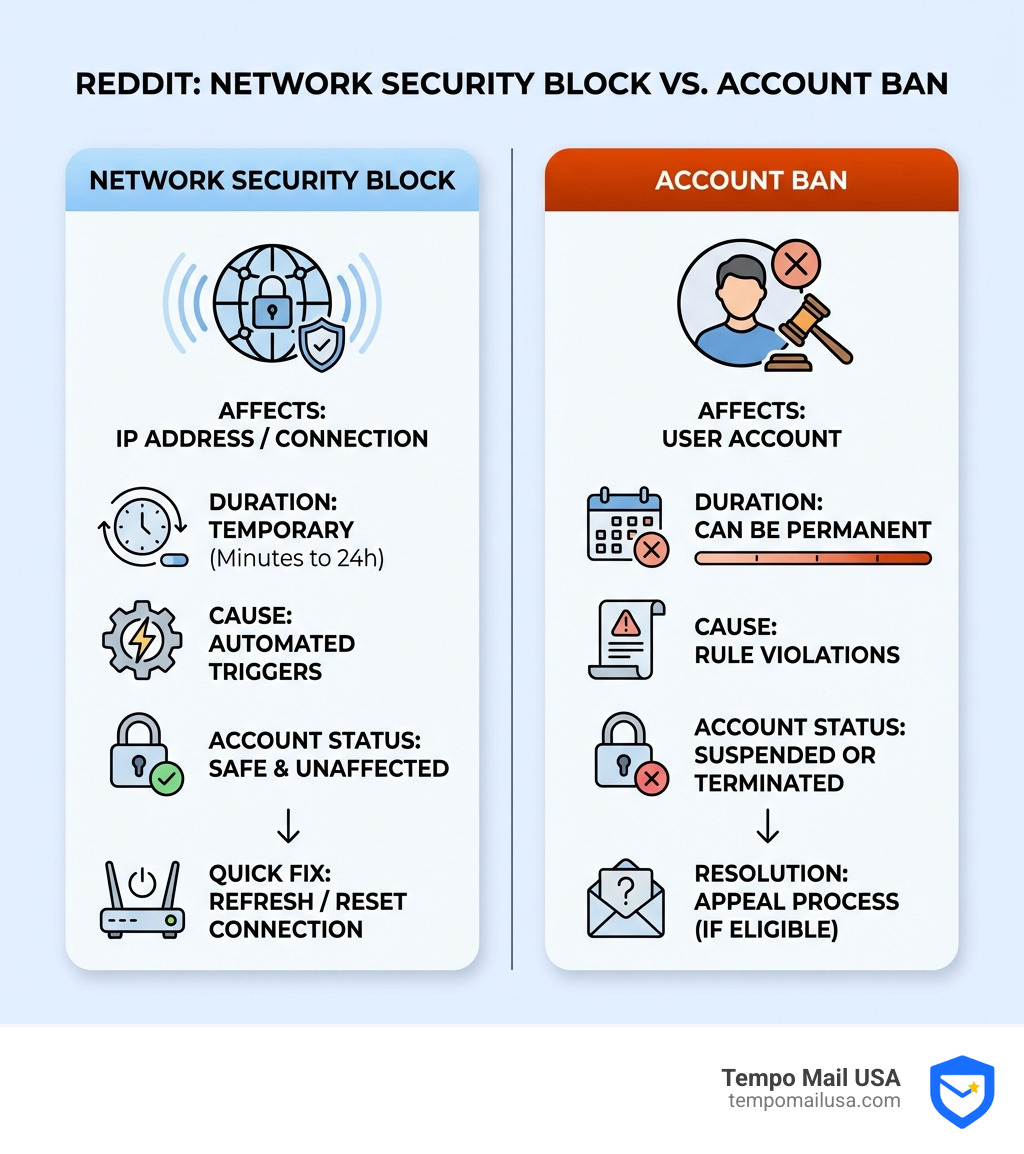
Network Block vs. Account Ban: Know the Difference
It's crucial to distinguish between a network security block and an account ban on Reddit. They are fundamentally different, affecting different aspects of your access.
| Feature | Network Security Block (IP/Connection Level) | Account Ban (User Level) |
|---|---|---|
| Cause | Suspicious IP activity, shared IP reputation, VPN/proxy use, network policies, browser conflicts, automated bot detection. | Violation of Reddit's content policy, spamming, harassment, vote manipulation, etc. |
| Scope | Affects your current connection/IP address. Can prevent access to Reddit from any account on that network. | Affects your specific Reddit user account. You might still access Reddit from a different account/IP. |
| Duration | Usually temporary (minutes to 24 hours), automatically lifted when conditions change or IP changes. | Can be temporary (suspension) or permanent, depending on the severity of the violation. |
| Resolution | Troubleshooting your connection, IP, browser, or network settings. | Appealing to Reddit administrators, adhering to ban duration. |
| Notification | "You've been blocked by network security" message before logging in. | Notification in your Reddit inbox or email, often after attempting to log in. |
A network block is a technical gatekeeper saying, "Whoa, hold on there, stranger!" An account ban is Reddit saying, "You're no longer welcome here." Your account is safe during a network block, even if you can't reach the site. However, persistent suspicious activity from an IP could eventually lead to Reddit reviewing accounts associated with that IP, or even shadowbanning. A shadowban means your posts and comments are only visible to you, making it seem like you're participating, but no one else can see your contributions.
How to Prevent the "reddit blocked by network security" Message
Prevention is always better than a cure, especially when it comes to online access.
- Avoid Free/Low-Quality VPNs and Proxies: These services often have blacklisted IP addresses due to widespread abuse by other users. Investing in a reputable, paid VPN or using high-quality residential proxies can significantly reduce your chances of being flagged.
- Be Cautious on Public Wi-Fi: While convenient, public Wi-Fi networks are shared environments where one user's bad actions can affect everyone on that IP. If possible, use your mobile data or a trusted VPN when accessing sensitive sites on public networks.
- Manage Browser Extensions Wisely: Regularly audit your browser extensions. Disable or remove any you don't actively use, and be mindful of how certain privacy or ad-blocking extensions might interfere with website security checks. If an extension seems to cause issues, consider a lighter alternative.
- Avoid Bot-Like Behavior: Try not to refresh pages too rapidly, engage in excessive voting, or use any automated tools that interact with Reddit. Even legitimate rapid browsing can be misinterpreted by security systems.
- Protect Your Digital Identity: When signing up for new services or managing multiple online accounts, maintaining a clean digital footprint is key. If you ever need to create new accounts on Reddit, or any platform, using a temp mail for Reddit from a service like TempoMail USA can protect your Personally Identifiable Information (PII) and keep your primary email address secure from spam and potential association with flagged activities.
Exploring Alternative Ways to Access Reddit
Sometimes, despite all troubleshooting, Reddit might remain inaccessible through conventional means. Here are some alternatives:
- Old Reddit (old.reddit.com): Many users prefer the classic interface of Old Reddit. Sometimes, the new Reddit frontend might be blocked while the old one still works, possibly due to different routing or security configurations.
- Alternative Frontends: Projects like Redlib - A private front-end for Reddit offer alternative ways to browse Reddit content without directly interacting with Reddit's official servers. These can sometimes bypass network blocks by presenting a different access pattern. You can even host a private instance of such frontends for maximum control.
- Tor Browser and Onion Addresses: For ultimate anonymity and bypassing censorship, the Tor Browser can be used. Reddit has official onion addresses that allow access through the Tor network. For instance, you might access the "old" Reddit frontend via an onion address like this one or the newer frontend via this one. Be aware that the TLS certificates on these onion addresses have sometimes been reported as expired, which poses a security risk, so proceed with caution.
Frequently Asked Questions about Reddit Network Blocks
Let's quickly address some common questions we hear about the reddit blocked by network security error.
Is a network security block a permanent ban on my Reddit account?
Absolutely not! We want to reiterate this: a network security block is almost always a temporary restriction on your access from a specific IP address or network, not a permanent ban on your Reddit account. Your account itself is safe and unaffected. Think of it as Reddit's bouncer temporarily denying entry to your car, but not banning you from the club for life.
Why does Reddit work on my phone but not my computer?
This is a classic diagnostic clue! If Reddit works on your phone (especially on mobile data) but not your computer (on Wi-Fi), it strongly suggests the issue is either:
- Different Networks: Your phone on mobile data is using a completely different IP address and network path than your computer on Wi-Fi. The Wi-Fi IP might be flagged, or the Wi-Fi network itself has restrictions.
- Device-Specific Issue: It could be a local problem on your computer, such as a browser conflict, an overzealous firewall, or a problematic browser extension that isn't present on your phone.
Can using a VPN get me blocked on Reddit?
Yes, it definitely can. While VPNs are great for privacy, their shared IP addresses are a double-edged sword. If other users on the same VPN server have engaged in activities that Reddit's security systems deem suspicious (spamming, botting, etc.), that shared IP can get blacklisted. When you connect through it, you get caught in the crossfire. This is particularly common with free VPN services, which tend to have a higher incidence of blacklisted IPs. If you rely on a VPN, switching servers or using a reputable, paid service with cleaner IP pools can help.
Conclusion: Regain Access and Protect Your Privacy
Encountering the reddit blocked by network security message can be a real headache, but as we've explored, it's a fixable issue that rarely signals a permanent problem with your Reddit account. By systematically troubleshooting your connection, browser, and network settings, you can almost always regain access.
These blocks are usually Reddit's automated systems trying to protect the platform from unusual traffic. Understanding the common causes—from problematic IP addresses and VPNs to local browser conflicts and network policies—empowers you to diagnose and resolve the issue efficiently.
In an increasingly interconnected world, where our digital identities are constantly scrutinized, maintaining secure and private online access is paramount. Tools that help you manage your digital footprint, like those that protect your Personally Identifiable Information (PII) by generating secure email aliases, are more vital than ever. TempoMail USA specializes in providing such identity proxying services, acting as a "firewall" for your PII. This can be particularly useful if you frequently sign up for online services or find yourself needing to create new accounts while maintaining your privacy.
Don't let a temporary block deter you. With the right knowledge and tools, you can steer these digital roadblocks and continue enjoying Reddit securely.