


Why Understanding Gmail Account Bans Matters for Your Digital Life
Ban Gmail account issues can happen to anyone—and when they do, you lose access to your emails, files, photos, and every other Google service you rely on. Your Google account is more than just an email address; it's the key to your digital life.
Quick Answer: What You Need to Know About Gmail Account Bans
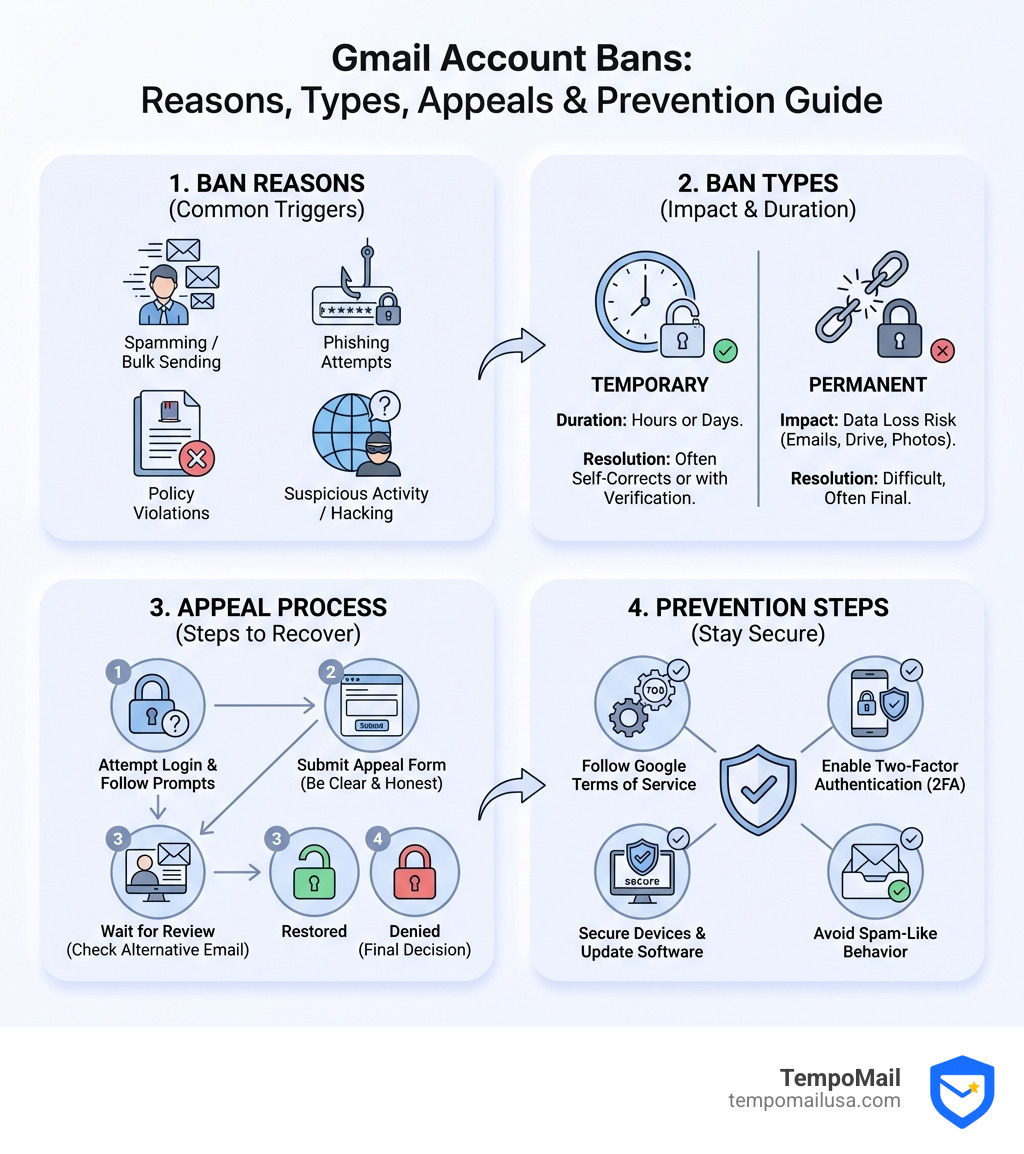
- What it means: A ban blocks access to Gmail and potentially all Google services (Drive, Photos, Play Store, YouTube)
- Common causes: Spamming, phishing, policy violations, suspicious activity, or security breaches
- Types of bans: Temporary (can be resolved in hours) or permanent (may result in data loss)
- Your options: Submit an appeal (up to 2 times for some violations), download your data if possible, or contact Google support
- Prevention: Follow Google's Terms of Service, enable two-factor authentication, avoid spam-like behavior
Google's strict enforcement protects users from malicious actors, but sometimes regular accounts get caught in the crossfire. As one frustrated user on a support forum put it: "My Google account has been banned. I need help to get it back." This scenario is more common than you might think.
A Gmail ban doesn't always mean you did something wrong. New accounts sending legitimate marketing emails, unusual login patterns from travel, or even false positives from Google's automated systems can trigger a suspension. The consequences are immediate and severe—you can't access your emails, recover important files, or even use your Android phone properly.
I'm Mohammad Waseem, and through managing multiple web platforms and online tools, I've helped users steer ban Gmail account scenarios and understand Google's policies to maintain secure, compliant digital operations. My experience with email systems and privacy-focused platforms gives me unique insight into how these bans happen and how to avoid them.
Understanding What Happens When You Have a Ban Gmail Account
When you encounter a ban Gmail account message, the digital world can feel like it's shrinking. But what actually happens behind the scenes?
First, you'll notice a sign-in error. Instead of your inbox, you’ll be greeted by a message stating, "Your Google Account has been disabled." This isn't just an email issue; because Google uses a unified identity system, a ban on your Gmail often ripples across every service you use.
Service Restrictions
The moment a ban is enacted, your access to Google Drive (and all your stored documents), Google Photos, and even your YouTube channel is typically severed. If you use "Sign in with Google" for third-party apps, those might stop working too.
Android and Hardware Functionality
For Android users, the impact is particularly heavy. You won't be able to update apps from the Play Store, and "Find My Device" features may become unavailable. Chromebook users might find their synced extensions and apps tied to that specific account are no longer usable.
Temporary vs. Permanent Bans
Not all bans are created equal.
- Temporary Suspensions: Often triggered by "suspicious activity" (like logging in from a new country) or sending too many emails quickly. These can sometimes be resolved within a few hours by following on-screen verification steps.
- Permanent Bans: These are usually the result of severe or repeated violations of Google’s terms of service. In these cases, Google may decide to delete the account and its data entirely after a certain period.
Primary Reasons Google Disables Accounts
Google doesn't just ban accounts for fun. They have sophisticated algorithms designed to keep the ecosystem safe. However, these systems can be aggressive.
Spamming and Phishing
Sending unsolicited bulk emails is the fastest way to get a ban Gmail account. If you’re a new business owner sending out a massive newsletter from a fresh account, Google’s "spam-dar" will go off. Phishing—attempting to steal passwords or personal info—is an immediate, non-negotiable ban.
Malware and Illegal Activities
Using Google Drive to host malware or using Gmail to distribute viruses will result in an instant shutdown. Google also cooperates with law enforcement; they may disable accounts in response to court orders or if the account is involved in illegal activities like child exploitation or promoting terrorism.
False Identity and Robodialing
Creating a fake identity to deceive people is a major violation. While making a "fan account" for a celebrity is usually fine, impersonating a government official or a company representative to manipulate others is a one-way ticket to a ban. Additionally, using Google services for automated robodialing or "traffic pumping" (sending high volumes of calls for financial gain) is strictly prohibited.
Violating Google's Terms of Service
Every user agrees to the Google Terms of Service upon signup. This document, along with Service Specific Terms, outlines the rules of the road.
- YouTube Community Guidelines: Violating these (e.g., posting hate speech or graphic violence) can lead to an account-wide ban.
- Google Workspace Acceptable Use Policy: For business users, violating the Google Workspace Acceptable Use Policy can result in the entire organization's admin being notified or the specific user being locked out.
Suspicious Activity and Security Flags
Sometimes, Google bans you for your own protection. If their system detects an unusual login from a foreign IP address or a "bot-like" pattern of behavior, they might disable the account to prevent a hacker from doing more damage. This is often referred to as "account hijacking" prevention.
The Consequences of a Banned Gmail Account
The fallout of a ban Gmail account is more than just an inconvenience; it can be a professional and personal disaster.
Data Loss and Access
The most immediate consequence is the loss of access to your communication history. All those "important" folders you've spent years organizing? Gone. Furthermore, any subscriptions you’ve paid for through Google Play—movies, books, or magazines—are essentially frozen.
Comparison: Gmail Service Removal vs. Full Account Deletion
It is important to distinguish between removing the Gmail service and a full account ban.
| Feature | Removing Gmail Service | Full Account Ban/Deletion |
|---|---|---|
| Google Drive Access | Retained | Lost |
| Google Play Purchases | Retained | Lost |
| Email Address | Deleted (after 30 days) | Locked/Deleted |
| Can anyone else use the ID? | No, never | No |
| Recovery Window | 30 days | Varies (often very short) |
If you choose to Remove Gmail from your Google Account, you keep your other data. But if Google bans you, everything is on the line.
How to Appeal and Recover Your Access
If you find yourself locked out, don't panic. There is a formal process to ask for your digital life back.
The First Step: The Appeal
When you try to sign in and see the "disabled" message, look for the "Start Appeal" button. This is your primary path to recovery. Google provides a form where you can explain why you believe the ban was a mistake.
Important Statistic: For some policy violations, Google will only review up to 2 appeals. This means your first attempt needs to be thorough and honest.
EU Resolution Options
If you are a resident of the European Union, you have additional rights. Under specific EU regulations, you may have more avenues for complaints and resolution if you believe your account was restricted by mistake. You can even lodge a complaint with a data protection authority.
For more information on staying safe and avoiding the types of behaviors that trigger these bans, check out this More info about anti-spam and online safety.
Step-by-Step Guide to the Ban Gmail Account Appeal Process
- Sign In: Go to accounts.google.com and enter your credentials.
- Read the Reason: Google will usually provide a brief explanation of why the account was disabled.
- Select Start Appeal: Follow the on-screen prompts.
- Provide Detailed Evidence: Don't just say "I didn't do it." If you were traveling, mention that. If you think you were hacked, explain why.
- Submit and Wait: The review timeframe varies. It can take a few hours, but often it takes several days or even weeks.
- Be Honest: Community experts emphasize that providing false information during an appeal will almost certainly result in a permanent ban.
Recovering Data from a Ban Gmail Account
Can you get your photos and files if the appeal fails? Maybe.
Google doesn't always delete your data immediately. In some cases, when you Sign in to your Google Account, you may see an option to "Download your data." This uses a tool called Google Takeout.
The Catch: For "egregious violations"—such as child safety issues, terrorist content, or valid legal requests—Google will completely lock you out, and data retrieval will be impossible.
Proactive Steps to Keep Your Account Secure
At TempoMail, we believe the best way to handle a ban Gmail account is to make sure it never happens in the first place. Prevention is the ultimate cybersecurity strategy.
Use Two-Factor Authentication (2FA)
This is non-negotiable. 2FA prevents hackers from hijacking your account, which is a leading cause of "accidental" bans. If a hacker uses your account to send spam, Google bans you, not the hacker.
Perform Regular Security Checkups
Google offers a Security Checkup tool. Use it to see which devices are logged in and which third-party apps have access to your data. If you see something suspicious, Remove the access of third-party apps immediately.
Maintain "Email Hygiene"
If you use your Gmail for business:
- Warm up your account: Don't go from 0 to 500 emails a day overnight.
- Watch your bounce rates: If you send emails to hundreds of dead addresses, Google flags you as a spammer.
- Avoid spam trigger words: Using "FREE," "CASH," or "ACT NOW" in all caps can trigger automated filters.
Protect Your PII with TempoMail
One of the best ways to avoid security flags is to keep your primary Gmail address private. By using TempoMail’s identity proxying services, you can generate secure aliases for online signups. This acts as a firewall, protecting your Personally Identifiable Information (PII) and ensuring that if a third-party site is breached, your main Google account remains untouched and secure.
Frequently Asked Questions about Gmail Bans
Why was my Google account banned without warning?
Google's automated systems are designed to act fast to stop abuse. If the system detects a severe violation (like malware distribution) or a massive spike in spam, it will disable the account immediately to protect other users. Warnings are not always possible when the risk to the network is high.
How long does the Gmail account appeal process take?
There is no guaranteed timeframe. While some accounts are unblocked within a few hours if the user acts immediately, many users report waiting several weeks for a response. Patience is key, but ensure your initial appeal is as detailed as possible to avoid unnecessary back-and-forth.
Can I recover my emails if my account is permanently disabled?
If the account is permanently disabled and the appeal window has closed, the data is eventually deleted. Unless you were able to download your data via Google Takeout during the initial suspension phase, those emails are likely gone forever. This is why regular backups are essential.
Conclusion
A ban Gmail account is a wake-up call about the fragility of our digital identities. While Google's policies are designed to keep the internet safe, they can be unforgiving to those who don't follow the rules or fail to secure their accounts.
To keep your digital life running smoothly:
- Adhere strictly to the Google Terms of Service.
- Secure your account with 2FA and regular security checkups.
- Backup your data frequently so a ban doesn't mean a total loss.
- Use identity proxies like TempoMail to keep your primary email address off "spam lists" and out of harm's way.
Don't wait for a "disabled" message to take action. Protect your identity with anti-spam tracking and online safety today and ensure your access to the digital world remains uninterrupted.