


What Is a Dummy Mail ID and How Does It Work?

A dummy mail ID is an ephemeral, disposable email address engineered to receive inbound messages without binding your real identity to an online service. Unlike permanent email accounts hosted by traditional webmail providers, a temporary inbox requires zero registration, no passwords, and no personal profile creation. It serves as an isolated, single-use communication endpoint designed to absorb inbound messages and vanish once its purpose is fulfilled.
To create one in under ten seconds, open an online temporary email generator in any browser, copy the auto-generated address, and paste it into the sign-up or verification form you need to complete. The inbox is ready immediately, so you can receive confirmation messages, download links, and one-time codes without exposing your primary email address to data harvesting scripts or marketing aggregators.
Behind the scenes, disposable mail architecture routes incoming mail traffic to transient storage nodes. When a sender dispatches a message to your temporary address, our mail exchange servers process the payload, present the content in real time via your browser session, and hold it only until the session expires or is manually cleared. This decoupled structure ensures that your real IP address, device telemetry, and personal records remain completely hidden from third-party senders.
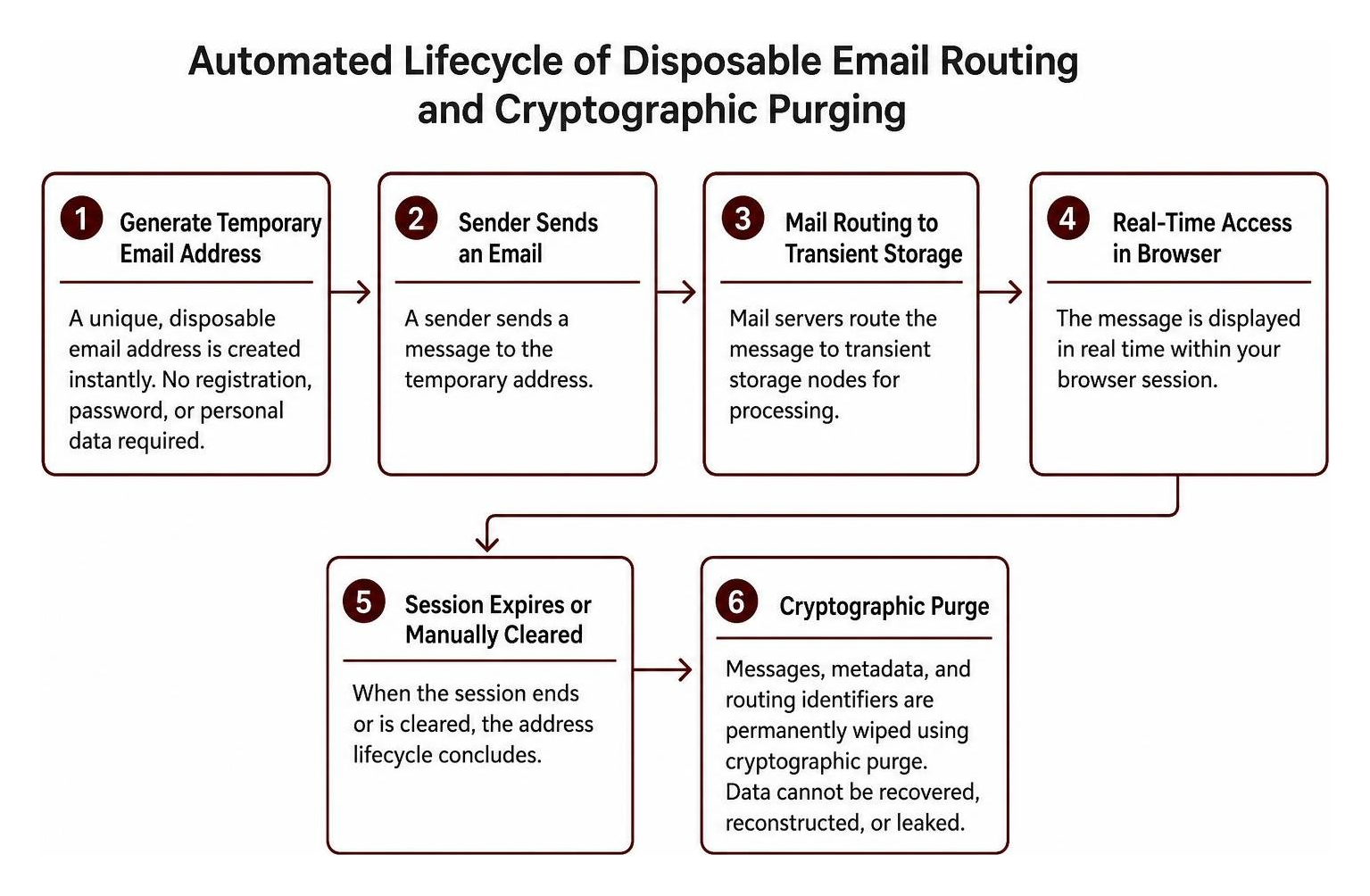
Once the lifespan of that address concludes, a cryptographic purge permanently wipes the messages, metadata, and routing identifiers from the host server. This automated process ensures that discarded data cannot be recovered, reconstructed, or leaked in downstream security incidents. By isolating your transient interactions from your permanent digital footprint, you establish a resilient defense against tracking and unauthorized profiling.
| Feature | Standard Personal Email | Temporary Dummy Mail ID |
|---|---|---|
| Registration Required | Yes (Phone, Name, Password) | No (Zero personal data needed) |
| Identity Linkage | Directly tied to your identity | Completely decoupled and anonymous |
| Inbox Lifespan | Permanent / Multi-year | Minutes, hours, or per browser session |
| Data Retention | Permanent cloud archive | Cryptographic purge / Auto-deletion |
| Spam Exposure Risk | High long-term vulnerability | Zero impact on your real mailbox |
| Best Used For | Banking, employment, family | One-off registrations, tests, downloads |
5 Best Use Cases for Disposable Inboxes
Every time you share your primary email address online, you create a permanent breadcrumb that data brokers, advertisers, and aggressive growth marketers can harvest. Over time, these breadcrumbs are cross-referenced across databases to build detailed behavioral profiles. Employing a short-lived address acts as an effective digital buffer. Here are five everyday scenarios where switching to a disposable inbox delivers immediate protection:
- Filtering Untrusted Newsletters: When an online publication demands an email address before letting you read an article, a burner address lets you view the content without subscribing your personal inbox to endless promotional sequences and partner marketing blasts.
- Developer and QA Testing: Software engineers and QA professionals need clean, unlinked inboxes to test registration funnels, password reset sequences, email template rendering, and transactional email deliverability across multiple environments simultaneously without polluting production databases.
- Public Discussion Boards and Classifieds: Posting listings on classified sites or participating in temporary online communities often exposes your address to automated web scrapers. A burner address handles necessary confirmations while keeping your real identity off public registries and search engine indexes.
- Public Wi-Fi Authentication: Airports, cafes, hotels, and train stations frequently demand email addresses to unlock local internet access. Using a disposable address grants you connectivity without exposing your primary inbox to subsequent location-based marketing drips.
- Mitigating Data Breach Exposure: If a platform suffers a credential breach, having registered with an ephemeral address ensures that compromised database dumps contain no actionable links to your true identity, primary communications, or password reset pathways.
Using a Dummy Mail ID for Gated Downloads and Free Trials
Content creators frequently place whitepapers, templates, ebooks, and trial software behind gated forms. While the resources are often useful, completing the form usually enters your contact information into aggressive multi-step sales funnels that deploy persistent automated follow-up cadences.
By entering a disposable address, you can access the download link or verification token without committing to months of follow-up outreach. If the service proves valuable and warrants a long-term commercial relationship, you can always update your account profile with a permanent business address later, maintaining complete control over your commercial relationships.
Protecting Personal Data on Unverified Websites
Websites with questionable security postures or obscure privacy policies present significant risks of data leakage. Reusing your primary email across smaller retail storefronts, gaming forums, and niche utility tools increases the likelihood that your contact information will be traded between advertising networks or exposed during server compromises.
Data minimization is a core principle of modern cybersecurity. Restricting the distribution of your permanent address reduces the digital surface area available to malicious actors, automated phishing rings, and unsolicited cold outreach. For a broader overview of the privacy principle behind this practice, see data minimization.
Step-by-Step Guide to Instant Email Generation
Creating an ephemeral mailbox takes only a few moments and requires no technical expertise. Because everything operates directly inside your web browser, you do not need to download browser plugins, install third-party software, or configure complex mail transfer protocols. The entire process is frictionless and accessible from desktops, tablets, and smartphones alike.
Steps to Generate a Dummy Mail ID Online
Follow these four steps to secure an anonymous inbox in seconds:
- Visit the Generator: Open our web interface in any standard browser to automatically initialize a fresh, randomized address without filling out sign-up forms.
- Copy the Address: Click the one-tap copy button to transfer the generated address string directly to your clipboard for instant use.
- Submit Your Form: Paste the temporary address into the registration field, download form, or verification dialogue on the external site requesting your contact info.
- Collect and Discard: Return to your open browser tab to read incoming confirmation messages or extract one-time passwords, then close the session to trigger the automatic cryptographic purge routine.
Managing Incoming Messages and Verification Codes
Our infrastructure utilizes real-time inbox synchronization, ensuring inbound messages, security tokens, and alphanumeric verification codes appear in your view without manual page reloads or delays.
You can view incoming attachments, review email styling, and verify account setups right from the browser window. Once you have retrieved your required tokens, you can manually delete the thread or let the system automatically discard it upon session termination, ensuring zero residual data remains on the server.
Critical Situations Where You Should Not Use Disposable Mail
While temporary email addresses are ideal for safeguarding privacy during everyday web browsing, they are not designed for long-term or high-security account management. Because disposable mailboxes are engineered to cycle out and purge their contents permanently, using them for critical accounts can lead to permanent lockouts and irreversible data loss.

Avoid using temporary addresses for the following critical categories:
- Banking and Financial Portals: Online banks, investment apps, digital wallets, and loan portals require persistent communication channels for two-factor authentication, fraud alerts, tax documents, and compliance updates.
- Government and Legal Services: Tax authorities, healthcare records, municipal portals, court documentation, and immigration platforms require verified, permanent contact records that can be audited over multi-year periods.
- Primary Account Recovery Channels: Do not link disposable addresses as recovery vectors for your main email addresses, master password vaults, hosting providers, or domain registrars where losing access means losing ownership of your digital assets.
- Long-Term Software Subscriptions: Services that bill you annually, store critical cloud documents, or house irreplaceable work products should always be anchored to a reliable, permanent address you control so you can resolve billing disputes and reset forgotten credentials whenever needed.
Frequently Asked Questions About Burner Emails
Can emails sent to a temporary inbox be traced back to me?
Temporary inboxes do not require account creation, billing data, or personal identifiers. Messages sent to a disposable address are routed to a temporary storage container that is decoupled from your real identity. Combined with our strict zero-logging practices for browser metadata and automated cryptographic message purging, inbound transmissions cannot be traced back to your personal email account.
Are disposable addresses safe for receiving verification codes?
Yes. Temporary addresses are an effective method for receiving one-time passwords (OTPs), authentication PINs, and activation links. Because incoming data is displayed in real time and automatically cleared after use, the window of exposure for transient verification codes is kept small.
How long does a temporary inbox stay active?
The lifespan of a disposable address depends on your active browser session and user preferences. Inboxes remain available while you complete your sign-ups and retrieve verification codes. Once you leave the site, manually cycle your address, or allow the session timer to elapse, the inbox and all associated contents are permanently purged.
Conclusion
Guarding your personal inbox against unsolicited marketing campaigns, tracking scripts, and security breaches does not require complex software. Utilizing an anonymous dummy email address lets you access digital services, test software, and download online resources while keeping your primary inbox clean and secure.
Whenever you encounter a platform that demands an email address for one-time access, rely on TempoMailUSA to generate a secure, disposable inbox instantly without registration. If you are a developer looking to deploy your own self-hosted temporary email platform, explore TempoPlay to integrate disposable inbox functionality into your custom workflows.