


Get Bitwarden on Windows in Minutes — Here's How
Bitwarden download Windows is straightforward: visit bitwarden.com/download, grab the .exe installer, run it, and you're set up in under five minutes.
Quick steps to download and install Bitwarden on Windows:
- Go to bitwarden.com/download
- Click the Windows installer (
.exe) under the Desktop section - Run the downloaded file and follow the prompts
- Launch Bitwarden and log in or create a free account
Weak, reused passwords are one of the biggest causes of account takeovers and data breaches. If you care about keeping your personal information private — and out of the hands of hackers — a password manager isn't optional anymore. It's essential.
Bitwarden is one of the most trusted options available. It's open-source, meaning anyone can inspect its code. It uses zero-knowledge encryption, so even Bitwarden itself cannot see your passwords. And it's rated #1 in Enterprise User Satisfaction on G2 for eleven straight quarters — with millions of users worldwide backing that up.
The Windows desktop app gives you a full vault experience outside the browser. That means you get stronger system integration, biometric unlock via Windows Hello, and the ability to stay logged in to up to five accounts at once.
Best of all? The core app is completely free to download and use.
Why Choose Bitwarden for Windows?
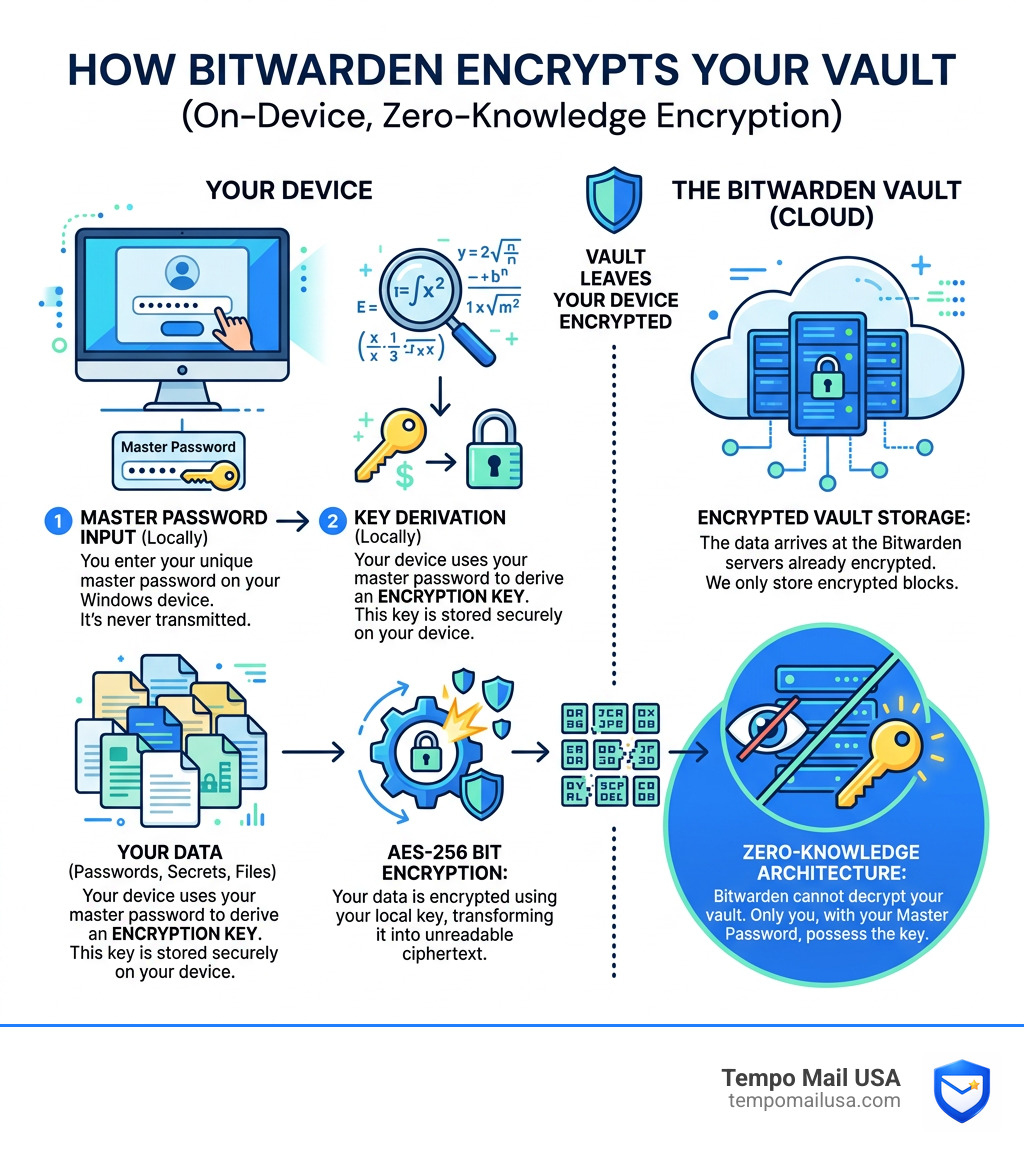
When we talk about digital security, we often look for "military-grade" protection. Bitwarden delivers exactly that by utilizing AES-256 bit encryption. This is the same standard used by governments and financial institutions to protect top-secret data. Because Bitwarden operates on a zero-knowledge architecture, your master password is the only key that can decrypt your vault. If you lose it, even the Bitwarden team can't help you get back in—that is how serious they are about your Security and Privacy features.
Beyond the raw math of encryption, Bitwarden stands out because of its transparency. It is an open-source project. This means the source code is available on GitHub for anyone to inspect. When "trust us" is a common corporate refrain, Bitwarden says "verify us." This transparency has led to a vibrant community of over 100,000 members across Reddit and GitHub who help identify bugs and suggest improvements.
Furthermore, Bitwarden undergoes regular third-party audits by reputable security firms. These audits ensure that the software remains resilient against modern hacking techniques. Whether you are a solo user looking for a free, reliable vault or a large corporation needing to manage thousands of credentials, Bitwarden’s consistent #1 ranking in Enterprise User Satisfaction on G2 proves it can handle the job. Plus, with Two-Factor Authentication (2FA) support, you can add an extra layer of armor to your vault, ensuring that even if someone steals your master password, they still can't get to your data.
Bitwarden Download Windows: Official Sources and Requirements
To ensure you are getting a legitimate and safe version of the software, we always recommend using official channels for your bitwarden download windows. While third-party mirrors exist, the official Bitwarden website and their GitHub repository are the gold standards for security.
For most users, the standard .exe installer from the official website is the way to go. However, power users or those who prefer package managers might look toward the Microsoft Store or even Portable versions that don't require a full installation.
One technical detail many users overlook is the dependency on the Microsoft Visual C++ Redistributable. This is a small piece of software from Microsoft that allows C++ applications (like Bitwarden) to run correctly on Windows. If you find that certain features, like biometric unlock, aren't showing up after installation, ensuring this redistributable is updated is usually the first troubleshooting step.
System Requirements for Bitwarden Download Windows
Thankfully, Bitwarden is a lightweight application that won't bog down your system. However, to get the best experience—especially with modern security features—you should meet the following criteria:
- Operating System: Windows 10 or Windows 11 (64-bit architecture is highly recommended).
- Processor: Any modern Intel or AMD processor.
- RAM: While Bitwarden uses very little memory, having at least 4GB of system RAM ensures smooth multitasking.
- Disk Space: Approximately 200MB of free space for the application and its local cache.
- Biometrics: To use facial recognition or fingerprint login, your hardware must meet the Windows Hello biometric requirements. This means having a compatible webcam or fingerprint reader.
Where to Find the Bitwarden Download Windows Link
You have three primary "safe" locations to grab the installer:
- The Official Website: The most direct route is bitwarden.com.
- GitHub: For those who want to see the changelogs or download specific versions, you can visit the Latest client releases on GitHub.
- Microsoft Store: A great option for users who want Windows to handle the updates automatically in the background.
Step-by-Step: How to Install Bitwarden on Windows
Once you have clicked the link for your bitwarden download windows, the process is incredibly smooth. Here is how we recommend doing it:
- Run the Installer: Double-click the
.exefile you just downloaded. You might see a "User Account Control" prompt asking for permission; click Yes. - Follow the Wizard: The Bitwarden installation wizard is very simple. It will ask where you want to install the files (usually
C:\Program Files). - Launch the App: Once finished, check the box to "Launch Bitwarden" and click Finish.
- Sign In or Sign Up: If you already have an account, enter your email and master password. If you are new, you will need to create a master password. Make it strong!
Pro Tip for Privacy: When you sign up for services like Bitwarden, you are often asked for an email address. To keep your real identity even more secure, consider using a Temp Mail for Bitwarden alias from Tempo Mail USA. This acts as a PII (Personally Identifiable Information) firewall, keeping your primary inbox clean and your identity shielded.
After installation, the app will perform its first vault sync, pulling down any passwords you may have already saved in the browser extension or mobile app.
Setting Up Your Vault and Biometric Unlock
Now that the app is installed, let's make it easy to use. One of the best features of the Windows app is Windows Hello. Instead of typing a 20-character master password every twenty minutes, you can just glance at your camera or touch a fingerprint sensor.
To set this up:
- Open the Bitwarden Desktop App.
- Go to File > Settings.
- Scroll down to the Security section.
- Check the box for Unlock with Windows Hello.
- Windows will ask you to confirm your identity (PIN or Biometric).
Once enabled, you can quickly get into your vault without the friction of typing. For more technical details on how Microsoft handles this data, you can check out More info on Windows Hello.
Managing Multiple Accounts in Bitwarden Download Windows
One of the coolest "hidden" features of the desktop app is the ability to stay logged into multiple accounts. Bitwarden supports up to five logged-in accounts simultaneously. This is perfect if you have a personal vault for your Netflix and banking, and a separate organization vault for work-related credentials.
To add another account, simply click on the account icon in the top right or bottom left (depending on your version) and select Add Account. You can switch between them instantly without having to log out and back in every time.
Bitwarden Desktop App vs. Browser Extension
You might be wondering: "If I already have the Chrome extension, why do I need the desktop app?" While both are great, they serve different purposes. The desktop app is the "command center" for your digital life, while the extension is the "autofill specialist."
| Feature | Desktop App | Browser Extension |
|---|---|---|
| System Integration | High (Windows Auto-start) | Medium (Browser-specific) |
| Biometric Support | Native Windows Hello | Requires Desktop App bridge |
| Multiple Accounts | Up to 5 active accounts | Limited switching |
| Offline Access | Full vault access offline | Requires browser to be open |
| Autofill | Via Global Hotkeys | Native browser field detection |
If you want the absolute best security, we recommend using both. You can even use a Temp Mail for Bitwarden.com to manage different identities across these platforms securely.
Frequently Asked Questions about Bitwarden
Is Bitwarden for Windows free to use?
Yes! The core Bitwarden experience is 100% free. This includes unlimited devices, unlimited passwords, and 2FA. There are premium plans for $10/year (which is a steal) that add features like file attachments and advanced 2FA (like YubiKey support), but for most people, the free version is more than enough.
How do I enable auto-start for Bitwarden on Windows?
Nobody wants to remember to open their password manager every time they reboot. To make Bitwarden start automatically:
- Go to File > Settings.
- Look for App Settings.
- Check the box that says Start automatically on login.
- You can also check Start minimized to tray so it stays out of your way until you need it.
Can I use Windows Hello to unlock my vault?
Absolutely. As long as your PC has a compatible webcam or fingerprint reader, you can enable this in the Security settings. It significantly speeds up your workflow while maintaining a high level of security. If the option is greyed out, make sure you have the Microsoft Visual C++ Redistributable installed!
Conclusion
Securing your digital world doesn't have to be a chore. By completing your bitwarden download windows, you are taking a massive step toward protecting your identity. Bitwarden provides the vault, but your email address is often the "master key" to your entire online presence.
At Tempo Mail USA, we believe in providing a PII firewall for your life. By using our secure temporary email aliases, you can shield your real identity from services, preventing trackers and data brokers from building a profile on you. When you combine the power of a zero-knowledge password manager like Bitwarden with the identity protection of Tempo Mail USA, you become a much harder target for hackers.
Ready to take control of your data? Protect your privacy today and start using secure aliases for all your new accounts!