


Why Secure Email Communication Matters Now More Than Ever
Secure email communication protects your messages from unauthorized access, interception, and tampering through encryption, authentication, and other security measures. Here's what you need to know:
Core Protection Methods:
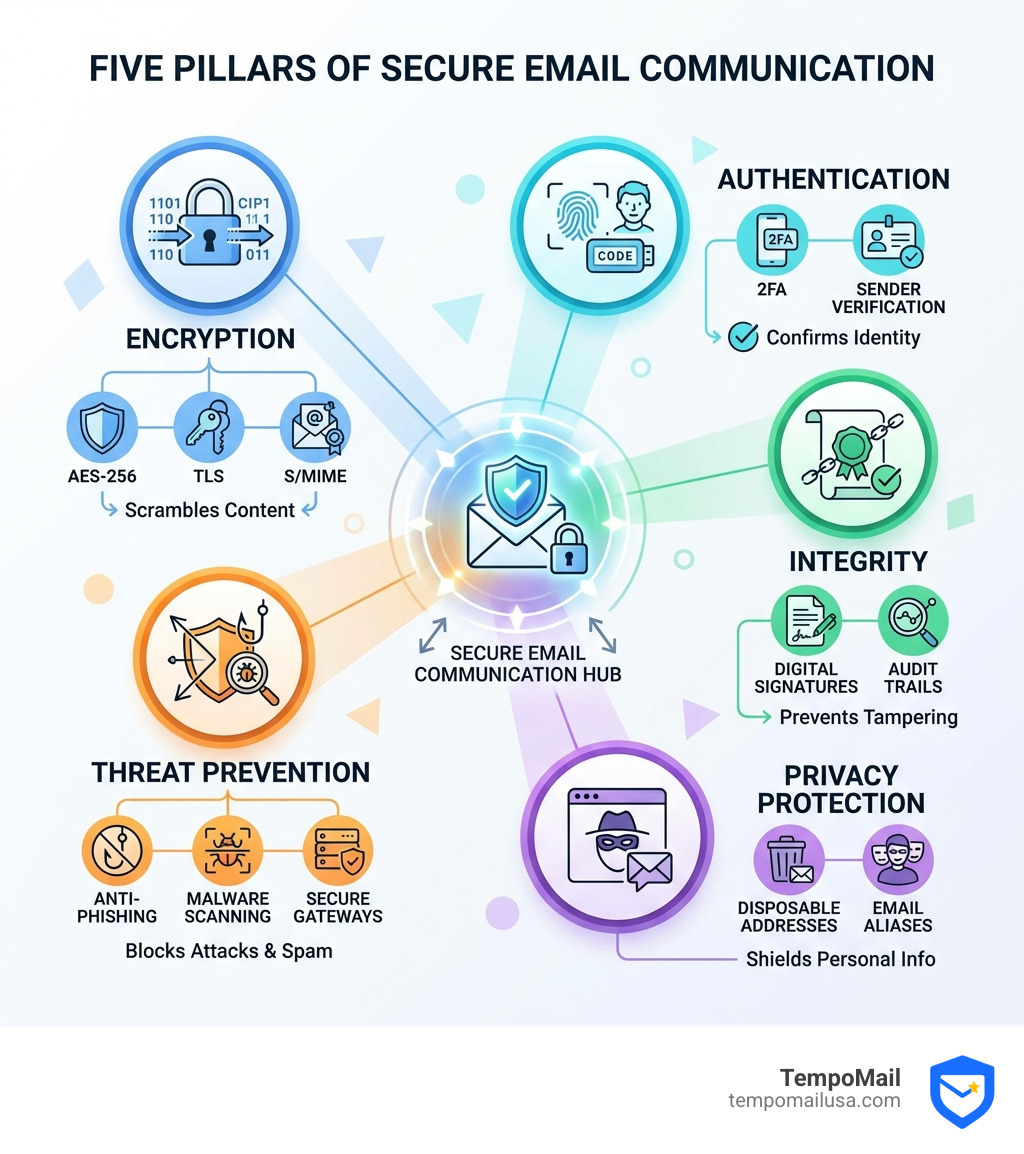
- End-to-End Encryption - Scrambles message content so only intended recipients can read it
- Digital Signatures - Verifies sender identity and confirms messages haven't been altered
- Two-Factor Authentication - Adds a second layer of account protection beyond passwords
- Anti-Phishing Tools - Detects and blocks fraudulent emails attempting to steal information
- Secure Email Gateways - Scans all messages for malware, spam, and security threats
The numbers tell a stark story. 32% of UK agencies suffered data breaches in 2023, with email being the top channel for information incidents. Even more concerning, over 88% of all business data breaches are caused by employee errors. Meanwhile, 81% of organizations worldwide have seen an increase in email phishing attacks since 2020.
These statistics reveal a fundamental problem: traditional email wasn't designed with sensitive data security in mind. Messages remain vulnerable to interception during transmission, can be modified without detection, and carry metadata that reveals who you're communicating with, even when content is protected.
The stakes have never been higher. Whether you're protecting personal privacy, securing business communications, or complying with regulations like HIPAA and GDPR, understanding secure email communication is no longer optional—it's essential.
I'm Mohammad Waseem, and I've built and managed multiple privacy-focused platforms including temporary email services where secure email communication is fundamental to protecting user identities. My work centers on practical security implementations, testing encryption methods, and optimizing systems that shield personal information from exposure.
Defining Secure Email Communication vs. Encrypted Email
When we talk about protecting our digital mail, we often use the terms "secure" and "encrypted" interchangeably. However, in cybersecurity, there is a distinct difference. Think of it like this: an encrypted email is a locked box, but secure email communication is the entire armored truck, the background checks on the driver, the GPS tracking, and the high-security warehouse where the box is eventually stored.
Secure email is an umbrella term. It refers to a comprehensive system of protocols and practices designed to ensure three things: Confidentiality (only the right person reads it), Integrity (the message isn't changed), and Authenticity (the sender is who they say they are).
Encrypted email, on the other hand, is a specific technical method used within that secure system. It involves using algorithms to transform your readable "plaintext" into "ciphertext"—a scrambled mess that looks like gibberish to anyone without the decryption key.
| Feature | Encrypted Email | Secure Email Communication |
|---|---|---|
| Primary Goal | Confidentiality of content | Confidentiality, Integrity, and Authenticity |
| Methods | PGP, S/MIME, AES-256 | Encryption + 2FA, Gateways, Policies, Training |
| Scope | The message body/attachments | The entire communication ecosystem |
| Threat Focus | Eavesdropping/Interception | Phishing, Malware, Human Error, Spoofing |
Key Components of Secure Email Communication
To achieve true security, we must look beyond just scrambling the text. A robust strategy includes several layers:
- Authentication: This verifies that you are you. Whether it’s a password or a biometric scan, it's the first line of defense.
- Digital Signatures: These act like a digital wax seal. If anyone tampers with the email after you send it, the seal breaks, alerting the recipient.
- Anti-Phishing & Malware Scanning: In 2020, phishing attacks skyrocketed by 81%. Modern secure solutions scan links and attachments before they ever reach your inbox.
- Access Controls: This involves setting permissions. For example, you might send an email that the recipient can read but cannot forward or print.
- Audit Trails: Especially important for businesses, this provides a log of who opened an email, when they downloaded an attachment, and if they tried to revoke it.
- User Education: Since 88% of breaches are caused by human error, teaching people not to click on "Free Pizza" links is just as important as the strongest encryption.
The Technical Architecture of Email Protection
To master secure email communication, we need to peek under the hood at the engines driving it. The "gold standard" for protecting data at rest—meaning the emails sitting on your server—is AES-256 encryption. This is military-grade security that would take a supercomputer billions of years to crack.
But what about when the email is moving? That’s where TLS Transport Layer Security (TLS) comes in. TLS creates a secure tunnel between email servers. If you’ve ever seen a "lock" icon in your browser, you’ve seen TLS in action. It ensures that no one can "sniff" your data as it travels across the internet.
For deeper, message-level security, we use the S/MIME protocol. S/MIME (Secure/Multipurpose Internet Mail Extensions) relies on Public Key Infrastructure (PKI). It uses a pair of keys: a public key (which you give to everyone) to encrypt messages sent to you, and a private key (which you keep secret) to decrypt them. To use S/MIME, you typically obtain a "Digital ID" from a Certificate Authority (CA), which acts as a digital notary verifying your identity.
End-to-End Encryption and Modern Standards
The ultimate form of privacy is End-to-End Encryption (E2EE). In a standard setup, your email provider might be able to see your messages. With E2EE, the message is encrypted on your device and only decrypted on the recipient's device. Even the email server in the middle sees only scrambled code.
Two major standards dominate this space:
- S/MIME: Great for corporate environments because it integrates well with Outlook and Apple Mail. It requires a centralized certificate.
- OpenPGP: Based on the "Pretty Good Privacy" software created by Phil Zimmermann, OpenPGP is a favorite for activists and privacy enthusiasts. It's decentralized and defined by RFC 9580.
A key part of these standards is the Key Fingerprint. This is a short string of letters and numbers that uniquely identifies your public key. Experts recommend verifying these fingerprints in person or over a trusted voice call to ensure you aren't being "spoofed" by an attacker.
Best Practices for Personal and Professional Email Security
Securing your email doesn't have to be a chore. We recommend starting with the "low-hanging fruit" that offers massive protection for very little effort.
First, Two-Factor Authentication (2FA) is non-negotiable. Even if a hacker steals your password, they can't get in without that second code from your phone or security key. When setting up recovery questions, here is a pro tip: always use fake answers. If a hacker knows your mother's maiden name from Facebook, they can bypass your password. Use a random word like "Caterpillar" instead.
For organizations, compliance is a major driver. Whether you are following the HIPAA audit protocol for healthcare, GDPR for European privacy, or SOX for financial integrity, you need policy enforcement. This often involves using cloud communication solutions that automatically encrypt sensitive data based on keywords (like "Social Security Number" or "Invoice").
Enhancing Privacy with Aliases and Disposable Accounts
One of the most effective ways to maintain secure email communication is to stop giving out your real email address. Every time you sign up for a newsletter or a new app, you're creating a "leak" point for your Personally Identifiable Information (PII).
This is where Identity Proxying comes in. By using email aliases, you create a firewall between your private life and the internet. If a service you use gets breached—and 32% of agencies were breached in 2023—you can simply delete that alias without ever risking your primary account.
For one-time interactions, like downloading a whitepaper, consider using a disposable email account. These accounts vanish after a short period, keeping your real inbox clean and safe from future spam or tracking.
Advanced Techniques: Headers and Subresource Protection
For the true privacy masters, we need to look at what's hidden. Every email comes with a header, a block of metadata that contains the digital "passport stamps" of the message's journey.
By reading email headers, you can see the original IP address of the sender and verify if it passed security checks like SPF or DKIM. This is the best way to spot a sophisticated phishing attempt that looks identical to a real bank email.
Maintaining Integrity in Secure Email Communication
A sneaky threat to secure email communication is the "external subresource." This is usually an image or a stylesheet hosted on a remote server. When you open an HTML email, your client might reach out to that server to fetch the image.
This creates two problems:
- Web Bugs: The server now knows your IP address, what time you opened the email, and what device you're using.
- Integrity Breaches: If a message is digitally signed, but the external image changes on the server, the "content" of the email has effectively changed even though the signature remains valid.
The latest Guidance on End-to-End Email Security suggests that Mail User Agents (MUAs) should either pre-fetch these resources and include them in the encrypted package or use Subresource Integrity (SRI) to ensure the external file hasn't been tampered with. To be safe, we recommend setting your email client to "Don't load remote images" by default.
Frequently Asked Questions about Secure Email Communication
What is the difference between different email encryption standards?
The two main standards are S/MIME and OpenPGP. S/MIME is "centralized"—it relies on a hierarchy of trust where a Certificate Authority vouches for you. It's very user-friendly for businesses. OpenPGP is "decentralized"—it uses a "Web of Trust" where users vouch for each other. It’s harder to set up but offers more control to the individual.
Can encrypted emails be hacked?
While the encryption itself (like AES-256) is virtually unhackable with current technology, the process can be compromised. If a hacker installs a keylogger on your computer, they can steal your passphrase as you type it. If they steal your private key file, they can read your mail. This is why device security is just as important as email security.
Why is 2FA more important than a strong password?
A strong password is just a longer lock. But in an age of massive data breaches, passwords are leaked every day. 2FA (Two-Factor Authentication) ensures that even if a hacker has your password, they still need physical access to your phone or security key. It turns a "knowledge" barrier into a "possession" barrier.
Conclusion
Mastering secure email communication is a journey, not a destination. As cyber threats evolve, so must our defenses. By moving beyond the simple password and embracing tools like encryption, 2FA, and identity proxying, we can reclaim our digital privacy.
At TempoMail USA, we believe your real identity shouldn't be the price of using the internet. Our identity proxying services act as a secure firewall, generating aliases that protect your PII from online services and data harvesters. By taking these steps today, you aren't just protecting your data—you're securing your digital future.