
Beyond the Inbox How to Master Temporary Email Tools

Why Temporary Email Tools Are Your First Line of Defense Against Spam
Temporary email tools are disposable email services that create short-term addresses for receiving messages without exposing your primary inbox. Here's what you need to know:
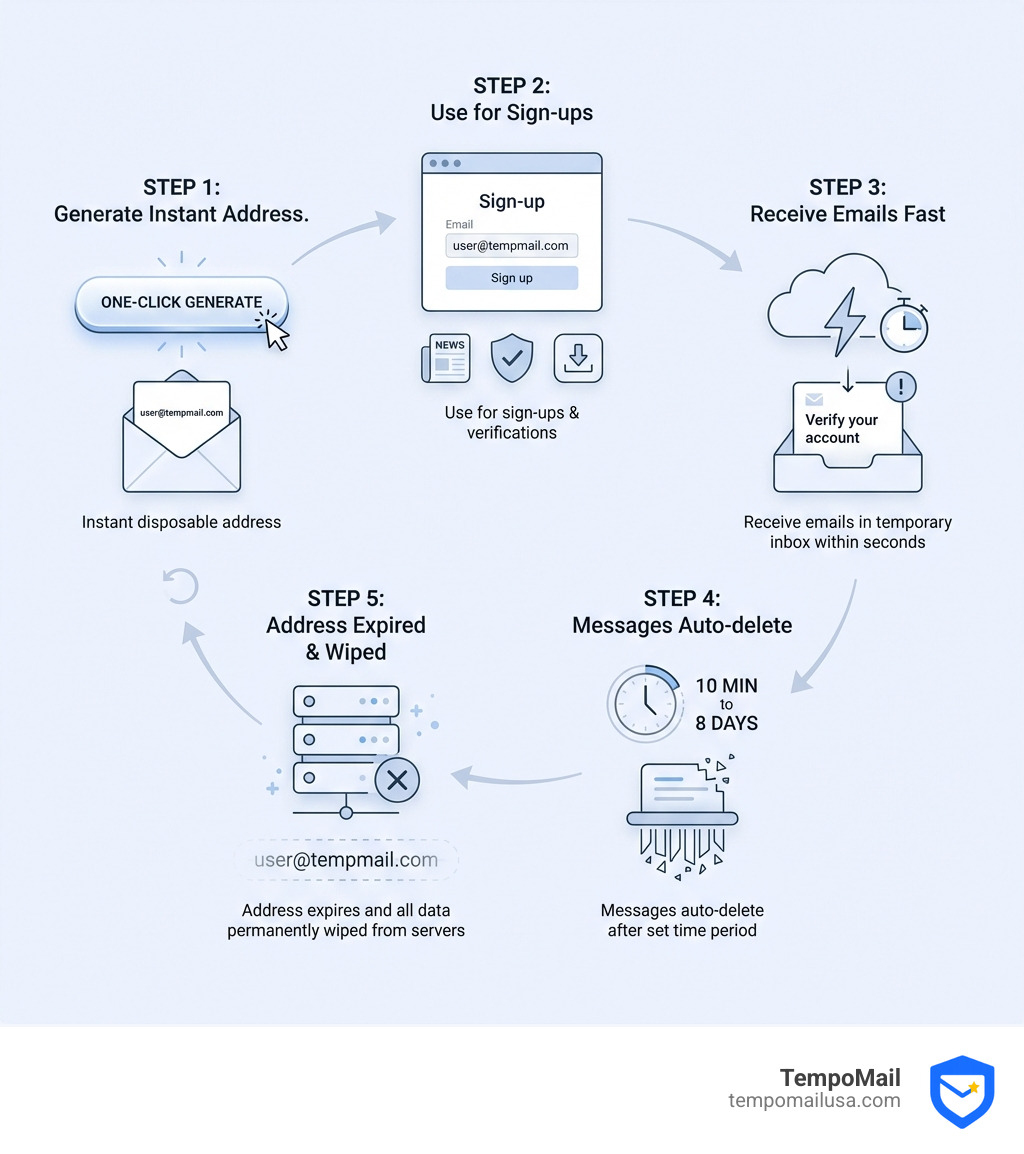
- What they do: Generate instant email addresses that self-destruct after a set time (10 minutes to 8 days)
- Key benefit: Protect your real email from spam, tracking, and data breaches
- How to use: Copy the generated address, paste it into sign-up forms, and check messages in the temporary inbox
- Best for: Online registrations, free trials, verification codes, and untrusted websites
- Not for: Banking, government services, or accounts requiring password recovery
Nearly 99% of apps and services today require an email address just to get started. Every time you hand over your primary email, you risk ending up on marketing lists, getting tracked across the web, or having your data exposed in the next breach.
That's where temporary email tools step in. They act as a shield between you and the online world.
These tools give you a working email address that receives messages for a limited time—anywhere from a few minutes to several days. Once the timer runs out or you close the session, everything disappears. No spam follows you home. No data sticks around to leak later.
The process is simple. Open a temp mail service, get an instant address, use it wherever you need to sign up, then walk away. Most services deliver emails within 2-3 seconds and require zero registration.
Some temporary email tools offer features like custom domains, attachment support, and premium addresses that rarely get blocked. Others focus on maximum privacy with zero-logs policies and RAM-only storage that wipes clean when you're done.
I'm Mohammad Waseem, and I've built and managed temporary email platforms as part of my web development work, focusing on privacy-first tools that balance user experience with strong security. Through hands-on testing and optimization, I've learned what makes temporary email tools effective for protecting online identity.
Understanding How Temporary Email Tools Work
To truly master temporary email tools, we need to peek under the hood at the technology that makes them so effective. Unlike your standard Gmail or Outlook account, which is designed for long-term storage and identity building, temporary services are built on the principle of "ephemerality."

At the heart of a high-quality temporary email service is a robust server infrastructure utilizing SMTP (Simple Mail Transfer Protocol) to catch incoming mail. However, the storage method is what sets us apart. Many top-tier services use volatile storage (RAM). This means that instead of writing your emails to a hard drive where they could potentially be recovered later, the data lives only in the server's active memory. Once the session ends or the timer expires, the power is "cut" to that data, and it vanishes forever.
To ensure your data remains private during its short life, we employ several layers of security:
- 256-bit SSL Encryption: This creates a secure tunnel between your browser and our servers, making it impossible for third parties to "sniff" the emails you are receiving.
- TLS 1.3 Security: The latest standard in data transmission security, ensuring that the journey from the sender to your temporary inbox is encrypted.
- Zero-Logs Policy: We believe that what you do with your temporary address is your business. High-quality tools do not log your real IP address, browser fingerprint, or personal data.
- Auto-Deletion: Whether it's a "10-minute" rule or a "7-day" rule, the system is hard-coded to purge data.
By protecting your inbox with temporary email, you are essentially placing a digital shredder between you and the sender.
The Difference Between Permanent and Temporary Email Tools
It is helpful to think of your permanent email as your home address and a temporary email as a hotel room. One is where you keep your life; the other is where you stay briefly to get a job done.
Standard permanent providers focus on PII (Personally Identifiable Information) protection over the long haul. They offer account recovery and long-term retention. Temporary email tools, however, are built for identity proxying. They act as a firewall.
Here is a quick look at how long different tools might store your data before the "self-destruct" sequence initiates:
- 10 Minutes: The classic "burner" speed.
- 60 Minutes: Standard for most browser-based sessions.
- 3 Hours: Common for services that detect inactivity.
- 2 to 8 Days: Extended storage for tools that allow you to return to the same address.
Why You Should Use Temporary Email Tools for Privacy
In an age where data is the new oil, your email address is the key to your digital vault. Every time you register for a "free" ebook or a discount code, you aren't just getting a deal—you're often being added to a marketing list that will be sold to the highest bidder.
The primary reason we use temporary email tools is spam avoidance. By using a disposable address for e-commerce discounts or untrusted websites, your "real" inbox stays clean and organized. You avoid the constant barrage of newsletters and promotional "check-ins" that clutter your digital life.
But it goes deeper than just annoyance. Tracking prevention is a major factor. Many marketing emails contain "tracking pixels" that tell the sender when you opened the email, where you were located, and what device you were using. Temporary services often strip this metadata or simply delete the email before a profile can be built on you.
Furthermore, data breach mitigation is a critical security step. If a website you signed up for years ago gets hacked, and you used a temporary email, the hackers get a dead address. Your primary password and identity remain safe. With a 95% acceptance rate across the web, there is almost no reason to risk your primary PII for a one-time interaction.
Bypassing Online Barriers with Temporary Email Tools
We’ve all been there: you just want to read one article or download one template, but a "gate" pops up demanding an email. Temporary email tools are the ultimate key for these barriers.
- Instant OTP Delivery: Most high-quality services feature delivery speeds of less than 10 seconds. This is perfect for One-Time Passwords (OTPs) and activation links.
- Social Media Sign-ups: Whether it's Facebook, Instagram, or Discord, premium temporary domains are rarely blacklisted, allowing you to create "test" or "lurker" accounts without linking them to your real identity.
- Smart Inbox Preview: Some advanced tools allow you to monitor multiple temporary addresses at once, which is a lifesaver for developers or power users.
- Premium Domains: Services that use real-looking domains (like those ending in .com or .net) help you bypass filters that try to block "fake" emails.
How to Choose the Right Disposable Service
Not all temporary email tools are created equal. Depending on your needs—whether you're a developer testing a new app or a shopper looking for a coupon—you’ll want to pick the right tool for the job.
| Feature | Session-Based Tools | Timer-Based Tools |
|---|---|---|
| Lifespan | Lasts as long as your tab is open | Fixed (e.g., 10 minutes) |
| Customization | Often allows custom usernames | Usually random strings |
| Recovery | Possible within 24 hours sometimes | Usually impossible |
| Best For | App testing & long registrations | Quick "grab and go" sign-ups |
When choosing, we recommend looking for custom domain support. This allows you to generate addresses that look professional, which is essential if you're using the tool for professional email and SMS workflow testing. If you need to receive a PDF or an image, ensure the service supports attachment handling, as many basic "10-minute" services do not.
Key Features to Look for in Temporary Email Tools
If you are evaluating a new service, keep this checklist of "must-haves" in mind to ensure your privacy is actually being protected:
- No Registration Required: If a temporary email service asks for your real email to sign up, walk away. That defeats the whole purpose!
- Instant Delete: You should have a button that allows you to manually wipe the inbox and the address immediately.
- Domain Rotation: To avoid being blacklisted by websites, the service should regularly cycle through new domain names.
- User Anonymity: The service should not require any personal info and should ideally use Free Metadata Remover technology for any files you interact with.
- SSL/TLS Encryption: Look for the padlock in your browser bar. If it’s not there, your "private" email is being sent in plain text.
Risks and Limitations of Disposable Addresses
While we love temporary email tools, we have to be honest: they aren't a magic wand for every situation. There are specific "don'ts" that you must follow to avoid digital disaster.
The biggest risk is password recovery issues. If you sign up for a service you plan to use for years (like a primary social media account or a professional tool) with a 10-minute email, you are in trouble. If you ever get logged out or forget your password, the "recovery" email will be sent to an address that no longer exists. You will be permanently locked out.
There is also the risk of sensitive data exposure. While the tools are secure, the "inboxes" on some free services are public. This means if someone guesses your temporary username, they might see your emails. Always choose a service that generates unique, private IDs.
Finally, be aware of website detection. Some high-security sites (like banks or government portals) maintain lists of known disposable email domains. If you try to use one, you might see an "Invalid Email" error. In these cases, you might need a more permanent privacy solution like an identity proxy.
Frequently Asked Questions about Temporary Mail
Can I use temporary email for banking or government services?
No. We strongly advise against this. Banking and government accounts require long-term access for security alerts, tax documents, and password resets. Since temporary emails self-destruct, you would lose access to these critical communications, which could lead to legal or financial headaches.
How long do temporary emails stay active?
It varies by provider. Some last exactly 10 minutes (though many allow you to "extend" the timer). Others stay active as long as your browser window is open. Some premium services will keep an address alive for up to 8 days if you keep the session active.
Are temporary email addresses legal to use?
Yes. Using a disposable email address is a perfectly legal way to protect your privacy and manage your digital footprint. However, using them to commit fraud, bypass paywalls in violation of terms of service, or engage in illegal activities is still illegal. The tool itself is a neutral privacy measure.
Conclusion
Mastering temporary email tools is about taking control of your digital identity. When every click is tracked and every email address is a target, these tools provide a necessary "firewall" for your personal life. By using secure aliases and identity proxying, you ensure that your PII stays where it belongs—with you.
Whether you are using a secure disposable address for a quick verification or utilizing advanced features for testing, you are making a conscious choice to prioritize your cybersecurity.
At TempoMail, we believe that your privacy shouldn't be a luxury. By using these tools wisely—avoiding them for sensitive accounts but embracing them for the "noise" of the internet—you can enjoy a cleaner, safer, and more anonymous online experience.
Ready to take the next step in protecting your digital footprint? Protect your identity with TempoMail and start using secure aliases today.
Need a disposable temporary email?
Protect your real inbox from spam and promotional clutter instantly and free.
Received a suspicious email, text, or charge alert?
Verify whether the sender domain is disposable, spoofed, or unverified before clicking links.