



Why Understanding Malicious Email Content Matters Now More Than Ever
What is true about malicious content in emails is that it represents the primary entry point for most cyberattacks today. Here are the essential facts you need to know:
Key Truths About Malicious Email Content:
- 94% of all cyberattacks begin with a malicious email - making it the most common attack vector
- Malicious content comes in multiple forms - attachments, links, embedded scripts, and deceptive text
- 87% of binary files detected in emails are malicious - executable files pose extreme risk
- HTML files have a 23% malicious rate - often used for phishing and credential theft
- Simply opening an email can be dangerous - preview panes and automatic content loading can trigger exploits
- Social engineering is the foundation - attackers manipulate human psychology, not just technology
- Cybercrime from email threats cost over $4.1 billion in 2020 - with business email compromise causing the most damage
Email is both essential and exploitable. Cybercriminals leverage its ubiquity, sending billions of malicious messages daily, knowing that even a small success rate yields significant profit.
The threat landscape is sophisticated. Malicious emails bypass spam filters by disguising themselves as urgent or trusted communications, exploiting both technical vulnerabilities and human psychology like fear, curiosity, and urgency.
The consequences are severe. A single click can install ransomware, spyware, or backdoors. For organizations, one employee's mistake can lead to network-wide breaches, stolen intellectual property, and compromised customer data.
Understanding what makes email content malicious isn't just technical knowledge - it's practical self-defense for anyone with an inbox.
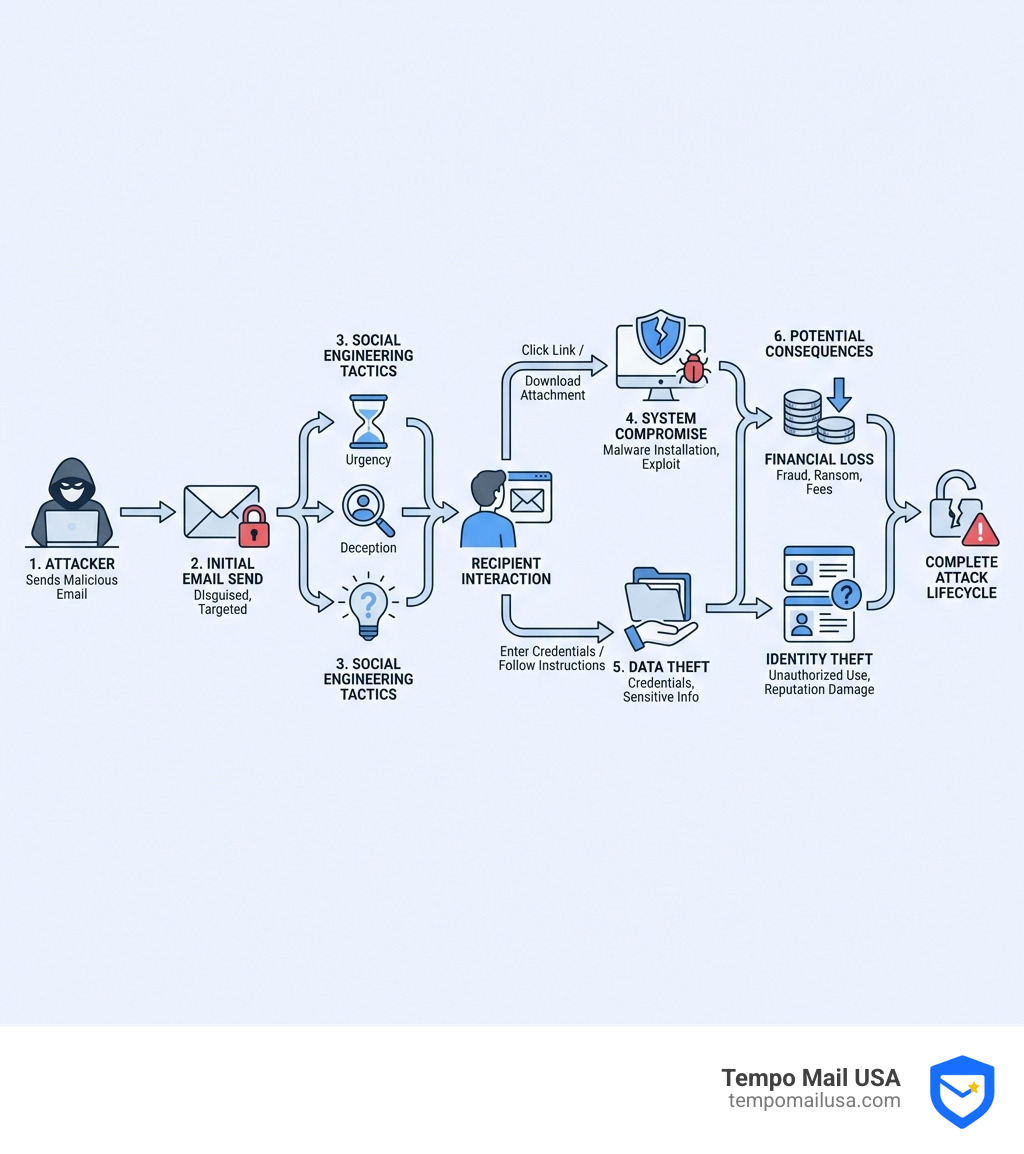
The Anatomy of a Threat: Unpacking Malicious Email Content
With over 333 billion emails sent daily, this constant flow creates a vast hunting ground for cybercriminals. They leverage various threat categories and employ sophisticated tactics to achieve their malicious goals. Understanding these core threats and how they're disguised is the first step in building a strong defense.
Defining the Primary Threats
When we talk about what is true about malicious content in emails, we're primarily referring to several distinct but often interconnected threats:
- Malware: A catch-all term for malicious software designed to damage, disrupt, or gain unauthorized access to a computer system. It includes:
- Viruses: Self-replicating programs that attach to legitimate files and spread, often corrupting data.
- Ransomware: Malware that encrypts a victim's files or locks their system, demanding a ransom for decryption.
- Spyware: Software that covertly gathers information like browsing habits, keystrokes, or login credentials.
- Phishing: Tricking individuals into divulging sensitive information (like passwords and credit card details) by impersonating a trustworthy entity. It's a prime example of social engineering.
- Credential Harvesting: A common goal of phishing, where attackers collect login details for online accounts.
- Business Email Compromise (BEC): A scam where attackers impersonate an executive or partner to trick an employee into transferring funds or data. This was the costliest form of cybercrime in 2020, contributing to the $4.1 billion total cost.
- Spam: Unsolicited bulk emails that can carry malicious payloads or act as a precursor to more targeted attacks.
- Data Exfiltration: The unauthorized transfer of data from a computer or network, often initiated by a malicious email.
How Threats Are Disguised
Attackers are masters of disguise, creating emails that look legitimate to bypass skepticism and spam filters. Common disguises include:
- Voicemail Notifications: Fake voicemail alerts with malicious attachments or links, often leading to credential theft and fraud.
- Fake Invoices or Order Confirmations: These emails create urgency, prompting recipients to open an attachment or click a link to "review" a fake bill.
- Package Delivery Notices: Emails claiming to be from FedEx or UPS about a package issue, requiring you to click a link. These are effective during peak shopping seasons.
- Security Alerts: False warnings about compromised accounts designed to panic recipients into clicking a link to a fake login page.
- Bogus Business Opportunities: Lures offering lucrative deals that are too good to be true, aiming to steal money or personal information.
- Social Engineering Lures: Any tactic that manipulates people into performing actions by exploiting curiosity, fear, or helpfulness.
| Threat Type | Primary Intent | Common Method | Potential Outcome |
|---|---|---|---|
| Malware | Infect device, disrupt operations, steal data | Malicious attachments, infected links | Data corruption, system lockdown (ransomware), data theft, remote control, further attacks |
| Phishing | Steal credentials/sensitive info | Deceptive links to fake login pages | Account compromise, identity theft, financial fraud, unauthorized access to systems |
| Spam | Unsolicited bulk messages, often with ulterior motives | Mass email distribution, sometimes with malicious links/attachments | Annoyance, reduced productivity, potential gateway for malware/phishing, email address validation for future attacks |
What is True About Malicious Content in Emails and How It Works
Understanding what is true about malicious content in emails involves grasping the technical mechanisms and psychological manipulations that cybercriminals employ. They don't just send bad emails; they design intricate traps.
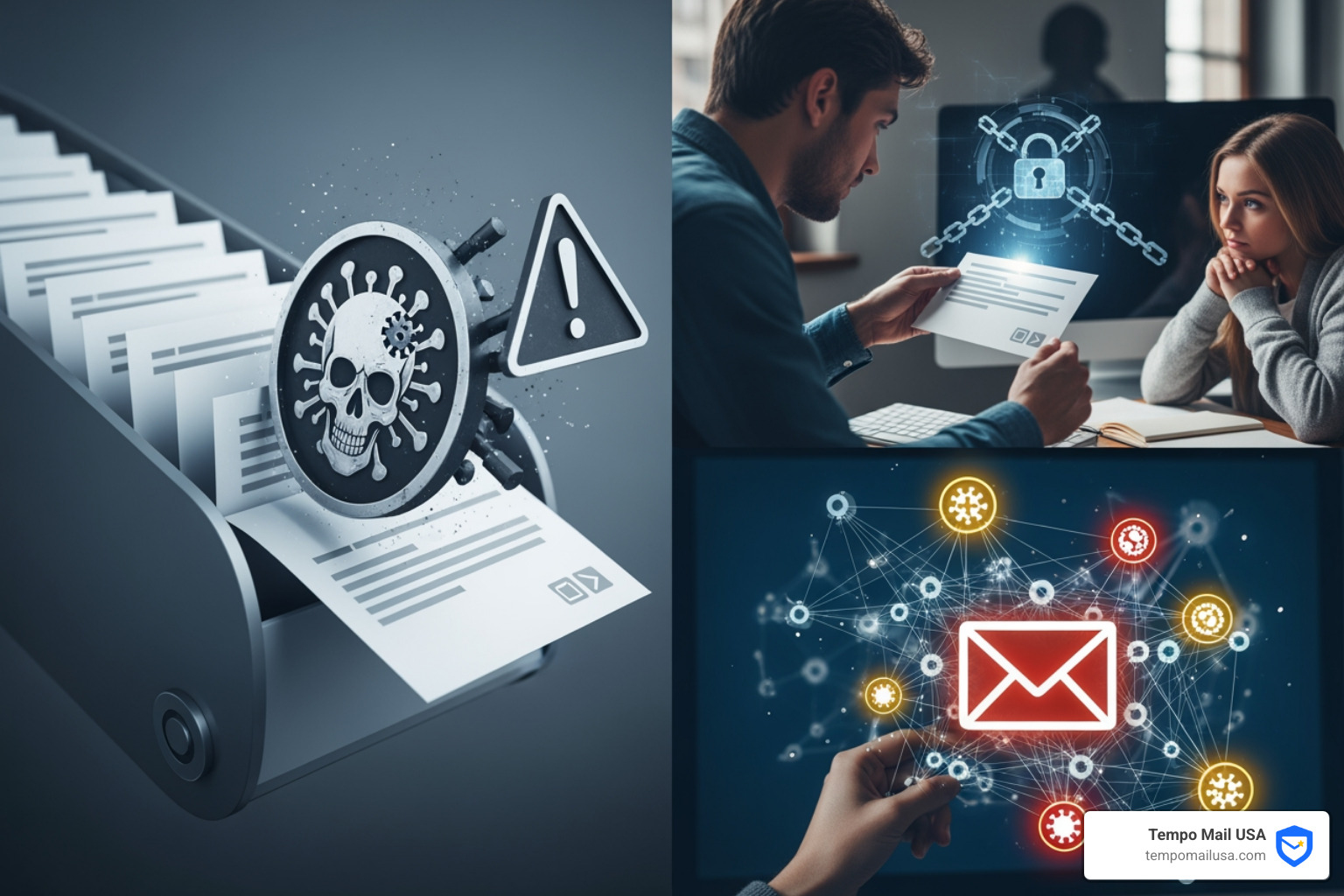
How Malicious Attachments and Scripts Function
Malicious content often hides within email attachments or embedded scripts, waiting for user interaction to compromise a system.
- Malicious Binaries and Executable Files: These are programs designed to run on your computer. An alarming 87% of binaries in emails are malicious. Files with extensions like
.exe,.com, or.batcan directly install malware and should be blocked by email policies. - Malicious HTML Files: With a 23% malicious rate, HTML files are frequently used for phishing. They can contain scripts or redirect you to malicious websites designed to steal your information.
- Microsoft Office Macros: Word, Excel, and PowerPoint files can contain embedded macros. If a user is tricked into enabling them, these macros can download and install malware.
- VBScript and JavaScript Exploits: Malicious code can be hidden within attachments or the email body to exploit software vulnerabilities. For example, the iOS 0-day Trident/Pegasus started from a malicious link exploiting JavaScript.
- Backdoors and Remote Access Tools (RATs): Once installed, malware can create a "backdoor" to bypass normal authentication. RATs allow attackers to take full remote control of your computer.
The Role of Social Engineering and Phishing Tactics
Human psychology is often the weakest link. Social engineering manipulates people into giving up confidential information.
- Urgency and Fear: Attackers create panic (e.g., "Your account is suspended!") to pressure victims into acting without thinking.
- Curiosity: Tapping into curiosity (e.g., "You won a lottery!") can entice recipients to click dangerous links.
- Deceptive Links and URL Spoofing: The displayed text of a link might look legitimate, but the actual destination URL (revealed on hover) points to a malicious site. URL shorteners are also used to hide the true destination.
- Sender Impersonation: Emails often spoof sender addresses to appear as if they're from a trusted source. They might use subtle misspellings (e.g.,
IRS.G0Vinstead ofIRS.GOV). - Generic Greetings: Emails addressed with "Dear Customer" instead of your name can be a red flag for a mass phishing attempt.
Exploiting Technical Vulnerabilities
Beyond social engineering, malicious emails can leverage technical flaws in software.
- Email Client Bugs: Bugs in software like Outlook or Thunderbird can be exploited, sometimes just by opening an email.
- Preview Pane Exploits: Historically, vulnerabilities allowed attackers to compromise systems just by an email being displayed in the preview pane.
- Browser 0-day Vulnerabilities: Malicious links can leverage unpatched "0-day" exploits in your web browser.
- Outdated Software: Keeping your email client, browser, and OS updated is crucial, as patches fix known security flaws.
- How Email Filters Work: Providers like Gmail use milters to assess emails based on sender reputation, authentication (SPF, DKIM), and content, but sophisticated attacks can bypass them.
- Image Loading Trackers: Loading images can signal to the sender that you've opened their email. While Gmail's image proxying helps, some tracking can still occur.
Red Flags: How to Identify a Malicious Email
Knowing how to spot malicious content in your inbox is critical. We need to become detectives, scrutinizing every detail.
Scrutinizing the Sender and Subject
The "From" field and subject line are often the first clues.
- Mismatched Sender Address: Always check the full sender email address, not just the display name. A message from "Apple Support" might actually come from
apple-support@randomdomain.xyz. - Spoofed Domains: Attackers use domains similar to legitimate ones (e.g.,
microsoftt.cominstead ofmicrosoft.com). - Number-for-Letter Substitutions: Look for subtle changes like
IRS.G0V(with a zero) instead ofIRS.GOV(with an O). - Generic or Urgent Subject Lines: Phrases like "Action Required" or "Account Suspended" are common red flags.
- Blank Subject Field: A blank subject can indicate a hastily sent malicious email.
- "Undisclosed-Recipients": If the recipient list shows "undisclosed-recipients" or an email address other than yours, it's a strong indicator of a mass-sent malicious email.
Analyzing Attachments and Links: What is true about malicious content in emails
This is where many attacks are delivered. Proceed with extreme caution.
- Hovering Over Links: Before clicking, hover your mouse over any link to see the actual destination URL. If it looks suspicious, don't click.
- Mismatched URLs: Be suspicious if the hover-over URL is different from the visible text. Phishers often display
www.yourbank.combut link tomalicious-site.ru. - URL Shorteners: Services like bit.ly can hide malicious destinations. Avoid clicking if you're unsure of the source.
- Unexpected File Types: Be wary of unexpected attachments. An alarming 87% of binaries in emails are malicious, and HTML files have a 23% malicious rate.
- Common Suspicious File Extensions:
.doc,.xls,.ppt(especially if they prompt you to "Enable Macros").zip,.rar,.ace(compressed files that can hide malicious executables).js,.vbs,.wsh(script files).exe,.com,.bat,.scr(executable files).pdf(can contain exploits or malicious links)
Spotting Deceptive Content and Language
Cybercriminals are improving, but their messages often contain tell-tale signs.
- Poor Grammar and Spelling: Many malicious emails are still riddled with typos and awkward phrasing.
- Unprofessional Formatting: Look for inconsistent fonts, low-resolution logos, or plain text from a brand that usually sends polished HTML emails.
- Urgent Calls to Action: Messages demanding immediate action ("Act now!") are designed to bypass critical thinking.
- Threats of Account Suspension: This is a common phishing tactic to scare you into clicking a link to "verify" your account.
- Requests for Personal Information: Legitimate companies rarely ask for sensitive information like passwords or Social Security numbers via email.
The Aftermath: Potential Consequences of an Email Attack
The impact of a malicious email attack can be devastating for both individuals and organizations, leading to significant financial loss and long-term disruption. The cost of cybercrime exceeded $4.1 billion in 2020, with business email compromise causing the most damage.
For Individuals
For individuals, the consequences can be very personal:
- Identity Theft: Stolen personal details can be used to open fraudulent accounts or claim government benefits in your name.
- Financial Fraud: Stolen banking credentials or credit card information can lead to unauthorized transactions and drained accounts.
- Ransomware Locking Personal Files: Your personal files, like photos and documents, can be encrypted, with attackers demanding payment for their release.
- Loss of Private Data: Attackers might steal sensitive personal communications or private documents, leading to blackmail or public embarrassment.
- Stolen Credentials: A compromised email account can be used to reset passwords for your other online accounts, leading to a takeover of your digital life.
For Organizations
For organizations, the stakes are even higher:
- Data Breaches: Malicious emails are a primary cause of data breaches, exposing customer or employee data and leading to massive fines and loss of trust.
- Corporate Espionage: Attackers can steal intellectual property, trade secrets, or strategic business plans.
- Network-wide Malware Propagation: A single infected machine can spread malware throughout the corporate network and to connected partners.
- Financial Loss: Direct losses from fraudulent transfers (BEC), incident response costs, and regulatory penalties can be astronomical, contributing to the over $4.1 billion in cybercrime costs in 2020.
- Disruption of Operations: Malware like ransomware can bring business to a standstill, causing lost productivity and significant recovery efforts.
- Damage to Client and Partner Relationships: A security incident erodes trust with customers, partners, and stakeholders.
Building Your Defenses: Protection Strategies for Individuals and Organizations
Given the pervasive nature of malicious email, building robust defenses is essential. This requires a layered approach combining proactive security measures, technical controls, and user education. Microsoft provides a helpful overview of email security, emphasizing its importance.
Best Practices for Personal Email Security
As individuals, we are the first line of defense. Simple habits can make a huge difference:
- Enable Two-Factor Authentication (2FA): This is the single most effective security measure. It requires a second verification step, preventing access even if your password is stolen. Enable it on all critical accounts.
- Use Strong, Unique Passwords: Use a password manager to create complex, unique passwords for each account.
- Keep Software Updated: Regularly update your OS, browser, and email client to patch security vulnerabilities exploited by attackers.
- Avoid Public Wi-Fi for Sensitive Tasks: Public networks can be insecure; avoid logging into banking or other sensitive accounts on them.
- Disable Automatic Image Loading: This prevents tracking pixels and can stop some exploits embedded in images.
- Think Before You Click: The golden rule. Pause and evaluate every email. If it feels off, delete it.
- Verify Information Independently: If an email asks you to log in, go to the official website directly in your browser instead of clicking the link.
Implementing Effective Organizational Security
For organizations, a comprehensive strategy is vital to protect against the 94% of cyberattacks that begin with a malicious email.
- Employee Awareness Training: Regular training is crucial to help employees recognize threats and know how to report suspicious emails.
- Phishing Simulations: Periodically send simulated phishing emails to test and reinforce employee training in a safe environment.
- Secure Email Gateways (SEG): These solutions filter emails for spam, malware, and phishing attempts before they reach user inboxes.
- Configuring SPF, DKIM, and DMARC: These email authentication protocols help verify sender legitimacy and reduce spoofing.
- SPF (Sender Policy Framework): Defines which IP addresses are authorized to send emails from your domain.
- DKIM (DomainKeys Identified Mail): Adds a digital signature to emails to verify they haven't been tampered with.
- DMARC (Domain-based Message Authentication, Reporting & Conformance): Tells servers how to handle emails that fail authentication and provides reporting.
- Incident Response Plans: Have a clear plan for what to do after a successful attack to minimize damage and speed up recovery.
- Reporting Procedures: Establish clear guidelines for employees to report suspicious emails to IT. You can also report phishing to authorities like the Canadian Anti-Fraud Centre or cyber.gc.ca.
- Network Segmentation: Isolate critical systems to prevent malware from spreading across the entire organization.
- Multifactor Authentication (MFA): Implement MFA for all corporate accounts, especially for access to sensitive systems.
- Data Backup and Recovery: Regularly back up critical data and have a robust recovery plan to mitigate the impact of ransomware.
Frequently Asked Questions about Malicious Email Content
Let's address some common concerns to further clarify what is true about malicious content in emails.
Can you get a virus just by opening an email?
Historically, yes. Older or unpatched email clients had vulnerabilities in preview panes or HTML rendering that could execute malicious code just by opening or previewing an email. Today, modern clients like Gmail and Outlook are much more secure, often blocking scripts and using image proxies to reduce risk. However, a sophisticated, unpatched "0-day" vulnerability could still theoretically pose a threat. The safest practice is to keep all software updated and remain cautious even when opening emails.
What are the most dangerous types of email attachments?
While any unexpected attachment is risky, some file types pose a higher threat:
- Executable Files: Files like
.exe,.com,.bat, and.scrare programs that run directly on your computer. An alarming 87% of binaries in emails are malicious. - Compressed Files: Files like
.zip,.rar, and.7zare dangerous because they can hide malicious executables and may evade basic antivirus scans. - Office Documents with Macros: Files like
.docmor.xlsmcan contain embedded programs (macros) that, if enabled, can download and install malware. Be wary of any document that prompts you to "Enable Content." - PDF Exploits: PDF files can contain malicious scripts or exploit vulnerabilities in PDF reader software.
The general rule: if you didn't expect an attachment, be highly suspicious.
What is the first thing I should do if I click on a malicious link?
If you click a malicious link, act quickly to limit the damage:
- Disconnect from the Internet Immediately: Unplug your Ethernet cable or turn off Wi-Fi. This stops communication with the attacker's server and prevents malware from spreading.
- Run a Full Antivirus/Anti-Malware Scan: Use reputable antivirus software to perform a full system scan to find and remove any threats.
- Change All Potentially Compromised Passwords: Assume your credentials were stolen. From a different, secure device, change the password for that account and any others that use the same one, prioritizing email and banking accounts.
- Report to IT (for Work Devices): If this happened on a work computer, notify your organization's IT or security team immediately.
- Monitor Accounts for Suspicious Activity: Keep a close eye on your bank, credit card, and other online accounts for any unauthorized activity.
- Backup Important Data: If you haven't already, back up your critical files to an external drive or cloud service to protect against potential ransomware.
Conclusion: Taking Control of Your Email Security
We've explored what is true about malicious content in emails, uncovering the sophisticated tactics cybercriminals use, the technical mechanisms behind their attacks, and the severe consequences for both individuals and organizations. From malware-laden attachments to expertly crafted phishing lures and exploited software vulnerabilities, the digital landscape is fraught with peril.
The overwhelming truth is that the human element remains the most significant factor in cybersecurity. While advanced filters and technical defenses are essential, our vigilance, skepticism, and adherence to best practices are our strongest shields. By understanding the red flags, verifying senders, scrutinizing links, and being wary of urgent or unusual requests, we can significantly reduce our risk.
This journey towards email security is ongoing, requiring continuous learning and adaptation. As threats evolve, so too must our defenses. Companies like Tempo Mail USA are at the forefront of this fight, offering innovative solutions to protect your privacy. By providing identity proxying services, Tempo Mail USA creates a "firewall" alias for your Personally Identifiable Information (PII), adding an extra layer of defense against sophisticated email attacks.
Taking control of your email security means empowering yourself with knowledge and employing smart digital habits. Protect your primary email address, guard your personal information, and remember that a moment of caution can save you from a world of trouble.
Protect your identity with advanced cybersecurity